CVE-2026-109618 and CVE-2026-109619 are Critical vulnerabilities in PHP, a scripting language used globally for web servers and CMS systems.
Source: Palo Alto Networks Unit 42 · 2026-10-29

CVE-2026-109618 and CVE-2026-109619 are Critical vulnerabilities in PHP, a scripting language used globally for web servers and CMS systems.
Source: Palo Alto Networks Unit 42 · 2026-10-29


Network-connected surveillance cameras are now widespread in both home and enterprise environments, so securing them is essential to safeguarding physical spaces and sensitive assets. As these devices continue to gain new features and network connectivity capabilities, vulnerabilities in their implementation can have significant security implications.
During our research, we discovered a denial-of-service vulnerability that affects Intelbras IP cameras systems. The flaw resides in a firmware update endpoint that is accessible without authentication and allows anyone with access to the local Wi-Fi network to knock cameras offline. A single request disrupts the camera for only about a minute, but sending periodic requests keeps the device offline indefinitely. We reported the issue to Intelbras, monitored the remediation process, validated the fix in the new firmware, and will now demonstrate the exploitation procedure step-by-step.
Following our notification, Intelbras patched the vulnerability and released updated firmware (R.260804) along with update instructions. A candidate ID of CAN-2026-2035970 has been assigned by MITRE following submission, pending the final CVE assignment. Additionally, the Intelbras team recently informed us that MITRE has classified the vulnerability as Medium, assigning it a score of 5.1 under the CVSS 4.0 framework. The issue discussed in this article is no longer present in the latest firmware version.
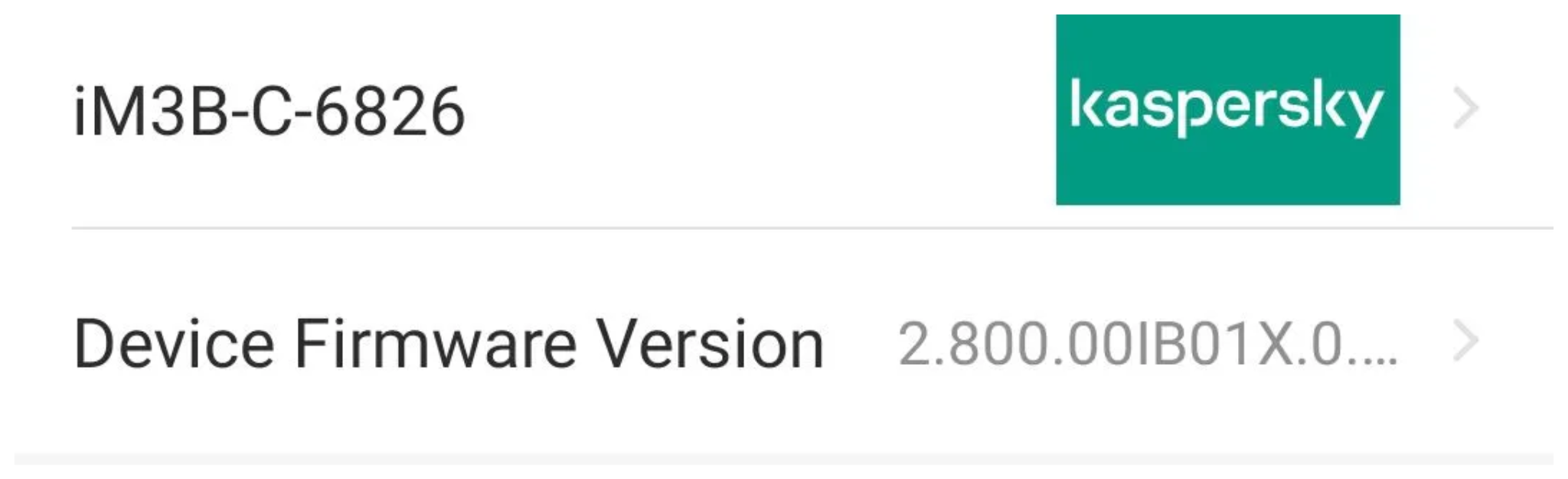
Intelbras provides firmware files on its official website. While users can manually install these updates via an SD card, the cameras also natively support firmware upgrades over the local network via their web interface and mobile app. We obtained the firmware version v240927 for the iM3B-C (IM3 C) camera, which was the latest available version at the time of our research. According to Intelbras, the same firmware is also compatible with the iMX C, iM4 C, iM5 SC, iME 360 C, and iM7+ FC models. Below, we can view the firmware version and the camera model used as an example.
To provide context, we will explain how the camera’s authentication mechanism works and why it is relevant to accessing the camera’s endpoints. The main firmware component is an ARM binary named sonia, responsible for controlling the kernel drivers used by the camera hardware, authentication, and livestream recording, among other things.
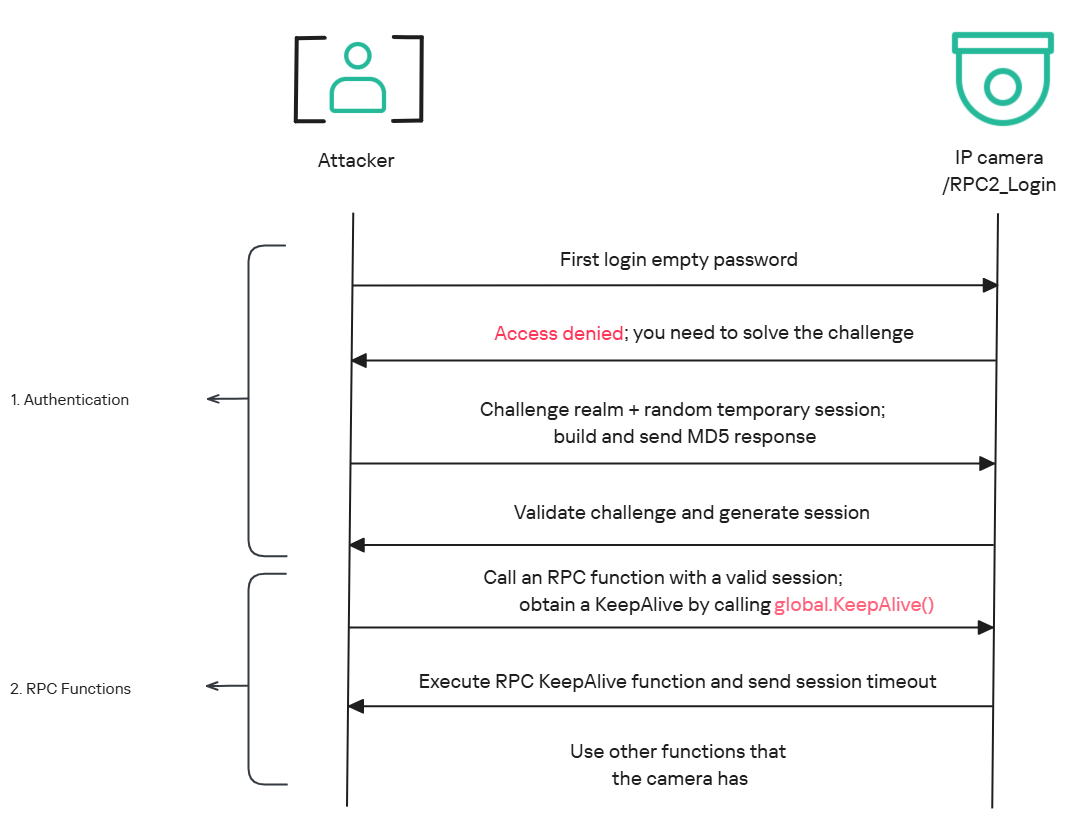
The global.login RPC method handles authentication at the /RPC2_Login endpoint. First, the client, such as the mobile app or a custom script, sends the username and an empty password. The camera responds with an authentication challenge (a set of values to verify the password without transmitting it). This response returns a temporary session, the encryption type in the encryption field, a random value, and a realm (authentication scope). At this stage, a false response is normal and does not indicate a failed login, as the authentication process is not yet complete.
Next, the client calculates the response password from the authentication challenge. It first generates an MD5 (username:realm:original_password) hash as the base. It then calculates a second MD5 (username:random:first_md5) hash, where first_md5 is the result of the previous step. To complete the authentication, the client sends this final result back to /RPC2_Login in a second global.login call, passing the username, calculated password, and temporary session ID.
If the login is accepted, the camera returns true and a new, authenticated session. This session must be used for all subsequent RPC calls, including the camera’s other endpoints, for example, the one that reboots the device or those that expose sensitive information.
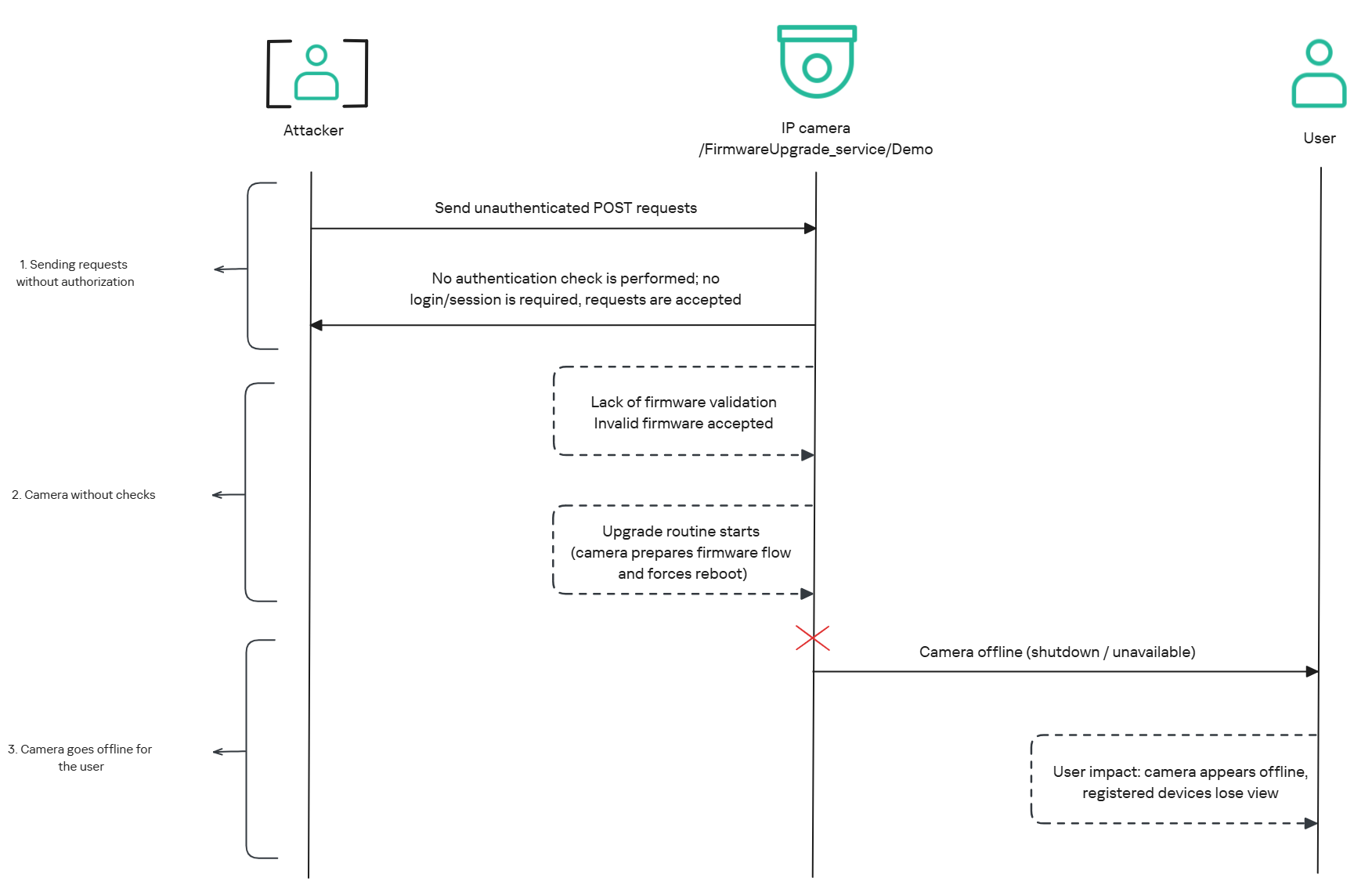
The affected endpoint is the firmware upgrade route http://<ip_address>/firmwareUpgrade_service/Demo, which lacks authentication checks; furthermore, it fails to verify whether the firmware is actually valid before initiating the upgrade process. This creates a serious issue because the upgrade requires the camera to reboot, and that is precisely when the problem occurs: the camera enters reboot mode and eventually shuts down, appearing offline to the user and anyone who has the camera registered on their device.
Now that we have outlined how the vulnerability works, we will use a Python script on an iM3B-C camera to exploit it for demonstration purposes. The exploit contacts the camera’s endpoint to upload firmware. Below, we can see sonia creating the endpoint responsible for the firmware upgrade.

Next, the exploit will hit the endpoint and cause the camera to reboot. Consequently, mobile phones running the Intelbras app will lose connection with the registered device. Below, we can see the camera operating normally: the green light is on and the app is showing it is available for viewing.
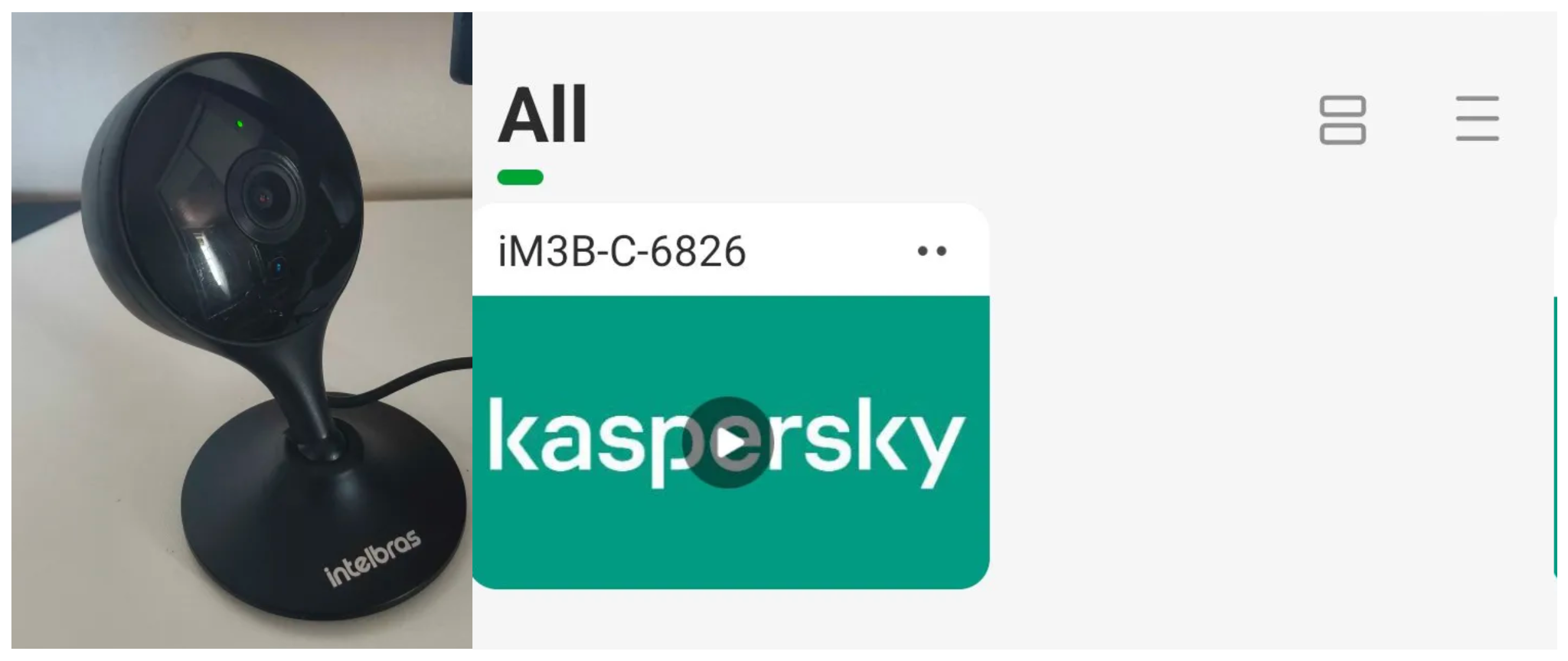
The camera is online
After the exploit executes, we can see the effects: the camera goes offline and loses connection to the registered devices.
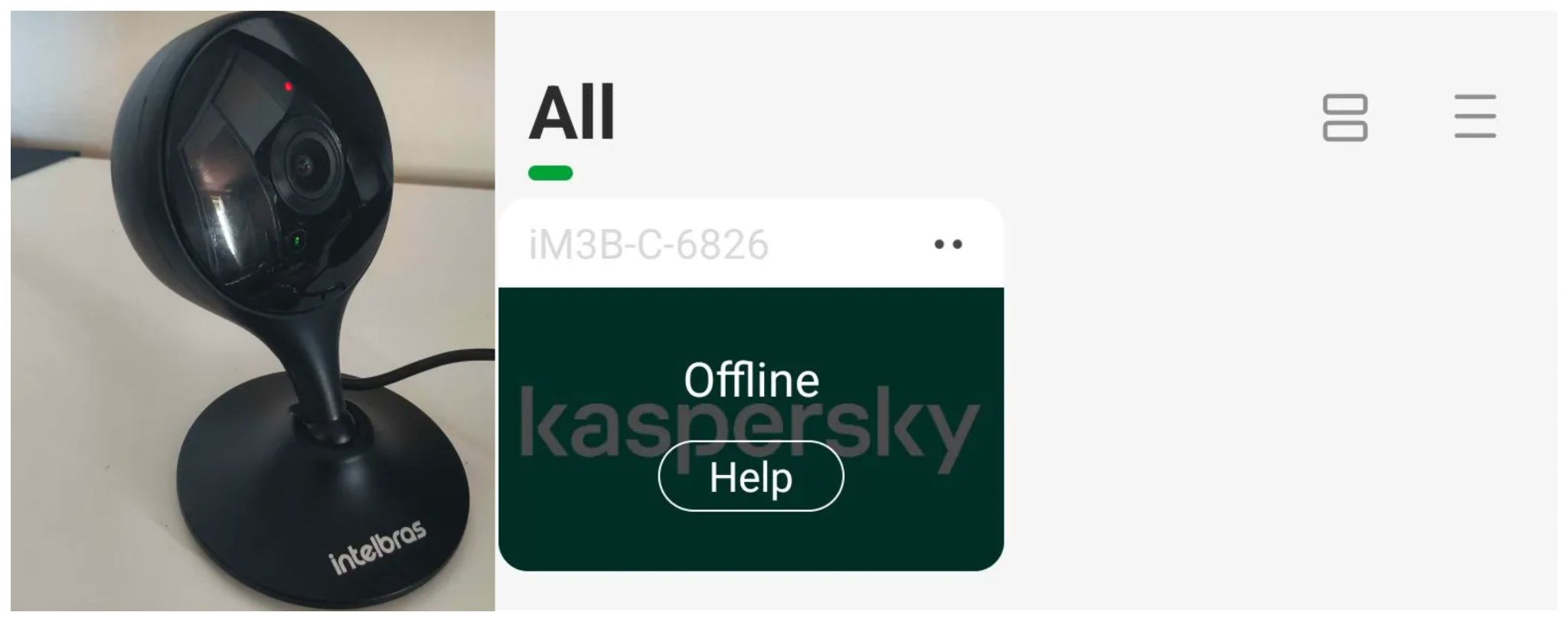
The camera is offline
The exploit is quite simple: it sends an HTTP POST request with the firmware, which causes the camera to accept the request and initiate the reboot process. It does not matter whether the firmware is original; the reboot process will start regardless.
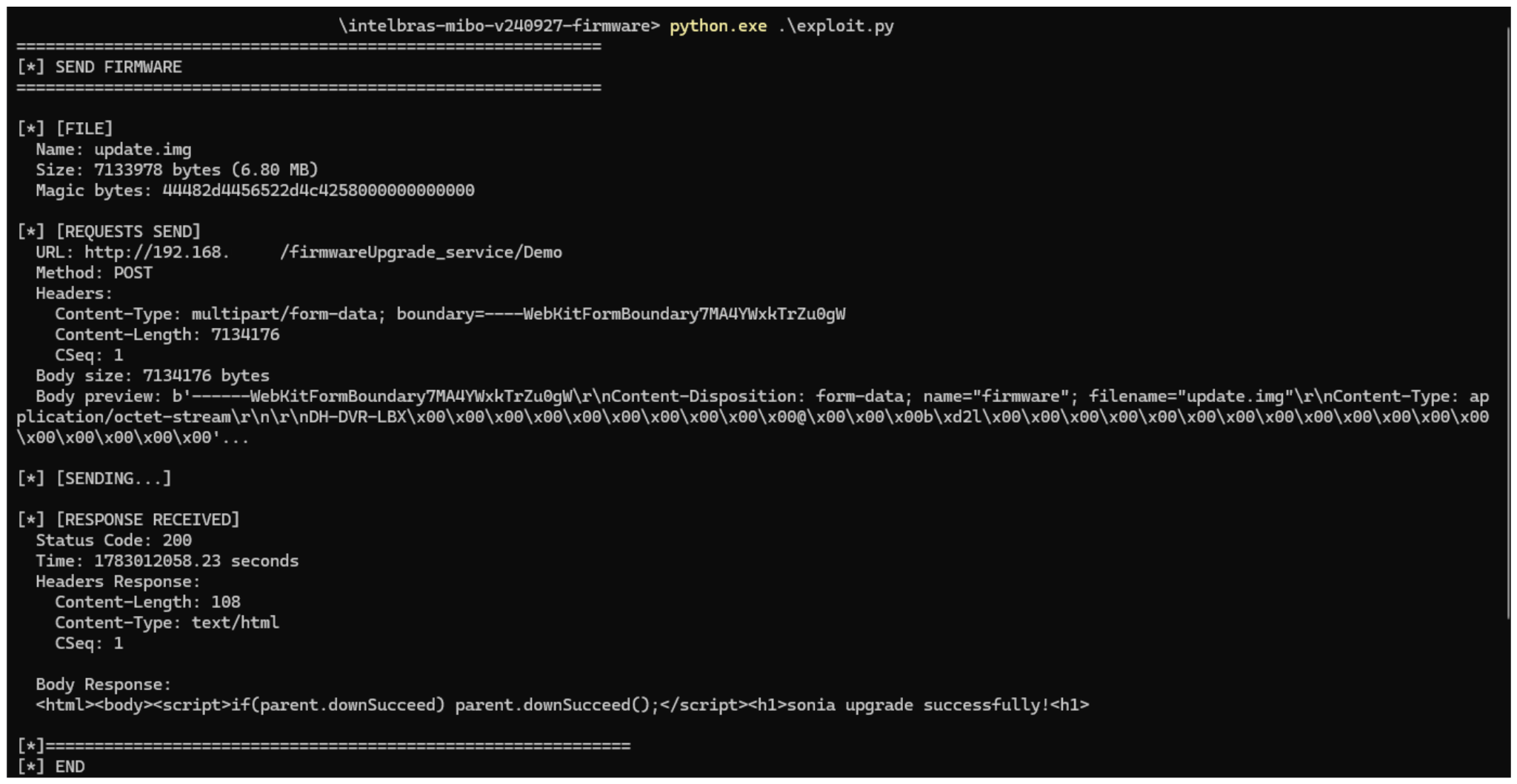
After we notified Intelbras about this flaw in the endpoint implementation, the company contacted the OEM vendor. As a result, a new firmware version was released that requires authentication to initiate an update through this endpoint.
Below, we can compare the new firmware, which validates cookies and session data, with the old firmware, which performed no authentication checks and proceeded directly to the update routine.
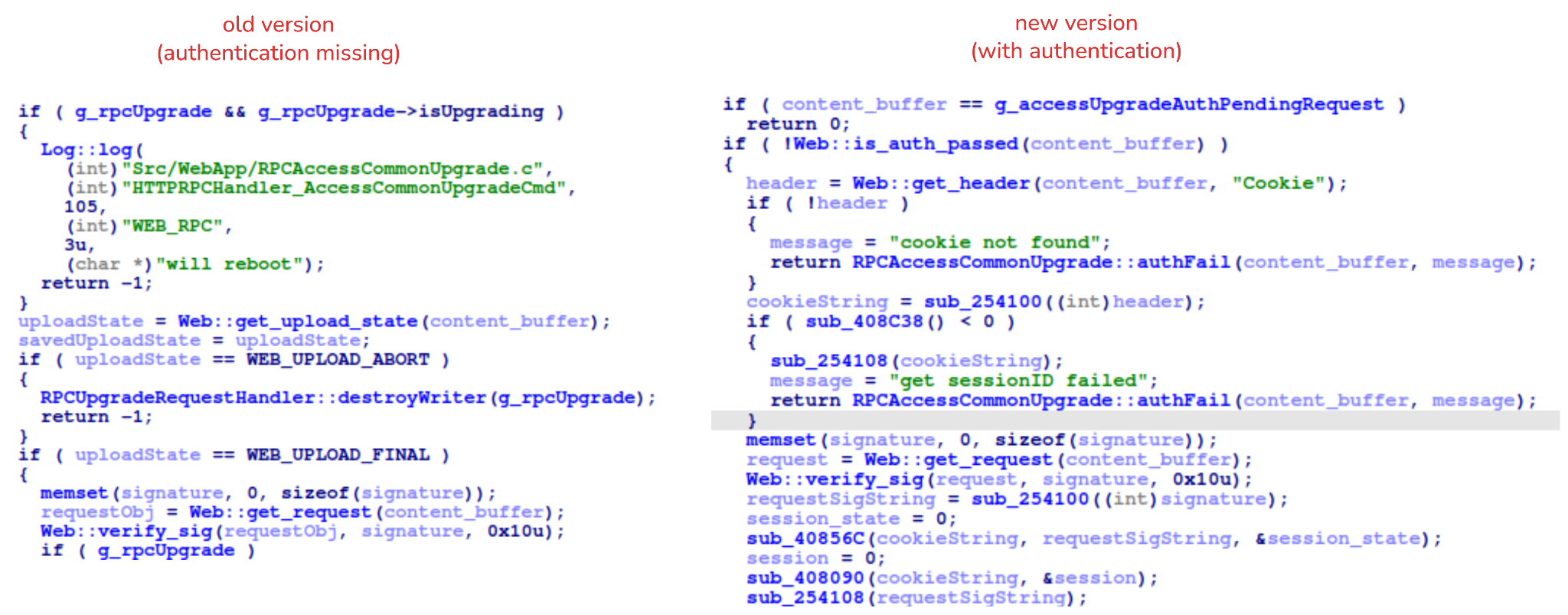
An attacker can remotely trigger the camera firmware upgrade and reboot process without authenticating or supplying a valid firmware image. This may cause the device to go offline, which results in a denial-of-service condition preventing legitimate users from accessing live monitoring or managing the camera.
The potential impact is significant due to the number of affected users. The Intelbras Mibo Smart app, which the company provides to connect and manage the devices mentioned in this report, has over 4,000,000 downloads. Brazil represents the largest user base, followed by Paraguay, Ecuador, Colombia, Argentina, Chile, Peru, Bolivia, Uruguay, and Venezuela. As a result, exploitation of this issue affects a large number of users.
This is a medium-severity vulnerability that Intelbras is already aware of. The issue has been addressed in a newer firmware release (R.260804 along with update instructions), which mitigates this attack vector. Because the vulnerability directly affects the availability and normal operation of the affected cameras, it is highly recommended that users verify the firmware version currently installed on their devices and update to the latest available version as soon as possible. Keeping the firmware up to date is an essential security practice, especially for internet-connected surveillance devices, as outdated versions may remain exposed to known vulnerabilities.
Source: Securelist (Kaspersky GReAT) · 2026-10-28
PHP maintainers have released fixes for two critical vulnerabilities:
PHP 8.5.12, 8.4.27, 8.3.36 and 8.2.35 fix two critical vulnerabilities that can allow unauthenticated remote code execution. All PHP users are strongly encouraged to update immediately.
Who is at risk: all PHP installations serving web requests, including PHP-FPM, Apache with mod_php, php-cgi, FrankenPHP and LiteSpeed. We consider the risk highest for mod_php, with a demonstrated exploit where an unauthenticated request can trigger the attack before any application code runs.
The vulnerabilities:
- RCE via OOM corruption, CVE-2026-109618 (GHSA-w8hw-w9fx-j79w): out-of-memory handling can interrupt PHP while internal request data is only partially initialized. Request cleanup may then treat the invalid data as valid.
- RCE via stale global state, CVE-2026-109619 (GHSA-6wmf-4rv5-p3rp): request-owned internal state can survive after its backing memory has been freed. A later request handled by the same worker may use that stale state before normal initialization resets it.
Updating PHP is the only way to regain security. Do it now.
More news.
Source: Schneier on Security · 2026-10-22


Back in October 2022, Kaspersky GReAT was looking into a peculiar advertisement on a hacking forum. A cybercriminal had been advertising a UEFI bootkit, dubbed BlackLotus, that could bypass Secure Boot, for $5,000. Given the low price for such powerful capabilities, the cybersecurity community initially took this advertisement with a grain of salt. As no BlackLotus samples were found in the wild, no one could at the time verify the claims made in the forum post.
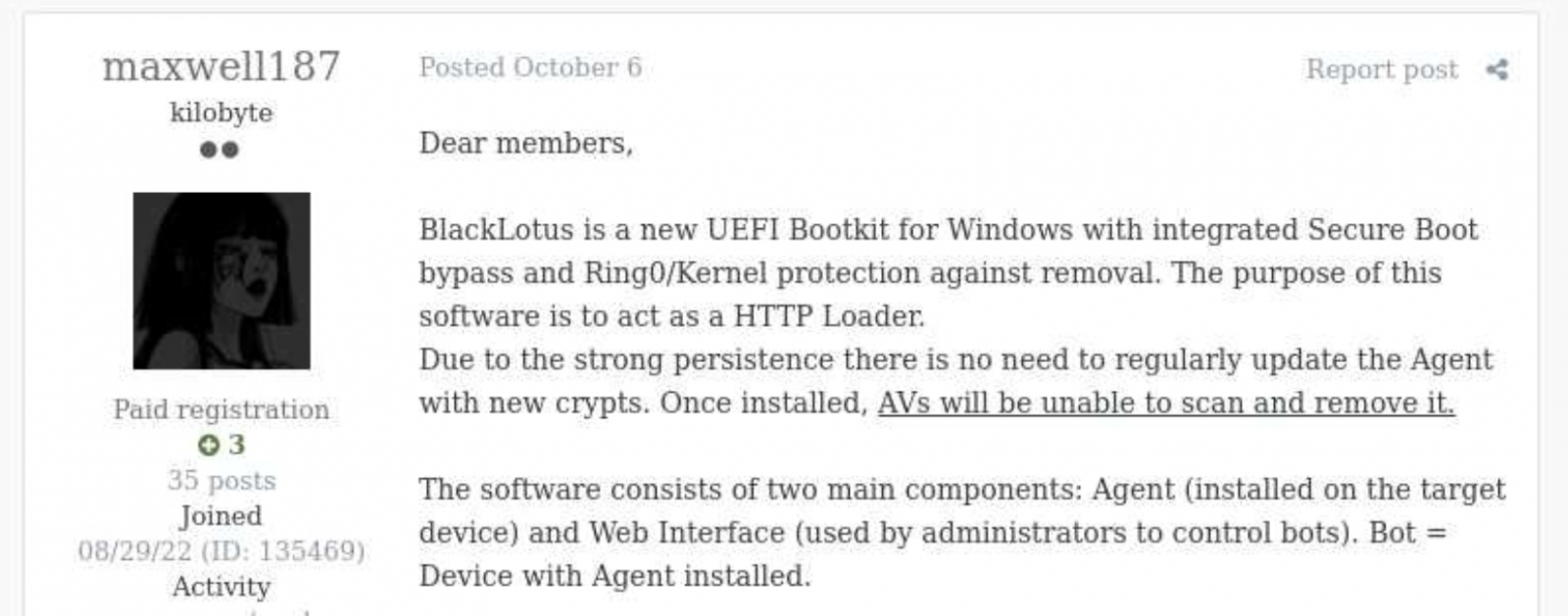
BlackLotus advertisement
However, about half a year later, in March 2023, ESET confirmed that the BlackLotus advertisement was genuine. The researchers tracked down samples of this bootkit and confirmed that it can indeed bypass Secure Boot through a vulnerability called Baton Drop (CVE-2022-21894). As this vulnerability was still exploitable in 2023, Microsoft had to release multiple security updates to address it.
Since the release of these updates, the BlackLotus bootkit has gone quiet — no publicly known attacks have used it. Yet in early 2026, we discovered a malware sample similar to BlackLotus that was used in an APT campaign in Central Asia. In this report, we share our findings, including new payloads and possible attribution of this campaign.
In early 2026 we identified a complex APT attack targeting diplomatic agencies in Central Asian countries — namely Tajikistan, Uzbekistan, and Turkmenistan. This attack involved a UEFI bootkit that we dubbed BlackX. Having examined it, we found it to be similar to BlackLotus.
Attackers have been deploying BlackX after compromising the victim machine networks and obtaining administrator privileges. To install the bootkit, we observed them dropping the following files:
inst.exe, an installer executablePVMDIJGKAX2, an RC4-encrypted extensionless file containing files and strings required for the installationThe installer was launched with the command line C:\ProgramData\Intel\inst.exe PVMDIJGKAX2 Q46F6MDLI3RX2KV1. The last argument here is the RC4 key used for decryption.
Curiously, the file inst.exe does not contain any malicious strings or embedded blobs. All the files needed to install the malicious payload are inside PVMDIJGKAX2, which makes it harder for incident responders to retrieve the bootkit components.
The installer package drops a set of files to both system and UEFI partitions, designed to exploit the Baton Drop vulnerability. We noted that the implementation of the exploit is remarkably similar to the one used in the BlackLotus malware. As with BlackLotus, the goal of the exploit is to install custom Machine Owner Keys (MOK), which allows loading arbitrary EFI files on the target machines to manipulate Secure Boot.
While the vulnerability exploitation chain was implemented very similarly to BlackLotus, we spotted differences between the exploits in BlackLotus and BlackX. That said, the source code of the BlackLotus bootkit has never been published online. This could mean that the attackers behind BlackX either reverse-engineered the BlackLotus bootkit or purchased its source code from cybercriminals. Either way, this is an interesting observation, as we rarely see APT actors borrow ideas or code from cybercrime actors.
The UEFI payload delivered during the Baton Drop exploitation has a classic bootkit goal — to inject a malicious driver into the Windows kernel. This driver differs from the one deployed by BlackLotus and is signed with a certificate belonging to an organization named 温江区明宇网络技术服务工作室 (English: Wenjiang District Mingyu Network Technology Service Studio). At the time of writing, this certificate (serial number: 0bcdf5e0da32d68900b8b7638459d072) has been revoked by its issuer.
The driver aims to tamper with security solutions installed on the machine. For example, it disables process, thread, and registry callbacks related to security solutions. It also tampers with ETW providers so that security solutions cannot access their output. Curiously, some of the tampering procedures are designed to run only if Kaspersky or Avast solutions are installed on the infected machine. However, during dynamic analysis of this driver, we found that these procedures are useless — they fail to interfere with Kaspersky products in any way.
The driver also protects the bootkit’s files from tampering. It intercepts kernel requests to open these files and returns a handle to calc.exe instead of a malicious file handle.
Apart from tampering with security solutions, the driver also deploys a user-mode payload. We observed two such payloads, used for cyberespionage, in the wild. One of them is a RAT that can load further-stage .NET payloads. This RAT uses cloud storage for C2 server communications — we observed its versions using Google Drive, OneDrive, and Yandex.Disk. Having connected to a cloud storage service, this RAT iterates over files available there and interprets them depending on the file suffix. Below is a list of supported suffixes:
| File suffix | Description | Type |
| 0X01 | A .NET file. The task is to parse it and run the method TEST.Class1.RunCMD(argument_array) from the module | Input |
| 0X02 | Result of the call TEST.Class1.RunCMD(argument_array) | Output |
| 0X03 | Task to upload a file to the drive | Input |
| 0X04 | Uploaded file | Output |
| 0X05 | Task to download a file to an infected machine | Input |
| 0X06 | File download status | Output |
| SSSR | Contains initial system info | Output |
We also observed another payload delivered through the bootkit, which we dubbed OxiDLLRunner. It is a malicious DLL obfuscated with OLLVM. It is loaded by the legitimate file googleupdate.exe (original filename: jcef_helper.exe, MD5: AF8A983B9ADA07EAE1259BF2953ABD40), which is also delivered by the bootkit. The DLL decrypts the contents of the file v8_context_snapshot.bin, which resides in the same folder, and then jumps to the beginning of the decrypted content. The decrypted data starts with shellcode followed by a PE file, which is a Rust payload designed to communicate with the www[.]archivetj[.]com C2 server. During communication, this payload is supposed to receive DLL files exporting a function named create_plugin, which are then executed in separate threads.
Based on the following facts, we have attributed this attack to the APT41 threat actor with medium confidence:
During our initial analysis of BlackX, we thought that attackers succeeded in deploying it due to the negligence of the target organizations. Baton Drop, the vulnerability used to deploy BlackX, was disclosed back in 2023 and was patched, so we first thought that the infected machines lacked the relevant updates. However, our investigation proved this wrong — the targeted machines were fully patched.
Instead, we found out that the problem was with the patch itself. As it turned out, the patch for the Baton Drop vulnerability is designed to revoke the “Windows Production PCA 2011” certificate used to sign vulnerable UEFI components. However, this revocation does not happen automatically upon patch installation — the user has to trigger it manually. This is done with the following steps:
This patch is designed to be applied manually — for instance, applying it automatically could break dual-boot systems relying on the “Windows Production PCA 2011” certificate to load. At the same time, this patch deployment practice creates a problem — as it is extremely unusual for a system administrator to take extra steps after installing an update. Usually, when applying patches, system administrators take no further action unless an installation failure occurs. These instructions for activating the patch are buried deep on the Microsoft website, and we assess that they are quite hard for an average IT administrator to notice.
Curiously, Microsoft’s plan for deploying the Baton Drop patches mentions an “Enforcement Phase” that involves revoking the “Windows Production PCA 2011” certificate automatically, without user interaction. At the time of publishing this post, this stage has not been implemented. On October 19, 2026, this certificate expired, but this does not prevent the vulnerable binaries from loading unless the certificate is blocklisted.
It is likely that the threat actor behind this campaign took into account that few organizations realized the importance of manually activating the Baton Drop patch. As such, we believe they decided to invest time in understanding how BlackLotus works and creating a copycat of this bootkit.
Patch management is important for every organization, as updates from vendors help protect software and hardware against known vulnerabilities. However, sometimes installed patches fail to protect against the flaws they address. The BlackLotus story we described is not the only such example — for instance, in 2025 Microsoft released an update against the ToolShell vulnerability that also had to be applied manually.
However, modern security solutions are designed to account for such cases when installed patches fail to protect against security flaws for one reason or another. For instance, the Exploit Prevention component available in Kaspersky products prevents exploits from running if the patch is not applied, or if it is a zero-day vulnerability with no available patch. It is thus crucial to equip all machines in an organization with security solutions and constantly monitor the alerts they raise.
Source: Securelist (Kaspersky GReAT) · 2026-10-22


UPD 23.10.2026: added Kaspersky SIEM rules and events for developing custom detection rules or conducting threat hunting.
UPD 22.10.2026: added a description of how the Kaspersky Managed Detection and Response service detects the described malicious activity.
UPD 22.10.2026: added a description of how Kaspersky Vulnerability Management detects vulnerable versions of PHP.
On October 20, 2026, the PHP security team published a preliminary notice regarding an upcoming emergency release that addresses two critical vulnerabilities (both rated 9.2 on the CVSS scale). The patches were released on Wednesday, October 21, 2026, at 14:00 UTC.
The release was expedited after information about the vulnerabilities was leaked to the public before the scheduled embargo was lifted. In a post on Hacker News, a user reported two RCE vulnerabilities in PHP, allegedly affecting all versions starting with PHP 5.4.0.
The vulnerabilities in question are CVE-2026-109618 and CVE-2026-109619. Shortly after the post appeared, researchers confirmed the existence of the vulnerabilities. Along with the leak of details, an exploit unofficially named PHP2Shell appeared online. In the leaked demo video, the exploit is shown in action on web servers running WordPress, MediaWiki, phpBB, Magento, Joomla, Laravel, Symfony, Drupal, and WHMCS — platforms that power many modern websites. The authenticity of the demonstration and the exact behavior of the exploit had not been independently verified at the time of publication.
According to the researcher who published the PoC, the vulnerabilities are related to the handling of the multipart/form-data MIME type in conjunction with the session upload progress mechanism (session.upload_progress) in the PHP core and fall under the categories of use-after-free and memory corruption. This means that the flaws cannot be fixed via application code, and the only fix is to update PHP on the server. The attack requires no authentication: an attacker with network access to a PHP application can execute arbitrary code with the privileges of the PHP process without needing to authenticate. Security advisories issued by the PHP team on October 21 confirm this information.
The vulnerabilities affect PHP versions 5, 7, and 8. As of this publication, branches 8.2 through 8.5 are supported. Older branches, including PHP 8.1, 8.0, 7.x, and 5.x, have reached the end of their lifecycle; however, due to the critical severity of the vulnerabilities, backported patches have also been released for versions 7.4, 8.0, and 8.1.
Sansec experts estimate that widespread exploitation could begin within 15 minutes of the update’s release. We strongly recommend that administrators responsible for publicly accessible PHP web servers take the following steps before the patch is available:
session.upload_progress.enabled = Off using the php_admin_flag in PHP-FPM pools.Kaspersky solutions detect the described malicious activity at various stages of the attack. Possible detection scenarios are listed below.
When an attempt is made to exploit these RCE vulnerabilities, Kaspersky Endpoint Detection and Response promptly alerts the user to suspicious actions performed in the context of a web server, on both Linux and Windows machines. This activity is detected by the following rules:
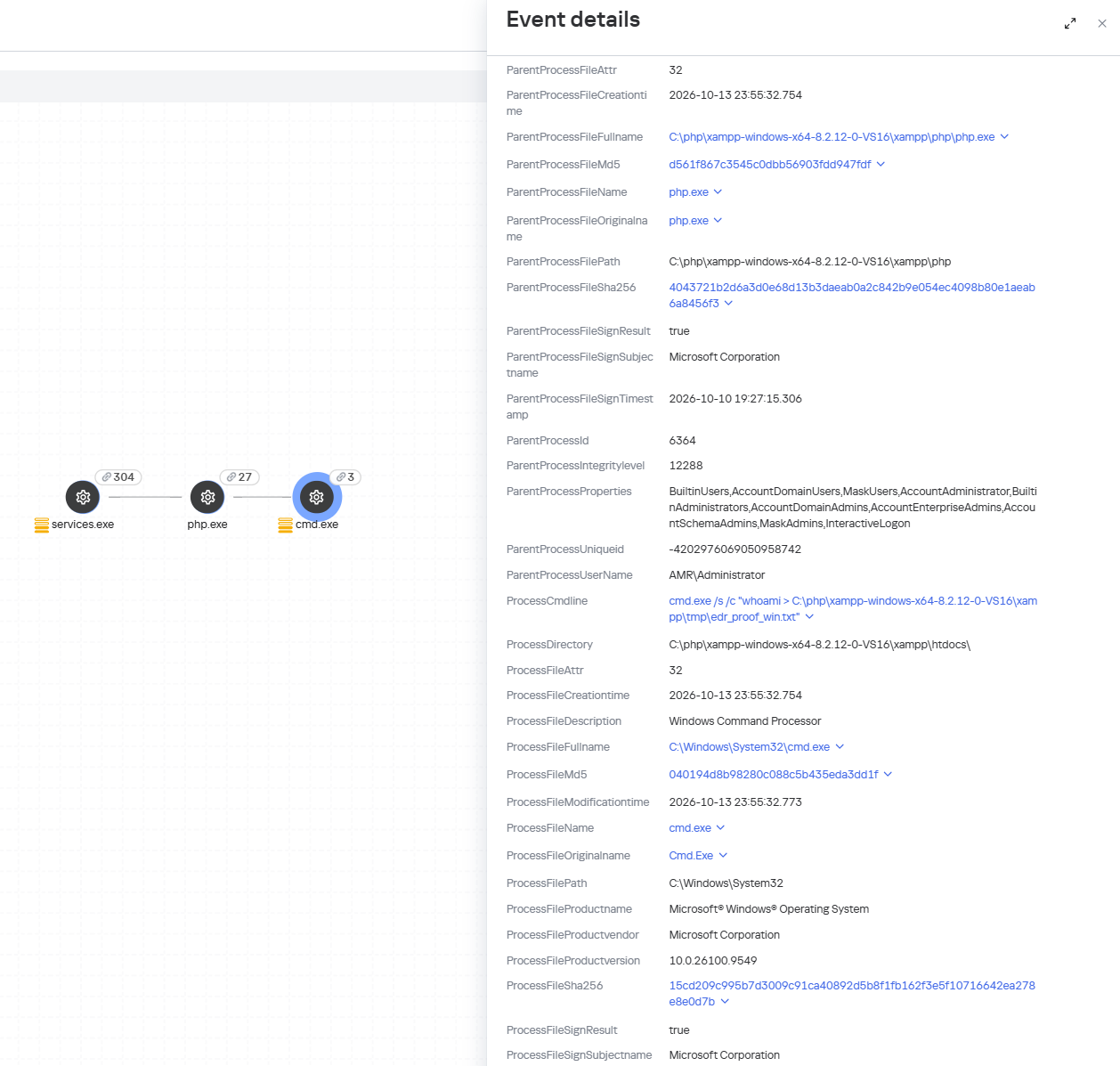
Detection of the PHP2Shell vulnerability exploit by KEDR
Exploitation of the PHP2Shell vulnerability in network traffic is detected by Kaspersky Anti Targeted Attack (KATA). This solution detects such activity with the following verdicts: Exploit.CVE-2026-109618.HTTP.C&C and Exploit.CVE-2026-109619.HTTP.C&C.
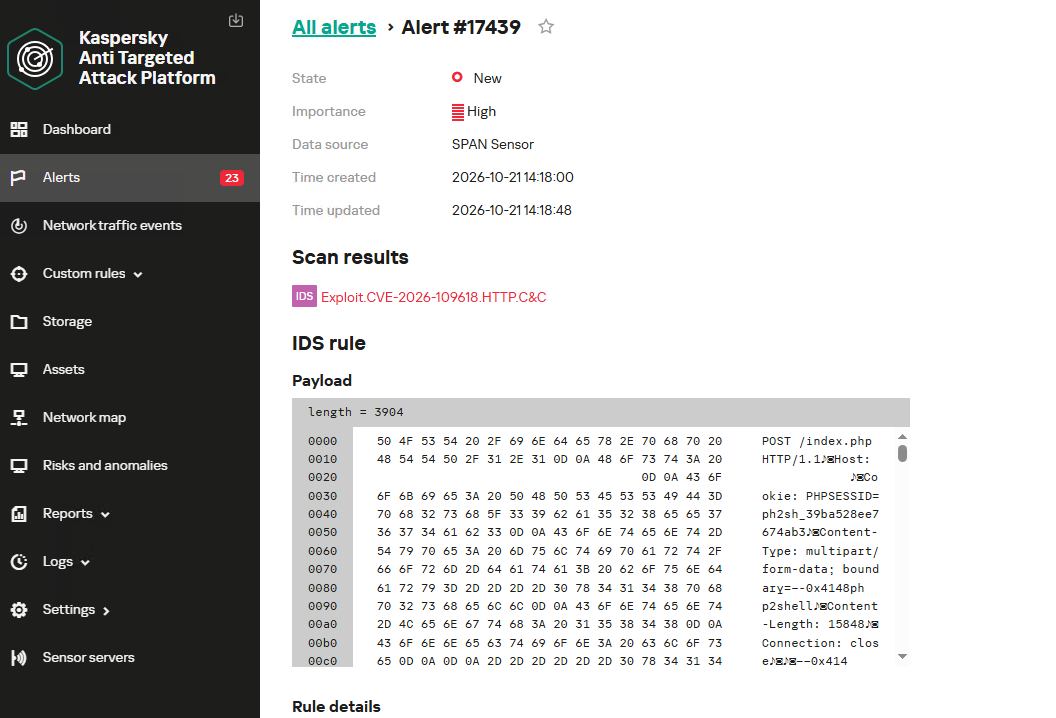
Detection of the PHP2Shell vulnerability exploit by KATA
Kaspersky Endpoint Security, now available as Kaspersky Next, also detects malicious post-exploitation activity using the Behavior Detection component, with verdicts such as PDM:Exploit.Linux.Generic and PDM:Exploit.Win32.Generic.
Our Kaspersky Vulnerability Management solution detects vulnerable software versions using the Vulnerability scanning and Agentless black-box scanning components.
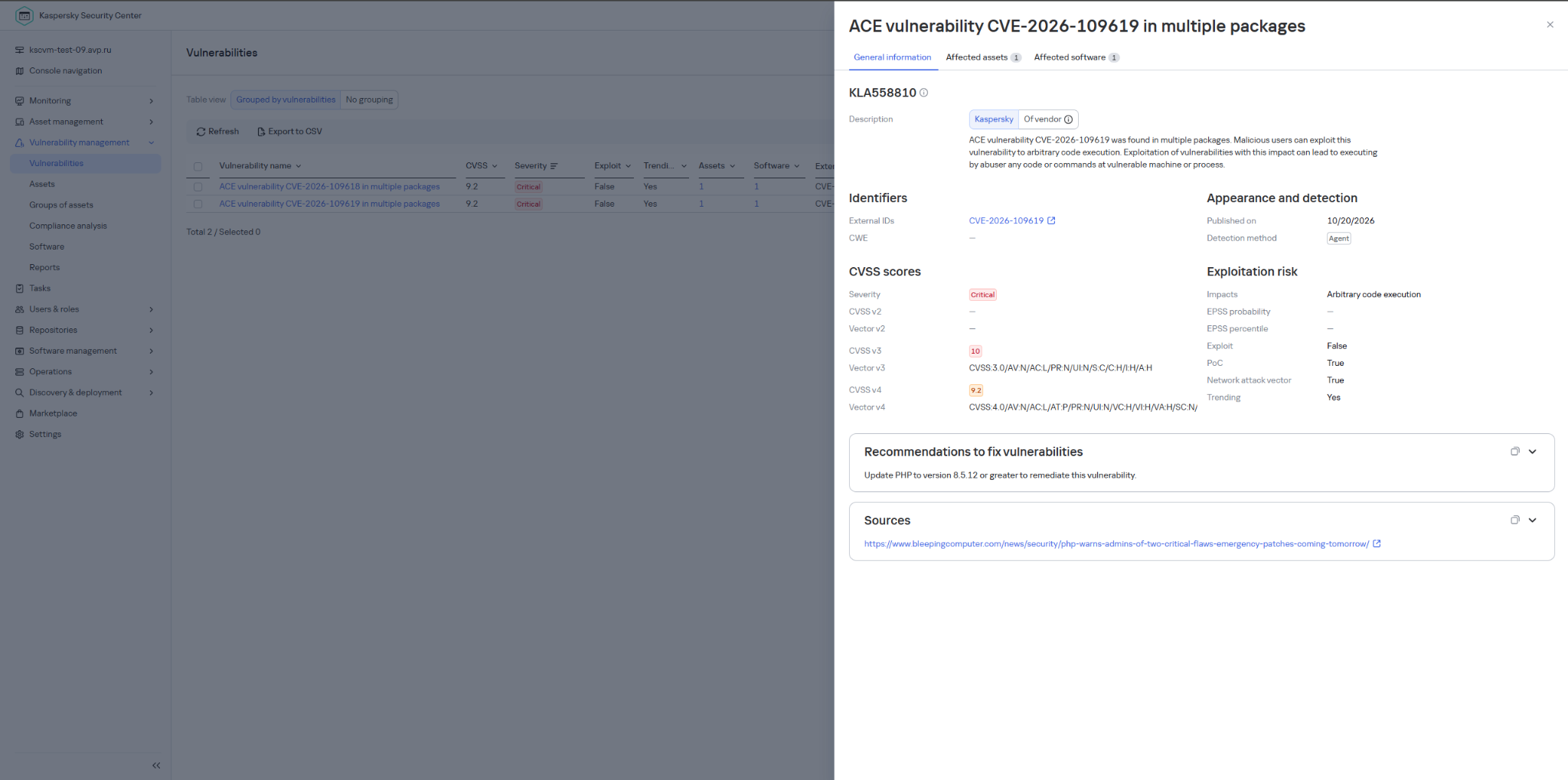
Detection of the PHP vulnerability in Kaspersky Vulnerability Management
The Kaspersky Managed Detection and Response service detects the exploitation of the described vulnerabilities by monitoring activity characteristic of RCE:
Moreover, MDR detects other malicious activity not directly related to remote code execution.
To protect companies that use our Kaspersky SIEM system, the product repository includes rules that help detect the following malicious activity.
We also recommend monitoring the creation of scripts or executable files in the web server directory when developing your own detection rules or conducting threat hunting:
((DeviceEventClassID = '4663' AND DeviceCustomString1 ilike 'WriteData') OR DeviceEventClassID = '11')
AND match(FileName,'(?i).*\.(php|asp|aspx|ashx|jsp|js|jar|jse|dll|exe|bat|ps1|vbs|wsf|wsh|msi|msp|hta|cpl)$')
AND match(DestinationProcessName,'(?i).*(php-cgi|nginx|httpd|w3wp)\.exe')
Name = 'openat' AND has(SA.Nametype, 'CREATE')
AND
length(arrayFilter(x -> match(x, '(public_html|var/www|usr/local/apache2|usr/local/httpd|var/apache|srv/www|home/httpd/html|srv/http|usr/share/nginx/html|var/lib/pgsql/data|usr/local/mysql/data|var/lib/mysql|var/vsftpd|etc/bind|var/named)'), SA.FileName))>1
AND
length(arrayFilter(x -> match(x, '\.(aspx|asp|asmx|asax|ashx|jspx|jsp|js|phpt|php|phtml|pht|cfm|shtml|htaccess|fcgi|cgi|pl|py|sh)'), SA.FileName))>1
Source: Securelist (Kaspersky GReAT) · 2026-10-21

Ransomware operators including Spikey Scorpius (aka Qilin) and Tarnished Scorpius (aka Inc) are exploiting PAN-OS vulnerability CVE-2026-0257.
Source: Palo Alto Networks Unit 42 · 2026-10-20


Imagine you’ve ordered a small paper unicorn from an online marketplace. You clicked “Buy”, received a cheerful notification, and expect a courier to bring the box tomorrow. If the unicorn is delayed by a day, it will be annoying but not catastrophic: an apology, a discount promo code — and the incident is forgotten.
Now let’s multiply one late unicorn by several hundred thousand orders.
Packages start heading to the wrong cities. The website shows an item is in stock, even though the required bin is empty. Conveyors stop, boxes get stuck between floors, the cargo piles up with no freight manifest. Trucks line up at the gates, and every minute of downtime turns into blown schedules, support tickets, fines, and lost sales.
It is at exactly this scale that a cyberincident in a warehouse becomes a problem for the entire business. A modern warehouse is no longer just a big building with shelving. It is a tightly interconnected hybrid system: web applications, radio channels, and an automated factory. Physical processes here depend on data, and errors in data have very physical consequences. Examples include an outage that affected warehouse management systems at the grocery giant Morrisons, and the 2025 Form 10-K annual report of United Natural Foods, Inc. (UNFI), which confirmed unauthorized activity on information technology systems that impacted order fulfillment. More recently, reports emerged that a cyberattack disrupted eight CEVA Logistics warehouses across Europe and exposed customer delivery data.
This paper follows a single order through a warehouse to show where the operation is vulnerable, the stages it traverses, the systems that drive it, and the points where an attacker can reach them. We then set out the threat model: what is at risk, who is in a position to take it, and how each risk lands on the business. From there, we look at how an attacker gets in, and what reaching the warehouse management system costs in practical terms: orders unshipped, inventory records nobody can trust, and an operation that stops. We close with recommendations on where the controls that matter actually sit.
A modern warehouse is a sequence of stages involving many machines and people, all working together to keep the business process stable so that, in the end, your order gets delivered. This process consists of eight main stages, shown in the figure below.
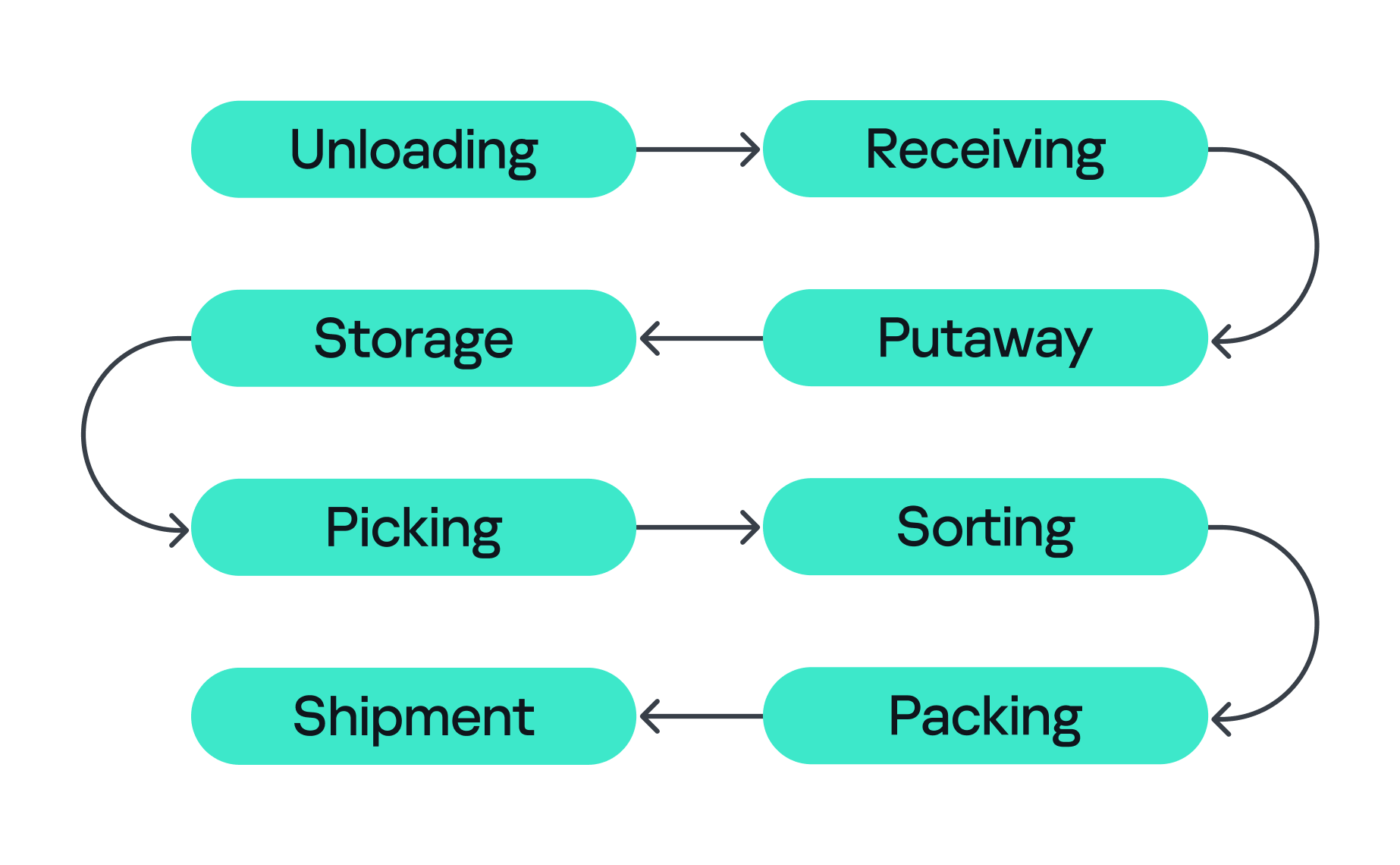
Stages of order fulfillment
So let’s assume we’ve ordered our paper unicorn and are waiting for it at home. Let’s follow our order through all the main stages, from its arrival at the warehouse to the final stop on its journey.
All eight stages are coordinated by the WMS. It looks like a large web application, but in its role it’s closer to the operating system of the entire warehouse: it knows which goods exist, where they’re located, who or what should move them, and where they go next, linking employees, inventory levels, storage addresses, tasks, and orders. It also exchanges data externally: with ERP systems, transport platforms, marketplaces, dark stores, and external carriers.
Surrounding the WMS is an even larger digital ecosystem: identity services, databases, APIs, printers, carrier systems, technicians’ laptops, video surveillance, access control, fire and gas alarms, power supply, and a building management system (BMS).
That is why a single “warehouse network” doesn’t really exist. As we’ve seen, there are many overlapping technologies — IT infrastructure, OT systems, radio, cloud services, building security, and automation — layered on top of one another. A lone vulnerability scanner will never tell you whether a warehouse is secure.
Securing an environment such as a warehouse requires a comprehensive security assessment covering all of its interconnected systems. This involves identifying vulnerabilities across each system and understanding how weaknesses can be combined into attack paths that a real attacker could exploit. But a vulnerability only matters in proportion to what it exposes and who is able to reach it, so before looking at the weaknesses themselves, we need to understand what an attacker in this environment is actually after, because in a warehouse, the blast radius extends well beyond data. Everything we just traced — the systems, the devices, and the people operating them — exists to keep goods moving, and attacks in various parts along that chain can affect the business differently. The chart below shows what is at risk in the warehouse and where those risks land for the business. The segment on the left groups them under the three core security properties: integrity, availability, and confidentiality. The segment on the right maps each property to the business outcomes a failure can cause.
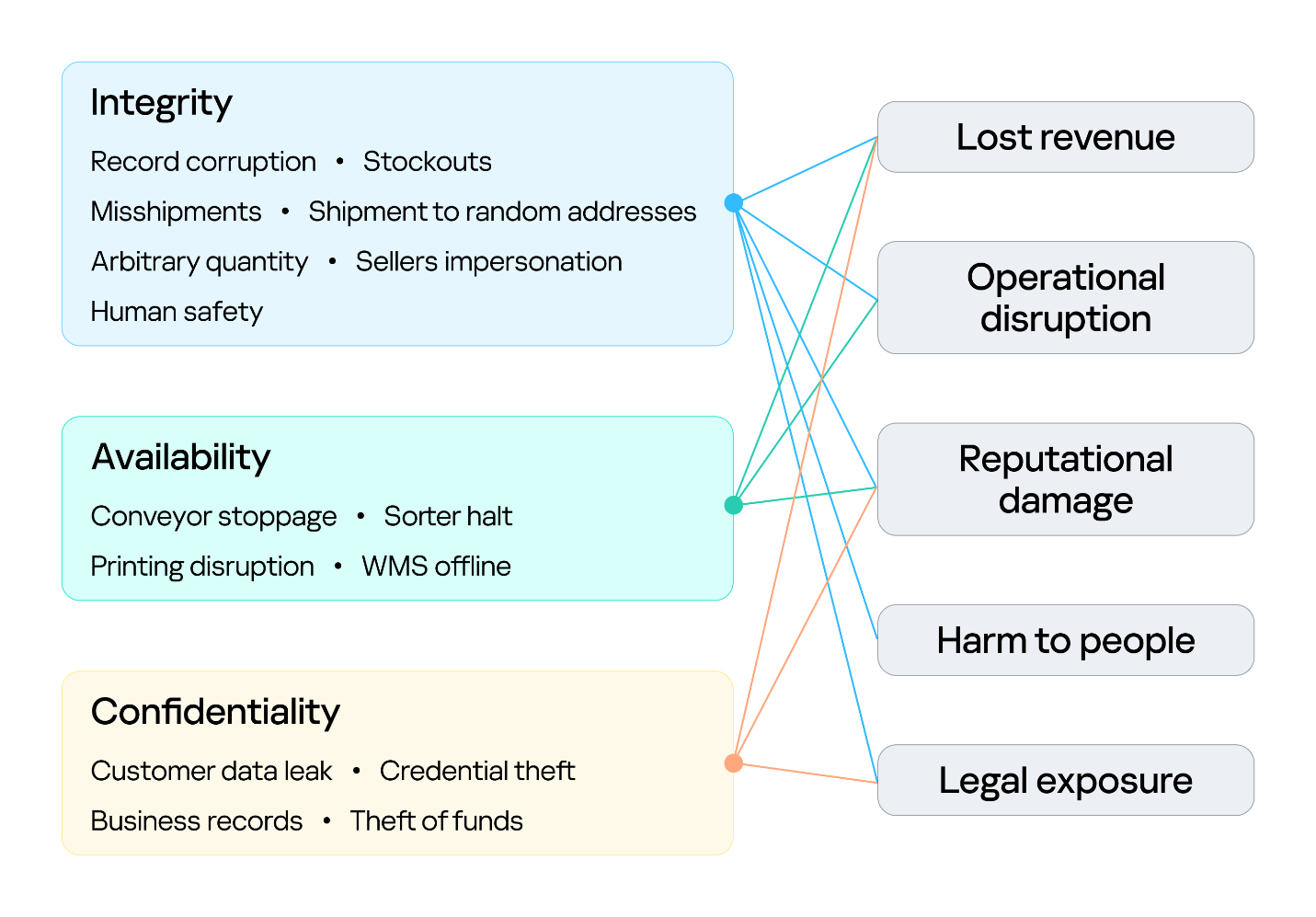
Warehouse risks
The first area at risk is integrity. Inventory counts, locations, orders, and shipment data must stay in sync with the physical world. Corrupting a record silently desynchronizes the operation, and because the eight stages form a dependency chain, one falsified entry early on is inherited downstream, surfacing later as stockouts and mis-shipments. In its deliberate forms, this lets an attacker redirect goods, release stock, and perform other actions on behalf of the platform’s vendors under cover of legitimate records. Integrity is also a safety concern: when people or machines act on information that no longer reflects the physical environment, a data failure can become a physical incident. This is why integrity is the only property linked to all five outcomes, including harm to people.
The second is availability, the warehouse’s ability to keep goods moving. Halting a conveyor, a sorter, label printing, or the WMS stops orders from shipping, and in a business built on speed, every hour of downtime means delayed deliveries and broken promises. Ransomware can bring the whole warehouse to a standstill. The impact shows up as operational disruption, lost revenue, and reputational damage.
The third is confidentiality. Customer data, business records, and system credentials are valuable targets. Their exposure leads to legal liability and reputational damage, and stolen credentials often open the door to further attacks. Where the WMS connects to financial or ERP processes, the risk extends to theft of funds.
Knowing what is at risk tells us what an attacker stands to gain; the next question is who is in a position to take it. Threat actors differ in the access they already hold. For example, an attacker may be authenticated and privileged, have limited physical or remote access, or have no legitimate access to the environment at all. Based on their relationship with the warehouse and their level of access, threat actors can generally be divided into two categories:
Combining these threat actors and their access levels with the risks identified earlier, the vulnerabilities present in each system, the resulting attack surfaces, and the potential attack paths between them provides a threat model for the warehouse environment. This allows an organization to understand how different systems and people could be targeted, how individual weaknesses could be combined, and where security controls are most needed.
Knowing what is at risk and who might come after it still leaves the most practical question open: how they would actually get in, and how far they could go once they did. The diagram below sets out the warehouse’s attack surface: every point where an attacker can get in, organized by the access that reaching each point requires.
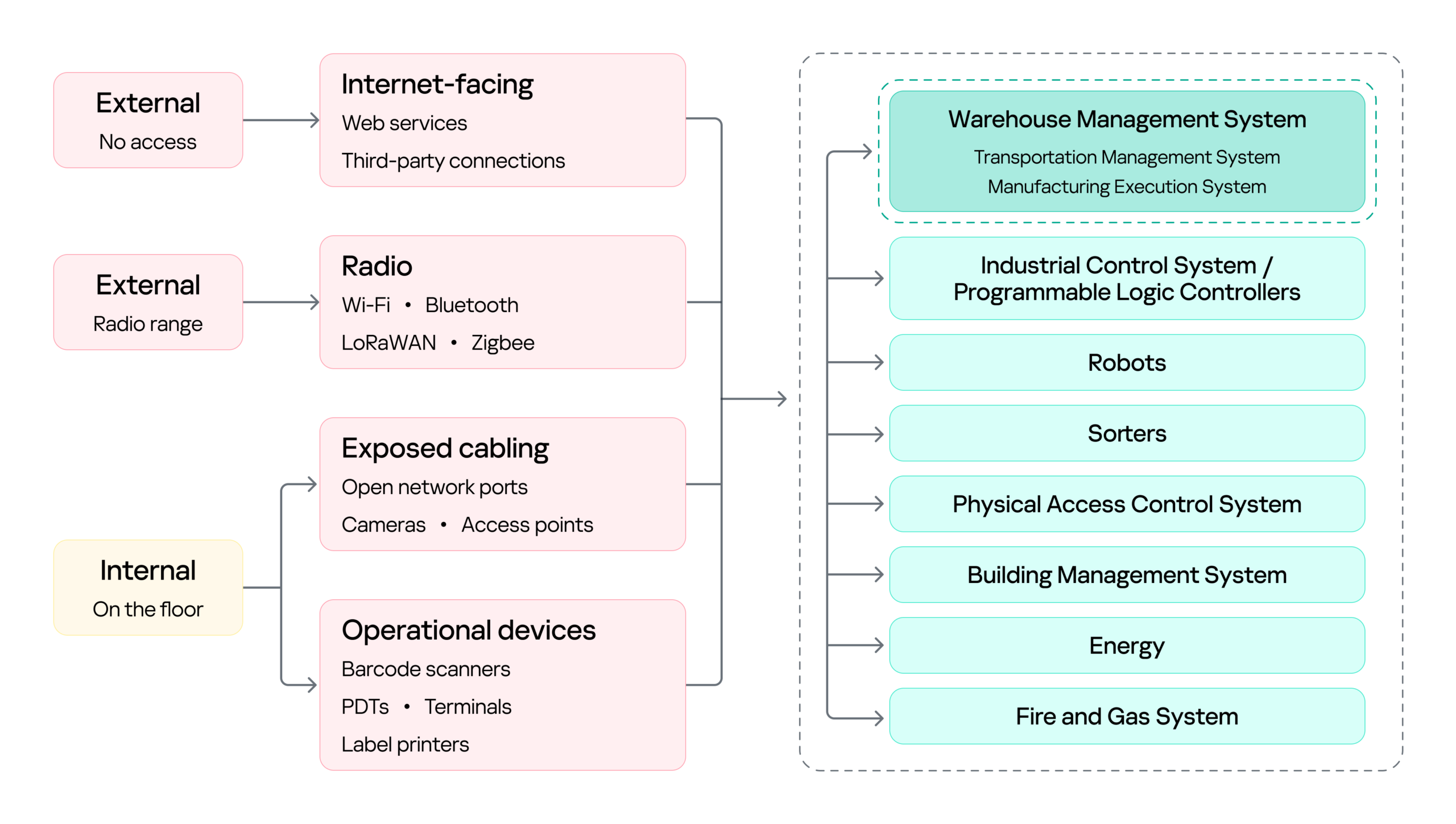
Warehouse attack surface
On the left are the attacker categories discussed above, distinguished by where they stand and what access they already hold. Each reaches the environment through a different set of entry points, and the impact of a successful attack can land on several systems, from the WMS to OT systems such as robots, sorters, and physical access control system (PACS). The WMS is highlighted because it is the most significant of these: it coordinates the OT systems, so compromising it can affect the entire operation rather than a single process.
Next, we will cover the initial access vectors, the points a threat actor can use to reach the warehouse environment. Following that, we turn to the impact on the logistics processes themselves, focusing on the WMS, since its compromise affects every logistics operation that depends on it.
Remote access through internet-facing services, third-party connections, and corporate networks gives an external attacker a foothold on the warehouse network infrastructure. It is a well-covered problem and not specific to this environment, so we note it here as an entry point but will not examine it further.
Wi-Fi connects handhelds, tablets, printers, cameras, and workstations. Bluetooth serves scanners, headsets, and positioning beacons. Zigbee and similar low-power protocols run lighting, sensors, and building automation, while LoRaWAN carries telemetry over long distances. Cellular provides a backup channel for kiosks and contractor equipment, and proprietary protocols control industrial panels and specialized machinery.
Radio passes through windows, gates, roofing, and thin external panels, so a network built for receiving and processing goods may be reachable from the parking lot and, with a directional antenna, from considerably farther away.
That reach matters in two ways. It gives an external attacker a place to start, as proximity alone is enough to reach the Wi-Fi and the low-power protocols, and from there to gain an initial foothold in the warehouse networks.
However, radio does not only lead into the network. It also connects directly to the field devices and carries the live control traffic of warehouse operations, which makes availability a first-order concern. If hundreds of handhelds lose their connection at once, picking stops. If an AGV loses its control channel, the safe reaction may be to halt in place, and a stopped machine can block an entire route.
The scale of the warehouse itself is part of the attack surface. A fulfillment warehouse can run up to tens of thousands of square meters, with racking climbing several stories and walkways threading through it. Structured cabling runs along that racking, cameras and access points are mounted on that, and wall jacks sit behind pallets that have not moved in months. Almost none of it is in anyone’s line of sight.
That gives a person in the warehouse something a normal office does not: unsupervised access to live network infrastructure. Unplugging a ceiling camera leaves an active port. An unused jack behind a shelf leaves another. Neither requires tools, credentials, or any interaction with a system that logs anything. And since the camera or access point sits on the same segment as the rest of the site, the compromised port, not being isolated, opens a path to the network core.
Barcode scanners are everywhere in a warehouse. They are the main tool workers use to tell the system what is moving and where, supporting receiving, picking, packing, and inventory management. A typical setup has handheld scanners communicating with a base station, which is in turn connected to a workstation or another business system.
This makes the scanner an entry point into the core network in two ways.
First, through the barcode itself. Since the scanner acts as a keyboard to the connected host, a maliciously crafted barcode or QR code can inject keystrokes when scanned, potentially giving the attacker an initial foothold on the host without directly accessing the network.
Second, through the scanner’s wireless link. During a customer engagement, with the provided test stand of such a device, we discovered that an attacker within range could inject keystrokes into the connected host and potentially achieve remote code execution without user interaction. This attack pattern was observed across multiple vendors, including, for example, Honeywell devices affected by CVE-2026-4272.
In both cases, the result is the same: a foothold on a host inside the warehouse network. The scanner is simply the entry point; the significance of that foothold comes from the host’s trusted position within the operational environment and its connectivity to core systems.
Portable data terminals (PDTs) are essentially ordinary Android devices with an embedded barcode scanner, carried by workers to scan items; each scan is passed to a dedicated application that forwards it to a remote server over an API. To keep workers on task, the devices usually run in kiosk mode, locking the user to that single application and preventing interaction with the rest of the Android system.
That lockdown is exactly what an attacker wants to break, and breaking it is what turns the terminal into an initial access vector: escaping the kiosk can expose the Wi-Fi password of the network the terminal is connected to, or allow malicious software to be installed that gives the attacker remote access to the network over the internet.
Warehouses contain different types of printers. Alongside the usual IT printers used for documents and paperwork, there are specialized thermal printers, small devices that use heated elements on the printhead to create labels, barcodes, and tags. As we mentioned earlier, these are mainly used to print the labels, usually containing barcodes, that are attached to goods during the putaway stage.
Here we focus on mobile thermal printers: small, battery-powered devices that workers can carry or wear. They typically connect to the internal network over Wi-Fi to receive print commands, while also supporting Bluetooth for connecting to nearby devices. This combination makes them a potential entry point into the internal network.
Some models, such as the Zebra ZQ630, support multiple interfaces and can run applications directly on the device. During a security assessment, we discovered that apps can be uploaded and executed over Bluetooth. By exploiting a pairing misconfiguration, an attacker within Bluetooth range could bypass pairing, upload malicious software, and gain an initial foothold through the printer.
With a foothold in the network, an attacker can pivot to the logistics processes themselves: from the WMS through the warehouse infrastructure to the PLCs and the machinery they drive. As we saw earlier, all OT systems and devices are interconnected and the WMS sits at the head of that chain: it is the system of record every other process reads from and writes to, so compromising it reaches all of them at once. That, and its being specific to this environment, is why it is the focus here.
Warehouse management systems (WMS) are the software platforms that optimize warehouse processes from the entry of goods to their exit. They provide real-time visibility into inventory and orchestrate end-to-end fulfillment by integrating with many warehouse subsystems and pieces of automation equipment, such as conveyors, PLCs, robotics, scanners, and voice systems. A typical WMS includes modules for receiving, inventory control, order management, labor management, shipping, and reporting. Major vendors include SAP EWM, Oracle Warehouse Management, Manhattan Active, Blue Yonder, Infor, Körber/HighJump, Microsoft, and TECSYS.
To picture how central this is, think back to our unicorn. From the moment it was scanned at receiving, it stopped being only a physical box and became a record inside the WMS, a record the system then used to decide where it should be stored, when it should be picked, how it should be sorted, and where it should ship. Every device employed along the way — the PDT at receiving, the printer at putaway, the workstation at picking, the conveyor at sorting — was really just talking to the WMS. It is the thread that ties all eight stages together, which is exactly what makes it such a valuable target.
Because modern WMS platforms are usually web-based and heavily interconnected, they inherit common web and API vulnerabilities alongside flaws specific to the WMS itself. A recent example is CVE-2026-70774 in Oracle Warehouse Management, part of Oracle E-Business Suite. Oracle rated it High and described it as an easily exploitable authorization bypass flaw in which a low-privileged attacker with network access can compromise the application, affecting integrity and availability by allowing unauthorized creation, deletion, or modification of critical data.
A flaw like this may look like a typical web application issue, but its consequences in a warehouse are more serious, because the WMS is the system of record. If an attacker can modify its data, they can alter stock levels, bin locations, receiving records, picking tasks, or shipment information, silently corrupting the digital twin of the warehouse. And since the eight stages form a dependency chain, that corruption doesn’t stay contained: a falsified record at receiving is inherited by putaway, picking, and everything downstream. The physical box and its record diverge, and every later process trusts the record.
The most direct version of this attack comes from an authorization bypass flaw like the Oracle vulnerability above. Here the threat actor can be an external attacker who has reached the application over the network, or an insider such as a low-privileged operator or storekeeper who already holds a legitimate account.
The danger grows when such a flaw is chained with others. An external attacker who combines remote code execution with SQL injection could generate shipment orders to arbitrary addresses together with the documents needed for goods to physically leave the warehouse, fabricate waybills, acceptance or transfer records, and registers, while also exposing customer data such as names and delivery addresses. In effect, the goods are sent out with legitimate-looking paperwork.
This is why ordinary web vulnerabilities carry considerable weight in a WMS. For an external attacker or an insider probing beyond their assigned role, broken access control could open a path into another warehouse zone, allow manipulation of other workers’ tasks, permit unauthorized exception operations, or expose administrative APIs. A server-side request forgery flaw could force the WMS server to reach resources an external attacker cannot touch directly, and if the network is flat or only formally segmented, that server may in turn reach internal management panels, cloud service interfaces, or systems sitting close to the operational network, turning a single web bug into a bridge between IT and OT.
Attacks on a WMS don’t always target the application directly, though. As we saw while tracing the unicorn, the warehouse is full of connected devices that already hold trusted access. A handheld terminal carries authenticated WMS API access as a matter of course, and anyone who gains control of that terminal inherits it (by escaping the kiosk, for example). Depending on the device’s permissions, that might mean confirming picks that never occurred, falsifying receiving operations, adjusting stock counts, or marking orders complete — something warehouse employees themselves could use to avoid their assigned duties.
Where the WMS is connected to control and automation systems, access to the WMS can extend into physical operations, including conveyors, sorting systems, lifts, doors, and pumps.
PLCs translate WMS instructions and sensor inputs into physical actions. Compromising a system that controls them therefore creates an opportunity to manipulate those actions. The impact can be as simple as a sorting diverter sending boxes down the wrong route, a conveyor repeatedly entering an error state and creating a backlog, or a falsified sensor value causing a line to be treated as clear when it is full.
However the WMS is compromised, the business consequence is the same: inventory corruption, unauthorized shipments, and operational disruption, each reaching the customer in the end as a late or missing delivery, the wrong item in the box, or a personal address exposed to a stranger.
We followed our unicorn through web applications and databases, radio channels and PDTs, printers, conveyors, robots, and the loading zone. Because warehouse environments combine IT, OT, wireless, physical, and human components, security controls should be implemented as a single, coordinated security architecture rather than as isolated measures. Network segmentation should be a foundational control, with clear separation between corporate IT, warehouse OT, operational devices, management networks, and externally connected systems. Segmentation should also extend across facilities and customer environments so that each site and customer integration is isolated from the others, limiting the potential impact of a compromise. A zero-trust approach should reinforce this architecture by requiring explicit authentication and authorization for connections between systems, regardless of their network location, and by applying least-privilege access wherever possible. Regular penetration testing of the corporate IT environment, including domain services, identity infrastructure, and endpoints, should be incorporated into the warehouse security program.
Physical and network access controls should be implemented together. Access to warehouse facilities, network rooms, communication cabinets, and operational areas should be restricted according to business need, with appropriate authentication, monitoring, and access logging. Network infrastructure should be hardened through controls such as switch port security, MAC-based access restrictions where appropriate, and IEEE 802.1X with EAP-TLS for strong device and user authentication. Network equipment should also be securely configured and regularly reviewed to ensure that unused interfaces, insecure management protocols, default credentials, and unnecessary services are disabled.
Web applications and their supporting infrastructure should be governed through a secure software development lifecycle (SSDLC), including security requirements, secure coding practices, code and dependency review, and application security assessment before deployment and throughout the application’s lifecycle. Third-party applications and components should be continuously monitored and updated, with a defined vulnerability and patch management process. This should explicitly include warehouse management systems (WMS), warehouse portals, APIs, and other applications that provide operational or customer-facing functionality.
Wireless technologies should be subject to dedicated security assessment and engineering. Radio-frequency surveys should be conducted to establish expected coverage, identify unauthorized or unexpected signals, validate the availability and protection of operational communications, and determine whether wireless deployments create unintended access paths into warehouse networks. Wireless security should be assessed not only from a connectivity perspective but also in terms of authentication, encryption, device provisioning, protocol exposure, interference resilience, and the potential impact of unauthorized devices.
Warehouse operational devices should be incorporated into the organization’s endpoint security and vulnerability management processes. Devices should receive security updates and firmware patches on a defined schedule, with accelerated remediation for critical vulnerabilities. Security assessments should be performed periodically to identify weaknesses in device configuration, applications, exposed services, and authentication mechanisms.
Personnel security should form an additional layer of the warehouse security architecture. In most industrial and ICS environments, getting inside means clearing background checks, holding relevant qualifications, or proving prior experience; the hiring process itself acts as a filter. A warehouse is different. Roles in sorting, packing, and courier work are hired quickly and in volume, and they typically require no prior expertise, certification, or specialized background at all. An ordinary person can walk in off the street, be hired within days, and immediately hold legitimate physical access to the facility. Therefore, a more restrictive and risk-based approach to hiring should be considered, particularly for roles that provide access to sensitive areas, operational systems, network infrastructure, or customer assets.
Ultimately, all of these measures serve the same objective: protecting the continuity and reliability of the warehouse as a whole. This matters because real warehouses handle food, medicines, machine parts, and the millions of ordinary things people and companies depend on every day. Protecting their journey means seeing the warehouse as it has actually become: a single digital system with doors, motors, shelving, and radio signals, and with entirely real consequences when it fails. And if the security program works, the customer never knows any of this happened. The unicorn simply arrives at the scheduled time.
If your warehouse operations rely on interconnected systems like these, we can help identify the gaps before an adversary does. Reach out to discuss a security assessment.
Source: Securelist (Kaspersky GReAT) · 2026-10-20