Tag: Bugs

  • Chrome 157 fixes 213 security issues, including 7 critical flaws

    Chrome 157 fixes 213 security issues, including 7 critical flaws

    On November 3, Google issued Chrome 157 to the stable channel for Windows, Mac and Linux. The update is rolling out over the coming days and weeks.

    Most users are on Chrome’s Stable channel. The desktop update brings Chrome to versions 157.0.8103.38/.39 for Windows and Mac and 157.0.8103.38 for Linux. It includes 213 security fixes, including seven vulnerabilities rated Critical by Google.

    Chrome for Android was also updated to 157.0.8103.38. It will become available on Google Play over the coming days.

    How to update Chrome

    The easiest option is to allow Chrome to update automatically. But you can end up lagging behind on updates if you never close your browser or if something goes wrong, such as an extension preventing the update.

    If you don’t want to wait for the rollout to reach you, you can update manually. Open About Google Chrome from Chrome’s settings or Help menu. Chrome will check for updates. If one is available, click Relaunch to apply it.
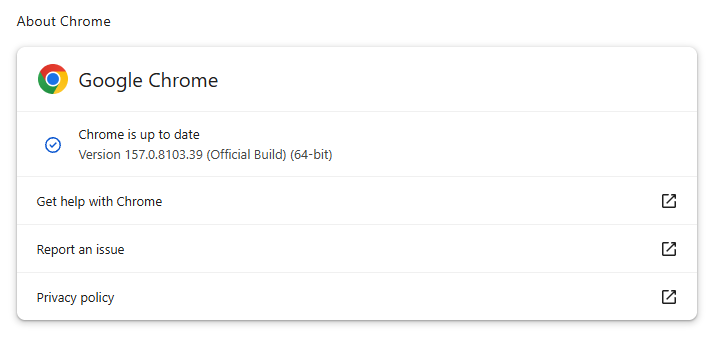
    Chrome 157.0.8103.39 is up to date
    Chrome 157.0.8103.39 is up to date

    You can find an explanation of the version numbering system and step-by-step instructions in our guide: How to update Chrome on every operating system.

    Technical details

    Some of the security fixes deserve a closer look.

    Google rates seven vulnerabilities in the update as Critical. One, a memory corruption flaw in ANGLE, affects Chrome for Android. It could potentially allow a remote attacker to run code outside the sandbox through a specially crafted HTML page.

    .wp-block-kadence-advancedbtn.kb-btns400740_ab89fd-c4{gap:var(–global-kb-gap-xs, 0.5rem );justify-content:center;align-items:center;}.kt-btns400740_ab89fd-c4 .kt-button{font-weight:normal;font-style:normal;}.kt-btns400740_ab89fd-c4 .kt-btn-wrap-0{margin-right:5px;}.wp-block-kadence-advancedbtn.kt-btns400740_ab89fd-c4 .kt-btn-wrap-0 .kt-button{color:#555555;border-color:#555555;}.wp-block-kadence-advancedbtn.kt-btns400740_ab89fd-c4 .kt-btn-wrap-0 .kt-button:hover, .wp-block-kadence-advancedbtn.kt-btns400740_ab89fd-c4 .kt-btn-wrap-0 .kt-button:focus{color:#ffffff;border-color:#444444;}.wp-block-kadence-advancedbtn.kt-btns400740_ab89fd-c4 .kt-btn-wrap-0 .kt-button::before{display:none;}.wp-block-kadence-advancedbtn.kt-btns400740_ab89fd-c4 .kt-btn-wrap-0 .kt-button:hover, .wp-block-kadence-advancedbtn.kt-btns400740_ab89fd-c4 .kt-btn-wrap-0 .kt-button:focus{background:#444444;}

    ul.menu .wp-block-kadence-advancedbtn .kb-btn400740_68fb6a-2d.kb-button{width:initial;}.wp-block-kadence-advancedbtn .kb-btn400740_68fb6a-2d.kb-button{color:var(–color-neutral-10);background:var(–color-brand-blue-60);border-top-left-radius:40px;border-top-right-radius:40px;border-bottom-right-radius:40px;border-bottom-left-radius:40px;padding:var(–kb-btn-padding);margin:var(–kb-btn-margin);box-shadow:1px 1px 2px 0px rgba(0, 0, 0, 0.2);}.wp-block-kadence-advancedbtn .kb-btn400740_68fb6a-2d.kb-button:hover, .wp-block-kadence-advancedbtn .kb-btn400740_68fb6a-2d.kb-button:focus{box-shadow:0px 4px 0px 0px var(–color-brand-blue-90);}Try it now

    CVE-2026-121229: Memory corruption in ANGLE, which could allow a remote attacker to potentially execute arbitrary code outside the sandbox via a crafted HTML page.

    ANGLE is Chrome’s graphics translation layer. A buffer overflow occurs when a program puts more data into an area of memory than it can hold, overwriting data in adjoining memory. An attacker can exploit this to make the vulnerable process run malicious code.

    Chrome vulnerabilities that enable remote code execution outside the browser sandbox are particularly valuable to attackers because they can turn a visit to a malicious or compromised website into direct code running on the underlying operating system, often without requiring additional exploitation steps.

    CVE-2026-121035: Use-after-free in Prerender.

    Chrome’s Prerender component helps pages open faster by loading and preparing a page in the background before you navigate to it. If you then visit that page, Chrome can display the prepared version almost instantly instead of loading it from scratch.

    This goes beyond just downloading content: Chrome also starts rendering the page and running its JavaScript.

    A use-after-free vulnerability occurs when a program attempts to access a memory location after it has been freed. That can cause crashes or, in some cases, allow an attacker to run their own code.

    CVE-2026-121156: Buffer overflow in Dawn.

    Dawn powers WebGPU in Chrome, allowing websites to use a device’s graphics processor for rendering and computational tasks. It checks and translates WebGPU instructions into commands that the device’s underlying graphics system can understand.

    A buffer overflow occurs when a program writes more data to a block of memory than it can hold. This can cause a crash or, in some cases, allow an attacker to run code.


    Stop threats before they can do any harm.

    Malwarebytes Browser Guard blocks phishing pages and malicious sites automatically. Free, one click to install. Add it to your browser →

    Source: Malwarebytes Labs · 2026-11-04
  • Hackers put porn on public billboards and claim it was “far too easy”

    While digital billboards are supposed to grab your attention, recent reports from Egypt, Malaysia, and Brazil described them doing so with explicit footage.

    The cyberattacks were claimed by a group called Leakers$, which said it exploited software used to send content to LED displays.

    The group said it did not hack into individual billboards to show the pornographic footage, but that it accessed the software used to send the content.

    For example, on October 29, explicit footage appeared on a large billboard overlooking one of Egypt’s busiest highways. Videos circulating online showed the attackers’ aliases and a Telegram channel address overlaid on the footage. Some motorists stopped to record it.

    Egyptian authorities said the billboard’s operator suffered a website compromise, resulting in unauthorized footage appearing in several countries simultaneously. Similar events were reported in Malaysia and Brazil. The attackers also claimed access to systems in Iraq and China, but those claims are less firmly corroborated.

    Speaking to The Cairo Report, a representative of Leakers$ claimed the group found thousands of exposed systems during roughly two hours of automated scanning. The representative described a vulnerability in content-transmission software and weaknesses accessible through the systems’ own web pages and interfaces.

    That is the group’s account, but if it is accurate, it helps explain the apparent ease and reach of the attack:

    • Internet exposure makes targets discoverable. Attackers can scan for reachable management systems rather than physically approach individual screens.
    • Repeated software weaknesses can scale. Finding a flaw in software used across multiple installations can create opportunities far beyond one billboard.
    • Content-management access is the prize. Someone who gains control of the system that publishes advertisements may be able to replace legitimate content without touching the display itself.

    This is another example of how convenient remote management can expose systems to attack. Recent attacks on refrigerated systems in European supermarkets demonstrated a similar risk. The cooling systems are internet-connected, so mechanics can remotely diagnose and fix problems.

    What should be done

    The risk of food waste or dangerous traffic situations should be a warning to review what organizations need to do to prevent their systems from being hacked and abused.

    Regarding digital billboards, the Out of Home Advertising Association of America’s security guidelines tell operators not to rely on manufacturers’ default passwords or reuse passwords across displays. They also recommend restricting access to management services, using multifactor authentication, and protecting remote connections with a VPN.

    But the practical response is less about protecting a giant television and more about securing a remotely managed computer system:

    • Restrict management access rather than leaving it open to the public internet.
    • Replace default and reused passwords and enable multifactor authentication.
    • Keep signage software, controllers, and networking equipment updated.
    • Check who has access, including suppliers, and how that access is protected.
    • Monitor systems and rehearse a way to stop unauthorized access quickly.

    These same basic rules can be applied to smart household appliances.


    What do cybercriminals know about you?

    Use Malwarebytes’ free Digital Footprint scan to see whether your personal information has been exposed online.

    Source: Malwarebytes Labs · 2026-11-03

  • Have an older iPhone or iPad? Apple has a security update for you

    Apple’s latest updates include a fix for a CoreGraphics bug that may have been exploited in targeted attacks. The fix is now available for older iPhones and iPads.

    Apple released security updates on October 26. Apple first fixed the flaw in iOS 26.7.1. Its latest updates also bring the fix to older devices that can’t run iOS 26, including the iPhone XS, iPhone XS Max, iPhone XR, and seventh-generation iPad.

    The iOS 18.7.11 update is a backport: it brings a fix from a newer software version to an older one. Here, Apple has made the fix available to older devices running iOS 18, so they can be protected without upgrading to an operating system they don’t support.

    Updates for your particular device

    The table below shows which updates are available and links to Apple’s security information for each one.

    Name and information link Available for
    iOS 27.2 and iPadOS 27.2 iPhone 11 and later, iPad Pro 12.9-inch 4th generation and later, iPad Pro 11-inch 2nd generation and later, iPad Air 4th generation and later, iPad 9th generation and later, and iPad mini 6th generation and later
    iOS 26.7.2 and iPadOS 26.7.2 iPhone 11 and later, iPad Pro 12.9-inch 3rd generation and later, iPad Pro 11-inch 1st generation and later, iPad Air 3rd generation and later, iPad 8th generation and later, and iPad mini 5th generation and later
    iOS 18.7.11 and iPadOS 18.7.11 iPhone XS, iPhone XS Max, iPhone XR, iPad 7th generation
    macOS Golden Gate 27.2 macOS Golden Gate
    macOS Tahoe 26.7.2 macOS Tahoe
    macOS Sequoia 15.8.2 macOS Sequoia
    tvOS 27.2 Apple TV 4K 2nd generation and later
    watchOS 27.2 Apple Watch Series 9 and later
    visionOS 27.2 Apple Vision Pro (all models)
    Safari 27.2 macOS Sequoia and macOS Tahoe
    tvOS 26.6.1 (no published CVE entries) Apple TV HD and Apple TV 4K 1st generation

    How to update your Apple devices

    How to update your iPhone or iPad

    For iOS and iPadOS users, here’s how to check if you’re using the latest software version:

    Go to Settings > General > Software Update. You will see if there are updates available and be guided through installing them.

    Turn on Automatic Updates if you haven’t already—you’ll find it on the same screen.

    How to update your Mac

    To update macOS on any supported Mac, use the Software Update feature, which Apple designed to work consistently across all recent versions. Here are the steps:

    • Click the Apple menu in the upper-left corner of your screen.
    • Choose System Settings (or System Preferences on older versions).
    • Select General in the sidebar, then click Software Update on the right. On older macOS, just look for Software Update directly.
    • Your Mac will check for updates automatically. If updates are available, click Update Now (or Upgrade Now for major new versions) and follow the on-screen instructions. Before you upgrade to macOS Tahoe 26, please read these instructions.
    • Enter your administrator password if prompted, then let your Mac finish the update (it might need to restart during this process).
    • Keep your Mac plugged in and connected to the internet until the update is done.

    How to update your Safari browser

    Safari updates are included with macOS updates, so installing the latest version of macOS will also update Safari. To check manually:

    • Open the Apple menu > System Settings > General > Software Update.
    • If you see a Safari update listed separately, click Update Now to install it.
    • Restart your device when prompted.

    Technical details

    The headline bug is CVE-2026-86950, in CoreGraphics, Apple’s framework for drawing graphics, images and PDF content. It’s an out-of-bounds write flaw, where software writes data outside the memory set aside for it. The result is that “processing a maliciously crafted file may lead to arbitrary code execution.”

    Apple says it is aware of a report that the flaw may have been exploited in an “extremely sophisticated attack against specific targeted individuals” on versions of iOS before iOS 27.

    That wording indicates Apple believes the bug was used in real attacks against a limited group of users.

    Usually, journalists, activists and officials are the targets of this kind of attack. If you think you could be a target of highly sophisticated spyware, you should update, restart your phone, and consider applying Apple’s Lockdown Mode.


    Scammers know more about you than you think. 

    Malwarebytes Mobile Security protects you from phishing, scam texts, malicious sites, and more. With real-time AI-powered Scam Guard built right in. 

    .wp-block-kadence-advancedbtn.kb-btns97520_6de029-2f{gap:var(–global-kb-gap-xs, 0.5rem );justify-content:flex-start;align-items:center;}.kt-btns97520_6de029-2f .kt-button{font-weight:normal;font-style:normal;}.kt-btns97520_6de029-2f .kt-btn-wrap-0{margin-right:5px;}.wp-block-kadence-advancedbtn.kt-btns97520_6de029-2f .kt-btn-wrap-0 .kt-button{color:#555555;border-color:#555555;}.wp-block-kadence-advancedbtn.kt-btns97520_6de029-2f .kt-btn-wrap-0 .kt-button:hover, .wp-block-kadence-advancedbtn.kt-btns97520_6de029-2f .kt-btn-wrap-0 .kt-button:focus{color:#ffffff;border-color:#444444;}.wp-block-kadence-advancedbtn.kt-btns97520_6de029-2f .kt-btn-wrap-0 .kt-button::before{display:none;}.wp-block-kadence-advancedbtn.kt-btns97520_6de029-2f .kt-btn-wrap-0 .kt-button:hover, .wp-block-kadence-advancedbtn.kt-btns97520_6de029-2f .kt-btn-wrap-0 .kt-button:focus{background:#444444;}

    ul.menu .wp-block-kadence-advancedbtn .kb-btn97520_074a67-a8.kb-button{width:initial;}.wp-block-kadence-advancedbtn .kb-btn97520_074a67-a8.kb-button{color:var(–color-neutral-10);background:var(–color-brand-blue-60);border-top-left-radius:40px;border-top-right-radius:40px;border-bottom-right-radius:40px;border-bottom-left-radius:40px;padding:var(–kb-btn-padding);margin:var(–kb-btn-margin);box-shadow:1px 1px 2px 0px rgba(0, 0, 0, 0.2);}.wp-block-kadence-advancedbtn .kb-btn97520_074a67-a8.kb-button:hover, .wp-block-kadence-advancedbtn .kb-btn97520_074a67-a8.kb-button:focus{box-shadow:0px 4px 0px 0px var(–color-brand-blue-90);}Try it now

    Source: Malwarebytes Labs · 2026-10-29

  • Chrome and Firefox updates fix serious security flaws. Install now

    Chrome and Firefox updates fix serious security flaws. Install now

    On October 27, Google issued a new Stable channel update for Chrome.

    Most users are on Chrome’s Stable channel. The desktop update brings Chrome to versions 156.0.8078.73/.74 for Windows and Mac and 156.0.8078.73 for Linux. The update includes 52 security fixes, including four rated Critical.

    On the same day, Mozilla issued Security Advisory 2026-118, which fixes 167 vulnerabilities. Firefox 159 also introduces several new features.

    Both updates will roll out over the coming days and weeks.

    How to update Chrome

    The easiest option is to allow Chrome to update automatically. But you can end up lagging behind on updates if you never close your browser or if something goes wrong, such as an extension preventing the update.

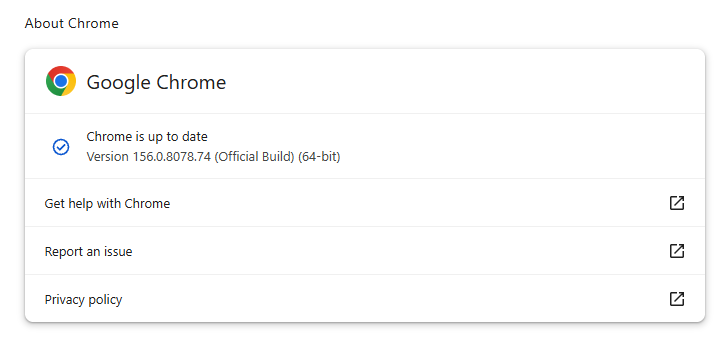
    If you don’t want to wait for the rollout to reach you, manually updating is easy. Open About Google Chrome from Chrome’s settings or Help menu. Chrome will check for updates. If one is available, click Relaunch to apply it.

    Chrome version 156.0.8078.74 is up to date
    Chrome version 156.0.8078.74 is up to date

    You can find an explanation of the version numbering system and step-by-step instructions in our guide: How to update Chrome on every operating system.

    How to update Firefox

    To update Firefox, open the browser and click the menu button at the right side of the Firefox toolbar, then go to Help and select About Firefox. The About Mozilla Firefox window will open.

    Firefox will automatically check for updates. If one is available, it will be downloaded. Once done, you’ll be prompted to click Relaunch. After Firefox restarts, it will be up to date.

    After the update, the version should be 159.0 or later
    After the update, the version should be 159.0 or later

    Technical details

    These Chrome and Firefox updates address a familiar problem: browser code mishandling memory while processing web content. Both releases fix use-after-free vulnerabilities, including flaws in page layout, JavaScript processing, and SVG graphics.

    A use-after-free vulnerability occurs when a program attempts to access a memory location after it has been freed. That can cause crashes or, in some cases, allow an attacker to run their own code.

    There’s another connection between these updates: both Google and Mozilla credit OpenAI Codex Security with finding bugs fixed in these releases. AI can help security teams examine browser code for weaknesses, alongside human code reviews and automated tests that check how software handles unexpected inputs.

    Mozilla’s collaboration with Anthropic shows how AI-discovered findings can lead to fixes: researchers validated vulnerabilities before reporting them, giving Mozilla’s team reproducible bugs to investigate, repair, and deliver to users.


    Browse like no one’s watching. 

    Malwarebytes Privacy VPN encrypts your connection and never logs what you do, so the next story you read doesn’t have to feel personal. Try it free → 

    Source: Malwarebytes Labs · 2026-10-28

  • The web’s having a rough week. Here’s how to browse safely

    You recognize the website. You’ve visited it before. You may even have it bookmarked. Then it asks you to do something unusual: install an update, allow notifications, or run a command to prove you’re human.

    Stop and check first. A website you trust can still display instructions you shouldn’t follow. Our researchers have documented attacks in which criminals hacked legitimate websites and used them to deliver fake verification pages that trick visitors into installing malware.

    Within the same week, serious problems emerged in several parts of the web’s security infrastructure. Attackers were exploiting two flaws in PHP, researchers disclosed a critical flaw in Brotli software used by Node.js, and eight compromised security certificates raised concerns about how browsers and apps verify websites. The incidents have different causes and levels of risk, but their timing makes this an unusual cluster.

    PHP is used by about 7 in 10 websites whose underlying programming language is known. Node.js is used by 7.4% of websites with an identified web-server technology, according to W3Techs. Both run websites behind the scenes, so flaws in them can put the sites that rely on them at risk. Most browsers have blocked the certificates, though updates may still be needed for other software and devices.

    These problems don’t mean you need to stop browsing. But keep your software and security protection up to date, and be wary of unexpected requests.

    How to stay safe when browsing

    Check the website’s address, but remember that even the genuine site may have been compromised. The important question is whether the page’s instructions make sense. A familiar website may earn your visit, but that doesn’t mean you should automatically let it run software on your device.

    In documented campaigns, malicious instructions appeared on legitimate, hacked WordPress websites, not just lookalike domains.


    A secure connection doesn’t guarantee that a page is safe, either. HTTPS protects the connection between your browser and the site. Browser protections against dangerous content are a separate layer. A page asking you to install software or enter sensitive information still deserves scrutiny, even when the connection is encrypted.

    Ask yourself: “Does this request make sense for what I came here to do?”

    Reading an article shouldn’t require opening PowerShell. Watching a video shouldn’t require following a website’s instructions to “repair” your computer. These are familiar themes in ClickFix attacks, which disguise malicious commands as routine verification or troubleshooting steps.

    You can’t patch someone else’s web server, but you can keep the software on your own device updated. Turn on automatic updates for your operating system, browser, and applications where available, and don’t repeatedly postpone installing them. Updates fix security flaws that criminals could otherwise use to access your files or accounts.

    Keep your browser’s phishing and malware protection enabled, too. Free browser extensions like Malwarebytes Browser Guard warn about known dangerous websites, malicious downloads, and clipboard hijacking. Treat those warnings as a reason to leave, not as another obstacle to get round. These checks are a useful layer of protection, but they can’t certify that every unflagged page is safe.

    Use strong, unique passwords stored in a password manager, and enable multifactor authentication on important accounts. These measures help protect your accounts from unauthorized access.

    If a request involves running code or making changes to your device, verify it independently. If a website claims your browser needs updating, close the prompt and check through the browser’s own settings. If it says an account or service needs attention, check through the official app, help page, or support channel that you open yourself.

    Criminals often present the harmful step as the thing that will let you do what you came to do: fix the connection, enable the player, or complete the security check. The frustration of being blocked can make it tempting to follow their instructions.

    Use up-to-date, real-time anti-malware protection on your devices to help stop malware from wreaking havoc or stealing your information.

    Watch for unexpected content, downloads, redirects, and repeated login requests, even on familiar sites. If something looks wrong, leave the page. If you’re unsure, use Malwarebytes Scam Guard to check whether a request may be a scam and get possible next steps.


    From reporting threats to removing them.

    Cybersecurity risks should never spread beyond a headline. Keep threats off your devices by downloading Malwarebytes today.

    Source: Malwarebytes Labs · 2026-10-27

  • Popcorn Time’s forgotten updater left millions of devices exposed to hijacking

    You may have forgotten about Popcorn Time. Unfortunately, its updater didn’t forget about your device.

    Security researchers have intervened to disable an abandoned update mechanism in Time4Popcorn, a version of the once-popular streaming app. If left running in the background, the updater could have allowed attackers to take control of Windows and Mac computers, even if their owners hadn’t opened the app in years.

    Eye Security estimates that the vulnerable updater was present on millions of devices worldwide, including 2.5–3 million Windows computers and around 250,000–350,000 Macs.

    Popcorn Time made watching movies and TV shows through BitTorrent look more like browsing Netflix. Rather than making users find torrent files and open them in a separate client, it wrapped the process in a familiar streaming-style interface.

    Amid concerns about copyright infringement and its possible consequences, the original developers abandoned it shortly after its launch in 2014. But because its source code was publicly available, other developers could pick it up and create their own versions, known as forks.

    One of those was Time4Popcorn, which was also distributed under the name “Popcorn Time.” That shared branding matters because people may have installed the affected software without ever seeing the Time4Popcorn name.

    The problem at hand

    Time4Popcorn was eventually abandoned too. But its update infrastructure was left behind, and at some point the domains associated with the software became available for others to register.

    In other words, the people maintaining the software had gone away. The software’s ability to accept instructions had not. Time4Popcorn’s updater used unencrypted HTTP connections and accepted executable updates without checking digital signatures to verify their authenticity. So, someone who controlled an update domain or was able to tamper with the unencrypted traffic could supply their own program instead.

    That combination created a remote code execution vulnerability, tracked as CVE-2026-30612, which could let an attacker run malicious software on a device. An attacker wouldn’t need to persuade someone to watch a movie or click a suspicious attachment. The forgotten updater could do the work for them.

    Although Android was affected too, users had an extra layer of protection. Its updater checked for updates when the application was opened, but installing an attacker-supplied APK required the user to approve the installation. It was not the same silent, background takeover route researchers found on Windows and macOS.

    What the researchers did

    Eye Security registered an abandoned update domain and used the vulnerable mechanism to distribute an update that disabled the updater itself. On Windows, it stopped and disabled the service; on macOS, it prevented the update process from starting. The researchers say their intervention did not delete users’ files or collect host data.

    By March 2026, Eye Security reported more than two million downloads of its updater-disabling fix, and update requests to its domains had fallen by 98%. Later that month, it transferred the 15 domains it controlled to the nonprofit Shadowserver Foundation.

    Researchers could not remotely disable the Android updater in the same way. And the desktop application still contained other weaknesses, including an obsolete Chrome engine dating from 2014 and disabled sandbox protections, which normally help contain malicious code.

    What users should do

    If you used Popcorn Time years ago, check the devices on which you installed it. Don’t assume that no longer using an application means its background components have stopped running.

    • Check your list of installed applications for Popcorn Time or Time4Popcorn. Pay particular attention to older Windows PCs, Macs, and Android devices where you may have forgotten about installing it. The affected fork was distributed under both names.
    • Remove the old application. There is no vendor security update for the abandoned Time4Popcorn software. Disabling the updater addresses one vulnerability, not the application’s other security weaknesses.
    • On Windows and macOS, check that the background updater is no longer running. Eye Security identifies the Windows component as Updater.exe, normally inside a Popcorn Time folder under Program Files or Program Files (x86), running through a service called Update Service. On macOS, the component is /Library/PrivilegedHelperTools/PT.updd, with a launch daemon at /Library/LaunchDaemons/PT.updd.plist. Its advisory provides instructions for disabling these components if needed.
    • On Android, uninstall the affected app rather than accepting an update prompt from it. The updater is part of the main application and cannot easily be disabled separately.
    • Use an up-to-date, real-time anti-malware solution to detect and block any attempts to install malware on your devices.

    As we saw recently, cybercriminals can use software updates to distribute malware. Remove abandoned apps and check for any background updaters they leave behind.


    From reporting threats to removing them.

    Cybersecurity risks should never spread beyond a headline. Keep threats off your devices by downloading Malwarebytes today.

    Source: Malwarebytes Labs · 2026-10-26