
Introduction
Preinstalled malware on mobile devices is a major threat to user security and privacy. When we buy a new smartphone or tablet, we expect it to be ready to use and secure right out of the box. In some cases, however, devices ship with malware already on them. Such malware can do almost anything: display ads, collect personal data and credentials, track user activity, and more. Preinstalled malware can also turn the infected device into a tool for fraud, such as stealing credit card numbers or other sensitive information, causing financial loss and reputational damage.
We’ve previously reported cases where users bought smartphones on marketplaces with malware already preinstalled. Over the past few months, however, several large organizations have encountered malware embedded in the firmware of mobile devices. The specific risks to corporate security depend on how the devices are used and on the company’s line of business. But because the Trojan sits in the device firmware, any app can be compromised, and the potential damage is hard to overstate. This post looks at the current landscape of preinstalled threats on mobile devices, the risks they pose to corporate users, and available countermeasures, including Kaspersky solutions.
Landscape of preinstalled threats
The total number of devices with malicious code found in their firmware or system apps keeps growing. According to Kaspersky Security Network, the number of such devices detected each month has increased more than 2.5-fold over the past year.
Monthly number of Android devices with preinstalled malware detected by Kaspersky solutions, November 2025 — October 2026 (download)
Several malware families are known to spread through firmware and system apps, the most common being Keenadu and Triada. According to our data, one or another of these two families was found on 88% of infected devices in the first ten months of 2026.
The Triada backdoor (Backdoor.AndroidOS.Triada) was discovered ten years ago and has remained popular with attackers ever since. Early versions of the malware actively exploited Android vulnerabilities to gain root access and the privileges they needed. At that time, Triada was often distributed as a regular app. Over time, however, Android introduced tighter restrictions, and attackers now mostly use the preinstalled version of this backdoor. Throughout 2026, users encountered about twenty markedly distinct variants. The most common ones were Backdoor.AndroidOS.Triada.ag and Backdoor.AndroidOS.Triada.z. The latest Triada versions have two key distinguishing features: the ability to inject malicious functionality into any app on the device, system or user-installed, and a modular architecture that lets attackers tailor the malware to their current targets with additional payloads. Known modules can steal credentials for messaging and social media apps, intercept calls and text messages, replace links in browsers, siphon off cryptocurrency, and run a reverse proxy on the infected device. It’s worth stressing that by loading additional modules, attackers get virtually unlimited capabilities.
Keenadu is another preinstalled backdoor we discovered, which appeared relatively recently. The earliest known firmware version that contains this malware dates back to 2023. Even so, the number of devices infected with Keenadu is considerable: according to our data, more than 220,000 devices were infected in the first ten months of 2026.
Keenadu is similar to Triada in many ways, especially in its main architectural feature: once it’s on a device, attackers can download additional modules with any functionality and inject them into target apps. In most known Keenadu attacks, the malware was used for ad fraud, in particular to generate fake clicks. Technically, however, it can perform any action on the infected device. Notably, on first contact with the C2 servers, the backdoor versions we analyzed received a command to activate after about two and a half months. Until then, the malware showed no activity. This is probably meant to give the device owner time to install all the apps they need and settle into daily use, and to make the compromise harder to detect.
Other families of preinstalled malware exist, although they’re less common than Triada and Keenadu. They include Dwphon, Vo1d, and BADBOX. Their functionality is generally similar: mostly ad fraud and traffic redirection. Note that most cases involve phones and tablets, but preinstalled backdoors also threaten other types of devices. For example, Dwphon has turned up in the firmware of children’s smartwatches, and Vo1d samples in TV box firmware.
Corporate environment
We first saw an organization, rather than a home user, encounter preinstalled malware several years ago. That case involved the Dwphon malware. Over the past year, however, we’ve received more and more reports from different customers. In less than a year, several large organizations have come to us with the same request. After installing Kaspersky Endpoint Security for Android on brand-new, out-of-the-box devices, they saw detections of Keenadu or Triada and asked us to confirm that those detections were genuine.
Note that when we talk about corporate threats, we mean the Corporate Owned, Business Only (COBO) and Corporate Owned, Personally Enabled (COPE) usage scenarios, where the employee’s device belongs to the organization. The difference between these models is that COBO doesn’t allow personal use of the device (and usually blocks it at the software level). With COPE, the organization controls global settings but allows free personal use and, in some cases, even installation of third-party apps. By corporate environment, we mean primarily the setup with centralized procurement, where an organization buys all the devices it needs (hundreds, thousands, or even tens of thousands) for uniform use. This post doesn’t cover infections under the Bring Your Own Device (BYOD) model, where employees use infected personal devices they bought themselves to access company resources or for work communications.
Preinstalled malware appears on a new device as a result of a supply chain attack. Devices can be manufactured and flashed in different places. Likewise, different parties in the production process can create the firmware and prepare it for the device. Malicious code typically gets onto a device in one of three ways:
- The manufacturer installs the malware deliberately: the attackers control the entire production process and either sell infected devices cheaply under an obscure brand name or, conversely, pose as a well-known manufacturer, damaging that company’s reputation.
- A legitimate brand that makes the final device receives malicious firmware from a contractor acting in bad faith.
- A legitimate manufacturer builds the firmware in-house, but the build relies on an already infected base or code component. Here, no one directly involved in manufacturing knows the production chain has been compromised.
What risks do corporate customers face when they buy such devices? Based on the technical capabilities of preinstalled malware, we can identify the following main risks:
- Degraded performance of infected devices: shorter battery life, overheating, and glitches in various apps. Some devices have even been known to play random sounds on their own.
- Ads on devices, both visible to the user and hidden. They consume extra traffic and also connect the device to various websites, which creates a separate group of risks.
- Account takeover in messaging apps, social media, and corporate resources: theft of credentials can damage the company’s reputation and lead to financial losses or even new attacks.
- Direct financial losses, such as cryptocurrency theft.
- Theft of confidential data and secrets: in effect, spying on corporate devices.
- Use in a proxy botnet: the organization’s infected devices can relay arbitrary traffic to any internet resources.
- Use in a DDoS botnet: infected devices can be enlisted to launch DDoS attacks on any target. Reputational risks come into play here as well.
- External access to the corporate infrastructure through a proxy module. Infected devices are known to have been used as residential proxies to infect other devices on the same local network.
- Device downtime: attackers who disable corporate devices in active use can disrupt operations.
Note that not all of the attack scenarios involving preinstalled malware listed above have been seen in real-world incidents. However, Triada and BADBOX, for example, have already expanded their functionality: besides displaying ads, they now steal accounts. We can therefore expect preinstalled malware to keep gaining capabilities that pose even higher risks.
Using Kaspersky solutions to mitigate risks
Mobile Device Management (MDM) is a separate category of solutions built to manage mobile devices, and it helps mitigate infection risks in corporate environments. With MDM, IT teams can centrally configure smartphones, tablets and laptops, enforce security policies, and control app installation. This significantly reduces the risk of infection caused by user actions, because it prevents a user from installing an APK from an attacker’s message, a malicious website, or a rogue app store listing.
However, these measures alone are not effective against preinstalled Trojans. Centralized mobile device management alone is not enough to contain threats like Triada and Keenadu. It must be complemented by protection that can detect malware, including any already present on a device before the company starts using it. The best approach is to combine management and protection in a single agent with a unified console, which simplifies rollout and day-to-day operation: IT teams only need to deploy and maintain one application instead of two.
Kaspersky Next product line, starting with Kaspersky Next EDR Optimum, combines Advanced MDM functionality with antivirus protection. The antivirus engine scans files and installed apps and provides real-time protection. Kaspersky Next can detect malware on Android devices, even in preinstalled apps, and alert administrators to any threats it finds. This allows spotting an infection on a device that nominally complies with corporate policies.
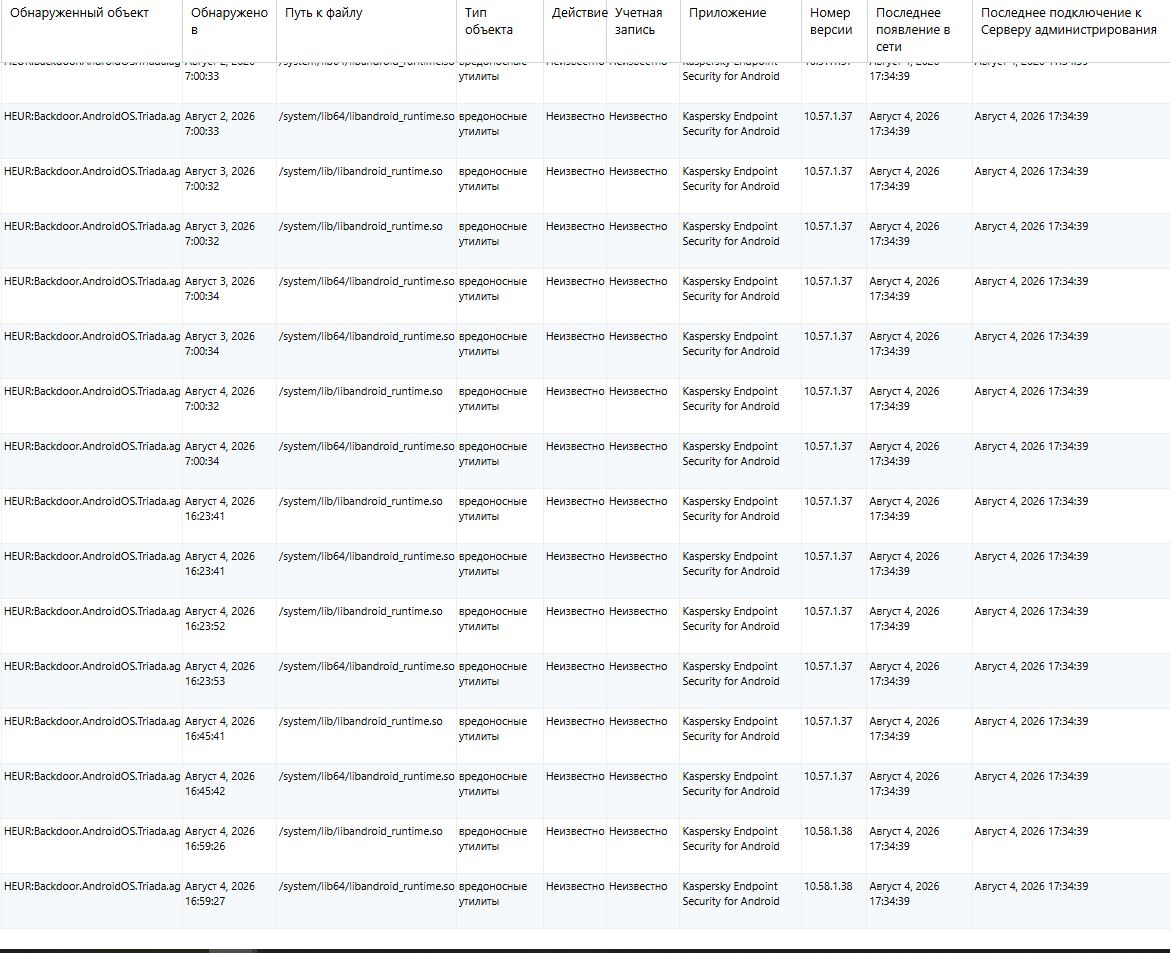
Triada detection report in the unified KSC console (screenshot in Russian)
Note that it’s technically impossible for either antivirus tools or the OS itself to remove preinstalled malware from the system partition. However, Kaspersky Next lowers the risk of buying a whole batch of devices and then finding a preinstalled Trojan that is hard or impossible to remove by reflashing. If Kaspersky Next detects malware like Triada or Keenadu, it alerts the IT administrator, who can then contain the threat by blocking the device’s internet access, clearing app data, rotating passwords, or locking the device entirely. Administrators can monitor and manage the infected device from the unified console of the Kaspersky Security Center.
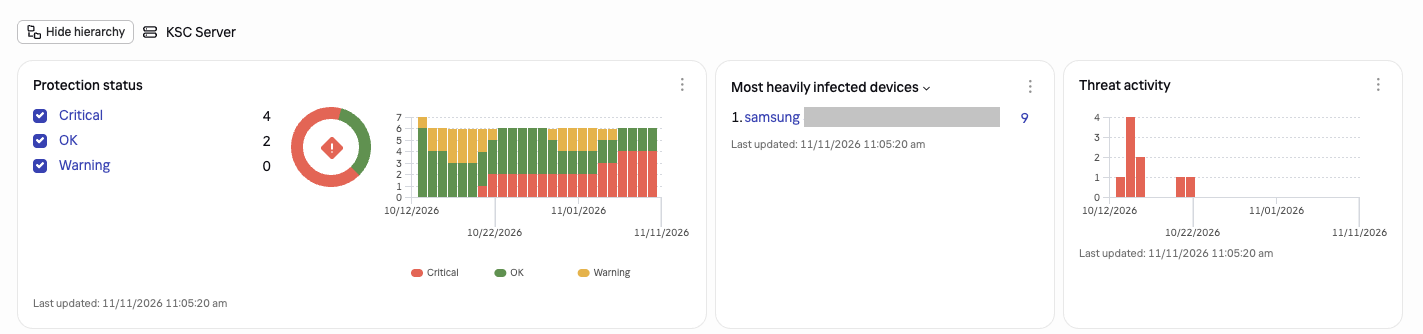
Threat monitoring in the unified KSC console
Companies planning a mobile infrastructure should account for the risk of encountering preinstalled malware. Before ordering a large batch of devices, we recommend inspecting and pilot-testing sample units. We should stress that this measure is no substitute for installing security software on every device used in the organization. Even if the tests come out fine, an unscrupulous supplier may have deliberately sent clean units for inspection. Protection must also be continuous because, for example, the device update system could come under attack.
Manufacturers need to check devices and firmware code for malware just as customers do. Whether the firmware is written in-house or by a contractor, the result can contain malicious code, as we noted earlier. To detect preinstalled threats, you need a file scanning solution that can respond quickly when it finds malware. Kaspersky Scan Engine is one of the Kaspersky products designed for this task. The engine uses the latest detection technologies to identify a wide range of cyberthreats, including preinstalled ones. It integrates easily into a variety of workflows. For example, it can connect to a software build pipeline or any other system that needs to check files for malicious code.
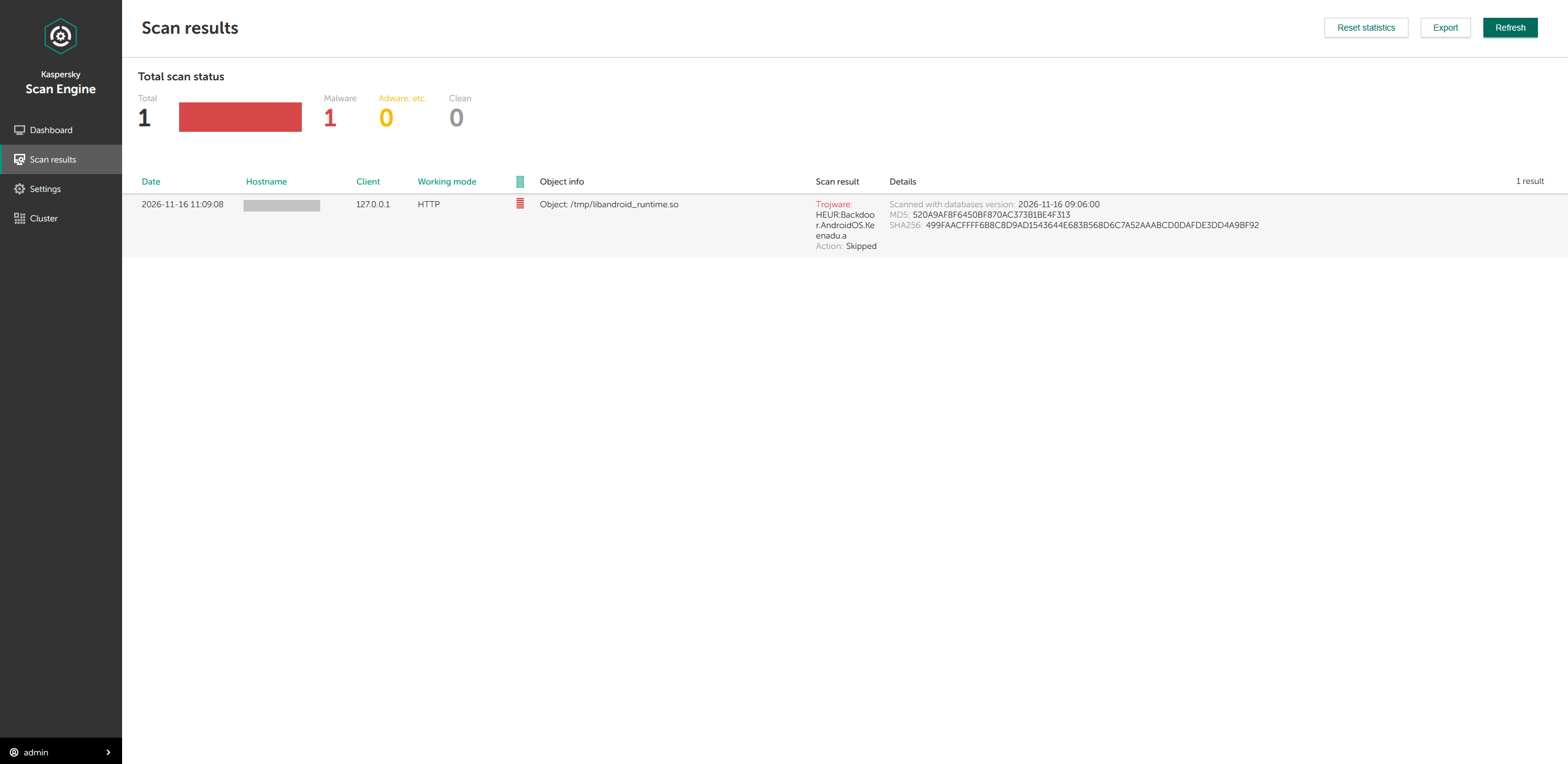
Triada detection in Kaspersky Scan Engine
Source: Securelist (Kaspersky GReAT) · 2026-11-25