Cloud application hosting platform Northflank is warning customers to rotate all credentials and secrets stored on its platform after a security breach led to unauthorized use of customers’ AI API keys. […]
Source: BleepingComputer · 2026-10-31
Cloud application hosting platform Northflank is warning customers to rotate all credentials and secrets stored on its platform after a security breach led to unauthorized use of customers’ AI API keys. […]
Source: BleepingComputer · 2026-10-31
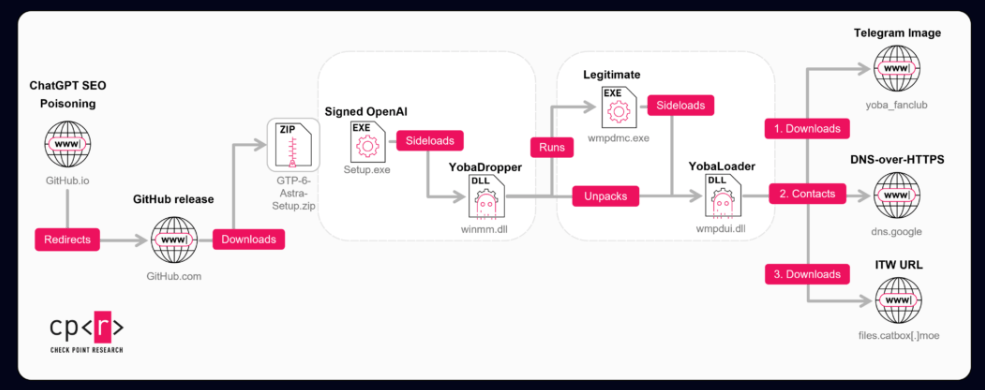
Check Point Research has spent two months tracking a campaign it calls Yoba, which uses the popularity of AI tools to spread a custom malware chain. The attackers build fake GitHub projects that pose as AI desktop applications such as GPT-5.6 Sol, GPT-6 Astra and Claude Opus. The projects look convincing and run on real GitHub infrastructure, which helps them seem legitimate to potential victims.
“These projects look convincing and use real GitHub infrastructure, which helps them appear legitimate to potential victims. The website exhibits search-targeted content and suspicious installer-delivery tactics consistent with an SEO-poisoning lure.
Inside the installers, there is a malicious component we refer to as the YobaDropper. This dropper includes another component, the YobaLoader, which is responsible for contacting attacker-controlled infrastructure and fetching the final payload.” reads the report. “In this report, we describe how victims are lured to these fake projects, how the YobaDropper and YobaLoader work together, and how the attackers ultimately use this chain to run unwanted software on infected systems.”
The lure is simple. Each project has a repository, a GitHub.io page describing the software, and a ZIP release with the malware. The repositories show no fake stars or forks, yet they still rank among the top Google results, most likely through SEO poisoning that optimizes titles, descriptions and hosting domains.
The first repository appeared around July 2026, but the first malicious releases landed only on August 30 and 31, and a third followed about five days later on September 4. Each repository uses a different Outlook address, and commit times point to UTC+4, UTC-4 and UTC+3, which Check Point reads as a deliberate attempt to hide the actor’s real time zone.
Here’s the trick that gives the report its title. Each ZIP holds a legitimate signed executable from OpenAI or Anthropic, named Setup.exe, next to a malicious winmm.dll. The signed program loads the DLL on its own, a technique known as DLL sideloading, which is often used to bypass security protections.
The ZIP files were not even password-protected. Attackers often use passwords to prevent security tools from automatically unpacking and scanning files. However, these binaries already had very low detection rates because they used anti-sandbox and other techniques to avoid analysis. The DLL’s compilation date is another clue: it was built on the same day it was added to the archive, unlike the legitimate files around it.
The dropper, called YobaDropper, checks the environment before running. It calculates a hash of the name of the program that launched it and continues only if the name is Setup.exe. This means that sandboxes that run the DLL on its own will fail this check. When that happens, the process does not exit. Instead, it sleeps 200,000 times for 5.5 seconds each, a total of about 12.73 days.
The malware also avoids victims in CIS countries by checking the keyboard layout. It excludes Russian, Belarusian, Tajik, Armenian, Azerbaijani, Georgian, Kazakh, Kyrgyz, Turkmen, Uzbek, and Tatar. Interestingly, Ukraine, which has often appeared in similar exclusion lists, is not included.
Next, the malware requests administrator privileges. If the user does not have them, it displays the message “Please run this program as Administrator.” and exits. The victim must then restart it with administrator rights.
Once it has the required privileges, the malware creates a folder called WMProcess under ProgramData. It copies the legitimate WMPDMC.exe file from System32 into this folder and places the second-stage payload there under the name wmpdui.dll.
The malicious code achieves persistence by using a scheduled task dressed up as Microsoft. The author is set to Microsoft Corporation, the description says it collects device metadata for Windows Media Player, and it starts three minutes after boot as Local System. The task launches the legitimate program, which sideloads the malicious DLL.
The second stage, YobaLoader, shares code with the dropper, which points to the same developer. It only runs under WMPDMC.exe and uses a different seed for its hashing than the dropper does, which separates the stages and weakens hash-based detection. Its job is to find its payload without a classic command server.
It goes to a Telegram channel, t[.]me/yoba_fanclub, and downloads the channel’s profile picture. The last 50 bytes of the image seed a domain generator that builds names from word lists in the form adjective-noun-verb-number on dedyn[.]io. Change the picture and the operator gets a new domain.
Then it asks Google’s DNS-over-HTTPS service for a TXT record on that domain. The reply is signed, and the loader checks the signature before decrypting it, which gives a link to a payload on Catbox. Check Point says this reliance on DoH and common hosting aims to bypass passive DNS monitoring and some gateway protections, and the campaign avoids dedicated command-and-control infrastructure, using Telegram, Tor, Catbox and DoH instead.
The operator can choose how the payload runs. It can inject it into svchost.exe, save it as an executable after removing the Zone.Identifier mark, or run it as a hidden PowerShell script while bypassing execution policies.
“Finally, the injected payload into svchost.exe is an XMRig 6.26.0 miner with a hidden command line targeting a TLS-enabled onion mining endpoint through a local Tor SOCKS5 proxy. It can unpack and start Tor 0.4.9.12 plus lyrebird 0.8.1, monitor user-input activity to pause mining, and conditionally load the WinRing0 driver service for MSR-based mining optimization.” continnues the report.
The miner uses Tor to connect to an encrypted mining server. It can start its own Tor components, use about 85% of CPU threads, and pause mining when the user is active. It resumes after 240 seconds of inactivity and can load the WinRing0 driver to optimize mining performance.
However, YobaLoader is not limited to cryptocurrency mining. Its DNS tasking system allows operators to deliver any PE executable or PowerShell payload, meaning future attacks could distribute other malware families.
Earlier versions appeared in June 2026. They used Cursor.exe for sideloading, a startup shortcut for persistence, and excluded only Russia. They also used .aber[.]ir instead of dedyn[.]io and included anti-debugging and anti-VM checks that later versions dropped.
Check Point believes the attackers may have Russian origins and mainly operate in the UTC-4 time zone, but this is an assessment, not a confirmed attribution.
Defenders should look for suspicious WMPDMC.exe copies under ProgramData, fake Microsoft scheduled tasks, Telegram-related traffic, DNS lookups for dedyn[.]io through dns.google, and unexplained high CPU usage.
“The Yoba campaign shows how attackers can use trusted platforms and the current interest in AI tools to distribute malware in a way that looks believable and harmless at first glance. By packaging their code together with well-known software names and hosting it on GitHub, they lower the chances that users or basic security checks will immediately flag the files as suspicious.” concludes the report. “Organizations should be cautious about installing “AI helpers” or similar tools from unverified repositories and should enforce policies that restrict running software from unknown sources. Combining user awareness with basic technical controls.”
Follow me on Twitter: @securityaffairs and Facebook and Mastodon
(SecurityAffairs – hacking, Yoba malware)
Source: Security Affairs · 2026-10-30
Noteworthy stories that might have slipped under the radar: Iran eyed in military freezer hacks, Copenhagen University breach, AI-powered malware.
Source: SecurityWeek · 2026-10-30


A modern organization protects its information systems with a whole suite of technologies that generate thousands of security alerts every day. Looking at these alerts in bulk, you’ll see that a significant share are false positives. Ideally, these alerts would be filtered out automatically so that analysts could focus on the ones that may point to a real incident. However, writing filters is a time-consuming task in itself. To create a correct filter, an analyst needs to:
This post looks at how filter creation itself can be automated to reduce analyst workload.
In the context of security alerts, a filter is a combination of event field values that marks a detection as a false positive and not worth the analyst’s attention. Filters can be generated for any combination of event fields, but not every combination yields a valid filter. That’s why we need to define validity criteria: conditions showing that a specific filter actually removes noise and doesn’t suppress useful alerts.
Detection rules in security systems typically contain a set of conditions, and each of them can generate an alert. A specific event triggers a given fragment of a detection rule. The set of events that a given fragment responds to is what we’ll call its context. A good filter should cover the entire context where possible, without going beyond it. Filters that are too broad or too narrow are useless. For example, a filter based solely on PowerShell would exclude too many events, including some that deserve the analyst’s attention. Most of the filtered events would also be unrelated to the rule in question. A filter on a specific ID, on the other hand, would cover only one event, which may never recur.
We can run into a number of problems when creating filters. First, events often contain an excessive number of fields (around 400 on average), and most of them aren’t needed for filtering. At the same time, generating and ranking combinations of these fields is also fairly resource-intensive. So, the first step is to discard the irrelevant fields and keep only those worth using in the filter. For example, out of 400 fields in an event, four may be enough for filtering.
Another problem is string normalization. Field values (for example, the path to the same application on different systems) can vary depending on system settings, user folder names, and so on. For a filter to account for all these variations, the strings must be normalized. For file paths, in particular, you can replace the drive letter and user folders with standard environment variables and convert all paths to a single case.
Finally, if a filter completely mirrors the query of a detection rule, it effectively disables that rule. To fix this, remove the event fields used in the detection rule from the filter. For example, if a rule triggers on a file path, there are two ways to filter out unwanted alerts:
file_path: ".../something.exe", you can set up a filter that excludes events with the user/unique_files/ directory in the file path.Given the problems described above, automatically generating filters for security alerts should consist of the following steps:
For example, consider an event described by the following JSON:
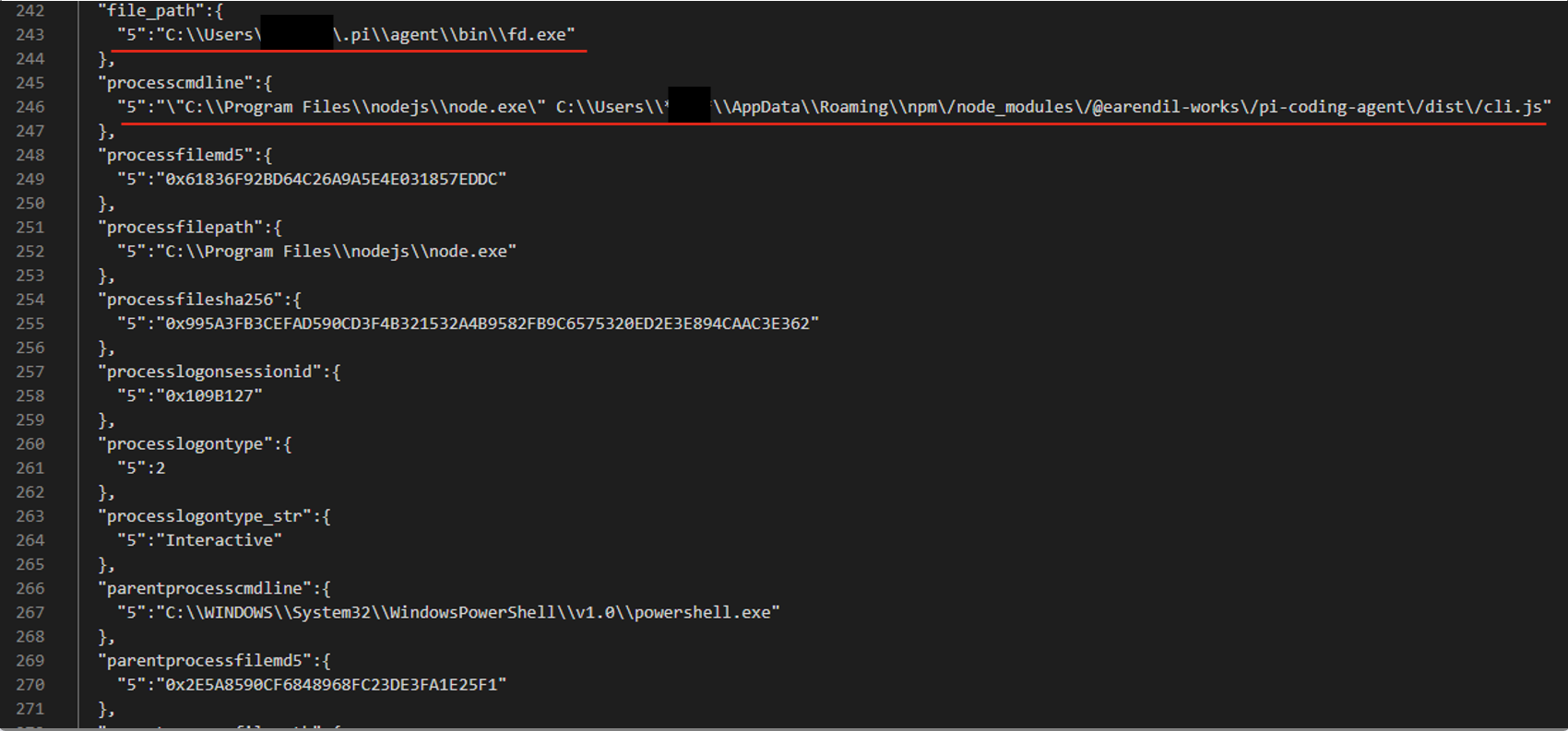
After generating and ranking the combinations, we got three filters based on file paths:
processcmdline:("nodejs\\node.exe" AND "*****\\appdata\\roaming\\npm\/node_modules\/pi-coding-agent\/dist\/cli.js")
file_path:"*****/.pi\\agent\\bin\\fd.exe"
processcmdline: "programfiles\\nodejs\\node.exe"
The last filter turned out to be too broad, but the analyst marked the other two as valid.
The algorithmic approach to filter generation has several advantages. First, it’s simple and deterministic: the same alert always produces the same result. Second, it’s interpretable, meaning we can see why a given combination ranked near the top of the list and why a particular field didn’t make it into the list of candidate fields at all. Third, the stages of the process are independent of each other, so individual steps can be improved and tuned without the risk of breaking the algorithm elsewhere. Finally, it has no external dependencies or models, which makes it easy to deploy in any customer environment.
However, it also has drawbacks. The first is its dependence on context. If there’s no context for some reason — for example, the rule’s first-ever trigger — a filter can’t be created. The second problem is string normalization. There’s a high chance of running into atypical cases that the normalization rules don’t cover. Often such cases can’t be described correctly at all, because they contradict each other.
These problems can be solved with large language models (LLMs). When an LLM generates the filters, no context is needed, because the LLM doesn’t iterate over or rank combinations. The LLM also takes a more flexible approach to string normalization, including non-standard cases. That said, an LLM doesn’t have to be involved at every stage of the generation process. We decided to keep the algorithmic solution where it works well. For example, a simple algorithm selects suitable fields without errors, so we didn’t move this stage to the model.
The LLM-based filter generation looks like this:
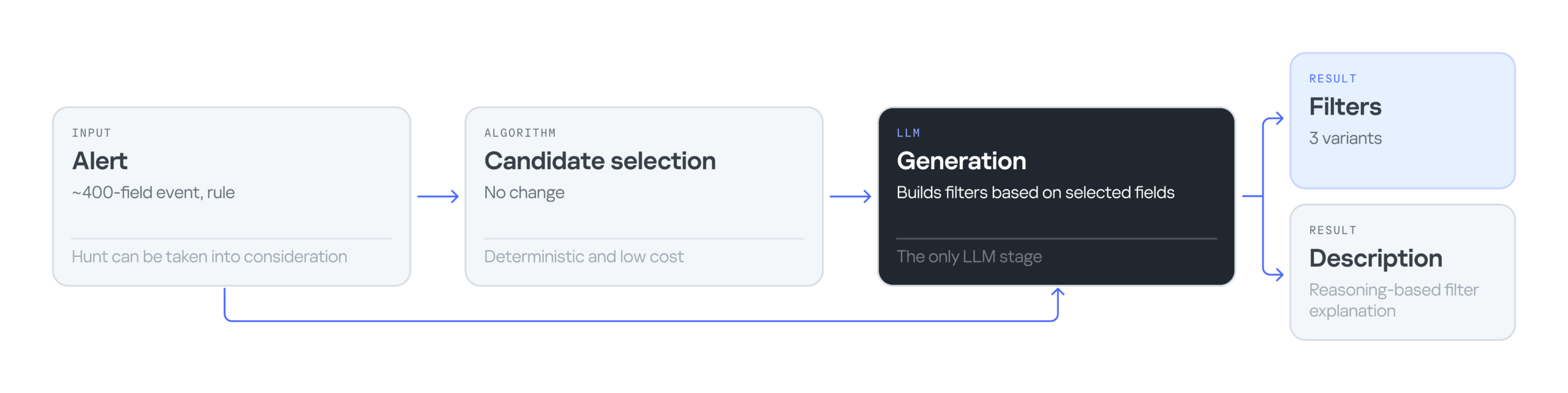
The input is still an alert containing an event with 400 fields, plus the rule that triggered on that event. Then an algorithm selects the most suitable fields for the filter. Next, the LLM processes the input — the event, the selected fields, and the detection rule — and generates three filter options along with an explanation for them. The explanation helps the analyst understand why these particular filters were suggested and make an informed choice.
Consider the following event in JSON format:
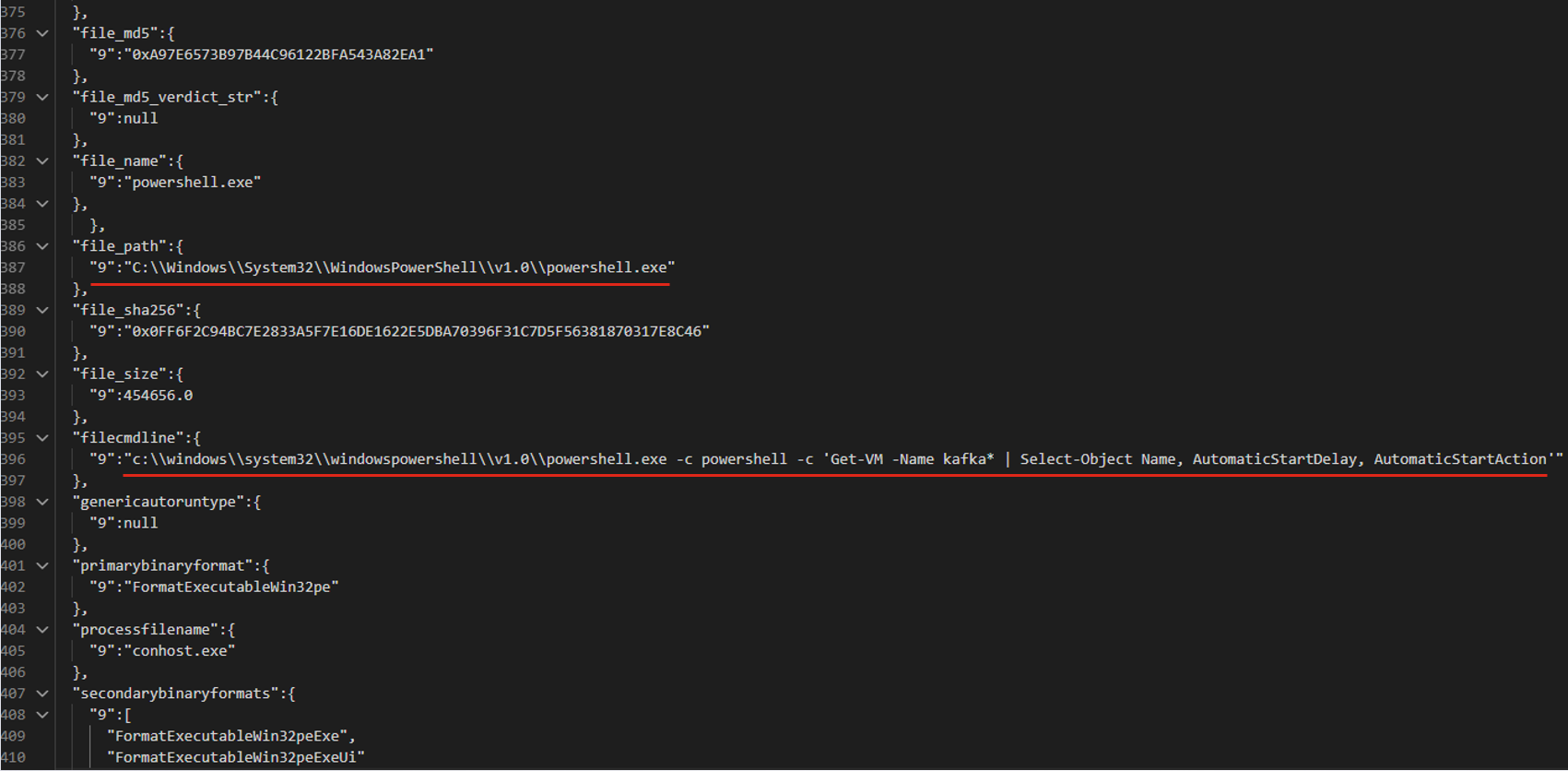
The LLM suggested three filter options that all contain the same command line fragment:
file_path: "\\WindowsPowerShell\\powershell.exe" AND filecmdline: "Get-VM -Name kafka\*"
filecmdline: "Get-VM -Name kafka\*"
filecmdline: "kafka*"
As in the previous example, two of the three output filters were valid. The last one was too broad to be usable. The analyst chose the first filter with minor edits:
file_path: "powershell.exe" AND filecmdline: "Get-VM -Name kafka\*"
Using an LLM solved the problems of purely algorithmic filter generation: dependence on context and errors in string normalization. However, the single-request approach had its own drawbacks. First, it had no output validation. The LLM returned filters as-is, with no syntax check and no way to correct errors. Second, unlike in the algorithmic version, all filter generation tasks were handled by a single system prompt. As a result, a minor fix in one place could break the logic in another.
To address the problems of generating filters with a single model and a single system prompt, we tried distributing the tasks across different LLM agents. In this version, we brought in agents as early as the stage of selecting relevant fields. The chain includes four agents in total:
For the following JSON event, the agents produce three valid filters based on the file path.
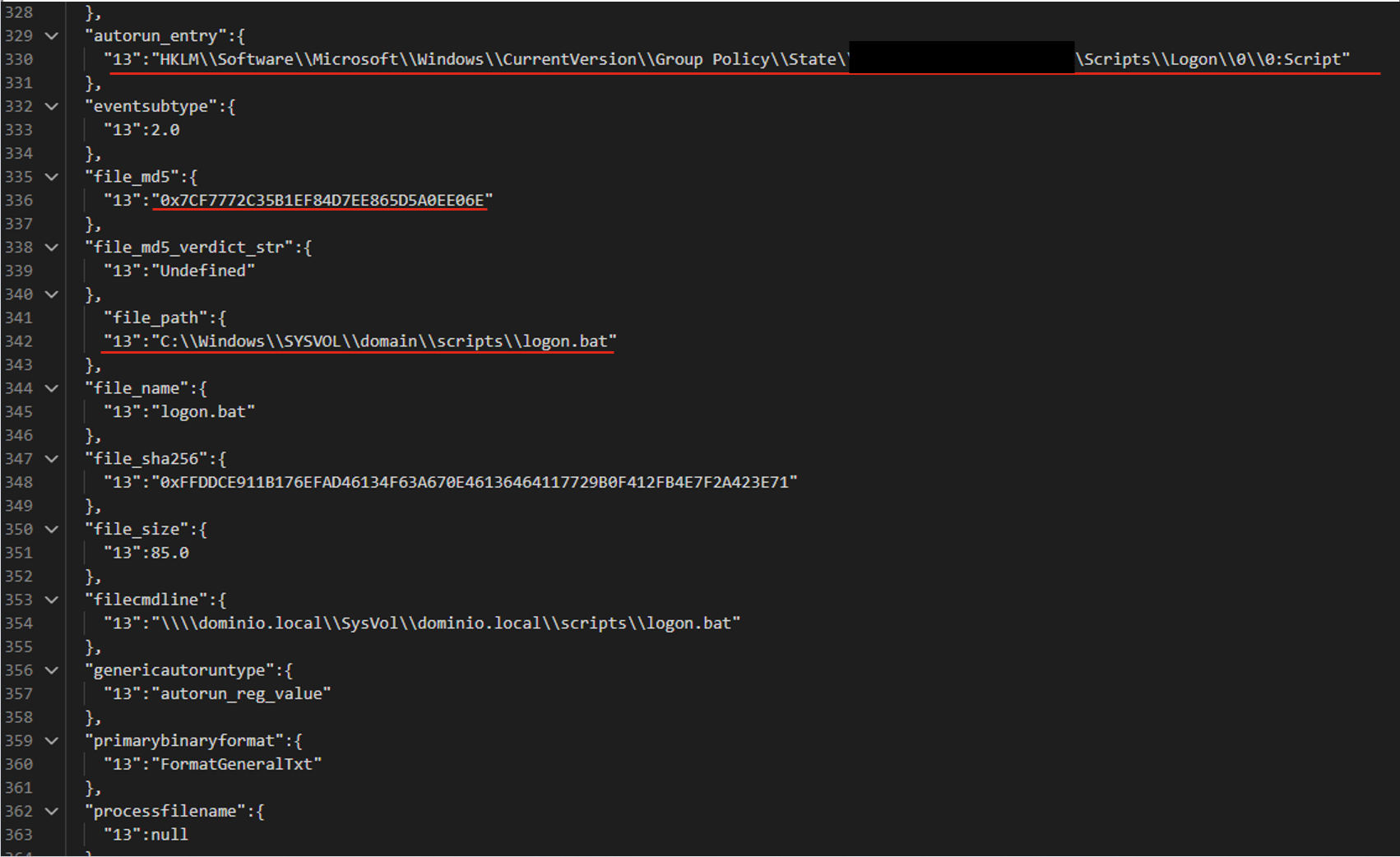
The filters differ in the additional parameters that support the detection:
file_path:"sysvol\\domain\\scripts\\logon.bat"
file_path:"sysvol\\domain\\scripts\\logon.bat" AND file_md5:"0x7..6E"
autorun_entry: "Group Policy\\State" AND file_path: "SYSVOL\\domain\\scripts\\logon.bat"
LLM agents give us a system that can validate and correct filters. Its modular architecture also lets us tune and improve different stages of generation independently. However, this approach makes more LLM calls than the previous ones, so the system is slower. It also depends on access to a model, which may not be available in the organization’s isolated environment.
To evaluate how well the filter generation system works, we use two main metrics:
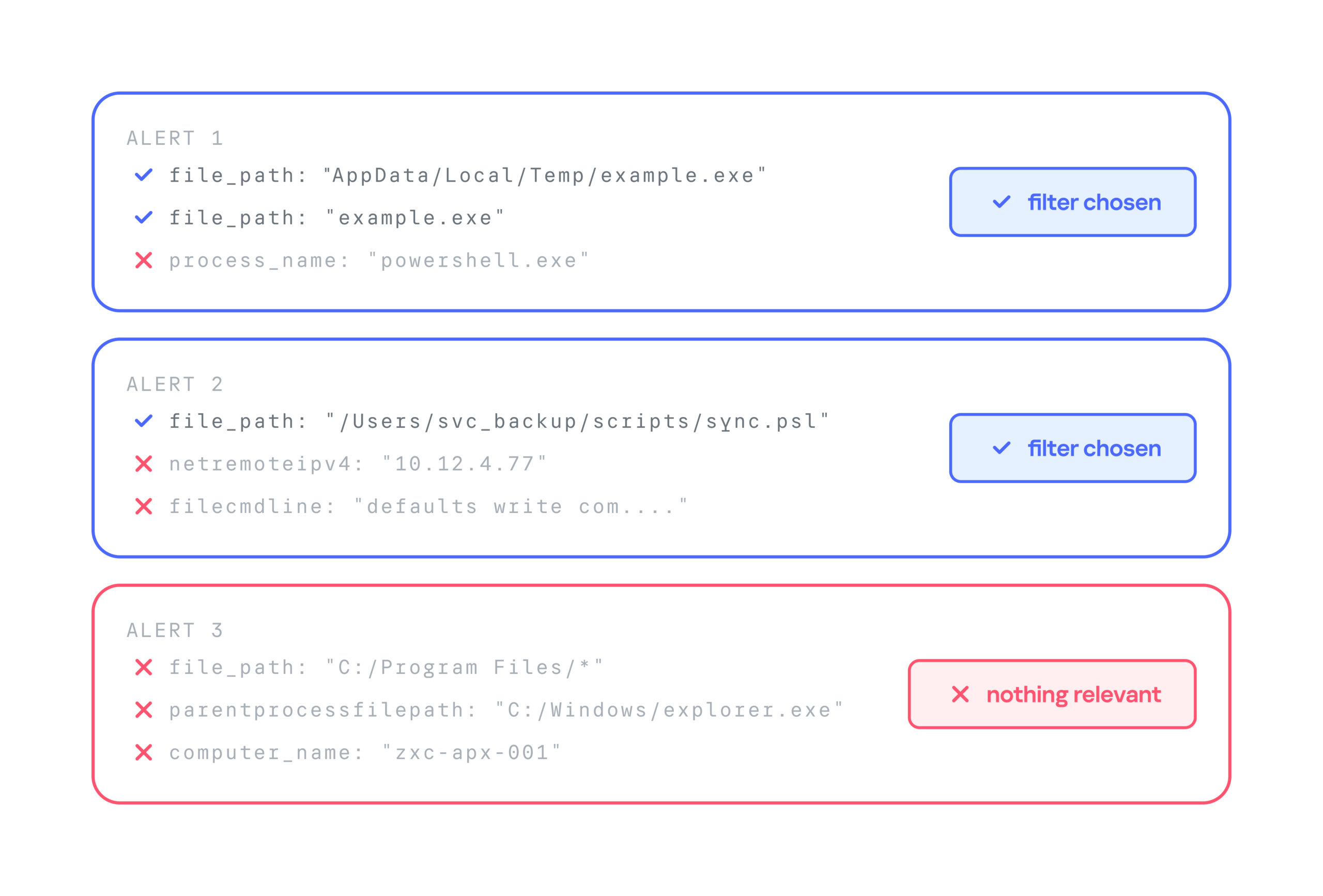
Below is a comparison of the three filter generation approaches by these metrics:
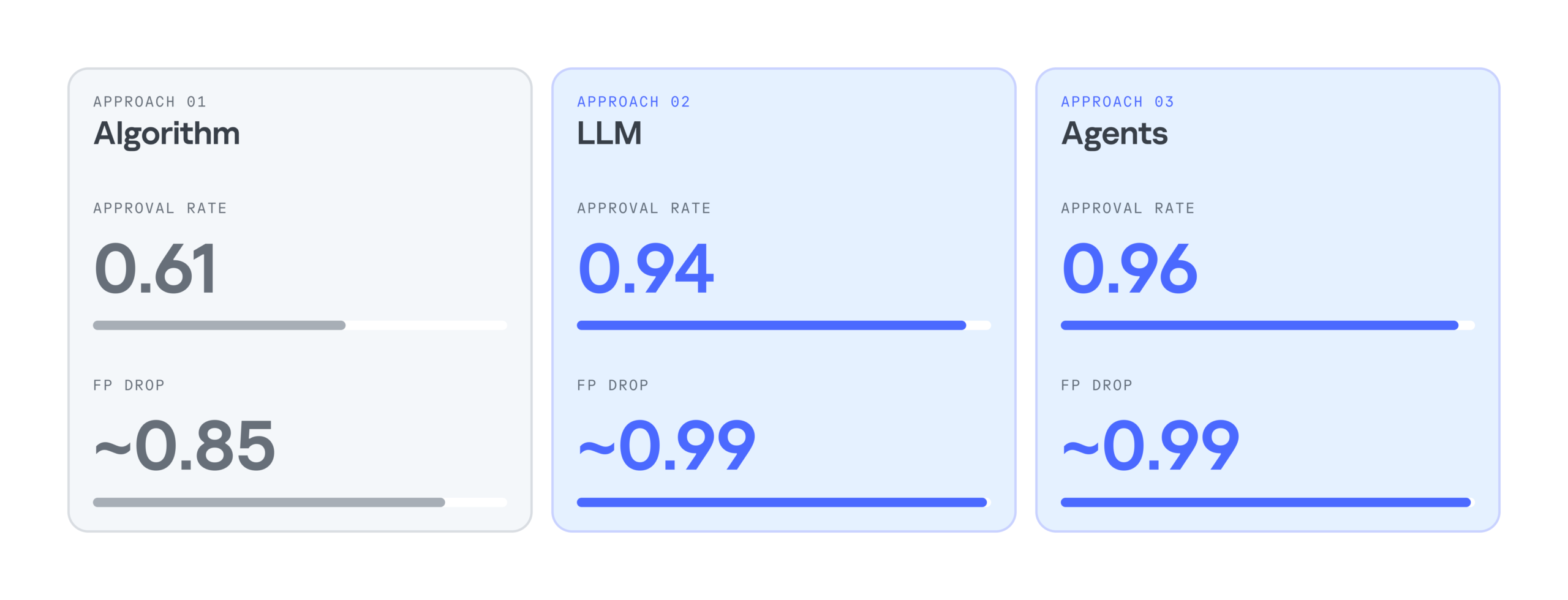
As the results show, LLMs significantly improve the efficiency of filter generation. At the same time, the LLM agentless and agent-based approaches perform almost identically. So we chose the simpler and faster option: an LLM with a single system prompt. As a result, we cut false positives by 99%, increased the number of filters generated per day by 28%, and made analysts’ alert handling 17% more efficient.
Practice has shown that filter generation can be automated effectively. We’ve looked at several options for automatically generating filters for false-positive security alerts: a purely algorithmic approach, an LLM-based approach, and an approach built on a group of LLM agents. All of them can generate valid filters and make the analyst’s work much easier, but each has its own pros and cons.
The algorithmic approach scored lower on the evaluation metrics, but in two-thirds of cases, it still produces filters that satisfy the analyst. It works especially well when there’s already a set of similar events to filter out, meaning enough context has accumulated. The algorithmic generator can also be deployed in any environment. Both standalone LLM and multi-agent LLM approaches show high accuracy, and their results differ only slightly, so the slower agent-based approach looks excessive at this stage. If an LLM is available, the best option appears to be a single model that handles several stages of the generation cycle.
Source: Securelist (Kaspersky GReAT) · 2026-10-30
OpenAI says it won’t reduce usage limits for the $100, $200, and $500 ChatGPT Pro plans, as well as Business Premium, and it also promised to keep Dots usage independent. […]
Source: BleepingComputer · 2026-10-29
Rowan Sterling reports: On 20 August 2026 an employee of RIZAP Inc., the Japanese fitness and health-guidance group, was pulling records out of the health-guidance management system it operates for insurers when the data went into a generative AI service on a personal account the company had never approved. The records covered 726 members of…
Source: DataBreaches.net · 2026-10-29

The bank’s message follows a trend among financial institutions that are restricting third-party AI agent access.
Source: ZDNet Security · 2026-10-29
EMBRACE affects AI coding tools Cursor, GitHub Copilot, Codex, VS Code and Claude Desktop, enabling code execution, file theft and browser address-bar spoofing.
Source: HackRead · 2026-10-29

Mistral has released the weights for Large 4, along with some impressive Artificial Analysis scores.
Source: ZDNet Security · 2026-10-29